






Your Internet Protocol (IP) address serves as your digital identifier, revealing your approximate location, internet service provider, and browsing habits to websites, advertisers, and potentially malicious actors. The question "can you hide your IP" has become increasingly relevant as privacy concerns mount and users seek greater control over their online footprint. Understanding how IP masking works and which methods deliver reliable protection is essential for anyone prioritising digital privacy, accessing geo-restricted content, or securing multiple devices simultaneously.
Why Your IP Address Matters for Privacy
Every device connected to the internet receives a unique IP address that functions like a postal address for data packets. This numerical identifier enables websites to deliver content to your location, but it simultaneously creates a trail of your online activities.
What your IP address reveals about you:
- Geographic location down to city or neighbourhood level
- Internet service provider and connection type
- Browsing patterns when combined with cookies and tracking scripts
- Device fingerprint that can persist across sessions
Websites routinely log IP addresses for analytics, security, and targeted advertising. Your IP address can reveal surprisingly specific information about your identity and online behaviour, making it a valuable commodity for data brokers and a potential vulnerability for privacy-conscious users.
The implications extend beyond simple tracking. Copyright enforcement agencies monitor IP addresses for illegal downloads, governments may restrict access based on geographic location, and cybercriminals can exploit IP information to launch targeted attacks. Understanding whether can you hide your IP becomes crucial when these risks affect your online activities.

VPN Technology: The Most Comprehensive Solution
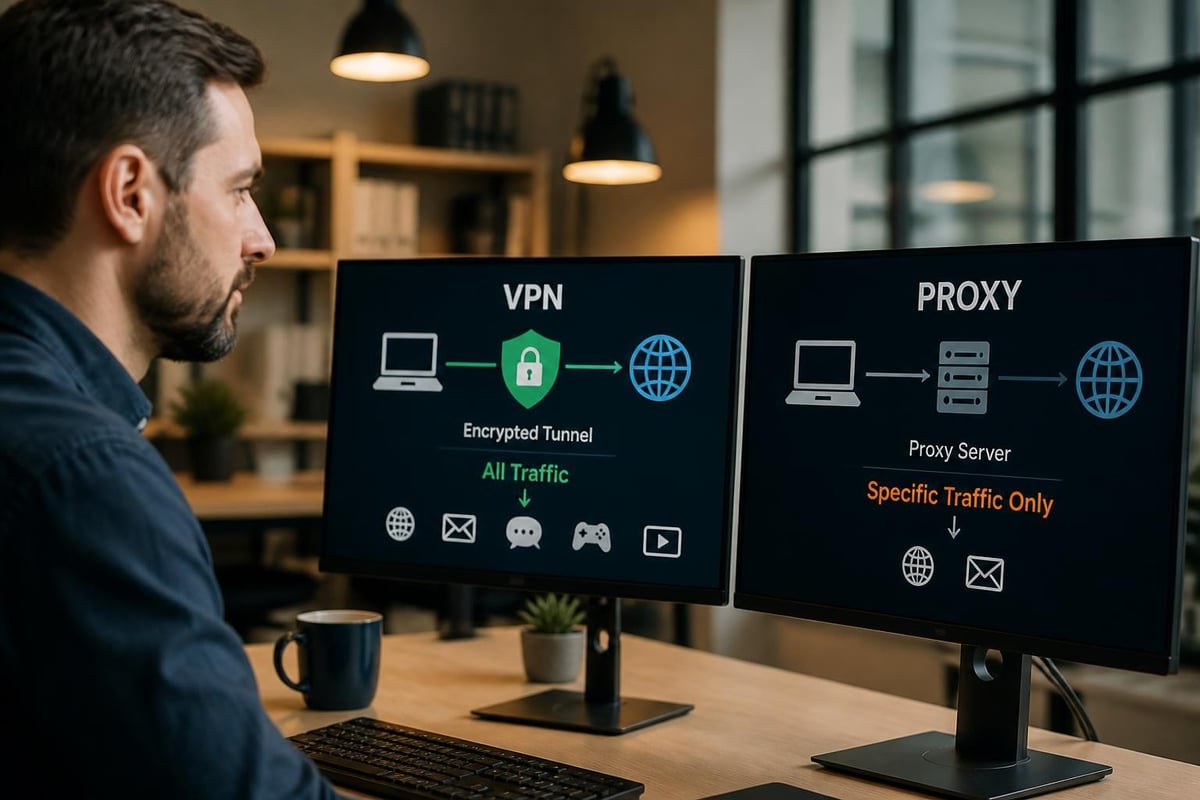
Virtual Private Networks represent the gold standard for IP masking because they provide comprehensive protection whilst maintaining usable connection speeds. When you connect to a VPN, your traffic routes through an encrypted tunnel to a remote server, which then communicates with websites on your behalf.
How VPNs Mask Your IP Address
The VPN server assigns you its own IP address, effectively replacing your real identifier with one from a different location. This process happens transparently, requiring no configuration on individual applications or websites. Understanding how VPNs work reveals the sophisticated encryption protocols that protect your data whilst it travels between your device and the VPN server.
Key advantages of VPN-based IP masking:
- Complete network coverage protecting all applications and services
- Military-grade encryption securing data from interception
- Geographic flexibility with servers in dozens of countries
- DNS leak protection preventing accidental exposure
- Kill switch functionality blocking traffic if VPN disconnects
Modern VPN protocols like WireGuard and OpenVPN balance security with performance, delivering speeds suitable for streaming, gaming, and large file transfers. The encryption overhead typically reduces bandwidth by 10-20%, a reasonable trade-off for comprehensive privacy protection.
Router-Level VPN Implementation
Whilst individual device VPNs require separate installations and licenses, router-level implementation protects every connected device automatically. Pre-configured VPN routers eliminate the need for technical expertise, offering plug-and-play protection for smartphones, tablets, smart TVs, gaming consoles, and IoT devices that cannot run VPN software natively.
This approach proves particularly valuable for households with multiple users or devices exceeding typical VPN license limits. A single router configuration secures dozens of devices simultaneously, ensuring consistent IP masking across your entire network without individual installations or ongoing management.
| Router VPN Benefits | Traditional Device VPNs |
|---|---|
| Protects all devices automatically | Requires installation per device |
| No software compatibility issues | Limited to supported platforms |
| Single configuration point | Multiple logins and settings |
| Covers smart home devices | Cannot protect IoT devices |
| One subscription for household | License limits on simultaneous connections |
Proxy Servers: Targeted IP Masking
Proxy servers function as intermediaries between your device and the internet, forwarding requests and returning responses under their own IP address. Unlike VPNs, proxies typically operate at the application level rather than routing all system traffic.
Various proxy server options include HTTP proxies for web browsing, SOCKS proxies for broader application support, and transparent proxies that don't hide your original IP. This fragmented approach creates both advantages and limitations depending on your specific requirements.
Common proxy server types:
- HTTP/HTTPS proxies for web traffic only
- SOCKS5 proxies supporting various protocols
- Web proxies accessible through browser interfaces
- Residential proxies using real user IP addresses
The primary limitation of proxy servers concerns encryption. Most proxies forward traffic without encryption, leaving data vulnerable to interception by ISPs or network administrators. Even HTTPS proxies only encrypt the connection between your device and the proxy server, not the subsequent connection to destination websites.
Speed represents another consideration. Free proxy services often suffer from overcrowding, resulting in slow connections and frequent timeouts. Premium proxy providers offer better performance but at price points comparable to VPN services that provide superior security and broader coverage.
The Tor Network: Maximum Anonymity with Trade-Offs
The Onion Router (Tor) network provides the highest level of anonymity by routing traffic through multiple volunteer-operated nodes, each adding a layer of encryption. This multi-hop approach makes it extremely difficult to trace connections back to the original source, answering can you hide your IP with a resounding yes for users willing to accept significant performance compromises.
How Tor Achieves IP Anonymity
Your connection bounces through at least three randomly selected nodes: an entry node, middle relay, and exit node. Each node only knows the IP address of the previous and next hop, preventing any single point from connecting your real IP to your destination. The layered encryption ensures that compromising one node doesn't expose your identity.
However, Tor’s architecture introduces substantial latency, making it unsuitable for bandwidth-intensive activities like streaming video or online gaming. Connections frequently suffer from slow speeds as traffic bounces across continents through volunteer-operated servers with varying capacity.
Tor network considerations:
- Extremely slow speeds due to multiple hops
- Limited protocol support primarily for web browsing
- Exit node vulnerabilities where unencrypted traffic becomes visible
- Website blocking as many services ban Tor connections
- Association with illegal activity potentially attracting unwanted attention
The Tor browser simplifies access to the network but requires behavioural changes to maintain anonymity. Users must avoid logging into personal accounts, enabling plugins, or performing activities that could reveal their identity through other means.
Mobile Tethering and Public WiFi: Temporary Solutions
When considering can you hide your IP through network switching, mobile tethering and public WiFi offer temporary alternatives that mask your home IP address. These methods work by substituting your residential connection with a different network's IP identifier.
Mobile tethering through your smartphone's data connection assigns you an IP address from your mobile carrier's pool, which differs from your home broadband IP. This approach proves useful for quick IP changes but consumes mobile data and may violate carrier terms of service for extended use.
Public WiFi networks similarly provide alternative IP addresses, though with substantial security risks. Unencrypted connections expose your traffic to other network users, and malicious hotspots can intercept sensitive data. Even encrypted HTTPS connections leak metadata that reveals your browsing patterns.
| Method | Privacy Level | Speed | Cost | Security Risk |
|---|---|---|---|---|
| VPN Router | High | Fast | £50-150 device + subscription | Low |
| Proxy Server | Medium | Variable | Free to £10/month | Medium |
| Tor Network | Very High | Very Slow | Free | Low-Medium |
| Mobile Tethering | Medium | Moderate | Data charges | Medium |
| Public WiFi | Low | Variable | Free | High |
Smart DNS: Geographic IP Masking for Streaming
Smart DNS services modify your device's DNS settings to route specific traffic through servers in different locations, making it appear you're accessing content from permitted regions. This targeted approach focuses on bypassing geo-restrictions rather than comprehensive privacy protection.
Unlike VPNs, Smart DNS doesn't encrypt traffic or change your IP address for most connections. Instead, it selectively routes requests for region-locked content through proxy servers in appropriate locations. This method works well for streaming services that check geographic location but offers no privacy benefits for other activities.
Smart DNS advantages and limitations:
- Faster speeds with no encryption overhead
- Device compatibility including smart TVs and consoles
- Simultaneous multi-region access on different devices
- No IP masking for general browsing
- Zero encryption leaving data exposed
- DNS leak risk revealing actual location
For users primarily concerned with accessing geo-restricted content rather than privacy, Smart DNS presents a lightweight alternative. However, it fails to answer can you hide your IP comprehensively, as your real identifier remains visible to websites, ISPs, and potential adversaries.
Privacy Beyond IP Masking
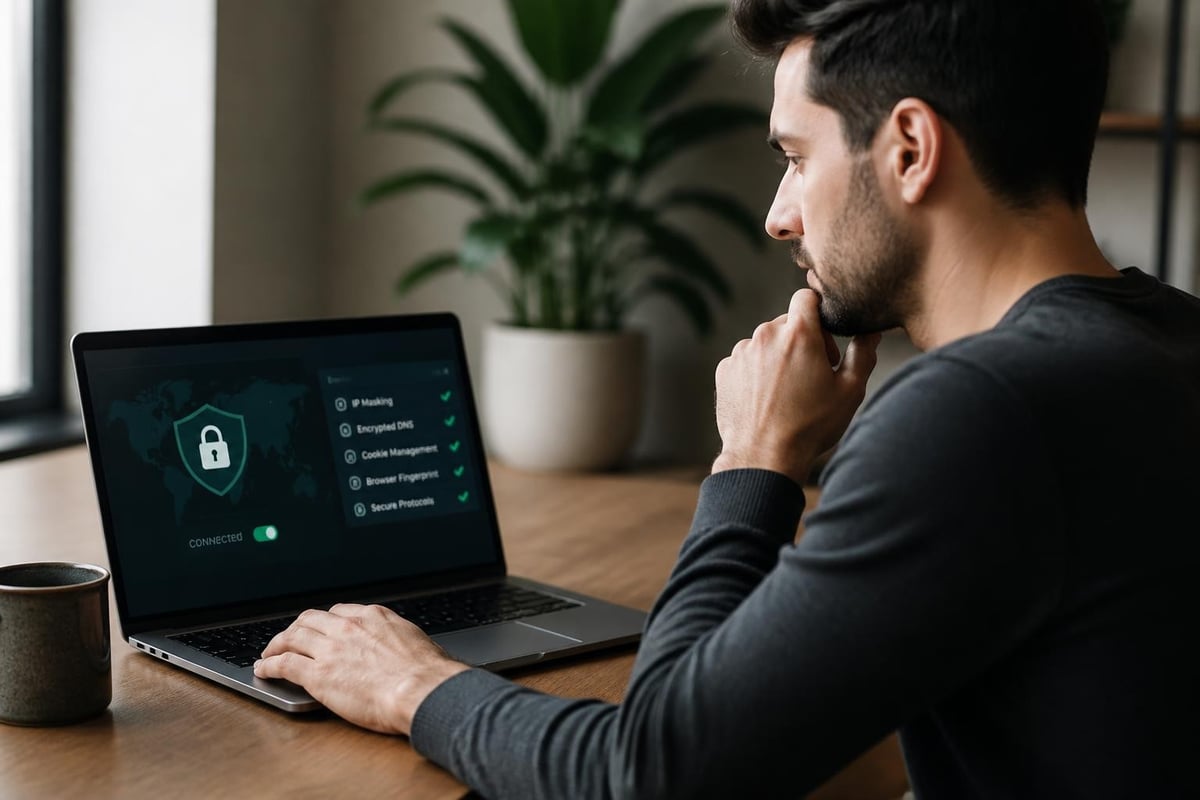
Hiding your IP address represents just one component of comprehensive online privacy. Additional tracking methods including browser fingerprinting, cookies, and device identifiers can reveal your identity even when your IP remains masked.
Complementary Privacy Measures
Modern tracking techniques analyse dozens of browser characteristics to create unique fingerprints that persist across sessions and IP changes. Screen resolution, installed fonts, timezone settings, and plugin configurations combine to identify individual users with surprising accuracy.
Essential privacy practices alongside IP masking:
- Cookie management regularly clearing tracking data
- Browser privacy extensions blocking trackers and scripts
- Private browsing modes preventing local data storage
- Alternative search engines avoiding profiling by major providers
- Email aliasing separating online identities
WebRTC leaks represent a particular concern for VPN users, as this browser technology can reveal your real IP address despite active VPN connections. Disabling WebRTC in browser settings or using extensions that block it prevents this exposure.
DNS queries also leak identity information if not properly routed through your VPN. When your device queries your ISP's DNS servers directly rather than through the VPN tunnel, those requests reveal the websites you visit even though the actual connections remain encrypted.
Legal and Ethical Considerations
The ability to hide your IP address carries both legitimate privacy applications and potential for abuse. Understanding the legal landscape helps ensure you remain compliant whilst protecting your digital rights.
Most jurisdictions permit IP masking for lawful purposes including privacy protection, security enhancement, and accessing legitimately purchased content whilst travelling. However, using hidden IPs to circumvent legal restrictions, commit fraud, or engage in copyright infringement remains illegal regardless of technical methods employed.
Legitimate reasons to hide your IP:
- Protecting personal information from trackers
- Securing connections on public networks
- Accessing home country content whilst travelling
- Preventing targeted advertising and profiling
- Researching sensitive topics without surveillance
- Testing websites from different geographic locations
Service provider terms of service sometimes prohibit VPN usage, particularly for streaming platforms enforcing geographic licensing restrictions. Whilst hiding your IP isn't illegal in these cases, it may violate contractual agreements and result in account suspension.
Businesses using IP masking for competitive research, price comparison, or market analysis should ensure compliance with computer fraud laws and website terms of service. Automated scraping or data collection may violate legal protections even when performed through masked connections.
Choosing the Right IP Masking Method
Your specific requirements determine which IP hiding method delivers optimal results. Privacy concerns, speed requirements, device coverage, and technical expertise all influence the most appropriate solution.
For comprehensive household protection covering multiple devices simultaneously, pre-configured VPN routers offer the most elegant solution. These plug-and-play devices eliminate per-device configuration whilst ensuring consistent protection across smartphones, tablets, computers, gaming consoles, and smart home devices.
Matching Methods to Use Cases
Different online activities benefit from specific approaches to IP masking. Streaming high-definition content requires fast, stable connections that rule out Tor but work well with modern VPN protocols. Maximum anonymity for sensitive research justifies Tor's performance compromises. Quick IP changes for testing purposes might warrant simple proxy solutions.
Use case recommendations:
| Activity | Best Method | Priority Factors |
|---|---|---|
| General browsing | VPN router | Speed, convenience, full coverage |
| HD streaming | VPN with WireGuard | Speed, reliability, geo-unblocking |
| Online gaming | Low-latency VPN | Ping times, stable connections |
| Anonymous research | Tor network | Maximum anonymity, source protection |
| Price comparison | Proxy servers | Quick IP switching, targeted use |
| Public WiFi security | Mobile VPN app | Encryption, immediate protection |
Technical users comfortable with command-line interfaces might configure their own VPN servers for complete control over infrastructure and logging policies. This approach requires ongoing maintenance and doesn't provide the geographic diversity of commercial VPN networks, but eliminates third-party trust requirements.
Non-technical users benefit most from solutions requiring minimal configuration and maintenance. Router-level VPN implementation with pre-configured devices removes technical barriers whilst delivering comprehensive protection that traditional software VPNs struggle to match for whole-home coverage.
Performance Optimization for Hidden IPs
Maintaining usable connection speeds whilst hiding your IP requires careful server selection and protocol optimization. Geographic distance between your location and the VPN server directly impacts latency, whilst server load affects available bandwidth.
Choosing servers closest to your physical location minimizes the additional distance your data must travel, reducing ping times crucial for real-time applications like gaming or video calls. However, accessing geo-restricted content requires servers in specific countries, necessitating a balance between speed and functionality.
Speed optimization strategies:
- Protocol selection using WireGuard for maximum performance
- Server load monitoring avoiding overcrowded endpoints
- Split tunneling routing only necessary traffic through VPN
- ISP throttling bypass actually improving speeds in some cases
- Quality of Service prioritizing time-sensitive applications
Modern VPN protocols achieve impressive speeds that rival direct connections for most activities. WireGuard, in particular, delivers throughput approaching unprotected connections whilst maintaining strong encryption. This efficiency makes the question of can you hide your IP without performance penalties increasingly answerable in the affirmative.
Connection stability matters as much as raw speed for many applications. Frequent disconnections disrupt streaming, interrupt downloads, and potentially expose your real IP during reconnection. Quality VPN implementations include automatic reconnection, kill switches that block traffic during outages, and connection monitoring that alerts users to protection failures.
Future Developments in IP Privacy
Privacy technology continues evolving as tracking methods grow more sophisticated and users demand better protection. Emerging protocols, decentralized networks, and regulatory changes will shape how effectively we can hide IP addresses in coming years.
IPv6 adoption introduces new privacy challenges as the expanded address space potentially assigns unique, permanent identifiers to individual devices. Privacy extensions for IPv6 help by generating temporary addresses, but complete implementation remains inconsistent across operating systems and networks.
Decentralized VPN networks built on blockchain technology promise to eliminate centralized logging whilst distributing infrastructure across thousands of nodes. These systems face scalability and speed challenges but could eventually provide trustless anonymity superior to traditional VPN architectures.
Emerging IP privacy technologies:
- Decentralized VPN networks removing central points of failure
- IPv6 privacy extensions generating temporary addresses
- Browser-native VPN integration simplifying protection
- AI-powered routing optimizing server selection automatically
- Zero-knowledge protocols proving identity without revealing data
Regulatory developments including GDPR and similar privacy legislation increasingly recognize IP addresses as personal data requiring protection. This legal recognition strengthens arguments for IP masking as a fundamental privacy right rather than suspicious behaviour requiring justification.
Protecting your IP address has transitioned from niche technical practice to essential privacy measure in 2026. Whether you prioritise comprehensive household protection, maximum anonymity, or simply want to access content whilst travelling, effective solutions exist for every use case. U Shield VPN delivers router-level protection that secures every device on your network with pre-configured, plug-and-play convenience, eliminating the complexity of individual installations whilst ensuring consistent privacy across smartphones, computers, gaming consoles, and smart home devices. Take control of your digital footprint today with solutions designed for real-world privacy needs.
