






Your internet address, commonly known as your IP address, serves as a unique identifier that reveals your location, internet service provider, and browsing habits to websites, advertisers, and potentially malicious actors. In 2026, the need to hide internet address information has become paramount as data collection practices intensify and cyber threats evolve. Understanding how to effectively mask your digital footprint whilst maintaining fast, reliable internet access is essential for anyone concerned about online privacy, whether you're protecting personal information, accessing geo-restricted content, or securing business communications.
Understanding Internet Addresses and Privacy Risks
Your internet protocol (IP) address functions similarly to a postal address for your internet connection. Every device connecting to the internet receives this numerical label, which enables data packets to find their way to and from your location.
What Your IP Address Reveals
When you browse online without protection, your IP address exposes several layers of information:
- Geographical location down to city level or closer
- Internet service provider details
- Connection type (residential, mobile, business)
- Browsing timestamps and activity patterns
Third parties can correlate this information to build detailed profiles about your online behaviour, shopping habits, and even physical movements if you use mobile devices. Advertisers, data brokers, and cybercriminals actively collect and monetize this data.

Common Threats to IP Privacy
Beyond marketing surveillance, exposed internet addresses create vulnerabilities. Hackers can use IP information to launch targeted attacks, whilst governments in certain regions monitor internet activity based on IP tracking. Streaming services and content providers enforce geographical restrictions by checking your IP location, limiting access to entertainment and information based on arbitrary boundaries.
Methods to Hide Internet Address Effectively
Multiple approaches exist to mask your digital identity, each offering different levels of protection, speed, and convenience. Selecting the right method depends on your specific privacy requirements and technical capabilities.
VPN Technology: Network-Wide Protection
Virtual Private Networks create encrypted tunnels between your devices and remote servers, effectively hiding your real internet address behind the VPN server's IP. This method ranks as the most comprehensive solution for most users because it combines strong encryption with reliable performance.
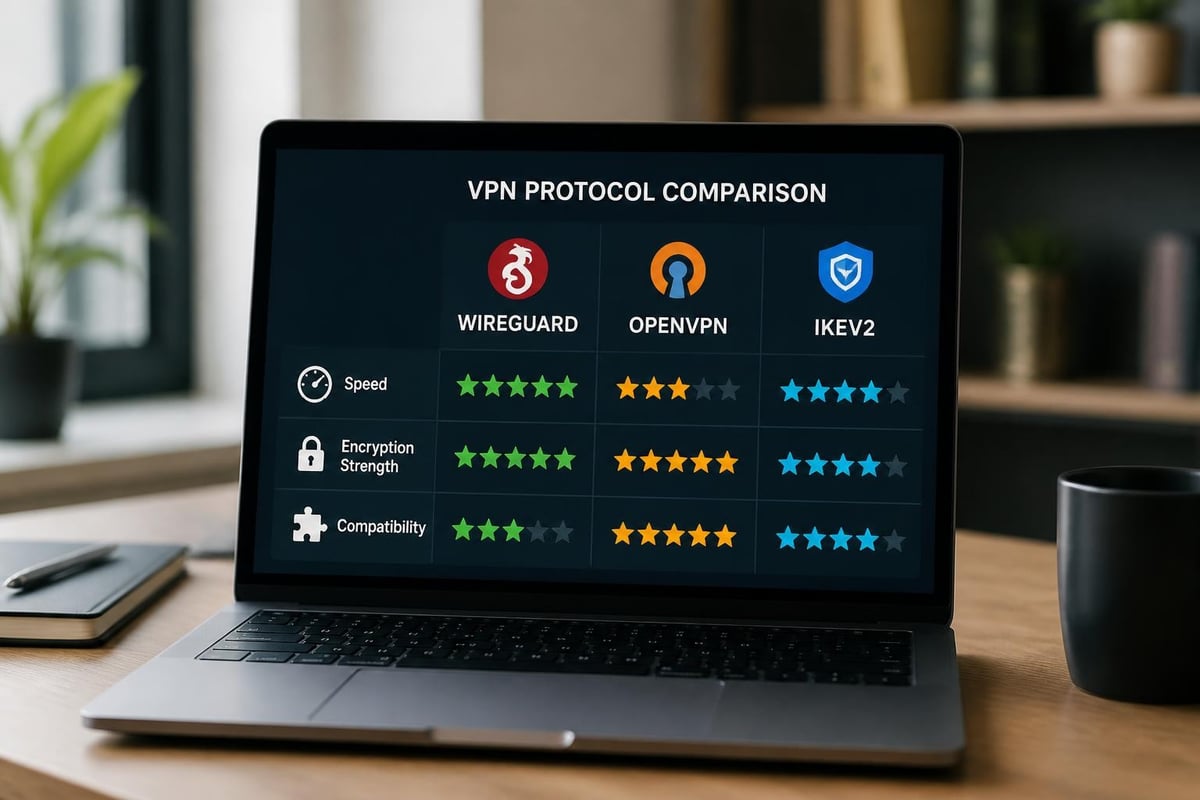
Modern VPN protocols have evolved significantly:
| Protocol | Speed | Security | Best Use Case |
|---|---|---|---|
| WireGuard | Excellent | Very High | Everyday browsing, streaming |
| OpenVPN | Good | Very High | Maximum compatibility |
| IKEv2/IPsec | Very Good | High | Mobile connections |
VPN services offer robust protection by routing all your internet traffic through encrypted servers located worldwide. This masks your true location whilst providing additional security benefits such as protection on public Wi-Fi networks.
Router-Level Implementation
Rather than installing VPN software on individual devices, configuring protection at the router level ensures every device on your network automatically operates through the VPN connection. This approach particularly benefits smart home devices, gaming consoles, and streaming devices that don't support native VPN applications.
Key advantages of router-level VPN deployment:
- Automatic protection for all connected devices
- Single configuration point for entire network
- No individual device setup required
- Protection for devices without VPN support
- Consistent privacy across your household
For users seeking comprehensive network protection without technical complexity, pre-configured VPN routers provide immediate plug-and-play security with optimized settings for streaming, gaming, and browsing across all household devices simultaneously.
Proxy Servers and Their Limitations
Proxy servers act as intermediaries between your device and the internet, masking your IP address for specific applications or browser sessions. However, proxies differ significantly from VPNs in crucial ways that affect your security.
Unlike VPNs, most proxy connections lack encryption, meaning your ISP and network administrators can still monitor your activity. Free proxy services often log user data extensively, undermining the privacy benefits they claim to provide.
Advanced Privacy Considerations
Effectively hiding your internet address requires understanding the nuances beyond simply routing traffic through different servers. Several factors influence how completely you can mask your digital presence.
DNS Leaks and WebRTC Vulnerabilities
Even when using privacy tools, certain technical vulnerabilities can expose your real IP address. DNS leaks occur when domain name queries bypass your VPN tunnel, revealing which websites you're visiting to your ISP. WebRTC, a browser technology enabling real-time communication, can leak your local IP address through JavaScript.
Protection checklist:
- Enable DNS leak protection in VPN settings
- Disable WebRTC in browser settings
- Use browser extensions that block WebRTC leaks
- Regularly test for leaks using dedicated tools
- Configure custom DNS servers for added privacy
IPv6 Addressing Challenges
The transition from IPv4 to IPv6 creates additional privacy considerations. Many VPN services primarily protect IPv4 traffic, potentially exposing IPv6 addresses if not properly configured. Disabling IPv6 on your router or ensuring your privacy solution fully supports both protocols prevents this form of address leakage.
Choosing the Right Solution for Different Scenarios
Different use cases demand specific approaches to hide internet address information effectively. Understanding these contexts helps you select appropriate tools and configurations.
Home Network Protection
Securing an entire household requires solutions that balance comprehensive coverage with ease of use. Family members with varying technical expertise need transparent protection that doesn't complicate daily internet use.
Router-level VPN implementation excels in home environments because it:
- Protects children's devices automatically
- Secures smart home ecosystems
- Enables safe remote work connections
- Maintains consistent privacy standards
- Simplifies management through centralized control
Mobile and Travel Security
When connecting through public Wi-Fi networks at airports, hotels, or cafés, the need to hide internet address information intensifies. These networks are frequently targeted by hackers using packet sniffing and man-in-the-middle attacks.
Mobile VPN applications provide on-demand protection, though maintaining connections whilst switching between networks requires protocols optimized for handoff scenarios. IKEv2 particularly excels at maintaining secure tunnels when transitioning between Wi-Fi and cellular data.
Business and Remote Work
Professional environments demand enterprise-grade privacy solutions that comply with data protection regulations whilst maintaining productivity. The ability to hide internet address details becomes crucial when handling sensitive client information or proprietary business data.
| Requirement | Solution | Implementation |
|---|---|---|
| Multi-user access | Dedicated VPN router | Network gateway |
| Compliance logging | Enterprise VPN | Centralized management |
| Split tunneling | Advanced configuration | Application-specific routing |
| Failover protection | Dual-WAN setup | Automatic redundancy |
Performance Optimization When Masking IP Addresses
Privacy measures inevitably affect connection speeds, but understanding optimization strategies minimizes performance impact whilst maintaining robust protection.
Server Selection Strategy
Geographic proximity to VPN servers significantly influences connection speeds. However, choosing the nearest server isn't always optimal. Server load, routing efficiency, and peer network quality all contribute to overall performance.
Modern privacy solutions employ intelligent server selection, automatically connecting to optimal endpoints based on real-time performance metrics rather than simple distance calculations.
Protocol Performance Characteristics
The encryption protocol you select when attempting to hide internet address information directly impacts speed and security balance. WireGuard has emerged as the leading protocol in 2026, offering exceptional speeds whilst maintaining strong cryptographic standards.
WireGuard advantages include:
- Minimal code base reducing vulnerability surface
- State-of-the-art cryptography with no legacy support
- Significantly faster connection establishment
- Lower battery consumption on mobile devices
- Superior performance on modern hardware
Understanding different privacy methods helps users make informed decisions about the security-performance trade-offs that best suit their requirements.
Implementation Best Practices
Successfully hiding your internet address requires more than simply activating privacy tools. Following established best practices ensures comprehensive protection without introducing new vulnerabilities.
Kill Switch Configuration
A VPN kill switch prevents internet access if your secure connection drops unexpectedly. Without this safeguard, your device might revert to unprotected internet access, exposing your real IP address without your knowledge.
Enable kill switches on both router-level implementations and individual device applications. This redundancy ensures protection even if one layer fails.
Multi-Hop and Cascading Connections
For users requiring maximum anonymity, multi-hop VPN configurations route traffic through multiple server locations sequentially. This approach makes traffic analysis exponentially more difficult, though it introduces additional latency.
Most users don't require this level of protection for everyday browsing, but journalists, activists, and security researchers benefit from the added anonymity layers.
Regular Security Audits
Privacy tools require ongoing maintenance to remain effective. Regularly verify that your protection measures work correctly by:
- Testing for IP, DNS, and WebRTC leaks monthly
- Updating VPN firmware and software promptly
- Reviewing connection logs for anomalies
- Confirming encryption protocols remain current
- Validating geographical IP masking accuracy
Common Misconceptions About IP Privacy
Several myths persist regarding the ability to hide internet address information, leading users to false confidence or unnecessary paranoia about their privacy measures.
Incognito Mode Doesn't Hide Your IP
Private browsing modes in web browsers only prevent local storage of browsing history and cookies. Your IP address remains completely visible to websites, ISPs, and network administrators. Incognito mode offers no meaningful privacy protection against external tracking.
Free Services Compromise Privacy
"Free" privacy tools often monetize user data through logging and selling browsing information. Comprehensive guides emphasize that reputable privacy services require resources to operate secure networks, making truly free options suspicious.
When selecting privacy solutions, scrutinize privacy policies carefully. Services that don't charge users are charging someone else-typically advertisers who receive your supposedly protected data.
Complete Anonymity Requires Multiple Layers
No single tool provides absolute anonymity. Browser fingerprinting, cookie tracking, and behavioral analysis can identify users even when IP addresses are masked. Comprehensive privacy requires combining IP masking with tracker blocking, fingerprint resistance, and careful browsing habits.
Technical Configuration for Maximum Privacy
Implementing robust IP masking involves several technical considerations that enhance protection beyond basic VPN activation.
Custom DNS Configuration
Default DNS servers operated by ISPs log query information that reveals browsing patterns. Configuring privacy-focused DNS providers adds another protection layer:
- DNS-over-HTTPS (DoH) encrypts DNS queries
- DNS-over-TLS (DoT) provides similar encryption
- Custom resolver selection prevents ISP monitoring
- DNSSEC validation ensures query authenticity
Combining encrypted DNS with VPN protection creates overlapping security layers that dramatically improve privacy.
Firewall Rules and Port Forwarding
Advanced users can configure firewall rules that force all internet traffic through VPN tunnels, preventing accidental leaks from applications attempting direct connections. Port forwarding configurations enable specific services whilst maintaining overall privacy protection.
Quality of Service (QoS) Settings
When routing all network traffic through privacy protection, QoS configurations prioritize latency-sensitive applications like video conferencing and gaming. This ensures that efforts to hide internet address information don't compromise user experience for real-time communications.
Regional Considerations and Compliance
Different jurisdictions impose varying requirements on internet privacy, affecting both the tools available and the legal frameworks surrounding IP address masking.
Data Protection Regulations
GDPR in Europe, CCPA in California, and similar regulations worldwide recognize IP addresses as personally identifiable information requiring protection. Businesses handling customer data must implement appropriate measures to mask or anonymize IP information in compliance with these frameworks.
Geographic Restrictions and Licensing
Content providers enforce regional licensing through IP-based geolocation. Whilst using privacy tools to hide internet address details enables access to geo-restricted content, users should understand the terms of service implications for streaming platforms and other regional services.
VPN Legality by Region
Most countries permit VPN use for privacy and security purposes, though some nations restrict or prohibit these technologies. Before implementing IP masking solutions, verify local regulations to ensure compliance with applicable laws.
Protecting your internet address in 2026 requires a comprehensive approach combining robust encryption protocols, network-level security, and informed configuration choices. Whether you're securing a home network, protecting mobile connections, or implementing business privacy standards, the right tools deployed correctly provide effective privacy without sacrificing performance. U Shield VPN offers pre-configured VPN routers that eliminate technical complexity whilst delivering network-wide protection through WireGuard and OpenVPN protocols, ensuring every device on your network maintains privacy automatically from the moment you connect.
