






Your IP address serves as your digital fingerprint, revealing your approximate location, internet service provider, and browsing patterns to websites, advertisers, and potentially malicious actors. Understanding how to hide IP location has become essential for anyone concerned about online privacy, data security, or accessing content without geographical restrictions. Whether you're protecting sensitive business communications, securing your family's browsing activity, or simply maintaining your right to privacy, masking your IP location provides a foundational layer of digital protection.
Understanding IP Addresses and Location Tracking
An IP address functions as a unique identifier assigned to every device connected to the internet. This numerical label enables data packets to find their way to and from your device, but it also creates a permanent record of your online presence.
What Your IP Address Reveals
Every time you connect to a website, your IP address transmits information that many users don't realise they're sharing. Your IP address can reveal your approximate geographical location, often down to city level, your internet service provider, and your timezone.
Key information exposed by your IP:
- Geographical location (country, region, city)
- Internet service provider details
- Connection type (residential, mobile, business)
- Browsing timestamp and session data
- Device network configuration
Third-party trackers compile this information to build detailed profiles about your online behaviour. Advertisers use IP data to serve targeted advertisements, whilst content providers restrict access based on your detected location.

Privacy Implications of IP Exposure
When you browse without hiding your IP location, you create a traceable path across the internet. Websites log your IP address alongside your browsing activity, creating datasets that can be sold, shared, or subpoenaed. Research has shown that IP addresses may constitute personal data under privacy regulations, yet many users remain unaware of how extensively this information is collected and utilised.
Government agencies, copyright enforcement organisations, and cybercriminals all have different reasons for tracking IP addresses. Without proper protection, your internet activity remains visible to your ISP, which may be required to retain this data for extended periods depending on local legislation.
Methods to Hide IP Location
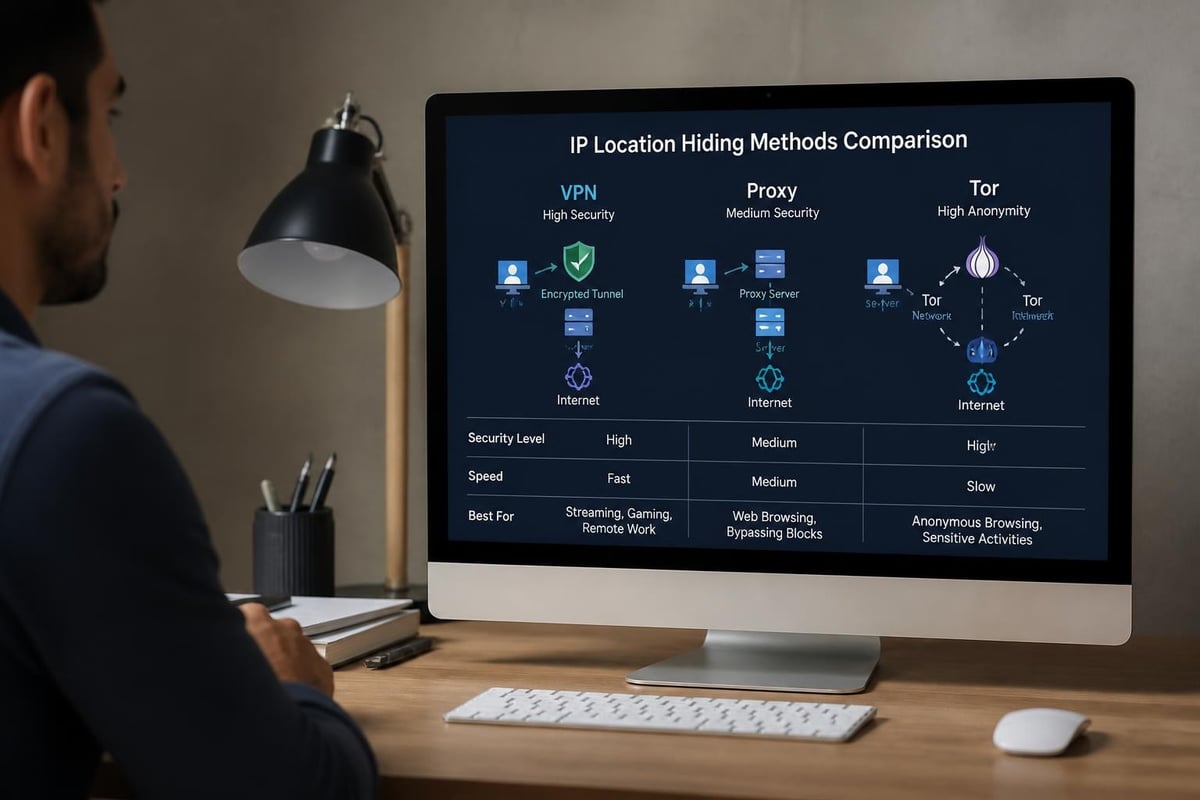
Several approaches exist for concealing your true IP location, each offering different levels of security, speed, and ease of implementation. Understanding these methods helps you select the most appropriate solution for your specific needs.
Virtual Private Networks (VPNs)
VPNs represent the most comprehensive solution for hiding your IP location. When you connect to a VPN server, your internet traffic is encrypted and routed through that server, replacing your actual IP address with the server's IP address.
How VPNs work involves creating an encrypted tunnel between your device and the VPN server. This encryption prevents your ISP, network administrators, and potential interceptors from viewing your browsing activity. The VPN server then forwards your requests to websites, which see only the VPN server's IP address rather than your own.
| VPN Method | Privacy Level | Speed Impact | Technical Skill Required |
|---|---|---|---|
| Software VPN | High | Moderate | Low |
| Router VPN | Very High | Low-Moderate | Moderate |
| Hardware VPN | Very High | Low | Low (pre-configured) |
The choice between software VPNs and router-based solutions significantly impacts your protection scope. Software VPNs protect individual devices, requiring separate installations on each phone, tablet, and computer. Router-based solutions protect every device on your network simultaneously.
Proxy Servers
Proxy servers act as intermediaries between your device and the internet, forwarding your requests whilst masking your IP address. Unlike VPNs, most proxies don't encrypt your traffic, making them less secure but potentially faster for specific tasks.
Types of proxy servers:
- HTTP proxies for web browsing only
- SOCKS proxies for various protocols
- Transparent proxies (often used by organisations)
- Anonymous proxies that hide your IP but identify as proxies
- Elite proxies that provide maximum anonymity
Proxies work well for bypassing simple geographical restrictions or accessing region-specific content, but they shouldn't be relied upon for sensitive activities requiring strong encryption.
Tor Network
The Tor network routes your traffic through multiple volunteer-operated servers, encrypting it at each hop. This creates layers of protection (hence "The Onion Router") that make it extremely difficult to trace activity back to your original IP location.
Whilst Tor provides exceptional anonymity, it comes with significant speed limitations. The multi-hop routing process slows connection speeds considerably, making it impractical for streaming, gaming, or large file transfers.
Router-Based IP Location Protection
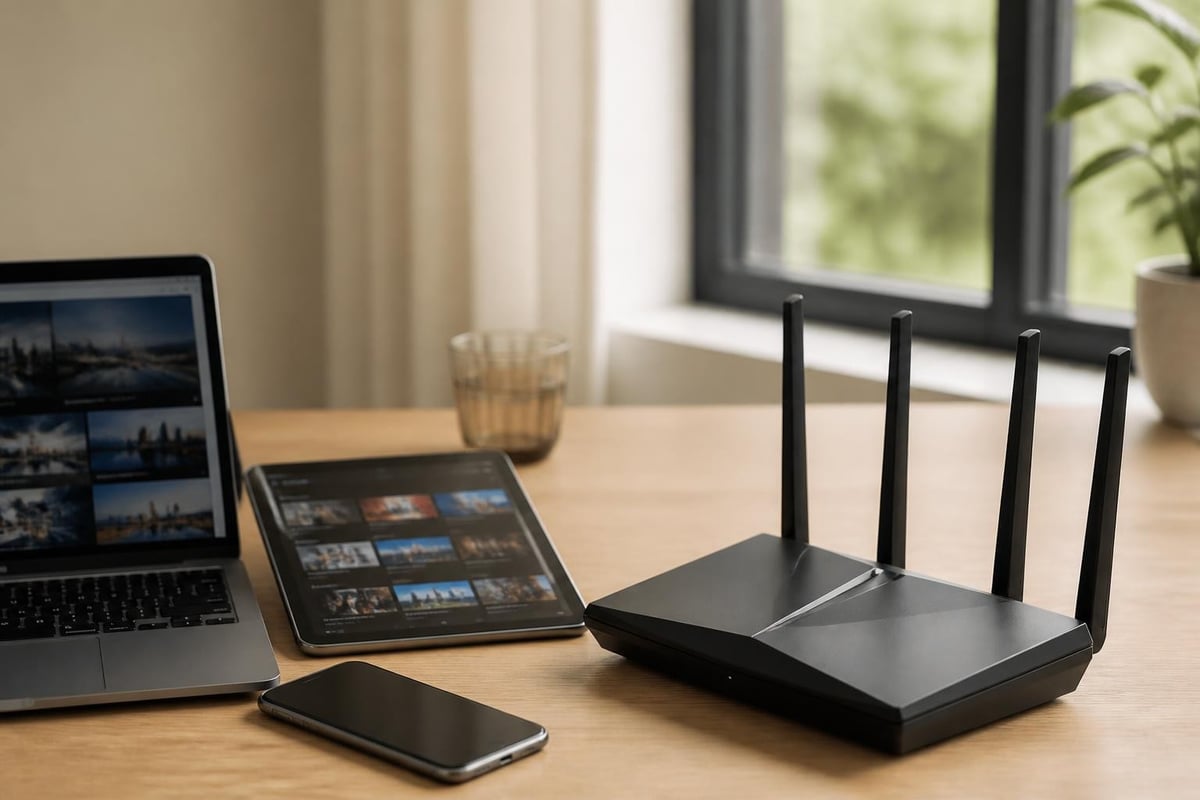
Protecting your IP location at the router level offers distinct advantages over device-specific solutions. When you hide IP location through your router, every device connecting to that network automatically benefits from protection without requiring individual configuration.
Benefits of Network-Wide Protection
A single router-based VPN connection protects smartphones, tablets, computers, smart TVs, gaming consoles, and IoT devices simultaneously. This approach proves particularly valuable for devices that don't support native VPN applications, such as streaming devices or smart home equipment.
Advantages of router-level protection:
- Automatic protection for all connected devices
- No individual device configuration required
- Consistent IP location across your entire network
- Protection for IoT and smart home devices
- Single subscription covering unlimited devices
Gaming consoles and smart TVs benefit significantly from router-based solutions. These devices often lack native VPN support, yet they transmit substantial amounts of data about viewing habits, gaming patterns, and account information.
Pre-Configured VPN Router Solutions
Setting up VPN functionality on standard routers requires technical knowledge of networking, VPN protocols, and router firmware. For users seeking immediate protection without technical complications, pre-configured VPN routers eliminate setup barriers by arriving ready to connect with optimised settings for privacy and performance.
Modern VPN routers support advanced protocols like WireGuard, which offers superior speed compared to older protocols whilst maintaining strong encryption. This becomes crucial when multiple devices stream content, participate in video calls, or engage in online gaming simultaneously.
Practical Applications for Hiding IP Location
Understanding why you need to hide IP location helps determine which method best suits your requirements. Different scenarios demand varying levels of protection, speed, and geographical flexibility.
Secure Remote Work
Remote workers handling sensitive business data must protect their IP location to prevent corporate espionage and data breaches. When accessing company resources from home networks, coffee shops, or co-working spaces, exposed IP addresses create vulnerabilities that sophisticated attackers readily exploit.
Various methods exist to hide your IP address, but remote workers require solutions that balance security with usability. Constant connection drops or complicated authentication processes reduce productivity and frustrate employees.
| Use Case | Recommended Method | Key Benefit |
|---|---|---|
| Remote Access | Router VPN | Protects all work devices |
| Public WiFi | Software VPN | Quick connection anywhere |
| Home Office | Hardware VPN Router | Set-and-forget protection |
| Travel | Portable VPN Router | Consistent security on the go |
Streaming and Content Access
Geographical restrictions limit access to streaming content, sports events, and regional services. Content providers detect your IP location and serve different libraries based on your detected country. By hiding your IP location and connecting through servers in different regions, you access content as if physically present in those locations.
Streaming quality depends heavily on VPN server performance and protocol efficiency. Older VPN protocols create bottlenecks that cause buffering, whilst modern implementations maintain speeds sufficient for 4K streaming across multiple devices.
Gaming Security and Performance
Online gamers face unique threats including DDoS attacks, swatting attempts, and competitive espionage. Exposing your real IP location during gaming sessions makes you vulnerable to targeted attacks that can knock you offline during crucial matches.
Gaming-specific benefits of hiding IP location:
- Protection against DDoS attacks
- Reduced ping through optimised routing
- Early access to region-locked game releases
- Protection from IP-based bans
- Privacy from other players and streamers
Competitive gamers particularly benefit from hiding their IP location, as opponents sometimes launch network attacks during tournaments or ranked matches. A stable VPN connection prevents these disruptions whilst maintaining the low latency essential for competitive play.
Choosing the Right IP Location Hiding Method
Selecting an appropriate method to hide IP location depends on your specific needs, technical comfort level, and the devices requiring protection. No single solution suits every scenario, but understanding the trade-offs helps you make an informed decision.
Evaluating Your Requirements
Begin by assessing which devices need protection and how you use the internet. A single laptop user has different requirements than a family with multiple smartphones, tablets, gaming consoles, and smart home devices.
Consider your typical internet activities and their security requirements. Casual browsing demands less robust protection than handling confidential business documents or conducting financial transactions. Comprehensive guides on hiding your IP address explain how different methods align with various security needs.
Technical Considerations
Protocol selection significantly impacts both security and performance. OpenVPN has established itself as the industry standard through years of security audits and proven reliability. WireGuard, a newer protocol, offers faster connection speeds and lower battery consumption whilst maintaining strong encryption standards.
Protocol comparison:
| Protocol | Encryption Strength | Speed | Battery Impact | Best For |
|---|---|---|---|---|
| WireGuard | Strong | Excellent | Low | Mobile, Gaming, Streaming |
| OpenVPN | Very Strong | Good | Moderate | Maximum Security |
| IKEv2/IPSec | Strong | Very Good | Low | Mobile Devices |
Network speed requirements vary considerably. Video conferencing and streaming demand higher bandwidth than email or web browsing. Calculate your household's combined bandwidth needs during peak usage to ensure your chosen solution maintains adequate speeds.
Long-Term Maintenance and Support
Consider the ongoing maintenance required for different solutions. Software VPNs need regular updates across all protected devices. Router-based solutions centralise updates, but require occasional firmware upgrades to maintain security and add features.
Expert support becomes valuable when connection issues arise or configuration changes become necessary. Solutions backed by knowledgeable support teams reduce downtime and frustration, particularly for users less comfortable with networking technology.
Advanced Privacy Measures
Hiding your IP location represents just one component of comprehensive online privacy. Combining IP protection with additional security measures creates layered defences against various threats.
DNS Leak Protection
DNS leaks occur when your device sends DNS queries outside the encrypted VPN tunnel, potentially revealing the websites you visit to your ISP. Even with your IP location hidden, DNS leaks expose browsing activity and undermine privacy efforts.
Proper DNS leak protection ensures all DNS queries route through the VPN tunnel to DNS servers that don't log your activity. Testing for DNS leaks should be performed regularly, as network configuration changes or software updates can inadvertently create vulnerabilities.
Multi-Hop Connections
Multi-hop VPN configurations route your traffic through multiple VPN servers in different countries before reaching its destination. This approach, similar to Tor's concept but faster, makes it exceptionally difficult to trace activity back to your original IP location.
The trade-off involves increased latency and reduced speeds, as each additional server hop adds processing time. Multi-hop proves worthwhile for journalists, activists, or anyone facing sophisticated surveillance threats, but remains unnecessary for typical privacy-conscious users.
Kill Switch Implementation
A kill switch monitors your VPN connection and blocks all internet traffic if the VPN disconnects unexpectedly. This prevents your real IP location from being exposed during brief connection drops that might otherwise go unnoticed.
Essential kill switch features:
- Automatic activation upon connection loss
- Application-specific or system-wide protection
- Configurable exceptions for local network access
- Clear notification of activation status
- Automatic reconnection attempts
Router-level kill switches provide more comprehensive protection than software implementations, as they block traffic for all connected devices rather than individual applications.
Common Mistakes When Hiding IP Location
Even experienced users sometimes make errors that compromise their privacy efforts. Recognising these common pitfalls helps you maintain consistent protection.
Inconsistent Protection
Protecting your laptop whilst leaving your smartphone exposed creates privacy gaps. Many users hide IP location on their primary computer but neglect tablets, smart TVs, or gaming consoles that transmit equally sensitive data.
Consistency requires either diligent individual device configuration or network-wide protection that covers all devices automatically. Gaps in protection provide tracking opportunities that undermine your overall privacy strategy.
Free VPN Risks
Free VPN services monetise their offerings through data collection, advertising injection, or selling bandwidth. Detailed analyses of privacy methods consistently warn against free services that often provide minimal encryption whilst logging extensive user data.
Research has documented instances where free VPN providers installed malware, sold user bandwidth for botnet operations, or shared connection logs with third parties. The cost savings rarely justify the security and privacy risks these services introduce.
Trusting Single Points of Failure
Relying exclusively on one privacy method creates vulnerability if that method fails or proves compromised. Whilst hiding your IP location provides significant protection, combining it with browser privacy extensions, encrypted communications, and strong authentication creates more resilient security.
Consider your threat model realistically. Casual privacy protection requires different measures than protection against state-level surveillance. Overcomplicating your setup can prove as problematic as insufficient protection if complexity leads to configuration errors or abandoned security practices.
Legal and Ethical Considerations
Understanding the legal landscape surrounding IP location hiding helps you make informed decisions whilst staying within applicable laws and regulations.
Jurisdictional Differences
Laws governing VPN use and IP address hiding vary significantly across countries. Most Western nations permit VPN use without restriction, whilst some countries heavily regulate or prohibit these technologies. Understanding local regulations prevents inadvertent legal violations.
Even where VPNs are legal, using them to engage in illegal activities provides no legal protection. Hiding your IP location doesn't grant immunity from laws governing copyright infringement, fraud, or other cybercrimes.
Service Terms and Conditions
Many streaming services, financial institutions, and online platforms include terms prohibiting VPN use or IP address manipulation. Violating these terms may result in account suspension or termination, even where hiding your IP location is otherwise legal.
Balancing privacy rights with contractual obligations requires careful consideration. Some services restrict VPN use to prevent geographical licensing violations, whilst others cite security concerns or fraud prevention as justification for these policies.
Responsible Use Principles
Ethical use of IP location hiding focuses on privacy protection rather than evading accountability. Protecting your family's browsing data, securing business communications, and maintaining personal privacy represent legitimate uses that respect others' rights.
Consider the broader implications of your privacy practices. Supporting privacy-respecting services through paid subscriptions rather than free alternatives helps maintain a healthy ecosystem of privacy tools that don't rely on exploitative business models.
Protecting your IP location has evolved from an advanced technical practice to an essential component of responsible internet use. Whether you choose software VPNs, router-based solutions, or hardware implementations, the important step is taking action to reclaim your privacy. For comprehensive protection that covers every device in your home or office without complicated configuration, U Shield VPN offers pre-configured VPN routers that combine ease of use with enterprise-grade security. Our plug-and-play solutions ensure your entire network benefits from advanced protocols like WireGuard and OpenVPN, giving you peace of mind that your IP location remains private across all your connected devices.
