






Your IP address functions as your digital fingerprint, revealing your location, internet service provider, and browsing habits to websites, advertisers, and potentially malicious actors. Every time you connect to the internet, this unique identifier follows you across the web, enabling tracking, targeted advertising, and in some cases, restriction of content based on your geographic location. Understanding how to hide your IP effectively has become essential for anyone concerned about online privacy, security, or unrestricted access to digital content.
Why Your IP Address Matters for Privacy
Your IP address serves as more than just a technical requirement for internet connectivity. It represents a significant privacy concern in today's data-driven digital landscape.
When you browse websites, stream content, or engage in online activities, your IP address gets logged by every server you connect to. This information can be collected, aggregated, and sold to advertisers who build detailed profiles about your online behaviour. Microsoft’s guide explains the concept of IP addresses and emphasises how this seemingly technical detail connects directly to your real-world identity and location.
Risks of IP Exposure
Financial institutions, healthcare providers, and government agencies track IP addresses to detect fraud and unauthorised access. Whilst this serves legitimate security purposes, the same technology enables surveillance and monitoring that many users find intrusive.
- Advertisers track your movements across websites to serve targeted advertisements
- Streaming services restrict content availability based on geographic location
- Hackers can use IP addresses as starting points for attacks
- Internet service providers monitor and potentially throttle your connection
- Government agencies may conduct surveillance of online activities

Cybercriminals can leverage exposed IP addresses for distributed denial-of-service (DDoS) attacks, particularly targeting gamers, streamers, and business users. Once they obtain your IP address, they can flood your connection with traffic, disrupting your internet access and potentially exposing other vulnerabilities in your network.
Methods to Hide Your IP Effectively
Several approaches exist to mask or hide your IP address, each with distinct advantages and limitations. The most effective solution depends on your specific needs, technical expertise, and security requirements.
Virtual Private Networks (VPNs)
VPNs represent the most comprehensive solution for concealing your IP address across all internet activities. When you connect through a VPN, your traffic routes through an encrypted tunnel to a remote server, which then connects to your desired destination using its own IP address.
| Method | Privacy Level | Speed Impact | Setup Difficulty | Device Coverage |
|---|---|---|---|---|
| VPN Router | Very High | Minimal | Easy | All Devices |
| VPN Software | High | Low to Medium | Easy | Per Device |
| Proxy Server | Medium | Variable | Easy | Per Application |
| Tor Browser | Very High | High | Easy | Browser Only |
TechRadar details how VPNs can effectively hide your IP address through encryption and server routing, making this approach particularly effective for users seeking comprehensive protection. The key advantage lies in the encryption layer, which not only masks your IP but also protects your data from interception.
VPN routers offer particularly elegant solutions for households and small businesses. Rather than configuring VPN software on each device individually, pre-configured VPN routers protect your entire network automatically. Every smartphone, tablet, smart TV, gaming console, and IoT device connected to your network benefits from IP masking without requiring individual setup or configuration.
Proxy Servers
Proxy servers function as intermediaries between your device and the internet, forwarding your requests whilst substituting their own IP address. However, proxies typically lack the encryption that VPNs provide, making them less secure for sensitive activities.
Free proxy services often maintain logs of user activity and may inject advertisements into your browsing sessions. They're suitable for basic tasks like accessing geo-restricted content but shouldn't be trusted with confidential information or financial transactions.
The Tor Network
The Tor network routes your internet traffic through multiple volunteer-operated servers, encrypting it at each hop. This creates layers of protection (hence "The Onion Router") that make tracing your activity extremely difficult.

Tor provides exceptional anonymity but comes with significant speed penalties. Each hop through the network adds latency, making Tor impractical for streaming, gaming, or large file transfers. Additionally, some websites block Tor exit nodes, limiting accessibility.
Choosing the Right Solution for Your Needs
Different use cases require different approaches to hide your IP address. Understanding your priorities helps identify the most appropriate method.
For Home Networks
Home users typically need comprehensive protection that covers multiple devices without complex configuration. A VPN router solution addresses this requirement by protecting laptops, phones, tablets, smart TVs, and IoT devices simultaneously.
Security.org explores various methods to hide your IP address and emphasises the importance of matching your solution to your technical capabilities and security requirements. For families with varying levels of technical expertise, centralised protection through network-level VPN implementation eliminates the need for individual device configuration.
For Travellers and Remote Workers
Mobility introduces additional security challenges. Public Wi-Fi networks in hotels, cafés, and airports pose significant risks, as malicious actors can intercept unencrypted traffic to steal credentials and sensitive data.
Portable VPN routers designed for travel provide secure connections regardless of the underlying network. These devices create a personal secure network bubble, protecting all connected devices through a single VPN connection. This approach proves particularly valuable when multiple devices need protection or when installing VPN software isn't feasible on certain devices.
For Streaming and Content Access
Geographic restrictions frustrate users attempting to access content available in other regions. Streaming services determine your location through your IP address and restrict content accordingly.
- Identify which regions offer your desired content
- Select a VPN server in the appropriate location
- Verify that your VPN provider supports streaming services
- Connect to the server before accessing the streaming platform
- Clear browser cookies to prevent location detection bypass
Not all VPN services successfully hide your IP from streaming platforms. Major services actively detect and block VPN traffic, requiring VPN providers to continuously update their infrastructure. How-To Geek outlines five effective ways to hide your IP address and discusses the challenges specific to streaming applications.
Implementation Best Practices
Successfully concealing your IP address requires more than simply activating a VPN or proxy. Several additional considerations ensure comprehensive protection.
Preventing Leaks
Even with active IP masking, various technical issues can expose your real IP address through leaks. The most common vulnerabilities include:
- DNS leaks occur when DNS requests bypass the VPN tunnel
- WebRTC leaks exploit browser features to reveal local IP addresses
- IPv6 leaks happen when VPN providers only route IPv4 traffic
- Connection drops temporarily expose your real IP if the VPN disconnects
Configuring a kill switch prevents internet access if your VPN connection drops unexpectedly. This feature ensures that no data transmits without IP protection, eliminating the risk of accidental exposure during connection interruptions.
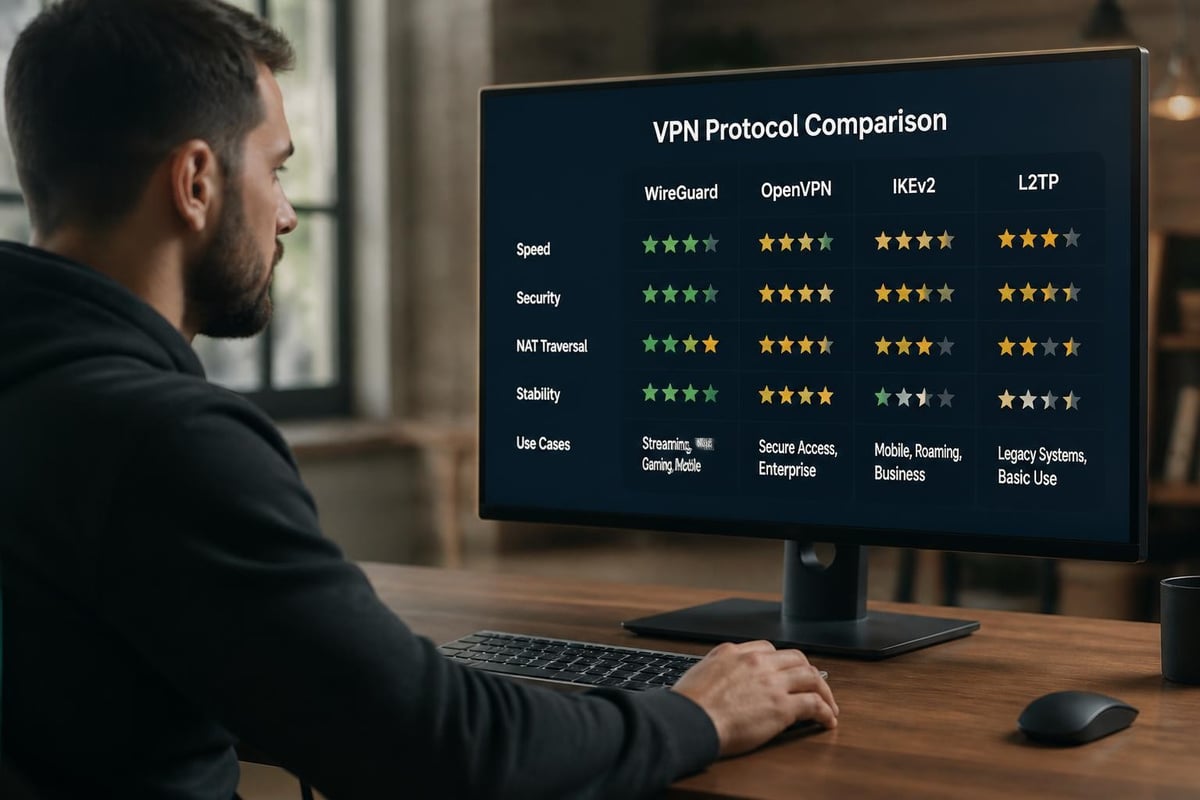
Selecting VPN Protocols
Modern VPN implementations support multiple protocols, each balancing speed, security, and compatibility differently.
| Protocol | Speed | Security | Best For |
|---|---|---|---|
| WireGuard | Excellent | Very High | General use, mobile |
| OpenVPN | Good | Very High | Maximum compatibility |
| IKEv2/IPsec | Very Good | High | Mobile devices |
| L2TP/IPsec | Fair | Medium | Legacy systems |
WireGuard represents the current state-of-the-art in VPN technology, offering exceptional performance through streamlined code and modern cryptographic approaches. Its efficiency makes it ideal for bandwidth-intensive activities whilst maintaining robust security.
Managing Multiple Devices
Organisations and households with numerous connected devices face practical challenges when attempting to hide your IP across the entire network. Individual software installations create administrative overhead and potential gaps in protection.
Network-level solutions through VPN routers eliminate per-device configuration whilst ensuring consistent protection. Pre-configured VPN routers from providers like U Shield VPN arrive ready to protect your entire network immediately, supporting both WireGuard and OpenVPN protocols without requiring technical expertise for initial setup.
This approach proves particularly valuable for IoT devices, smart home equipment, and gaming consoles that don't support native VPN applications. Once connected to a VPN router, these devices automatically benefit from IP masking and encryption.
Advanced Privacy Considerations
Beyond basic IP masking, comprehensive privacy protection requires addressing additional tracking methods and vulnerabilities.
Browser Fingerprinting
Even with a masked IP address, websites can identify and track you through browser fingerprinting. This technique analyses your browser configuration, installed fonts, screen resolution, timezone, and dozens of other attributes to create a unique identifier.
TechRadar’s guide reviews the best private browsers and privacy tools that combat fingerprinting through standardisation and randomisation. Combining IP masking with privacy-focused browsers creates layered protection against multiple tracking methodologies.
Cookie and Tracker Management
Third-party cookies track your movements across websites even when you hide your IP address. Advertisers embed these tracking mechanisms across thousands of sites, building comprehensive profiles of your interests and behaviours.
Regular cookie clearing, tracker blocking extensions, and privacy-focused browser configurations complement IP masking efforts. Many modern browsers include enhanced tracking protection, but dedicated privacy tools offer more comprehensive blocking.
Multi-Factor Privacy Strategy
Effective privacy protection requires multiple complementary approaches rather than relying on any single technique:
- Network level: Hide your IP through VPN routers or software
- Browser level: Use privacy-focused browsers with tracker blocking
- Application level: Configure privacy settings within individual apps
- Account level: Minimise data shared with online services
- Device level: Regular security updates and malware protection
Tech Advisor discusses the reasons for hiding your IP address as part of a broader privacy strategy that addresses multiple vectors of surveillance and tracking.
Business and Professional Applications
Organisations face unique requirements when implementing IP masking across their infrastructure. Security, compliance, and operational continuity take precedence over individual user concerns.
Remote Workforce Protection
Remote employees accessing corporate resources from home networks, cafés, and other locations create security challenges. Each connection point represents a potential vulnerability where sensitive data might be intercepted or compromised.
Providing remote workers with VPN routers ensures consistent security regardless of their location. This centralised approach simplifies IT management whilst maintaining comprehensive protection across distributed teams.
Regulatory Compliance
Various regulations mandate data protection measures that include securing network communications. GDPR, HIPAA, and other frameworks require organisations to implement appropriate technical safeguards when handling sensitive information.
Demonstrating compliance often requires documented security measures that include encrypted communications and IP protection. Network-level VPN implementation provides auditable security controls that satisfy regulatory requirements whilst protecting against data breaches.
Competitive Intelligence Protection
Businesses conducting market research, competitive analysis, or price monitoring need to hide your IP to prevent detection and blocking. Many websites restrict automated access or alter displayed information based on the visitor's location and identity.
Rotating IP addresses through VPN servers in multiple locations enables legitimate research activities whilst avoiding detection systems that might block repeated requests from the same source.
Protecting your digital privacy through IP masking has evolved from a technical curiosity to a fundamental security practice for individuals and organisations alike. Whether you're concerned about advertiser tracking, geographic restrictions, or comprehensive network security, the right approach to hide your IP creates essential protection layers around your online activities. For whole-network protection that covers every connected device automatically, U Shield VPN offers pre-configured routers with WireGuard and OpenVPN support, eliminating complex setup whilst delivering robust security for homes, travellers, and businesses.
