






Your IP address functions as your digital home address, revealing your location, internet service provider, and online activities to websites, advertisers, and potential threat actors. Learning how to hide IP addresses has become essential for maintaining privacy, accessing geo-restricted content, and protecting yourself from tracking and cyber threats. Whether you're concerned about data collection, corporate surveillance, or simply want to browse anonymously, understanding the various methods available empowers you to take control of your digital footprint.
Understanding IP Addresses and Why You Should Hide Them
An IP address (Internet Protocol address) serves as a unique identifier assigned to every device connected to the internet. This numerical label enables data packets to find their destination, but it also creates a trail of your online activities.
What Your IP Address Reveals About You
Every time you visit a website, stream content, or send an email, your IP address travels with that data. This seemingly innocuous string of numbers can reveal:
- Your approximate geographical location (city and postal code)
- Your internet service provider and connection type
- Your browsing habits across multiple websites
- Potential vulnerabilities in your network security
Websites and advertisers use this information to build detailed profiles of your behaviour, whilst cybercriminals may exploit IP addresses for targeted attacks or to bypass security measures.
Privacy Risks and Tracking Concerns
Third-party trackers, advertising networks, and even government agencies monitor IP addresses to create comprehensive surveillance networks. Security.org explains the importance of hiding your IP address and highlights how this data collection extends far beyond simple website analytics. Your ISP can log every site you visit, whilst data brokers compile and sell your browsing history to the highest bidder.

Primary Methods for How to Hide IP Addresses
Multiple techniques exist to mask your IP address, each offering different levels of protection, speed, and ease of use. Understanding these options helps you select the approach that best suits your specific privacy requirements.
Virtual Private Networks (VPNs)
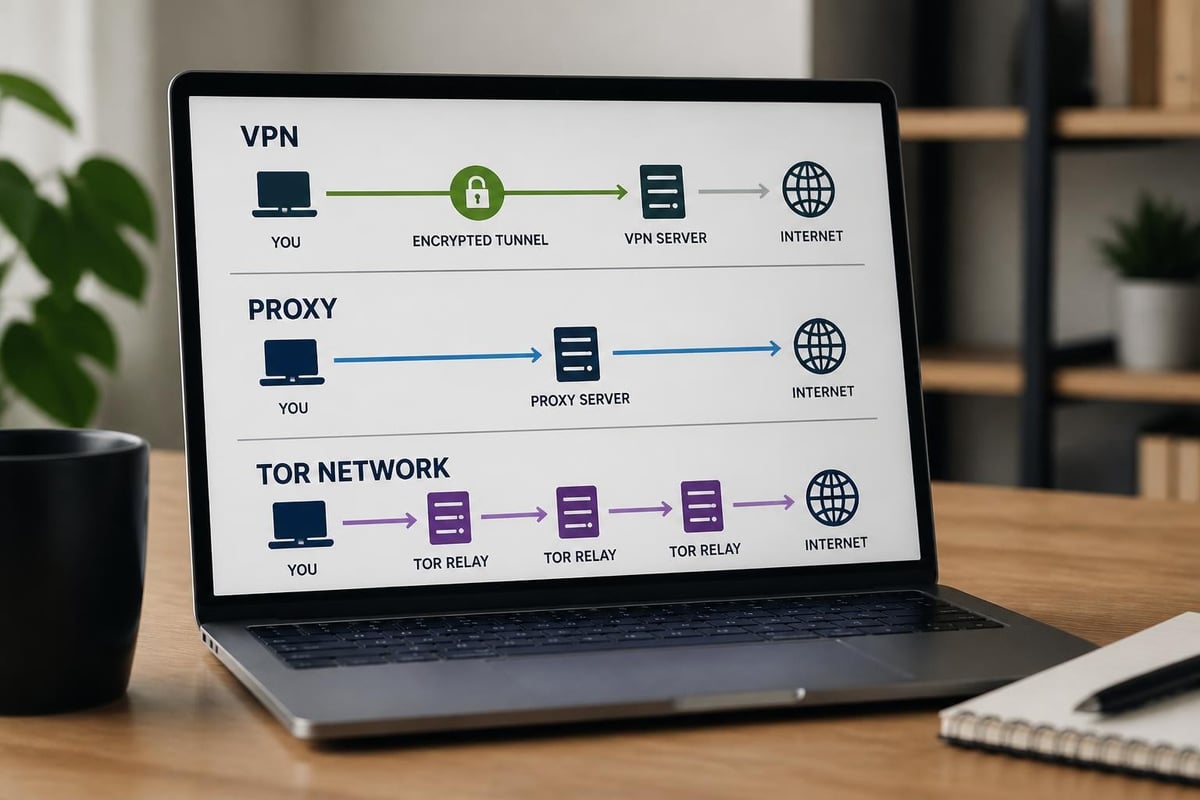
VPNs represent the most comprehensive and user-friendly solution for hiding IP addresses. When you connect to a VPN server, your internet traffic routes through an encrypted tunnel before reaching its destination. The websites you visit see the VPN server's IP address rather than your actual location.
Key VPN benefits include:
- Military-grade encryption protecting all data transmissions
- Access to servers in multiple countries worldwide
- Protection for all applications and devices simultaneously
- Fast connection speeds suitable for streaming and gaming
- Additional security features like kill switches and DNS leak protection
Modern VPN protocols such as WireGuard and OpenVPN provide robust security without sacrificing performance. TechRadar’s guide on using VPNs to hide IP addresses demonstrates how straightforward implementation can be, particularly with dedicated VPN routers that protect every device on your network without individual software installation.
VPN Routers: Network-Wide Protection
Whilst individual VPN applications protect single devices, VPN routers extend coverage to your entire network. These specialized routers come pre-configured with VPN technology, creating a protective shield for smartphones, smart TVs, gaming consoles, and IoT devices that typically cannot run VPN software.
For households and small businesses seeking comprehensive protection, pre-configured VPN routers from U Shield VPN offer plug-and-play solutions that eliminate complex setup procedures. Every device automatically benefits from IP masking the moment it connects to your network, ensuring consistent privacy without configuration hassles.
Proxy Servers: Basic IP Masking
Proxy servers act as intermediaries between your device and the internet, forwarding requests on your behalf using the proxy's IP address. Unlike VPNs, proxies typically don't encrypt your traffic, making them faster but less secure.
| Feature | VPN | Proxy Server |
|---|---|---|
| Encryption | Yes, full tunnel | Usually no |
| Speed | Fast to moderate | Very fast |
| Coverage | System-wide | Application-specific |
| Privacy Level | High | Moderate |
| Cost | Subscription required | Often free |
Proxies work well for accessing geo-restricted content or bypassing simple IP blocks, but they shouldn't be your primary privacy tool. Many free proxy services log your activities or inject advertisements into your browsing sessions.
The Tor Network for Maximum Anonymity
The Tor (The Onion Router) network provides exceptional anonymity by routing your traffic through multiple volunteer-operated servers, encrypting data at each hop. How-To Geek discusses five effective ways to hide your IP address, noting that Tor offers the highest level of anonymity available to average users.
However, Tor comes with significant drawbacks:
- Extremely slow browsing speeds due to multiple relay points
- Many websites block Tor exit nodes automatically
- Potentially suspicious to network administrators and ISPs
- Complex configuration for optimal security
- Unsuitable for streaming, gaming, or large downloads
Tor excels for sensitive research, whistleblowing, or accessing information in restricted regions, but it's impractical for everyday internet use.
Advanced Techniques and Considerations
Beyond the primary methods, several additional approaches and combinations can enhance your IP privacy strategy depending on your specific threat model and use case.
Mobile Networks and Public Wi-Fi
Connecting through mobile data or public Wi-Fi networks temporarily changes your IP address, though this method offers limited privacy benefits. Norton provides four easy methods to hide your IP address, including the strategic use of public networks, but emphasizes the security risks involved.
Public Wi-Fi hotspots expose you to man-in-the-middle attacks, packet sniffing, and rogue access points. Mobile networks still tie your activity to your account and SIM card. Neither approach provides genuine anonymity or protection.
Smart DNS Services
Smart DNS services modify your DNS queries to make websites believe you're accessing them from a different location. These services excel at unblocking streaming content but don't hide your IP address or encrypt your traffic. They're faster than VPNs for streaming but offer zero privacy benefits.
Browser-Based Privacy Tools
Modern browsers include privacy features like built-in VPN services, tracking protection, and fingerprinting resistance. Whilst these tools help reduce tracking, they typically don't mask your IP address from the websites you visit. They work best as supplementary measures rather than primary privacy solutions.
Selecting the Right Method for Your Needs
Choosing how to hide IP addresses depends on your specific requirements, technical expertise, and the devices you need to protect. Different scenarios demand different solutions.
For Home Network Protection
Families and households benefit most from router-level VPN solutions that protect every connected device automatically. This approach eliminates the need to configure individual devices and ensures consistent protection for smart home devices, gaming consoles, and guest networks.
Home network priorities:
- Comprehensive device coverage without individual setup
- Fast speeds for streaming and gaming
- Reliable connections with minimal interruptions
- Family-friendly controls and content filtering options
For Business and Remote Work
Professional environments require robust security alongside IP masking. VPNs with business-grade features provide encrypted communications, secure access to corporate resources, and audit trails for compliance requirements.
Remote workers particularly benefit from VPN routers when working from home offices or traveling. These devices create secure connections regardless of the underlying network, protecting sensitive business data from interception.
For Travelers and Mobile Users
Frequent travelers face unique challenges accessing home services and maintaining security on unfamiliar networks. Portable VPN routers offer an elegant solution, creating a secure bubble around your devices whether you're in a hotel, airport, or coffee shop.
| Use Case | Best Solution | Key Benefit |
|---|---|---|
| Streaming | VPN Router | Bypasses geo-restrictions |
| Gaming | Low-latency VPN | DDoS protection |
| Research | Tor Browser | Maximum anonymity |
| General Browsing | Standard VPN | Balanced speed and security |
| Public Wi-Fi | VPN (any type) | Encryption protection |

Implementation Best Practices
Successfully implementing IP masking requires more than simply activating a VPN or proxy. Following established best practices ensures maximum protection whilst avoiding common pitfalls that could compromise your privacy.
Avoiding DNS Leaks
DNS (Domain Name System) leaks occur when your device sends DNS queries outside the VPN tunnel, revealing the websites you visit despite using IP masking. Premium VPN services include DNS leak protection, routing all queries through encrypted tunnels.
Testing for DNS leaks:
- Connect to your VPN service
- Visit a DNS leak testing website
- Verify that displayed DNS servers match your VPN provider
- Check that your real IP address doesn't appear
- Repeat tests from different VPN server locations
Configure your devices to use your VPN provider's DNS servers exclusively, disabling any automatic DNS detection features that might bypass protection.
Kill Switch Configuration
VPN kill switches automatically disconnect your internet if the VPN connection drops, preventing accidental exposure of your real IP address. Tom’s Guide explores different methods to hide your IP address and emphasizes the importance of kill switches for maintaining consistent protection.
Enable system-level kill switches rather than application-specific versions for comprehensive coverage. Test your kill switch by manually disconnecting the VPN and attempting to access websites.
Multi-Hop VPN Connections
Advanced users may employ multi-hop VPN configurations, routing traffic through multiple VPN servers in different countries before reaching the destination. This technique adds extra layers of obfuscation but significantly reduces connection speeds.
Multi-hop configurations suit high-security scenarios where you need to minimize the risk of traffic correlation attacks. Most everyday users find single-hop connections provide adequate protection with better performance.
Legal and Ethical Considerations
Understanding how to hide IP addresses includes recognizing the legal framework surrounding IP masking and using these tools responsibly within applicable laws.
Jurisdictional Variations
VPN and proxy usage legality varies significantly across countries. Most Western democracies permit IP masking for privacy purposes, whilst some nations restrict or ban these technologies entirely. Research local regulations before implementing IP hiding solutions, particularly when traveling internationally.
Academic research on IP-based subject access requests highlights the complex legal landscape surrounding IP addresses and privacy rights across different jurisdictions. Even in permissive countries, using IP masking to commit crimes or violate terms of service remains illegal.
Terms of Service Compliance
Many online services prohibit VPN usage in their terms of service, particularly streaming platforms enforcing geographical licensing restrictions. Whilst hiding your IP address is legal, violating contractual agreements could result in account suspension or termination.
Balance your privacy needs against service agreements, understanding that platforms may detect and block VPN traffic. Select VPN providers with obfuscation features that make encrypted traffic resemble regular HTTPS connections.
Responsible Usage
IP masking tools provide powerful privacy protection but shouldn't facilitate harmful activities. Avoid using hidden IP addresses for:
- Harassment, cyberbullying, or threatening behaviour
- Unauthorized access to computer systems or networks
- Copyright infringement or digital piracy
- Fraud, identity theft, or financial crimes
- Circumventing security measures for malicious purposes
Ethical IP masking focuses on protecting your legitimate privacy rights whilst respecting others' security and property.
Performance Optimization
Maximizing the effectiveness of IP hiding methods requires balancing security, speed, and reliability. Several factors influence performance, and understanding these variables helps you optimize your configuration.
Server Selection Strategies
Geographic proximity between your location and the VPN server significantly impacts connection speed. Servers closer to you typically provide faster speeds, whilst distant servers introduce additional latency.
Optimal server selection criteria:
- Choose nearby servers for general browsing and downloads
- Select servers in content regions for streaming geo-restricted media
- Use specialized servers optimized for gaming or torrenting
- Rotate between servers to prevent traffic correlation
- Avoid overcrowded servers during peak usage hours
Quality VPN providers display real-time server load information, helping you identify the fastest available options for your current needs.
Protocol Selection
Different VPN protocols offer varying balances between security and performance. WireGuard represents the current gold standard, delivering exceptional speeds with robust encryption. OpenVPN provides excellent security with broader device compatibility, whilst IKEv2 excels on mobile devices with frequent network changes.
| Protocol | Speed | Security | Mobile Support | Best For |
|---|---|---|---|---|
| WireGuard | Excellent | Excellent | Good | General use |
| OpenVPN | Good | Excellent | Excellent | Maximum security |
| IKEv2 | Very Good | Very Good | Excellent | Mobile devices |
| L2TP/IPsec | Moderate | Good | Good | Legacy systems |
Experiment with available protocols to find the optimal balance for your specific devices and use cases. Modern VPN routers often support multiple protocols, allowing per-device customization.
Bandwidth Management
VPN encryption introduces overhead that slightly reduces available bandwidth compared to unencrypted connections. High-quality providers minimize this impact through optimized server infrastructure and efficient protocols.
Monitor your actual speeds using reputable testing tools, comparing encrypted versus unencrypted connections. Expect a 10-20% speed reduction with premium VPN services, whilst budget providers may impose greater performance penalties or bandwidth throttling.
Troubleshooting Common Issues
Even properly configured IP hiding solutions occasionally encounter problems. Understanding common issues and their solutions helps maintain consistent protection.
Connection Failures
VPN connections may fail due to network restrictions, firewall interference, or server maintenance. Attempt these troubleshooting steps:
- Switch to a different VPN server location
- Change VPN protocols (try WireGuard, then OpenVPN)
- Restart your router and modem
- Temporarily disable firewall or antivirus software
- Contact your VPN provider's support team
Persistent connection failures may indicate ISP-level VPN blocking. Providers offering obfuscation features can disguise VPN traffic as regular HTTPS, bypassing many restrictions.
Speed Degradation
Significant speed reductions beyond normal VPN overhead suggest configuration problems or provider limitations. Diagnostic steps include:
- Testing multiple servers to identify provider-wide issues
- Verifying your base internet speed without VPN active
- Checking for bandwidth-intensive background applications
- Ensuring your router firmware remains current
- Confirming adequate processing power for encryption overhead
Router-based VPN solutions require sufficient processing capability to handle encryption for multiple simultaneous connections. Dedicated VPN routers include optimized hardware for this purpose.
Website Blocking
Some websites actively block known VPN IP addresses to enforce geographical restrictions or reduce fraudulent activity. Solutions include:
- Rotating between different VPN servers
- Using residential IP addresses rather than data center IPs
- Enabling obfuscation or stealth modes
- Contacting the VPN provider for dedicated IP options
- Temporarily disabling the VPN for specific trusted sites
Understand that website blocking represents an ongoing arms race between VPN providers and content platforms. Premium services continuously update server IP addresses to maintain access.
Protecting your online privacy through IP masking has become essential in 2026's increasingly surveilled digital landscape. Whether you prioritize streaming access, gaming protection, or comprehensive network security, understanding the available methods empowers you to make informed decisions about your digital privacy. For complete household or business protection without complex configuration, U Shield VPN offers pre-configured VPN routers that secure every device on your network with industry-leading WireGuard and OpenVPN protocols, combining ease of use with robust privacy protection for all your connected devices.
