






Your PlayStation 5 is a security blind spot in your home network. While you’re focused on the leaderboards, your connection is often exposed to ISP throttling and targeted DDoS attacks. You’ve likely experienced that sudden, unexplainable lag during a crucial match. Using a VPN for PS5 is the most effective way to eliminate these interruptions and secure your gaming environment. You deserve a connection that works as hard as you do.
This guide changes the game. You’ll learn exactly how to secure your console to reclaim your speed and total privacy. We promise a clear path to a stable, low-latency connection through full encryption. It’s about achieving plug-and-play simplicity without the technical headache. We’ll walk you through the most effective setup methods for 2026, including hardware-level solutions that protect your console at the source. From bypassing regional content blocks to stopping lag in its tracks, you’re about to take full control of your digital experience. Protection should be instantaneous; we’ll show you how to make it happen.
Key Takeaways
- Stop DDoS attacks instantly. Secure your IP to prevent malicious interruptions during competitive play.
- Master the VPN for PS5 setup. Gain a reliable, high-speed connection for a smoother gaming experience.
- Eliminate manual configuration. Use hardware-level solutions to protect every connected device at once.
- Achieve low-latency gaming. Use military-grade encryption to keep your traffic invisible to your ISP.
- Simplify your security. The U Shield VPN Router offers zero-config protection for your entire home.
Why Every PS5 Needs a VPN in 2026
Gaming has evolved. In 2026, a high-speed fiber connection isn’t enough to guarantee a smooth experience. Your console is a beacon on the open internet. Without a VPN for PS5, your public IP address is visible to every player in your lobby. This exposure invites unnecessary risks that can ruin a competitive session or compromise your personal data. Understanding how VPN technology works is the first step toward reclaiming your digital sovereignty. It creates a secure tunnel that shields your console from the outside world.
Competitive gaming is fierce. Malicious players often use “booting” to kick opponents offline by flooding their IP addresses with junk data. A VPN absorbs these attacks. Your real location stays hidden. You stay in the game. Beyond security, there is the issue of performance. ISPs often detect high-traffic gaming packets and respond by artificially slowing your speeds. This throttling causes the dreaded high ping. Encryption makes your traffic invisible to your provider. They can’t throttle what they can’t see.
The Hidden Risks of Unsecured Console Gaming
Your IP address is a digital fingerprint. Current gaming trends show that “booting” remains a common tactic in ranked ladders. A single disgruntled opponent can disrupt your entire home network. The PS5 integrated browser also lacks the robust ad-blocking and tracker-prevention found on PCs. It’s a quiet gateway for data-hungry providers to map your habits and sell your profile. A dedicated VPN for PS5 acts as a filter. It strips away these vulnerabilities before they reach your hardware, ensuring your session remains private and uninterrupted.
Anonymous Browsing on All Devices vs. Single Console Security
Security shouldn’t be a patchwork. Protecting only your console leaves your phones, laptops, and smart home devices exposed. A unified approach is superior to fragmented app installs. When you secure the network at the source, your PlayStation Network (PSN) credentials gain an extra layer of defense. This prevents credential stuffing and local network snooping. It’s about total peace of mind for every device you own.
- Total Encryption: Every packet leaving your home is shielded by professional-grade protocols.
- Global Access: Connect to servers in London, Tokyo, or New York to play with international friends.
- Zero Interference: Bypass ISP speed caps during peak hours for a consistent, low-latency experience.
- Credential Safety: Keep your PSN login and credit card details hidden from prying eyes on the local network.
A secure connection is a fast connection. By removing the obstacles of tracking and throttling, you unlock the true potential of your hardware. You gain the freedom to play anywhere, with anyone, without looking over your shoulder.
Comparing the 3 Ways to Connect Your PS5 to a VPN
The PlayStation 5 is a powerhouse, but it lacks native VPN support. You cannot simply download an app from the PlayStation Store. To bridge this gap, you must choose a connection method that fits your technical comfort level and security needs. Selecting the right VPN for PS5 setup determines whether you gain true protection or just a superficial location change.
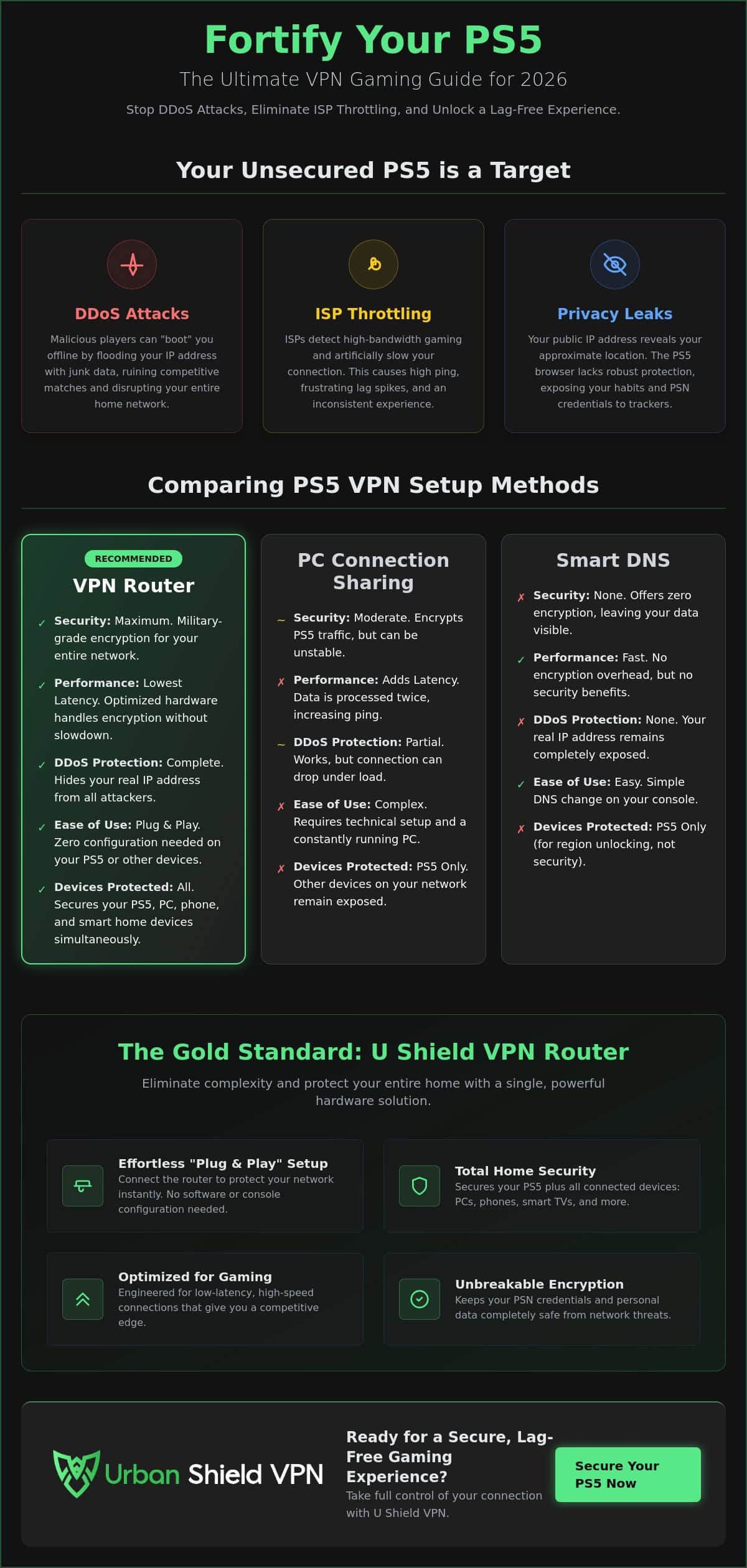
There are three primary paths. The VPN router is the gold standard. It encrypts your entire network at the source. The second path is connection sharing through a PC or Mac. This is a manual workaround for specific sessions. Finally, Smart DNS offers a quick way to bypass regional blocks but provides zero security. For those seeking absolute peace of mind, a hardware-level solution like the U Shield VPN Router offers the most reliable protection.
The Pros and Cons of Connection Sharing
Sharing a connection requires a physical bridge. You link your PS5 to a computer using an Ethernet cable. The computer runs the VPN and passes the secure connection to the console. It works, but it’s a temporary fix. Your computer must remain powered on and active throughout your entire gaming session. This method often introduces a latency penalty. Data must be handled twice, once by the PC and once by the console, which can spike your ping during competitive play. You also need a computer with two network adapters or a steady Wi-Fi-to-Ethernet bridge to maintain stability.
Smart DNS: Speed Without the Shield
Smart DNS is a lightweight alternative. It reroutes your DNS requests to make you appear as if you’re in another country. It’s fast because there is no encryption overhead. However, speed comes at a cost. Smart DNS leaves your data completely exposed. It does not hide your IP address from other players, meaning it fails to stop DDoS attacks. This method is ideal for streaming international movies but offers no defense for gaming. In 2026, where digital threats are sophisticated, relying on DNS alone is a significant risk. True security requires full encryption to keep your gaming traffic invisible and your identity protected.
Encryption matters for more than just hiding your location. It prevents your ISP from inspecting your data packets. When your provider cannot identify your traffic as “gaming,” they cannot apply specific speed caps. If you want a permanent VPN for PS5 solution, the router method is unbeatable. It provides a silent, powerful guardian that operates in the background, protecting every device in your home without constant manual intervention.
The Power of a Pre-Configured VPN Router for Gaming
Setting up a VPN for PS5 shouldn’t feel like a chore. Most users want to jump into the action immediately. A pre-configured router makes this a reality. It eliminates the need to dive into complex network menus on your console. You simply connect to the Wi-Fi network. The security is already there. It operates silently in the background. It protects your console and every other device in your home simultaneously. This hardware-first approach is the most efficient way to maintain a secure connection in 2026.
A dedicated router does more than just shield your IP. It acts as a traffic manager for your entire household. It can handle multiple high-bandwidth devices without breaking a sweat. Your console gets the priority it needs for competitive play while your other devices enjoy network-wide anonymous browsing. This unified shield removes the fragmentation of individual app installs. It creates a single, powerful point of defense for your digital life.
Why Plug-and-Play Hardware Beats Manual Setup
Technical stress is the enemy of a good gaming session. Many users try to “flash” third-party firmware onto standard routers to enable VPN support. This process is complex. It carries the risk of permanently damaging your hardware. Pre-configured solutions remove this barrier. They arrive with the security layer already integrated. This ensures 100% uptime for your VPN shield. There are no apps to launch. There are no settings to toggle. Your protection is always on and ready to defend your network.
Optimizing for Low Latency and High Speed
Modern gaming demands massive bandwidth. You might be downloading a massive update while someone else streams 4K video in the next room. A dedicated router manages these high-bandwidth tasks with ease. It uses optimized encryption protocols that don’t sacrifice speed for safety. Hardware-based AES-256 encryption is superior for gaming latency because it processes data at the chip level without taxing your console’s performance. This level of efficiency is impossible with software workarounds. You get military-grade protection that remains invisible to your ping. It keeps your connection stable and your VPN for PS5 traffic invisible to your ISP.
- Zero Configuration: Connect your PS5 to the VPN network and start playing.
- Dedicated Processing: Hardware-level encryption prevents the lag spikes common in software sharing.
- Total Coverage: Every phone, tablet, and smart device in your home is instantly secured.
- Reliable Uptime: No background apps to crash or disconnect mid-match.
Step-by-Step: Setting Up Your PS5 for Anonymous Browsing
Execution is everything. Once your hardware is active, the final configuration happens on the console itself. This process ensures your VPN for PS5 is fully operational and leak-free. Follow these steps to lock down your connection and reclaim your privacy. Protection should be seamless. We make it simple.
Step 1: Access your PS5 Network settings. Select your VPN-enabled Wi-Fi network or plug in your Ethernet cable directly from your secure router. Step 2: Under “Set Up Internet Connection,” ensure the console recognizes the new gateway. Step 3: Open the hidden PS5 web browser. You can do this by sending a message to a friend with a URL like “google.com” and clicking the link. Step 4: Visit an IP lookup site to confirm your location has changed. Finally, run the built-in system speed test to verify your NAT type and bandwidth.
Verifying Your Connection on the Console
Your NAT type determines your ability to host matches and join lobbies. Aim for NAT Type 2. This signifies a successful bridge through your secure router. If you see NAT Type 3, your connection is too restrictive for most online games. While in the browser, check for DNS leaks. Your DNS server should always match your VPN location. If it shows your local ISP, your browsing habits are still exposed. A properly configured U Shield VPN Router prevents these leaks automatically, keeping your identity invisible.
Troubleshooting Common PS5 VPN Issues
Network errors are rare but manageable. If you encounter a “Fragmented IP” error, navigate to your advanced network settings. Adjust your MTU value to 1473 or 1450. This usually solves data packet issues instantly. If your PSN login is temporarily blocked, your current server might be flagged by the network. Simply switch to a different server location on your router dashboard. This refreshes your digital identity and restores access. For better regional matchmaking, choose a server geographically closer to the game’s host. This minimizes travel time for your data. It keeps your ping low and your gameplay sharp.
- NAT Type 2: The ideal setting for secure, open matchmaking.
- MTU Adjustment: Fixes “Fragmented IP” errors by optimizing packet size.
- Server Switching: Bypasses PSN login blocks and improves regional lag.
- DNS Check: Ensures your VPN for PS5 isn’t leaking your real location through the browser.
Your console is now a fortress. By following these steps, you’ve eliminated the primary privacy leaks that most gamers ignore. You’re ready for a faster, more secure session.
Elevating Your Console Security with U Shield VPN
The U Shield VPN Router is the ultimate silent guardian for your network. It provides zero-config protection. You don’t need to be a networking expert to secure your gaming environment. Simply plug it in. Your VPN for PS5 is active immediately. This hardware-level approach ensures your gaming traffic remains invisible through military-grade encryption. It shields your IP from every player in the lobby. You gain total privacy without lifting a finger. It’s security that respects your time and your hardware.
Speed is our priority. Our global server network is meticulously optimized for low-ping gaming. We understand that every millisecond counts in a competitive environment. U Shield routes your data through the most efficient paths possible. This reduces the distance your packets travel. You get the protection of a secure tunnel with the velocity of a direct connection. Peace of mind is built-in. Our kill switch ensures that if the secure connection drops, your real IP is never exposed. An integrated anti-tracker stops data-hungry providers from profiling your habits. It’s security that works for you, not the other way around.
One Solution for Your Entire Digital Life
Your PlayStation 5 is just one part of your digital world. Securing it shouldn’t leave your other devices vulnerable. Moving beyond the console allows you to secure every smart device in your home simultaneously. From tablets to smart speakers, every connection gains the same professional-grade defense. A single login is the most efficient way to manage your security. You don’t need a dozen different apps or fragmented subscriptions. You need one powerful, unified shield. Learn more about network-wide VPN protection to see how we simplify your digital safety across every screen.
Ready for the Next Level of Gaming?
The best security is the kind you don’t have to think about. U Shield eliminates the weakest link in your home network by providing a pre-configured setup. You avoid the technical hurdles and get straight to the game. It’s bold. It’s innovative. It’s practical. We take the technical burden off your shoulders so you can focus on the leaderboard. Our hardware manages the encryption load so your PS5 can focus on rendering 4K visuals. Get started today with our pre-configured VPN router. Elevate your VPN for PS5 experience with a solution designed for the 2026 gaming landscape. Protection is instantaneous. Freedom is yours.
Take Control of Your Digital Battlefield
Your PlayStation 5 is a window to the world. It shouldn’t be a gateway for digital threats. By choosing a hardware-level solution, you eliminate the vulnerabilities of software workarounds and unencrypted DNS. You’ve seen how a dedicated router provides a silent, powerful shield for your entire network. This approach ensures your gaming sessions remain private, stable, and incredibly fast. Setting up a VPN for PS5 is no longer a technical hurdle; it’s a strategic advantage that keeps you ahead of the competition.
True security should be effortless. We’ve optimized our technology to handle the heaviest loads without sacrificing your ping. You gain military-grade AES-256 encryption and plug-and-play simplicity that protects every device you own. Our hardware is built for 4K streaming and high-intensity gaming. It’s time to play without compromise. Secure your PS5 with a U Shield VPN Router and reclaim your digital freedom today. Your best gaming experience is just one connection away.
Frequently Asked Questions
Does a VPN for PS5 reduce lag or increase ping?
A VPN usually adds a few milliseconds of latency due to the encryption process. However, it can actually reduce lag if your ISP is actively throttling your gaming traffic. By masking your activity, you bypass these artificial speed caps. This ensures a stable, consistent flow of data during peak hours when your provider might otherwise slow you down.
Can I install a VPN app directly onto my PlayStation 5?
No, you cannot install a VPN app directly on the console. The PlayStation Store does not host these applications. Instead, you must secure the connection at the router level or share it from a computer. This hardware-based approach is more reliable. It protects the entire system without requiring any native app support from Sony.
Is it legal to use a VPN on the PlayStation Network?
Yes, using a VPN for PS5 is completely legal for privacy and security purposes. While it hides your IP, it doesn’t violate international laws. You should use it responsibly to protect your personal data. Keep in mind that using it to bypass regional pricing or gain an unfair advantage could technically breach the PlayStation Network Terms of Service.
Will a VPN help me get into easier “bot lobbies” in games like Warzone?
Yes, it is possible. By connecting to a server in a different time zone or a region with a smaller player base, matchmaking systems might place you in less competitive lobbies. This tactic is often used to find “bot lobbies” during off-peak hours in specific geographic locations. It allows for a more relaxed gaming experience when the local competition is too intense.
What is the best way to get anonymous browsing on all devices in my house?
A pre-configured VPN router is the most efficient solution. It encrypts your entire Wi-Fi network at the source. This means every phone, laptop, and smart device enjoys anonymous browsing automatically. You don’t need to manage individual apps or logins for every piece of hardware you own. It provides a unified shield for your entire digital life.
Can I use a free VPN with my PS5?
We do not recommend using free services. Most free options have strict data caps and slow speeds that make gaming impossible. More importantly, they often sell your browsing data to third parties to cover their costs. A professional service provides the velocity and invisibility required for a secure and enjoyable gaming experience.
How do I change my PS5 region with a VPN?
A VPN changes your IP address to make you appear in a different country. This helps you access international streaming content or different game servers. However, your actual PlayStation Network account region is permanent once created. To buy games from another region’s store, you would need to create a new PSN account for that specific location.
Does a VPN router protect my other smart home devices too?
Yes, it protects everything connected to the network. Smart cameras, thermostats, and speakers often have weak built-in security. A VPN router acts as a powerful guardian for these vulnerable devices. It wraps all outgoing traffic in military-grade encryption. This prevents local network snooping and keeps your private home data away from prying eyes.
