






Your IP address serves as your device's digital identifier on the internet, but this unique number reveals far more about you than most people realise. Every time you browse a website, stream content, or send an email, your IP address broadcasts information about your location, internet service provider, and online activities. Understanding how to protect your IP address has become essential in 2026, as cyber threats continue to evolve and data privacy concerns reach unprecedented levels. This comprehensive guide explores the risks associated with exposed IP addresses and provides actionable strategies to safeguard your digital identity.
Understanding IP Address Vulnerabilities
An IP address functions similarly to a postal address for your internet connection, allowing data to find its way to and from your devices. However, this necessary component of internet connectivity creates several security and privacy vulnerabilities that malicious actors can exploit.
What Your IP Address Reveals
When you connect to the internet, your IP address exposes several pieces of information. Your approximate geographical location becomes visible, often down to the city or neighbourhood level. Internet service providers can track every website you visit through your IP address, building comprehensive profiles of your online behaviour. According to TechRadar’s analysis of IP address exposure, this digital fingerprint can reveal browsing habits, shopping preferences, and even political or religious affiliations.
Key information exposed through IP addresses:
- Geographical location (city, region, country)
- Internet service provider details
- Network type (residential, business, mobile)
- Browsing timestamps and duration
- Device type and operating system hints

Common Threats to IP Address Privacy
Cybercriminals employ various techniques to exploit exposed IP addresses. Targeted attacks become possible when hackers identify your IP address, potentially leading to distributed denial-of-service (DDoS) attacks that overwhelm your network. Advertisers use IP tracking to build detailed consumer profiles, whilst government agencies may monitor internet traffic for surveillance purposes.
Identity theft represents another significant risk. When combined with other data breaches, your IP address can help criminals piece together your digital identity. The information gleaned from what someone can do with your IP address extends beyond simple location tracking to more sophisticated privacy invasions.
| Threat Type | Risk Level | Common Impact |
|---|---|---|
| DDoS Attacks | High | Service disruption, network downtime |
| Location Tracking | Medium | Physical security risks, stalking |
| Ad Profiling | Medium | Privacy invasion, targeted manipulation |
| ISP Monitoring | Medium | Data logging, bandwidth throttling |
| Hacking Attempts | High | Unauthorised network access, data theft |
Strategic Methods to Protect Your IP Address
Multiple approaches exist to shield your IP address from prying eyes, each offering different levels of protection, convenience, and technical complexity. Selecting the right combination of methods depends on your specific security requirements and technical expertise.
Virtual Private Networks (VPNs)
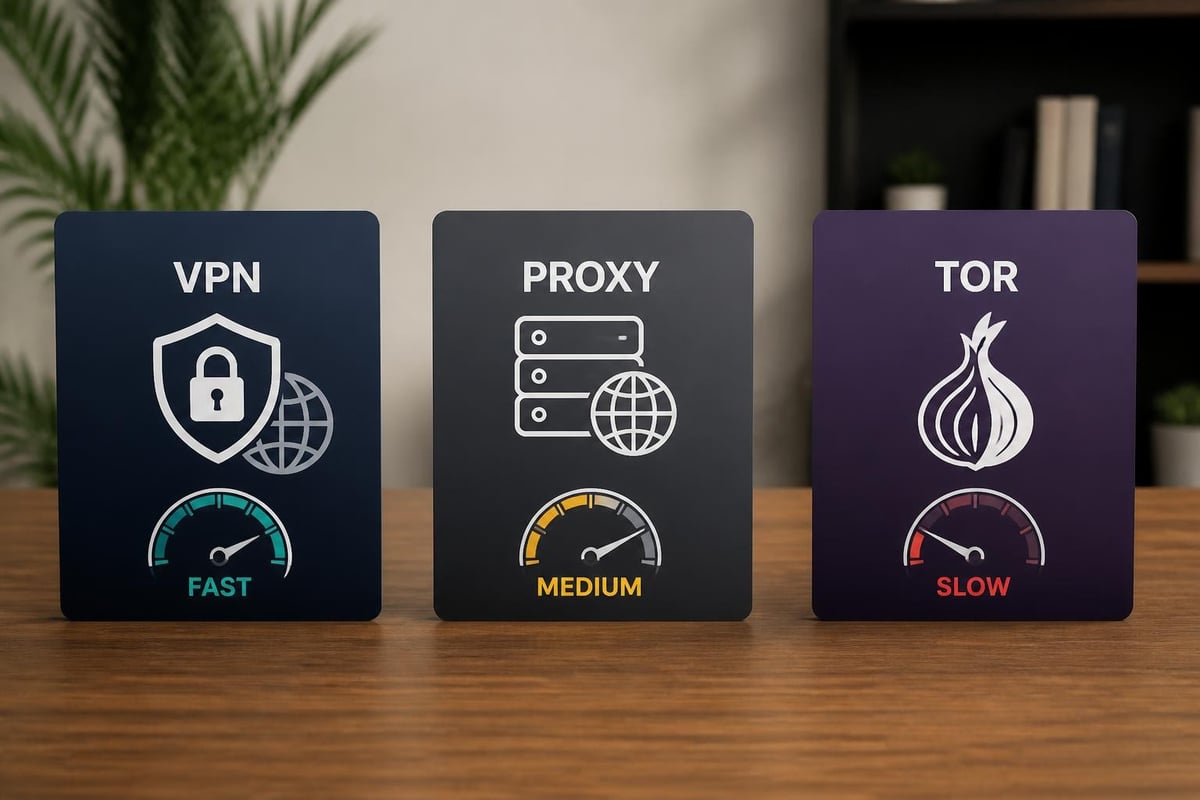
VPNs remain the most comprehensive solution to protect your IP address in 2026. These services create encrypted tunnels between your device and the internet, routing all traffic through secure servers that mask your actual IP address. When you connect to a VPN, websites and online services see the VPN server's IP address rather than your own.
Modern VPN protocols like WireGuard and OpenVPN provide robust encryption whilst maintaining fast connection speeds. WireGuard has gained particular prominence for its streamlined codebase and superior performance, making it ideal for bandwidth-intensive activities like streaming and gaming.
For users seeking comprehensive network protection, pre-configured solutions offer distinct advantages. Pre-configured VPN routers eliminate the need to install VPN software on individual devices, instead securing every connected device automatically through your home network.
Proxy Servers and Their Limitations
Proxy servers offer a basic method to protect your IP address by acting as intermediaries between your device and the internet. However, proxies typically lack the encryption that VPNs provide, making them suitable only for low-security applications like accessing geo-restricted content.
Proxy server types and use cases:
- HTTP proxies for web browsing only
- SOCKS proxies for broader application support
- Transparent proxies that don't hide your IP
- Anonymous proxies that conceal your IP but reveal proxy usage
- Elite proxies offering the highest anonymity level
The Malwarebytes guide to IP protection highlights that free proxy services often compromise privacy by logging user data or injecting advertisements into browsing sessions.
Tor Network for Maximum Anonymity
The Tor network provides exceptional anonymity by routing your traffic through multiple volunteer-operated servers worldwide. Each relay only knows the previous and next hop in the chain, making it extremely difficult to trace activity back to your original IP address.
Despite its privacy advantages, Tor presents significant drawbacks. Connection speeds suffer dramatically due to the multiple relay hops, making it impractical for streaming or large file transfers. Additionally, some websites block Tor exit nodes, limiting accessibility.
Router-Level Protection Strategies
Protecting your IP address at the router level offers comprehensive security for all devices on your network simultaneously. This approach proves particularly valuable for households with multiple internet-connected devices, from smartphones and laptops to smart home systems and gaming consoles.
Configuring Router Security Settings
Your router serves as the gateway between your home network and the internet, making it a critical component in efforts to protect your IP address. Begin by accessing your router's administrative interface and implementing several foundational security measures.
Change default credentials immediately, as manufacturers often use identical passwords across thousands of devices. Enable WPA3 encryption for wireless networks, or WPA2 if WPA3 isn't supported. Disable remote management features unless absolutely necessary, as these create potential entry points for attackers.
Essential router security configurations:
- Update firmware to the latest version
- Disable WPS (Wi-Fi Protected Setup)
- Change default SSID to avoid revealing router model
- Enable firewall with strict inbound rules
- Set up guest networks for IoT devices
VPN-Enabled Router Benefits
Installing VPN functionality directly on your router transforms how you protect your IP address across your entire network. Rather than managing VPN connections on individual devices, router-level VPN implementation secures all traffic automatically.
This approach offers particular advantages for devices that don't natively support VPN software, including smart TVs, gaming consoles, and home automation systems. The comparison of IP hiding methods demonstrates that router-level VPN protection provides superior convenience compared to device-by-device configuration.
| Feature | Device VPN | Router VPN |
|---|---|---|
| Setup Complexity | Per device | One-time configuration |
| Device Coverage | Selected only | Entire network |
| Performance Impact | Variable | Consistent |
| IoT Device Protection | Limited | Complete |
| Simultaneous Connections | Counted separately | Single connection |
Advanced Privacy Techniques
Beyond basic IP masking, sophisticated privacy techniques provide additional layers of protection against determined adversaries and comprehensive tracking systems.
IP Address Rotation
Dynamic IP rotation involves regularly changing your visible IP address to prevent long-term tracking and profiling. Some VPN providers offer automatic IP rotation features that switch your IP address at predetermined intervals or with each new connection.
This technique proves particularly effective against sophisticated tracking algorithms that analyse browsing patterns over time. According to How-To Geek’s IP hiding strategies, combining IP rotation with encrypted DNS queries creates a formidable privacy shield.
Multi-Hop VPN Connections
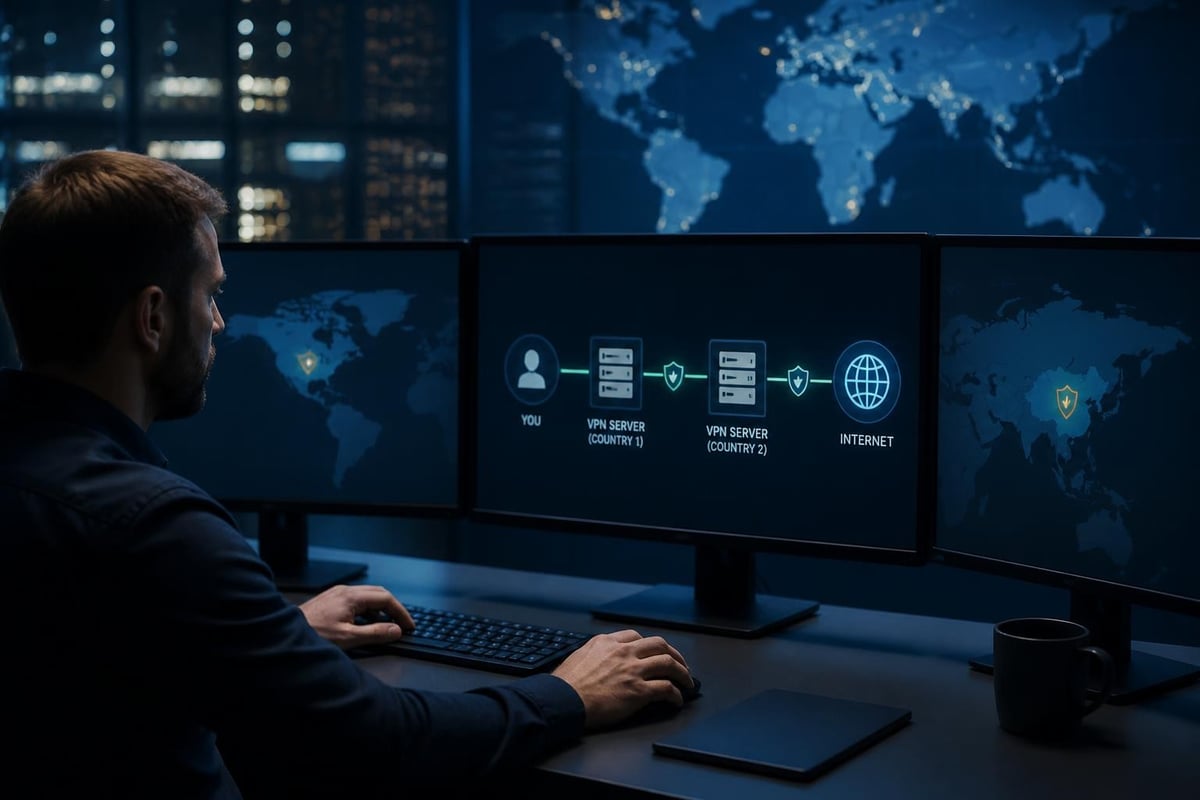
Multi-hop or double VPN configurations route your traffic through two or more VPN servers in different locations. Your data gets encrypted multiple times, and even if one server were compromised, your actual IP address remains protected by the additional layers.
Whilst multi-hop connections provide exceptional privacy, they reduce connection speeds significantly. Reserve this approach for situations requiring maximum anonymity rather than everyday browsing.
Browser-Level Privacy Enhancements
Protecting your IP address works best when combined with comprehensive browser privacy measures. Even with IP masking, browser fingerprinting can identify you through unique combinations of browser settings, installed fonts, screen resolution, and other characteristics.
Browser privacy checklist:
- Disable WebRTC to prevent IP leaks
- Block third-party cookies and trackers
- Use privacy-focused search engines
- Enable Do Not Track headers
- Install fingerprint protection extensions
- Clear browsing data regularly
Mobile Device IP Protection
Smartphones and tablets present unique challenges when you protect your IP address, as these devices frequently switch between Wi-Fi networks and mobile data connections. Each network change potentially exposes a different IP address with varying security characteristics.
Mobile VPN Applications
Dedicated mobile VPN applications provide on-the-go IP protection, encrypting your traffic whether you're connected to home Wi-Fi, public hotspots, or cellular networks. Modern mobile VPNs include features like automatic Wi-Fi protection that activates whenever you connect to untrusted networks.
Battery consumption represents a primary concern with mobile VPNs. Choose applications optimised for mobile processors and implement split tunnelling to exclude battery-intensive apps from the VPN connection when security isn't critical.
Public Wi-Fi Security Considerations
Public Wi-Fi networks in cafés, airports, and hotels present significant risks to your IP address and overall security. These networks often lack encryption, allowing anyone on the same network to intercept your traffic and identify your device's IP address.
The Norton guide to IP address protection emphasises that using VPN protection on public Wi-Fi isn't optional but essential. Without encryption, your login credentials, personal messages, and financial information travel in plain text across networks shared with strangers.
Business and Remote Work Considerations
Organisations face distinct challenges when implementing policies to protect IP addresses for remote workers and distributed teams. Corporate IP address protection balances security requirements with usability and productivity needs.
Corporate VPN Deployment
Businesses typically deploy enterprise VPN solutions that route all employee traffic through company servers, protecting both the employee's IP address and the organisation's internal resources. These systems integrate with identity management platforms, ensuring only authenticated users access sensitive systems.
Split tunnelling configurations allow non-work traffic to bypass the corporate VPN, reducing bandwidth costs whilst maintaining security for business applications. However, this approach requires careful policy definition to prevent data leakage.
Dedicated vs Shared IP Addresses
The debate between dedicated and shared IP addresses impacts how effectively you can protect your IP address whilst meeting specific business needs. Dedicated IP addresses offered by VPN services provide consistent identification for accessing IP-restricted services but sacrifice the anonymity benefits of shared IPs.
Shared IP addresses pool multiple users behind the same address, making individual activity tracking significantly more difficult. For most privacy-focused users, shared IPs offer superior protection despite occasional limitations with banking or streaming services.
Monitoring and Maintaining IP Protection
Implementing measures to protect your IP address requires ongoing monitoring to ensure continued effectiveness. Security configurations drift over time, software updates introduce vulnerabilities, and new tracking techniques emerge.
Regular Security Audits
Conduct monthly checks to verify your IP protection measures function correctly. Visit IP checking websites whilst connected to your VPN to confirm your actual IP address remains hidden. Test for DNS leaks, which occur when DNS queries bypass your VPN connection and reveal your internet provider.
WebRTC leaks represent another common vulnerability that can expose your real IP address even when using a VPN. Browser-based communication features may reveal your local IP address to websites unless properly configured or disabled.
Monthly security audit checklist:
- Verify VPN connection and IP masking
- Test for DNS leaks using dedicated tools
- Check WebRTC leak protection
- Review router firmware version
- Assess VPN protocol performance
- Examine connection logs for anomalies
Responding to IP Address Exposure
If you discover your IP address has been exposed or compromised, take immediate action to minimise potential damage. Disconnect from the internet and restart your router to obtain a new dynamic IP address from your ISP. Contact your VPN provider if the exposure occurred through their service.
Consider whether the exposure warrants changing online account passwords, particularly for financial services or accounts containing sensitive personal information. Document when and how the exposure occurred to prevent similar incidents.
Future-Proofing Your IP Privacy
The landscape of IP address protection continues to evolve as new technologies emerge and regulatory frameworks shift. Staying ahead of these changes ensures your privacy measures remain effective in 2026 and beyond.
IPv6 and Privacy Implications
The ongoing transition from IPv4 to IPv6 introduces new privacy considerations. IPv6's vast address space eliminates the need for Network Address Translation (NAT), potentially making individual devices more identifiable. However, IPv6 also includes privacy extensions that generate temporary addresses for outbound connections.
Ensure your VPN provider fully supports IPv6 or implements IPv6 leak protection to prevent your actual IPv6 address from bypassing the VPN tunnel. Many providers still route only IPv4 traffic through their VPN, leaving IPv6 connections exposed.
Emerging Privacy Technologies
Decentralised VPN networks represent an emerging approach to protect your IP address through blockchain-based architectures. These systems distribute VPN functionality across peer-to-peer networks rather than centralised server infrastructure, potentially offering greater resistance to censorship and surveillance.
Quantum-resistant encryption protocols are beginning to appear in VPN services, preparing for the eventual arrival of quantum computers capable of breaking current encryption standards. Early adoption of these technologies positions you ahead of future privacy challenges.
Protecting your IP address requires a multi-layered approach combining VPN technology, router security, and careful browsing habits to shield your online identity from tracking and cyber threats. Whether you're concerned about corporate surveillance, government monitoring, or simply maintaining control over your personal data, implementing these strategies creates a robust privacy foundation for 2026 and beyond. U Shield VPN simplifies this process with pre-configured routers that protect every device on your network automatically, combining WireGuard and OpenVPN technologies with plug-and-play convenience for home users, travellers, and businesses seeking comprehensive network-wide IP protection.
