






Your VPN encrypts your data. Your browser might still be leaking your identity. A secure tunnel is useless if your software broadcasts your location to every site you visit. It’s a common gap in digital defense. It leaves many feeling exposed despite their best efforts. Finding the best browser for VPN users is about more than just speed. It’s about finding a partner for your encryption that stays silent and secure.
We understand the frustration of security tools that slow your connection. You deserve a digital experience that’s both invisible and fast. This guide highlights the top browsers for 2026. We’ll examine the latest releases, such as Firefox 152.0.4 and Brave v1.91.180, to see how they complement your encryption. You’ll discover how to eliminate data leaks and achieve total anonymity without the technical headache. It’s time to take the complexity out of your privacy setup.
Key Takeaways
- Distinguish between browser proxies and true encryption. Protect your digital footprint by understanding why your choice of software matters as much as your VPN.
- Identify the best browser for VPN users to prevent WebRTC leaks. Stop your browser from accidentally broadcasting your real IP address to every website you visit.
- Master browser hardening techniques for instant results. Enable HTTPS-Only mode and native tracker blocking to lighten the load on your connection and boost speed.
- Secure your entire network at the source. Use a pre-configured VPN router to provide a silent, powerful guardian for every browser on every device in your home.
Beyond the Built-in VPN: Why Your Browser Choice Still Matters
You’ve activated your VPN. You feel safe. Encryption is a vital first step, but it’s only half the battle. A VPN creates a secure tunnel for your data. It hides your IP address and scrambles your traffic. However, your browser acts as the interface between that tunnel and the web. If the browser is poorly configured, your identity remains at risk. Using a standard browser with a high-end VPN is like locking your front door but leaving every window wide open. Websites can still peer inside. You need a setup where the software and the connection work in perfect harmony.
Finding the best browser for VPN users involves looking at how software manages your digital footprint. Encryption protects the “what” of your data. Your browser manages the “who.” If your browser is constantly leaking small details about your hardware, the encryption tunnel becomes a transparent glass pipe. You want a tool that stays silent. You want a browser that refuses to talk to trackers. This synergy provides the peace of mind that comes with true anonymity.
The Proxy Trap: Browser VPNs vs. System-Wide Protection
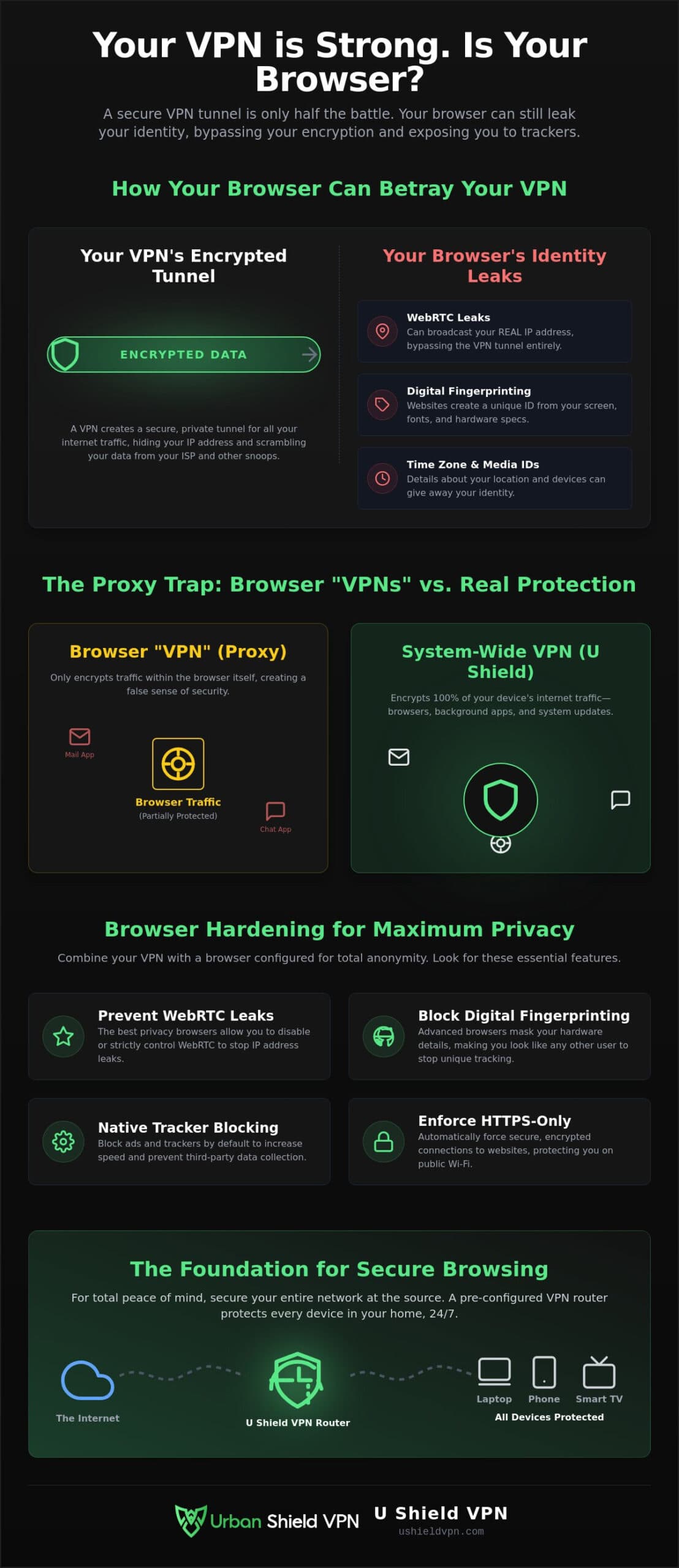
Many popular browsers, like Opera, advertise “built-in VPNs” to attract privacy-conscious users. In reality, these are often just HTTPS proxies. They only protect the traffic happening inside that specific browser window. They don’t touch your background apps, system updates, or messaging clients. This creates a false sense of security. If you’re browsing in one tab while your email app syncs in the background, your ISP can still see your activity. A system-wide solution, like the U Shield VPN App, ensures that every single packet of data is encrypted. This prevents the “proxy trap” where your browser is protected but your operating system is exposed.
Digital Fingerprinting: How Browsers Give You Away
Your IP address is just one way websites track you. Modern trackers use advanced digital fingerprinting to identify you. They look at your screen resolution, installed fonts, and even your hardware specifications. They piece these details together to create a unique ID. A VPN hides your location, but your browser often hands over these identifiers without a fight. This makes Browser security a critical component of your privacy stack. The right software doesn’t just hide your IP; it masks your hardware specs to make you look like every other user. Even with a VPN active, a leaky browser can reveal:
- WebRTC connections: These can bypass your VPN to leak your real IP address.
- Time zone data: This reveals your general geographic location to servers.
- Media device IDs: Unique markers for your cameras and microphones.
- Canvas rendering: How your hardware draws graphics can be a unique signature.
Choosing a browser that blocks these scripts ensures your VPN tunnel remains opaque. It’s the difference between being a target and being invisible. By pairing a hardened browser with a dedicated VPN, you take the technical burden off your shoulders and reclaim your digital freedom.
Essential Browser Features for Total VPN Synergy
Your VPN acts as a high-security vault. Your browser is the door. If that door is poorly constructed, the vault’s strength doesn’t matter. The best browser for VPN users must provide more than just a clean interface. It needs specific technical safeguards that prevent your identity from slipping through the cracks of your encrypted tunnel. When your software and your connection work together, you achieve a level of invisibility that neither can provide alone. This synergy is the foundation of modern digital peace of mind.
Reliable protection requires a browser that prioritizes transparency and user control. You don’t want a “black box” that handles your data in secret. You want a tool that follows browser security best practices by default. This includes isolating processes to prevent one malicious site from compromising your entire system. It also means choosing a developer that doesn’t harvest your browsing habits for profit. True security is silent, efficient, and operates without constant manual intervention.
Preventing WebRTC Leaks
WebRTC (Web Real-Time Communication) is a useful technology for voice and video calls. It’s also a significant vulnerability. WebRTC can bypass your VPN tunnel to request your local and public IP addresses directly from your hardware. WebRTC leaks are the primary threat to VPN anonymity. You can check for these leaks by visiting a detection site while your VPN is active. If your real IP address appears, your browser is failing to protect you. The right browser allows you to disable these requests entirely or manage them through strict permissions.
Anti-Fingerprinting and Tracker Blocking
Aggressive tracker blocking does more than just clean up your view. It improves your browsing speed over a VPN by reducing the data your connection must process. Modern 2026 browser builds often feature “strict” privacy modes that block cross-site tracking by default. Don’t rely on “Incognito” or “Private” mode as a substitute for a VPN. These modes only hide your history from other people using your device. They don’t hide your activity from your ISP or the websites you visit. You need a browser that active masks your hardware fingerprints to ensure you look like every other anonymous user on the network.
- Sandboxing: This isolates malicious scripts from your operating system. It ensures that a threat in one tab cannot infect your entire computer.
- Open-Source Architecture: Transparency is key. Open-source code allows the global security community to vet and patch vulnerabilities quickly.
- Minimal Logging: Choose a browser that doesn’t track your history. If the data isn’t collected, it can’t be leaked or sold.
Achieving this level of protection shouldn’t be a chore. Pairing a hardened browser with the U Shield VPN App ensures your security is always active and always invisible. It takes the technical burden off your shoulders so you can focus on what matters.
Top 3 Browsers for VPN Users: A 2026 Comparison
Choosing the right tool is about balancing convenience with ironclad security. In 2026, the market offers several specialized options. Each caters to a different level of technical comfort. Whether you want a “set and forget” solution or a fully hardened workstation, there is a clear choice for the best browser for VPN users. Not all software handles encryption the same way. You need a platform that respects your tunnel and refuses to leak your identity through the back door. These top contenders provide the silence and speed you deserve.
Brave: Speed Meets Security
Brave leads the pack for immediate, out-of-the-box utility. It uses the Chromium engine. This ensures every website works exactly as expected without compatibility issues. Brave’s native “Shields” act as a powerful secondary defense layer. They strip away trackers and scripts that attempt to bypass your military grade encryption VPN protocols. For the modern user, Brave’s support for IPFS is a significant advantage. It allows for decentralized browsing. This bypasses traditional censorship and adds another layer of resilience to your digital footprint. It’s fast, familiar, and fiercely private.
Firefox: The Power of Customization
Mozilla Firefox remains the gold standard for those who want total control. It is the only major browser not based on Chromium. This independence is vital for a healthy, private internet. Through the “about:config” menu, you can manually disable telemetry and WebRTC. This stops the browser from phoning home or leaking your IP. The Multi-Account Containers extension is a standout feature. It allows you to isolate sessions. You can stay logged into work on one tab and personal social media on another. There is zero data leakage between them. It turns your browser into a series of secure silos.
Mullvad Browser: Developed for VPNs
For those seeking the best browser for VPN users with a focus on anonymity, the Mullvad Browser is a top-tier choice. It was developed in collaboration with the Tor Project. It doesn’t use the slow Tor network; instead, it uses the Tor Browser’s world-class anti-fingerprinting technology. It makes your browser look identical to every other user. This “one-size-fits-all” approach is the most effective way to defeat advanced tracking scripts. For advanced users who want a similar experience with more flexibility, LibreWolf offers a pre-hardened version of Firefox. It removes all Mozilla telemetry and includes privacy patches by default.
- Brave: Best for users who want privacy without changing their browsing habits.
- Firefox: Best for technical users who enjoy fine-tuning their security settings.
- Mullvad: Best as a secondary browser for high-sensitivity tasks and banking.
- LibreWolf: Best for those who want the power of Firefox without the corporate overhead.
Security is a layered process. Your browser should be the first line of defense, not the weakest link. By selecting one of these tools, you ensure your encryption remains effective and your digital presence stays invisible.
How to Harden Your Browser for Maximum Privacy
Even the best browser for VPN users requires a few manual adjustments to reach peak performance. Privacy is not a one-time toggle. It is a series of deliberate choices that reinforce your encrypted tunnel. By hardening your software, you close the small gaps that trackers and ISPs use to peer into your activity. These steps ensure your security remains silent and absolute. You deserve a browsing experience that doesn’t leave a trail behind.
Start by enabling “HTTPS-Only” mode in your settings. This forces your browser to use encrypted connections for every site you visit. It prevents man-in-the-middle attacks where third parties intercept your data on unsecured pages. Next, configure DNS-over-HTTPS (DoH). This protocol encrypts your DNS requests. It prevents your ISP from seeing the names of the websites you visit. Finally, set your browser to clear cookies and site data automatically upon closing. This wipes your digital footprint clean every single day without manual effort.
Step-by-Step WebRTC Disabling
WebRTC remains a persistent threat because it can bypass your VPN to reveal your hardware’s real IP address. In Firefox, you can disable this manually. Type “about:config” in the address bar. Search for “media.peerconnection.enabled” and set it to “false.” This stops the browser from making direct hardware calls. For Chrome or Edge users, install the “WebRTC Leak Prevent” extension. It provides a simple, effective interface to block these requests. Once you’ve made these changes, verify that your IP remains hidden at ushieldvpn.com.
Managing Browser Extensions Wisely
When it comes to browser security, less is more. Every extension you install is a potential new vector for tracking or data harvesting. Stick to a minimal set of trusted tools. We recommend uBlock Origin for advanced ad blocking and Privacy Badger for stopping invisible trackers. These tools reduce the data load on your connection and improve your overall speed. Avoid “Free VPN” extensions found in browser stores. These often act as data scrapers rather than security tools. They trade your privacy for a free connection you don’t need if your system is already protected.
A hardened browser is a powerful ally in your quest for anonymity. For a seamless experience that protects every app on your device, the U Shield VPN App provides the foundation you need. It takes the technical burden off your shoulders so you can browse with absolute confidence and peace of mind.
U Shield VPN: The Foundation for Secure Browsing
We’ve explored how software choices and manual hardening create a safer experience. But managing individual settings on every device is a chore. A pre-configured VPN router changes the game. It provides a silent, powerful guardian at the source of your internet. This approach eliminates the need for per-browser VPN extensions. It ensures that even the best browser for VPN users is supported by a robust, system-wide foundation. You get total protection without the technical stress. When your router handles the encryption, your browser is free to focus on performance. It reduces memory usage and prevents the slowdowns often caused by layering multiple security add-ons.
U Shield’s built-in anti-tracker stops threats before they even reach your device. It cleans your connection at the network level. This means your browser doesn’t have to work as hard to filter out malicious scripts. It results in faster loading times and a cleaner digital footprint. You gain peace of mind knowing your entire home is invisible to prying eyes. This proactive defense catches trackers that browser-based shields might miss. It creates a cleaner environment for every member of your household. You don’t have to worry if someone forgets to turn on a setting. The protection is always active and always invisible.
The U Shield VPN Router Advantage
Secure your smart TVs, gaming consoles, and IoT devices alongside your computer. Modern network-wide VPN protection ensures no device is left exposed. Our “Plug and Play” setup means you don’t need to be a networking expert. Just connect and browse. Our high-speed servers are optimized for 2026 demands. You’ll enjoy a lag-free experience whether you’re streaming in 8K or working from home. We prioritize your velocity. We know that security shouldn’t come at the cost of your time. Our hardware handles heavy traffic without breaking a sweat. It keeps your connection stable while it keeps your data private.
Choosing Your Protection Plan
Consistency is the key to digital freedom. An Annual VPN Plan provides long-term peace of mind and the best value for your security. It removes the friction of monthly renewals. For protection on the move, the U Shield VPN App secures your mobile browsing on public Wi-Fi. It brings the same level of authority and speed to your phone or tablet. Protection should be instantaneous. It should never be a burden. You deserve a partner that operates in the background, keeping you safe without demanding your attention. Secure your entire network today and reclaim your right to privacy.
Reclaim Your Digital Sovereignty
Securing your digital footprint requires more than just a single tool. It demands a layered strategy. You now know that finding the best browser for VPN users is about choosing software that prevents WebRTC leaks and masks your hardware fingerprint by default. Hardening your settings ensures your encryption tunnel remains opaque and your identity stays private. These steps turn your browser into a silent guardian for your personal data. You’ve learned how to bridge the gap between simple encryption and total anonymity.
True peace of mind comes from a foundation that never sleeps. You can eliminate the stress of manual configuration by securing your connection at the source. It’s time to move beyond software-only solutions and embrace a comprehensive defense. Stop worrying about data leaks and focus on the freedom of a truly anonymous web experience. You deserve a setup that works for you without constant maintenance.
Secure your entire home with the U Shield VPN Router. It features military-grade AES-256 encryption along with a built-in anti-tracker and kill switch. It arrives pre-configured for plug-and-play security. Take the technical burden off your shoulders. Step into a faster, more invisible digital future today.
Frequently Asked Questions
Is Brave browser better than Chrome for VPN users?
Yes, Brave is a superior choice because it prioritizes privacy by default. Unlike Chrome version 150, which is built on an advertising model, Brave v1.91.180 includes native shields that block trackers and ads. This makes it the best browser for VPN users who want to reduce the data load on their encrypted tunnel. You get a faster, cleaner experience without the need for additional extensions.
Does a VPN hide my browsing history from my ISP?
A VPN encrypts your traffic so your ISP cannot see the specific websites you visit or the content of your pages. They only see that you’re connected to a VPN server. To ensure complete privacy, use a tool with a kill switch and DNS leak protection. This prevents your ISP from seeing your requests even if the connection momentarily drops.
Can I use a VPN and a privacy browser at the same time?
Using a VPN and a privacy browser together is the gold standard for digital security. The VPN secures your connection to the internet, while the browser manages your hardware footprint. This combination stops websites from identifying you through fingerprinting or tracking scripts. It’s an effortless way to achieve total anonymity on every site you visit.
What is a WebRTC leak and how do I stop it?
A WebRTC leak happens when your browser reveals your real IP address to websites through real-time communication protocols. This bypasses your VPN tunnel entirely. You can stop it by adjusting your browser’s “about:config” settings or using a trusted leak-prevention extension. Always verify your status on a leak-test site after making changes to ensure your identity is hidden.
Are browsers with built-in VPNs safe to use for banking?
Many built-in browser VPNs are actually just proxies that only encrypt traffic within that specific app. For banking, you need system-wide protection that covers your entire device. A dedicated VPN app or router ensures your financial data is scrambled with AES-256 encryption. This provides a much higher level of security than a simple browser proxy can offer.
Do I need a browser extension if I have a VPN router?
You don’t need a VPN-specific extension if your router is already protecting your entire network. The router handles all the encryption at the source. However, you should still use content-filtering extensions like ad blockers. These tools work alongside your router to remove trackers and malicious scripts that could still monitor your behavior within the browser.
Why is my browser still showing my location with a VPN on?
Your location can still leak through HTML5 geolocation or WebRTC requests even if your IP address is hidden. Your browser may be sharing data from your hardware or nearby Wi-Fi networks. Finding the best browser for VPN users involves selecting software that blocks these location-sharing requests by default. It ensures your physical location remains as private as your data.
Which browser uses the least amount of data when paired with a VPN?
Brave is highly efficient because its native shields block data-heavy ads and trackers before they load. This significantly reduces the total amount of bandwidth your VPN connection needs to process. By stripping away unnecessary scripts, it provides a faster experience and helps you save on data costs. It’s the ideal companion for users who prioritize velocity and efficiency.
