






The secret to a secure home office isn’t hidden in complex software settings or endless manual updates. It’s actually much simpler. Most professionals believe that protecting their data requires a degree in networking. The truth is that hardware can do the heavy lifting for you. By choosing a dedicated VPN router for remote work, you eliminate the friction of individual device setups. You also remove the fear of accidental data leaks. This approach turns your entire home network into a private fortress. It prevents the speed drops that often plague standard software solutions.
We understand the frustration of dropped video calls and the constant worry about employer location tracking. You need a connection that stays fast while keeping your digital footprint invisible. You deserve peace of mind without the technical overhead. In this guide, you’ll learn how to master a five-minute setup that secures every smart device and workstation in your house simultaneously. We will walk through the streamlined process of achieving network-wide privacy. This ensures your remote work remains stable, secure, and completely stress-free.
Key Takeaways
- Secure every device instantly. Hardware-level encryption removes the need for manual app management across your home office.
- Simplify your digital life. A dedicated VPN router for remote work provides a silent, powerful guardian for your network.
- Prioritize performance. Learn how to optimize server selection and manage bandwidth for lag-free video conferencing.
- Eliminate data leaks. Use our essential checklist to verify DNS protection and hide your physical location from employers.
- Master the five-minute setup. Follow a streamlined, plug-and-play process to achieve professional-grade security without technical stress.
What is an Easy VPN Setup at Home and Why Remote Workers Need It
An easy VPN setup at home is no longer a luxury for tech enthusiasts. It’s a baseline requirement for professional safety. By 2026, the definition has evolved. It’s no longer about clicking a “connect” button every morning. Instead, it’s a network-wide security layer that requires zero manual app management. This means your protection is always on. It’s always ready. You don’t have to remember to secure your connection because the hardware does it for you. This creates a seamless experience where security becomes invisible.
Remote work demands more than a standard software app. Your work laptop isn’t the only device on your Wi-Fi. You have smart assistants, security cameras, and personal tablets. Each one is a potential entry point for data leaks. A hardware-based approach protects your IoT devices and your work laptop simultaneously. Utilizing a VPN router for remote work is the defining trend of 2026. It provides a “silent guardian” that works in the background without slowing you down or requiring constant updates.
The Vulnerability of the Standard Home Office
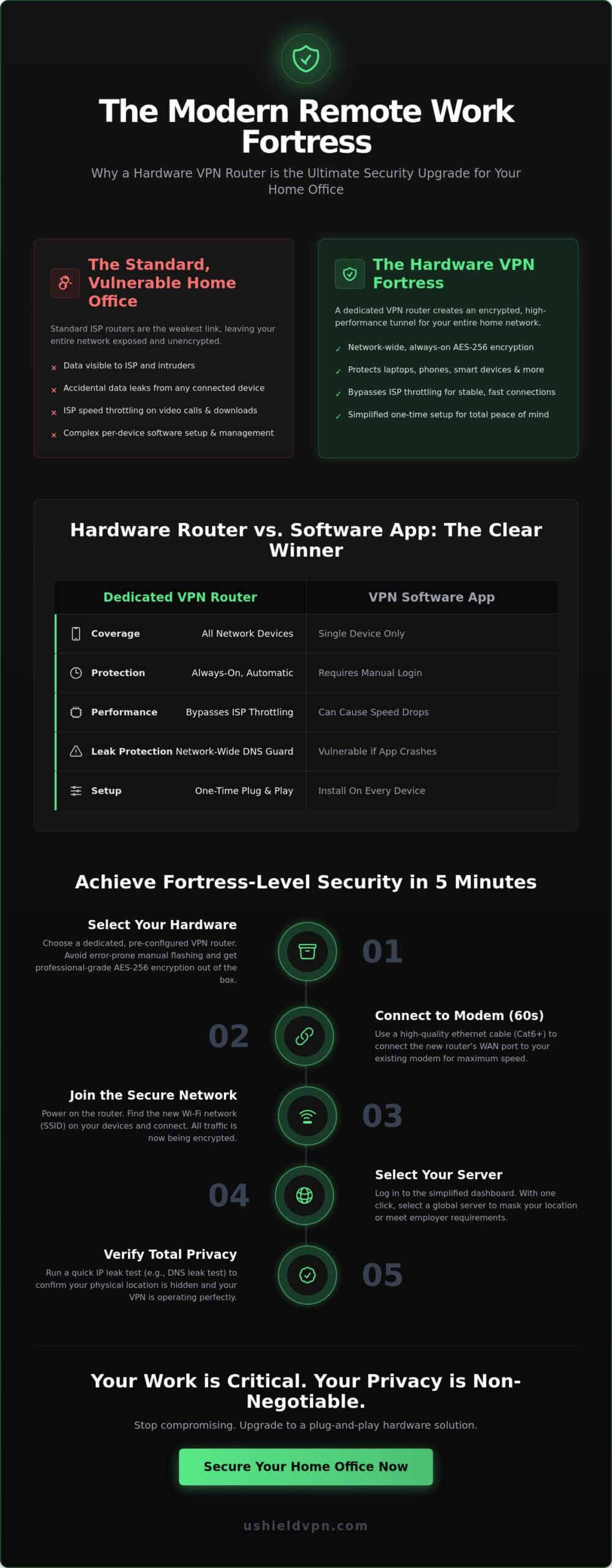
Standard ISP routers are built for cost efficiency; they aren’t built for high-level security. This makes them the weakest link in your home office. Many users don’t realize that their unencrypted data is visible to their ISP or potential intruders. To get a better grasp of the technology, you can read more about What is a VPN and its core functions. A dedicated router creates a secure, encrypted tunnel for all your professional traffic. This tunnel acts as a shield. It keeps your sensitive work files and private conversations away from prying eyes.
VPN Router for Remote Work: Key Benefits
The advantages go beyond simple privacy. A VPN router for remote work helps you bypass ISP throttling. During peak hours, providers often limit speeds for video calls or large file transfers. Since a VPN hides your traffic type, your ISP can’t target your work apps for slowdowns. You get a stable, fast connection for every meeting. You also gain the convenience of securing multiple devices with a single login. There’s no need to install software on every gadget. A VPN router serves as the central hub for digital privacy in 2026. It offers total peace of mind with minimal effort.
Step-by-Step: How to Achieve an Easy VPN Setup at Home
Setting up a secure network shouldn’t take all morning. In 2026, efficiency is the priority. You can achieve total protection in under five minutes. The process is linear and logical. It removes the guesswork that used to define network security. By following a streamlined path, you ensure your home office is a fortress from the moment you log on. It’s about working smarter, not harder.
Hardware Selection: The Foundation of Ease
Hardware selection is your foundation. Don’t waste time on DIY projects. Manual firmware flashing is often prone to error. It can even brick your device. Choosing a dedicated VPN router for remote work ensures you start with a professional-grade tool. Look for hardware that supports AES-256 encryption natively. This is the gold standard for data protection. These plug and play VPN routers eliminate technical friction. They allow you to focus on your work, not your settings. They arrive ready. They just work.
The Physical Connection: A 60-Second Process
The physical connection is a 60-second process. Locate the WAN port on your new router. Connect it to your existing modem using a high-quality Ethernet cable. We recommend Cat6 cables or higher for maximum speed. This ensures your video calls remain crisp and clear. You might choose to keep your original router as a secondary network. This creates a bridge setup. It’s a highly effective way to isolate your work traffic from personal browsing. This strategy mirrors best practices outlined in the NSA and CISA VPN hardening guide. It provides an extra layer of defense for your most sensitive professional data.
Once the cables are secure, power on the unit. Connect your devices to the new, secure Wi-Fi SSID. You’ll then log in to a simplified dashboard. In 2026, these interfaces are designed for absolute clarity. You can select a global server with one tap. This is vital if your employer requires a specific regional IP. Finally, run a quick IP leak test. This verifies that your physical location is invisible. It confirms your VPN router for remote work is operating at peak performance. If you want to skip the complexity, the U Shield VPN Router offers the most direct path to total privacy.
Optimising Your VPN Router for Remote Work Performance
Performance shouldn’t be a trade-off for security. A well-configured VPN router for remote work keeps your productivity high while maintaining a silent, protective shield. It’s about precision. It’s about speed. By 2026, high-speed global servers ensure that 4K video calls remain crystal clear. You don’t have to settle for grainy video or stuttering audio during important presentations. Optimization turns a good connection into a professional-grade asset.
Selecting the right server is the first step toward peak efficiency. Many users assume the closest server is always the fastest. This isn’t always true for specialized work apps. Sometimes, a server in a major data hub slightly further away offers better routing and less congestion. This results in a more stable connection for resource-heavy platforms. Always look for the lowest latency rather than just the shortest physical distance. It makes a noticeable difference in your daily responsiveness.
For remote professionals who handle more than just video calls, such as those working on AI development or complex simulations, eCircles LLC provides high-performance GPU infrastructure designed to support these intensive computing workloads.
Security must be absolute to be effective. Use the integrated kill switch feature found in modern dashboards. This tool instantly cuts your internet connection if the VPN drops for even a second. It prevents accidental data exposure during brief network flickers. It’s your digital safety net. It ensures your private work data never travels over an unsecured line. This level of protection allows you to work with total confidence.
Low Latency for Zoom and Microsoft Teams
Test your ping times before your first meeting of the day. Low latency is crucial for real-time collaboration and avoiding the “talking over each other” effect. Consider switching protocols based on your needs. WireGuard is often the best choice for 2026, offering incredible velocity without compromising safety. It’s significantly more efficient than older standards like OpenVPN. Modern hardware handles military-grade encryption without causing noticeable slowdowns in your daily workflow. This keeps your communication fluid and natural.
Managing Multiple Users and Devices
Home networks are often crowded with competing traffic. A VPN router for multiple users prevents network congestion by distributing bandwidth intelligently. You can prioritize your work laptop over background traffic from smart home devices or streaming services. This ensures a software update on a gaming console doesn’t ruin your video conference. Consider these steps for a cleaner network:
- Set up a Guest Network: Isolate children’s devices and IoT gadgets from your primary work line.
- Enable Quality of Service (QoS): Direct the bulk of your bandwidth to essential professional applications.
- Verify Unlimited Usage: Ensure your plan supports heavy file transfers without data caps or throttling.
By isolating your work traffic, you create a dedicated lane for your professional life. This isolation reduces the risk of internal interference. It also simplifies troubleshooting if a connection issue arises. A VPN router for remote work acts as an intelligent traffic controller. It keeps your data moving fast, secure, and uninterrupted throughout the entire workday.
Avoiding Common Mistakes: Privacy Checklist for Remote Work
Security isn’t a one-time event. It’s a continuous state of readiness. Even the best hardware needs a quick verification to ensure it’s performing as expected. By 2026, the sophistication of data tracking has increased. This makes a simple privacy checklist essential. You’ve already established your VPN router for remote work as your primary defense. Now, you must ensure that defense is airtight. It’s about closing the small gaps that others often overlook.
Start with DNS leak protection. Verify this is active within your router dashboard. A DNS leak happens when your requests bypass the encrypted tunnel. This reveals your browsing habits to your ISP. Next, disable WebRTC in your browser settings. WebRTC is a common source of physical location leaks, even when a VPN is active. You should also check for anti-tracker features. These block intrusive corporate telemetry that collects data on your work habits. Finally, ensure your firmware is set to auto-update. This guarantees you always have the latest security patches without manual intervention.
The ‘Set and Forget’ Security Audit
A weekly audit keeps your network healthy. It’s a “set and forget” process that only takes a few seconds. If you’re still asking do I need a VPN router, these metrics will provide the answer. Check your dashboard for any signs of ISP throttling. Encrypted traffic should move at consistent speeds. If you notice sudden drops during work hours, your ISP might be targeting your connection. Confirm that your IP address remains hidden across every connected device in your home. This consistency is what defines a truly secure office.
Troubleshooting Without the Headache
Occasionally, a specific work website might block a known VPN IP address. Don’t panic. Simply log in to your dashboard and switch to a different server location. This refreshes your digital identity instantly. If your connection feels sluggish, follow the ‘Power Cycle’ rule. Rebooting your hardware clears the cache and resets the connection. It’s a simple fix that solves 90 percent of performance issues. For more complex hardware-specific problems, always rely on professional support. You deserve assistance that respects your time. For a solution that handles these details automatically, order the U Shield VPN Router today.
A reliable VPN router for remote work eliminates the friction of manual troubleshooting. It provides a stable environment where you can focus on your tasks. By following this simple checklist, you ensure your privacy remains uncompromised. You turn your home office into a professional, secure workspace with minimal effort. This is the standard for modern remote work in 2026.
Why the U Shield VPN Router is the Ultimate Remote Work Tool
The U Shield VPN Router is more than a piece of hardware. It’s a commitment to effortless security. We’ve explored the necessity of a secure home office. We’ve mapped out the steps to achieve it. Now, you need the right tool to make that vision a reality. The U Shield hardware is designed for the modern professional. It removes technical stress. It prioritizes your peace of mind. This is the definitive VPN router for remote work in 2026.
Security should be powerful yet invisible. Military-grade encryption is built directly into the router’s core. This ensures every packet of data leaving your home is shielded from prying eyes. You don’t have to manage complex software on individual devices. The router handles everything. It acts as a silent guardian, operating in the background so you can focus on your career. It’s about freedom. It’s about absolute confidence in your digital environment.
Reliability is non-negotiable. The built-in kill switch provides an essential safety net. If your VPN connection flickers, the kill switch instantly halts all traffic. This prevents your real IP address from being exposed to your employer or ISP. Additionally, the integrated anti-tracker blocks intrusive corporate telemetry. It stops companies from harvesting your habits and data. You gain a level of privacy that standard routers simply cannot match. It turns your home into a private professional sanctuary.
Protection for Every Smart Device
Your security is only as strong as your weakest link. Most IoT devices, such as smart TVs and home assistants, cannot run traditional VPN apps. This creates a dangerous security gap. The U Shield VPN Router closes this gap instantly. It secures every connected device with zero extra steps. You connect to the Wi-Fi, and you are protected. For those who want to dive into the technical details, refer to the ultimate guide to pre-configured VPN routers for deep hardware specs. It explains how our hardware maintains high speeds while providing total coverage.
Getting Started with U Shield
Efficiency defines our onboarding process. You can choose between a Monthly VPN Plan or an Annual VPN Plan. The annual option is ideal for long-term remote workers seeking the best value. We recommend the pre-configured hardware bundle for the fastest possible start. It arrives at your door ready for action. There’s no firmware to flash and no settings to struggle with. You simply plug it in and get to work. Don’t leave your professional data to chance. Secure your home office today with the U Shield VPN Router and experience the standard of modern privacy.
Secure Your Professional Future Today
Your home office deserves professional-grade protection without the technical burden. You now understand how hardware-based security simplifies your digital life. You know how to optimize for speed and verify your privacy with a simple checklist. By choosing a dedicated VPN router for remote work, you’ve taken the most important step toward total digital freedom. It’s about working with confidence and absolute peace of mind.
The U Shield VPN Router provides everything you need in one streamlined package. It features military-grade AES-256 encryption to keep your data invisible. It includes a built-in kill switch and an anti-tracker for constant, silent protection. This plug-and-play hardware ensures that every device in your home is secure from the moment you power it on. There’s no complex configuration. There’s no technical stress. Just pure, uninterrupted productivity for your remote career.
Take control of your digital privacy today. Secure your workspace and protect your professional reputation with a solution that works as hard as you do. Order your pre-configured U Shield VPN Router now. Your secure future is just one simple step away.
Frequently Asked Questions
Is it hard to set up a VPN router if I’m not technical?
Setting up a pre-configured router is remarkably simple. It’s a plug-and-play experience. You just connect the cables and power it on. There’s no manual firmware flashing or complex coding required. It’s designed for immediate use. You get professional-grade security without needing an IT degree. It’s the most efficient way to secure your network.
Will a VPN router for remote work slow down my Zoom calls?
A high-quality VPN router for remote work won’t disrupt your video conferencing. Modern protocols like WireGuard offer exceptional speeds. They handle 4K video and real-time audio with ease. You maintain high productivity while staying completely secure. It’s built for performance. It ensures your meetings remain crisp and professional.
Can my employer tell I am using a VPN router?
Your employer sees a standard residential connection. The router hides your traffic type and location at the network level. Unlike software apps that might be detected on a work laptop, hardware protection is invisible. It operates outside the reach of company-installed monitoring tools. This gives you total privacy and peace of mind.
Do I still need the VPN app on my phone if I have a VPN router?
You only need the app when you leave your home network. While you’re at home, the router protects every device automatically. This includes your phone, tablet, and laptop. When you travel, the U Shield VPN App extends that same protection to public Wi-Fi. It’s a comprehensive security ecosystem for every environment.
What happens if the VPN connection drops while I’m working?
The built-in kill switch instantly cuts your internet connection. This prevents your private data from leaking onto an unsecured line. Your real IP address remains hidden. Once the VPN reconnects, your internet access returns automatically. It’s a fail-safe system that ensures your location is never accidentally revealed.
Can I use a VPN router with my existing ISP modem?
You can use it with any standard ISP modem. The router connects via a simple Ethernet cable. It sits between your modem and your devices. This creates a dedicated, secure network for your home office. It works alongside your existing equipment without any conflicts. It’s a seamless addition to your home.
Is a pre-configured VPN router better than setting it up myself?
Pre-configured routers are vastly superior for most users. They eliminate the risk of damaging your device with incorrect firmware. You save hours of troubleshooting and manual configuration. It’s a reliable, professional solution that’s ready for action right out of the box. It removes the technical burden from your shoulders.
How many devices can I connect to an easy VPN setup at home?
You can connect dozens of devices to your easy VPN setup at home. There’s no limit on the number of laptops, phones, or smart home gadgets you can protect. Every device on the network shares the same encrypted tunnel. This provides total coverage for your entire household with a single connection point.
