





What if your Smart TV’s biggest limitation isn’t the hardware, but the software? You’ve invested in a stunning 4K display, yet you’re still hitting digital walls. It’s frustrating when an app store blocks your favorite streaming libraries or leaves your data exposed to harvesting. Learning how to put VPN on smart TV without app access is the key to reclaiming your digital freedom.
You deserve a seamless experience. Privacy shouldn’t be a chore. We’ll show you how to bypass these arbitrary limitations and secure your connection. You’ll gain peace of mind and access to the global content you’ve been missing. It’s about taking control of your living room with absolute confidence. We’ve simplified the technical hurdles so you can focus on the entertainment.
This guide covers three proven methods to transform your viewing experience. We’ll explore the speed of SmartDNS, the flexibility of connection sharing, and the set-it-and-forget-it power of a U Shield VPN Router. Get ready for lag-free 4K streaming and invisible protection. Your TV is about to get much smarter.
Key Takeaways
- Bypass operating system blocks. Reclaim your digital freedom on TVs that don’t support native VPN apps.
- Stream global content instantly. Use SmartDNS to access international libraries with a simple network setting change.
- Bridge your connection effortlessly. Turn your laptop into a secure hotspot to provide your TV with immediate protection.
- Protect every device simultaneously. Master how to put VPN on smart TV without app by securing your connection at the gateway.
- Experience plug-and-play security. Use a pre-configured U Shield VPN Router to eliminate technical stress and enjoy 4K streaming.
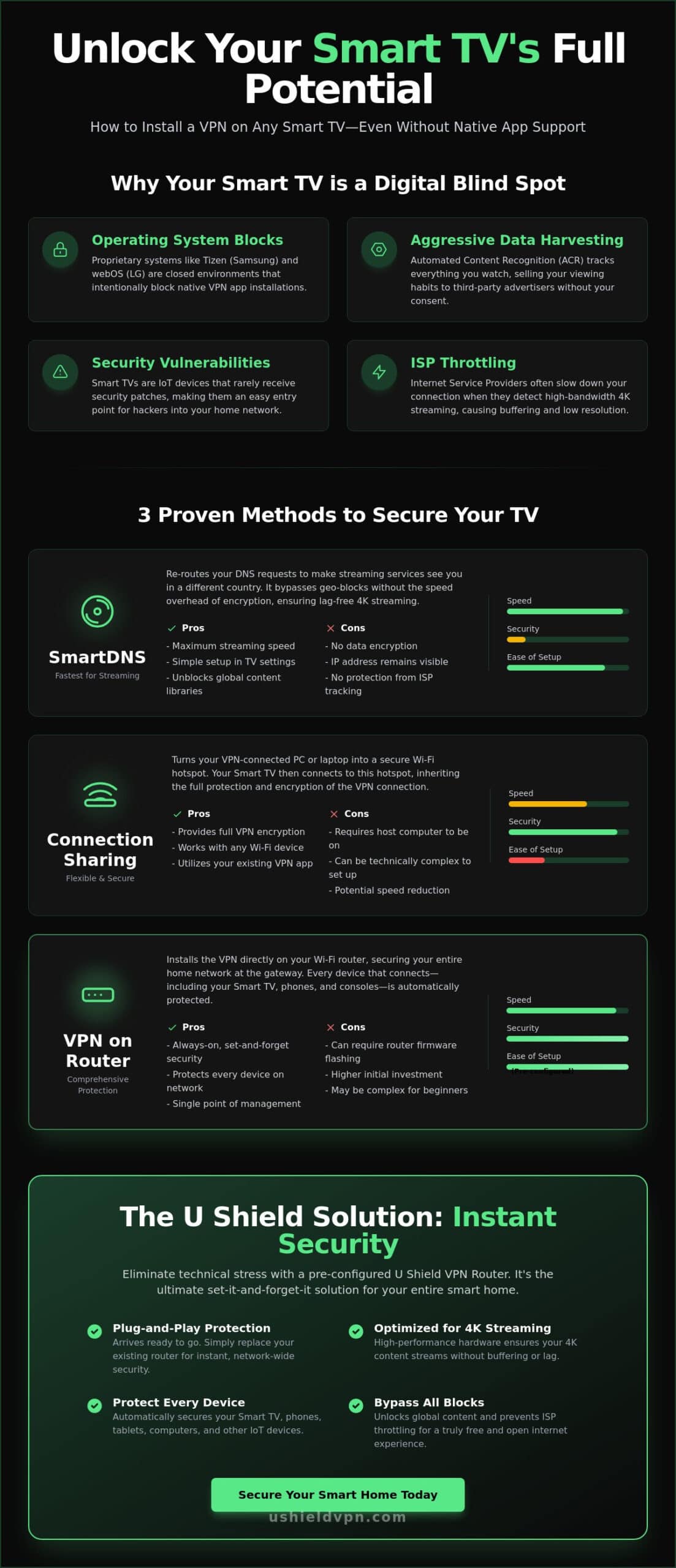
Why Your Smart TV Doesn’t Have a VPN App (And Why You Still Need One)
Most Smart TVs aren’t built for privacy. They’re built for consumption. Major manufacturers like Samsung and LG use proprietary operating systems like Tizen and webOS. These platforms are closed environments. They intentionally block native VPN installations to keep users within their controlled ecosystems. This creates a significant hurdle for anyone wanting to secure their viewing experience. Understanding how to put VPN on smart TV without app support is the only way to break through these software walls.
Your TV is often the weakest link in your digital perimeter. It lacks the sophisticated defensive layers found on modern smartphones or laptops. Manufacturers prioritize flashy features over consistent firmware updates. This leaves your device vulnerable to exploits for years after purchase. Beyond external threats, the TV itself is a privacy risk. Most modern sets use Automated Content Recognition (ACR) to track everything you watch. They sell this data to third-party advertisers. An unprotected TV isn’t just a screen; it’s a data-harvesting tool sitting in your living room. Learning how to put VPN on smart TV without app access is essential for anyone who values their online privacy.
The Security Gap in Modern Smart Homes
Smart TVs are essentially massive IoT devices with minimal security oversight. They’re “set and forget” hardware that rarely receives critical security patches. This vulnerability makes them an ideal entry point for hackers. Once a malicious actor gains access to your TV, they can move laterally across your Wi-Fi. They can target your tablets, phones, and home office equipment. You can prevent smart home hacking by shifting your defense to the network level. Securing the gateway ensures that every device, including your TV, remains invisible to intruders. It provides a blanket of safety that individual apps can’t match.
Streaming Freedom: The Primary Driver for TV VPNs
Streaming quality should be consistent and fast. Unfortunately, many Internet Service Providers (ISPs) use deep packet inspection to monitor your activity. When they detect high-bandwidth 4K streaming, they often throttle your connection. This leads to frustrating buffering and lower resolutions. A Virtual Private Network (VPN) solves this by wrapping your traffic in a layer of encryption. Your ISP sees that you’re online, but they can’t see what you’re watching. This prevents them from selectively slowing down your favorite shows. It also unlocks global content libraries. You gain the freedom to watch what you want, regardless of your physical location. You paid for your subscriptions; you should see the full catalog.
This is especially true for users of premium services like Edge IPTV, where a secure connection ensures uninterrupted access to thousands of global channels without ISP interference.
Method 1: Using SmartDNS for App-Free Content Access
SmartDNS offers a streamlined path to global content. It works by re-routing your Domain Name System (DNS) requests. This makes streaming services believe you’re in a different country. It requires zero software downloads. This makes it a popular answer for how to put VPN on smart TV without app availability on platforms like Tizen or webOS. You get the speed of your standard connection because there is no encryption overhead. Your 4K streams remain crisp and lag-free. It’s an elegant solution for those who prioritize performance above all else.
Encryption usually takes a toll on processing power. Smart TVs often have limited CPUs. By removing the encryption layer, SmartDNS allows the TV to focus entirely on video decoding. This ensures your high-bitrate content doesn’t stutter. It’s a trade-off. You exchange total privacy for maximum performance. For many, this is the ideal middle ground for entertainment. However, your IP address remains visible to every site you visit. Your data remains unencrypted. If you use your TV for more than just streaming, SmartDNS provides no shield. It’s a surgical tool for bypassing geo-blocks, not a comprehensive security suite.
How to Configure SmartDNS on Your TV
Setting up SmartDNS is a logical, step-by-step process. First, log in to your VPN provider’s dashboard. Locate the specific SmartDNS server addresses. You’ll usually find two unique sets of numbers. Next, grab your TV remote. Navigate to the Network Settings menu. Look for IP Settings or DNS Settings. Change the configuration from “Automatic” to “Manual.” Carefully enter the new addresses into the Primary and Secondary DNS fields. Save your changes and restart your television. This refresh ensures the TV pulls the new location data immediately. If you prefer a more permanent and secure solution, consider a U Shield VPN Router for your home.
SmartDNS vs. VPN: Knowing the Difference
Clarity is essential when choosing your protection. SmartDNS is for unblocking; a VPN is for unblocking plus total security. SmartDNS offers no protection on public Wi-Fi or against sophisticated hackers. It won’t stop your ISP from seeing your traffic patterns. In a heightened state of cybersecurity, this distinction matters deeply. SmartDNS is a location-masking tool that lacks the ‘military-grade’ encryption of a true VPN. It’s built for access, not defense. If you want to secure your entire digital life, a network-wide VPN is the only choice. SmartDNS is merely a key to a locked door; a VPN is the entire security system for the house.
Method 2: Sharing Your VPN Connection from a PC or Laptop
Reclaiming control of your TV doesn’t always require deep technical knowledge. If you have a PC or laptop, you already have the tools needed. You can turn your computer into a ‘Virtual Router.’ This device then broadcasts a secure, encrypted signal that your television can join like any other Wi-Fi network. It is a reliable answer for how to put VPN on smart TV without app support. Your TV remains untouched. No complex settings menus are required on the big screen. The encryption happens on the computer, and the TV simply enjoys the benefits.
This method works because your computer handles the heavy lifting. Your PC processes the encryption protocols that your TV’s processor might struggle with. It’s an ideal temporary fix for a movie night or a specific sporting event. However, it requires your computer to stay powered on and connected at all times. If the laptop sleeps, the stream dies. While this works well for occasional use, many users eventually find that configuring your router to use a VPN provides a more permanent, “always-on” solution for the entire household. It removes the need to keep a secondary device running just to watch a show.
Steps for Windows 10/11 Users
Setting this up on Windows is a logical progression. First, open your VPN app and connect to your preferred server. Next, navigate to your PC settings and enable the ‘Mobile Hotspot’ feature. You must then go to ‘Network Connections’ in the Control Panel. Find your VPN’s network adapter, right-click it, and select ‘Properties.’ Under the ‘Sharing’ tab, check the box to allow other network users to connect through this computer’s connection. Finally, search for Wi-Fi networks on your Smart TV. Select your PC’s hotspot, and you’re ready to stream.
The Downsides of Virtual Hotspots
Convenience comes with inherent trade-offs. While this is a fast way to learn how to put VPN on smart TV without app installations, it isn’t perfect. You may notice a significant increase in latency compared to direct hardware solutions. This happens because data must pass through multiple layers of software before reaching the internet. You should also consider the following limitations:
- Power Consumption: Broadcasting a Wi-Fi signal while running encryption causes heavy battery drain on laptops.
- Stability Issues: Inconsistent connection speeds can lead to buffering during high-definition 4K playback.
- Hardware Stress: Keeping a desktop or laptop running 24/7 can lead to unnecessary wear and increased electricity costs.
It is a functional bridge for short-term needs. However, for a seamless and professional home theater setup, a dedicated network solution is far superior. It provides the reliability you expect from modern technology.
Method 3: Securing Your Entire Network at the Router Level
The previous methods provide a bridge. This method provides a fortress. A VPN router is the ultimate answer for how to put VPN on smart TV without app limitations. It secures the source of your internet. Every byte of data entering or leaving your home becomes encrypted at the gateway. Your TV, your gaming console, and even your smart fridge gain immediate protection. You don’t need to install a single app on any individual device. It’s a set-it-and-forget-it strategy that values your time and your privacy.
Encryption at the source means zero leaks. Your data is scrambled before it even hits the airwaves. This prevents malicious actors from intercepting your traffic via Wi-Fi sniffing. While SmartDNS is fast, it leaves you exposed. Connection sharing is convenient but often unstable. If you want the most robust answer for how to put VPN on smart TV without app store restrictions, the router is the gold standard. It provides a level of reliability that software-based solutions simply can’t match.
The Power of a VPN Router for Smart Homes
Modern homes are filled with connected gadgets. Most have zero built-in security. A VPN router creates a unified shield for everything you own. It provides network-wide VPN protection with just one configuration. This approach bypasses the frustrating “device limits” set by many providers. Whether you have five devices or fifty, they’re all covered. Guests connecting to your Wi-Fi are automatically secured. It consolidates your digital life into one manageable, powerful gateway. You gain peace of mind without managing a dozen different logins.
Manual Configuration: The Technical Hurdle
Manual setup is where most people struggle. It requires technical precision. You must log into your router’s admin panel, typically at 192.168.1.1. From there, you upload specific configuration files for protocols like OpenVPN or WireGuard. In some cases, you may need to “flash” entirely new firmware onto the hardware. This is high-stakes work. One wrong click can disable your entire home’s internet access. Competitors often gloss over this risk. We believe in transparency. Manual configuration is powerful but carries a real learning curve. It requires a router with a processor strong enough to handle encryption in real-time. Before committing to a DIY approach, reviewing a secure router for smart TV buying guide can help you choose hardware that’s genuinely capable of handling these demands.
Skip the technical stress and the risk of “bricking” your hardware. Our U Shield VPN Router comes pre-configured for instant, effortless security. It’s the professional way to protect your home theater.
The U Shield Solution: Pre-Configured VPN Routers for Instant Security
Manual configuration is a hurdle most people don’t need to clear. You’ve seen the technical risks of flashing firmware. You’ve seen the limitations of temporary hotspots. The definitive answer for how to put VPN on smart TV without app store headaches is a dedicated hardware solution. A pre-configured VPN router removes the guesswork entirely. It arrives at your door ready to work. It’s a professional-grade gateway that prioritizes your peace of mind. We’ve taken the technical burden off your shoulders so you can get back to what matters. Your entertainment should be effortless.
Our U Shield VPN Router features a plug-and-play design. It works right out of the box with any Smart TV, including Samsung and LG models. You get military-grade encryption for every device in your home without installing a single app. We’ve optimized the hardware specifically for high-speed 4K streaming and low-latency gaming. It’s invisible protection that never stutters. It’s a silent guardian for your digital life. You get the benefits of a professional setup without the technical headache. It’s the most efficient way to master how to put VPN on smart TV without app limitations.
Why Pre-Configured is the Smart Choice
Setting up a VPN at the network level is powerful, but doing it yourself is risky. There’s a real danger of bricking your expensive hardware during a manual firmware flash. A pre-configured solution eliminates this risk entirely. Our engineers handle the optimization. We ensure you get the fastest possible speeds for your specific network environment. We select the best protocols to balance security and speed. This means your 4K content remains crisp and your gaming remains responsive. You also gain access to dedicated support. If you have a question, an expert is ready to help. It’s about reliability and authority in digital security.
Getting Started with U Shield VPN
The path to unrestricted content is shorter than you think. First, connect the U Shield VPN Router to your existing modem using the provided cable. Second, find the new secure Wi-Fi network on your Smart TV. Enter the password and connect. That’s it. You now have total privacy and unrestricted global libraries immediately. No configuration files. No admin panels. No stress. You’ve secured your home theater with a single, powerful move. Secure your Smart TV today with a U Shield VPN Router and experience the freedom of a truly open internet.
Reclaim Your Digital Freedom Today
You now have the blueprint for unrestricted access. Whether you choose the speed of SmartDNS or the flexibility of a virtual hotspot, the goal remains the same. You’re taking control of your hardware. Mastering how to put VPN on smart TV without app store restrictions is the first step toward a better home theater. You’ve moved past the limitations of proprietary software and reclaimed your right to privacy.
While manual methods provide a functional bridge, true security should be effortless. You shouldn’t have to be a networking expert to enjoy the content you love. A professional solution operates in the background, protecting every device without constant maintenance. It provides peace of mind through reliability and invisible strength. Your living room is now a fortress of entertainment.
Ready for a seamless experience? Secure your entire home with a pre-configured U Shield VPN Router. Our hardware features military-grade AES-256 encryption and a plug-and-play setup that requires no technical skills. Every unit is optimized for 4K streaming and low-latency gaming. Enjoy your global content libraries with absolute confidence. Your secure streaming journey starts now.
Frequently Asked Questions
Will putting a VPN on my router slow down my Smart TV streaming?
High-performance VPN routers maintain your 4K streaming speeds with ease. While encryption adds a layer of processing, modern hardware is built to handle this without lag. You’ll often see improved performance because the VPN prevents ISP throttling. This ensures your connection remains fast and stable during peak viewing hours. It provides a smooth experience for the whole family.
Is SmartDNS just as safe as a VPN for my Smart TV?
SmartDNS is not a security tool. It changes your virtual location to bypass geo-blocks but offers zero encryption. Your viewing habits and data remain exposed to your ISP and potential hackers. A VPN provides a secure tunnel that protects your entire household. Choose a VPN if you value privacy alongside global content access. It is the only way to ensure total protection.
Can I put a VPN on a Samsung TV without using a router?
You can secure a Samsung TV without a router by using SmartDNS or sharing a connection from your PC. These methods bypass the limitations of the Tizen operating system. However, they lack the “always-on” convenience of a network-level solution. Learning how to put VPN on smart TV without app access gives you these flexible alternatives for immediate streaming and privacy.
Do I need a separate VPN subscription for my router and my phone?
One subscription covers your entire digital life. When you install a VPN on your router, it counts as a single connection but protects every device in your home. Your phone remains protected on the go with the same account. This consolidation simplifies your security and saves you money on multiple licenses. It is a cost-effective way to stay secure everywhere.
What happens if I try to install a VPN app on a TV that doesn’t support it?
Your TV’s app store will simply hide incompatible software. If you attempt to sideload an app, it will likely crash or fail to launch due to operating system conflicts. Proprietary systems like webOS are intentionally restrictive. This is why hardware-based solutions or network settings changes are the only reliable paths to protection. Trying to force an installation often leads to technical frustration.
Can a VPN router help me access Netflix libraries from other countries?
A VPN router is highly effective for accessing international streaming libraries. By masking your home IP address, it allows your Smart TV to appear in a different country. This unlocks hundreds of titles that are usually geo-blocked in your region. It provides a seamless way to enjoy global entertainment on the big screen. You get more value from your existing streaming subscriptions.
Is it legal to use a VPN on my Smart TV in 2026?
Using a VPN remains legal in most jurisdictions globally as of June 2026. It is a standard tool for digital privacy and data protection. While it may violate the terms of service for some streaming providers, it is not a violation of the law in democratic countries. Always verify local regulations if you are traveling abroad. Privacy is a fundamental right in the digital age.
How do I know if my current router supports VPN installation?
Check your router’s administrative dashboard for “VPN Client” or “OpenVPN” settings. Most basic ISP-provided routers do not support this feature. You typically need a third-party router with advanced firmware to handle the connection. If these options are missing, learning how to put VPN on smart TV without app store access usually involves upgrading to a pre-configured solution. This ensures your hardware is ready for modern security. For a comprehensive breakdown of what to look for, consult our secure router for smart TV guide to find the right model for your home network.
