






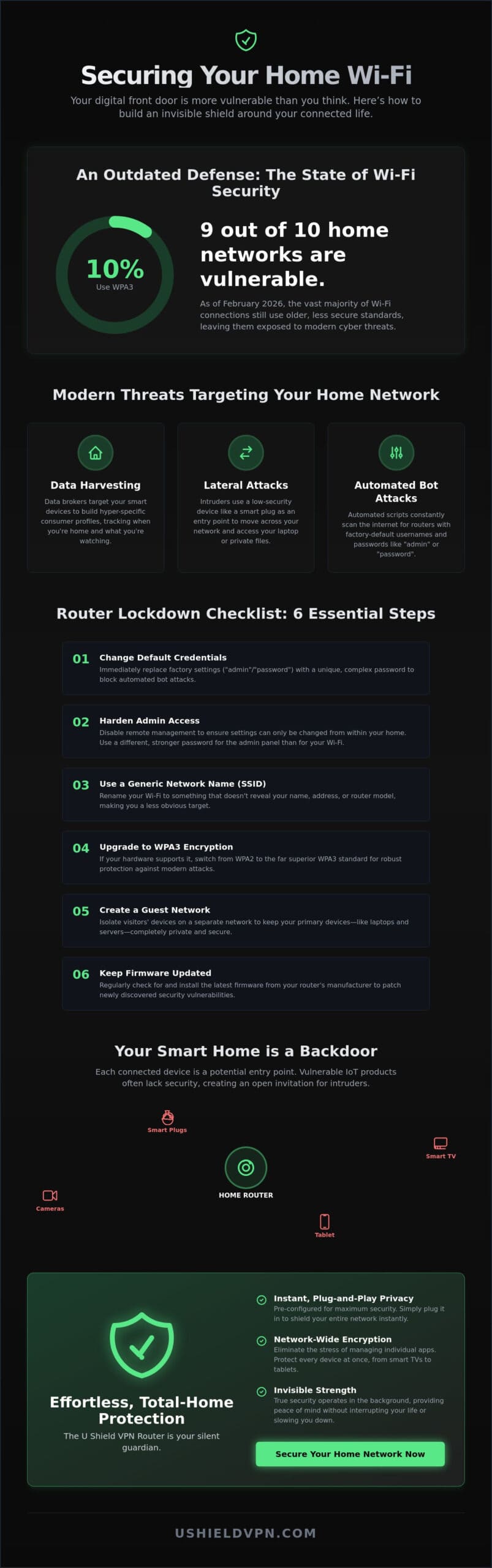
Only 10% of Wi-Fi authentications use the current WPA3 security standard as of February 2026. This means the vast majority of home networks remain vulnerable to modern exploits. Learning how to secure home Wi-Fi is no longer just about choosing a strong password. It’s about building an invisible shield around your digital life. You deserve a home where your privacy is the default setting, not a chore to maintain.
It’s natural to feel overwhelmed by the dozens of smart devices now connected to your router. Managing them individually feels impossible, and the fear of a smart home backdoor is real. We’re here to simplify that complexity. This guide promises to help you master the essential steps to lockdown your network and protect every device from modern cyber threats. We will walk you through the latest Wi-Fi 7 security features, critical firmware updates for brands like ASUS and Netgear, and the impact of the new EU Cyber Resilience Act. You’ll achieve a secure home perimeter and total privacy for your smart TVs and tablets with absolute peace of mind. It’s time to take the technical burden off your shoulders and enjoy a faster, safer connection.
Key Takeaways
- Update default router credentials immediately to block automated bot attacks and secure your digital front door.
- Identify and protect vulnerable IoT devices like smart TVs that often lack built-in security software.
- Learn how to secure home Wi-Fi by moving beyond passwords toward invisible, network-wide encryption.
- Shield every connected device at once to eliminate the stress of managing individual security apps.
- Deploy a pre-configured U Shield VPN Router for instant, plug-and-play privacy without the technical headache.
Why Home Wi-Fi Security is Your First Line of Defence in 2026
Your Wi-Fi is the digital front door to your private life. In 2026, a weak connection is an open invitation to unwanted guests. It’s not just about a hacker stealing your bandwidth anymore. It’s about protecting the intimate details of your daily routine. Every connected device in your home represents a potential vulnerability. Unsecured networks expose every phone, laptop, and smart bulb in the house. Understanding how to secure home Wi-Fi is the first step toward reclaiming your digital boundaries. Effective security provides the freedom to browse without the fear of being watched. It ensures your home remains a private sanctuary.
The Evolution of Home Network Threats
Modern threats go beyond simple hacking to sophisticated data harvesting. Data brokers now target home networks to build hyper-specific consumer profiles. They harvest information from your smart appliances to see when you’re home or what you’re watching. Smart home devices are frequently used as entry points for lateral attacks. Once an intruder gains access to a low-security device like a smart plug, they can move through your network to reach your laptop. For a comprehensive overview of Wi-Fi security, one must look at how encryption standards have changed to meet these risks. Mastering how to secure home Wi-Fi ensures that your private data stays exactly where it belongs: inside your home. Wi-Fi security is the foundation of digital autonomy in 2026.
The Benefit of a Silent Guardian
True security operates in the background without interrupting your flow. You shouldn’t have to be a network engineer to feel safe. Reliable protection means never having to worry about an open port or a leaked IP address. It’s about invisible strength. When your network is locked down, you gain the peace of mind to enjoy your technology. Simplicity is the ultimate sophistication in network defense. You want a system that works while you sleep, acting as a powerful guardian for your family. This approach removes the technical stress and lets you focus on what matters. Protection should be instantaneous and absolute. It’s the only way to achieve total network privacy.
Essential Router Settings Every Homeowner Must Change
Securing your digital perimeter starts at the source. Most people plug in their router and never look at the settings again. This is a mistake. To understand how to secure home Wi-Fi, you must first master your router admin panel. Access this gateway by entering the manufacturer IP address into your browser. Usually, this is 192.168.1.1 or 192.168.0.1. Once inside, your priority is to update the default credentials. Automated bot attacks constantly scan for factory settings like “admin” or “password.” Changing these immediately stops low-level intrusions in their tracks. It’s a simple step that provides instant peace of mind.
Hardening Your Admin Access
Your router gateway needs a unique, complex password that differs from your Wi-Fi key. This ensures that even if someone joins your network, they cannot change your security settings. You should also disable remote management. This feature allows settings to be adjusted from the internet, but it’s a major risk. Disabling it ensures that only someone physically inside your home can alter the network. Finally, change your SSID. Give your network a generic name that doesn’t identify your address or router model. This makes it harder for attackers to target you specifically. Following these steps is a vital part of the process to secure your home network effectively.
Encryption Standards and Guest Networks
Modern encryption is your best defense. Although WPA3 has been required since 2020, only 10% of authentications used it as of February 2026. Transition from WPA2 to WPA3 immediately if your hardware supports it. WPA3 offers superior protection against brute-force attacks and enhanced handshake security. If you have frequent visitors, set up a guest network. This keeps your main devices, like your laptop or private server, isolated from external phones. If you live in a high-density apartment, consider limiting your broadcast power. This prevents your signal from reaching too far into the street or neighboring units, shrinking your attack surface. If these technical adjustments feel like a chore, a pre-configured U Shield VPN Router handles the heavy lifting for you.
Firmware is the lifeblood of your network security. Manufacturers release patches to close newly discovered vulnerabilities. For instance, in June 2026, Netgear released firmware 1.2.7.4 for its RS models, and Linksys issued version 2.0.7.216620 for the MX4200 v2. ASUS users should ensure they’re on version 3.0.0.6_102 or later to patch high-severity flaws. Check for updates at least once a month. You can also disable WPS (Wi-Fi Protected Setup). While convenient for connecting devices with a button, it’s a known security loophole that’s easily exploited. Closing these gaps is essential for anyone learning how to secure home Wi-Fi properly. A well-maintained router is a silent, powerful guardian for your family.
Securing the Weakest Link: Smart TVs and IoT Devices
Smart TVs and appliances are often the weakest link home network security. While you might focus on locking down your laptop, your “smart” fridge could be wide open. These devices are built for convenience, not safety. Most IoT hardware lacks the processing power to run sophisticated security apps. This creates a permanent gap in your home defense. Manufacturers rarely provide long-term security updates for older models. A single compromised camera can compromise the entire local network. Once an intruder is inside your smart bulb, they can move laterally to your private data. Understanding how to secure home Wi-Fi means looking past your computer screen and protecting every entry point.
Why Apps Aren’t Enough
You cannot install a VPN app on a smart fridge or a basic IP camera. Most smart home gadgets run on proprietary, closed systems. This makes them “dumb” when it comes to self-defense. If you rely solely on individual apps, these devices remain exposed. Security must be applied at the network level to cover every connected item. Encryption should be a blanket, not a patch-work of individual apps. By securing the source, you protect the devices that cannot protect themselves. It’s about being efficient. You shouldn’t have to manage twenty different security settings for twenty different gadgets. A single, powerful solution is always better than a fragmented one.
Closing the Smart Home Gap
Start by identifying every device connected to your network. Use your router’s device list to spot unauthorized guests or forgotten gadgets. Isolate high-risk devices that don’t require local network communication. For example, your smart toaster doesn’t need to talk to your private server. The average cost of an IoT security incident is now $330,000 according to 2026 data. This makes prevention a financial necessity. The EU Cyber Resilience Act (CRA) will require manufacturers to report exploited vulnerabilities starting September 11, 2026. This is a positive step, but you shouldn’t wait for government regulation. Learning how to secure home Wi-Fi today prevents future incidents. A network-wide shield eliminates the need for per-device configuration. It creates a silent, powerful guardian for your entire home. You get total protection without ever touching a single setting on your TV or appliances.
Moving Beyond Passwords: The Power of Network-Wide Encryption
Passwords protect the connection, but encryption protects the data itself. Think of a password as the lock on your front door. It keeps strangers out. Encryption is the vault inside that protects your valuables if someone manages to peek through a window. When you learn how to secure home Wi-Fi, you realize that local security isn’t enough. Your ISP still sees your traffic. Data brokers still track your browsing habits. You need a way to wrap your data in a layer of absolute privacy before it touches the open internet. This is where network-wide VPN protection becomes your strongest asset.
By implementing military grade encryption VPN, you tunnel all outgoing traffic through a secure corridor. This process masks your true IP address from every site you visit. It makes your household invisible to the trackers that follow your digital footprint. Built-in anti-trackers stop advertisers from following your family’s habits across different platforms. This level of digital autonomy is essential in 2026. It ensures your private life remains private, regardless of which device you use.
The VPN Router Advantage
Managing individual apps is a chore. A VPN router provides VPN for all home devices simultaneously. You don’t have to worry about whether your guest’s phone is protected. You don’t have to log in on every single tablet or laptop. This approach eliminates app fatigue. It creates a unified security perimeter that covers everything from your gaming console to your smart thermostat. It’s the most efficient way to achieve total network privacy. You secure the source, and the rest follows automatically. It’s a single point of protection for your entire digital world. For households juggling phones, tablets, and smart appliances, a VPN single login for multiple devices is the most practical path to unified, effortless protection.
Maintaining High Speeds with High Security
Speed shouldn’t be the price of safety. Modern hardware ensures that encryption doesn’t mean a sacrifice in performance. Optimized servers allow for seamless 4K streaming and low-latency gaming. You get the security of a fortress with the speed of a fiber connection. Total security should be felt in its protection, not its presence. It operates silently in the background. You browse, stream, and play without even knowing it’s there. You deserve a fast connection that doesn’t compromise your data. For a seamless experience that requires zero configuration, the U Shield VPN Router offers the perfect balance of velocity and invisibility.
Effortless Protection with U Shield VPN Routers
Manual security can feel like a full-time job. Most homeowners don’t have the time to audit every device or manually patch every vulnerability. U Shield provides a pre-configured, plug-and-play solution for instant security. It’s the most efficient way to understand how to secure home Wi-Fi without getting lost in technical jargon. There is no technical configuration required. You simply connect the unit to your existing modem. It works immediately. This is professional-grade protection stripped of its intimidation factor. It’s designed to give you your time back while keeping your data safe.
Security should be absolute from the first second. Military-grade AES-256 encryption is active the moment you power on the device. Every byte of data leaving your home is wrapped in an unbreakable layer of privacy. The integrated Kill Switch acts as a fail-safe. It ensures no data leaks if the VPN connection drops. Your information never travels over an unencrypted line. This level of reliability provides genuine peace of mind. It allows you to focus on your life while the hardware handles the defense. You get the strength of a fortress with the ease of a light switch.
Plug and Play Peace of Mind
Skip the complex setup of a pre-configured VPN router. U Shield hardware acts as a silent guardian for your entire smart home. It protects the devices that cannot protect themselves, from smart TVs to IP cameras. You protect multiple devices with a single, unified network login. There’s no need to manage twenty different passwords. This unified perimeter is the ultimate expression of modern network defense. It’s simple. It’s effective. It’s invisible. You get total coverage without ever opening a technical manual.
Your Global Secure Network
Access high-speed global servers optimized for both privacy and performance. You don’t have to choose between speed and safety. The built-in anti-tracker prevents digital footprinting across every device in your house. It stops data brokers from harvesting your family’s habits and building consumer profiles. Take control of your digital life with a solution designed for the 2026 home environment. Mastering how to secure home Wi-Fi shouldn’t be a chore. With U Shield, it’s a single, effortless step toward total privacy. Your home remains your private sanctuary, exactly as it should be.
Reclaim Your Digital Sanctuary
Your home is your private sanctuary. In 2026, protecting that space requires more than just a complex password. True security involves hardening your router settings and shielding vulnerable smart TVs from lateral attacks. Moving toward network-wide encryption is the most effective way to protect every device under your roof. Understanding how to secure home Wi-Fi shouldn’t be a source of technical stress. It should be an effortless part of your daily life. You deserve a connection that is both invisible to trackers and lightning fast.
You can achieve total network privacy without the configuration headache. U Shield offers plug-and-play hardware that activates military-grade AES-256 encryption the moment it’s powered on. It provides unlimited data for all home devices; ensuring your speed never suffers for your safety. It’s time to take the technical burden off your shoulders and let a silent guardian handle the defense. You gain the freedom to browse, stream, and play without the fear of being watched.
Secure your entire home in minutes with a U Shield VPN Router.
Embrace the freedom of a truly private connection. Your digital peace of mind starts today.
Frequently Asked Questions
Is a Wi-Fi password enough to keep my home secure?
No, a password is only the first step in digital defense. It prevents unauthorized neighbors from joining your signal, but it doesn’t protect your data once it leaves the router. To truly master how to secure home Wi-Fi, you must implement network-wide encryption. This hides your browsing habits from ISPs and data brokers. A password locks the door; encryption hides what is happening inside the house.
How do I know if someone else is using my Wi-Fi?
You can identify unauthorized guests by checking your router’s device list. Access your admin panel and look for a section labeled “Connected Clients” or “Device Map.” If you see a device name you don’t recognize, it’s time to update your credentials immediately. Regularly monitoring this list is a vital part of how to secure home Wi-Fi. It ensures only your trusted devices consume your bandwidth.
Can I secure devices like Smart TVs that don’t support VPN apps?
Yes, you can secure every device at the network level using a specialized router. Most Smart TVs and basic IoT gadgets lack the processing power to run individual security software. A VPN router solves this by encrypting the connection at the source. This creates a blanket of protection for every device in your home. You get total privacy for your television without ever touching its internal settings.
Will securing my Wi-Fi with a VPN router slow down my internet?
Modern hardware ensures that any speed loss is negligible and often unnoticeable. While encryption requires processing power, high-performance routers are built for high-velocity data. You can continue to enjoy 4K streaming and low-latency gaming without interruptions. The protection operates silently in the background. You get the safety of a fortress without sacrificing the speed of your fiber connection. It’s powerful and efficient.
What is the most secure encryption setting for a home router?
WPA3 is the current gold standard for home network encryption. It provides superior protection against brute-force attacks and enhanced data privacy compared to the older WPA2 standard. If your hardware supports it, enable WPA3 in your router settings immediately. It offers the strongest available handshake protection. This setting ensures your local connection remains unbreakable by common hacking tools used by modern cyber threats.
Do I need to hide my Wi-Fi network name (SSID) for better security?
Hiding your SSID provides very little actual security and can often cause connection issues. Hackers can still locate hidden networks using simple, widely available scanning tools. It’s much more effective to focus on robust WPA3 encryption and a complex admin password. Hiding your name is a minor deterrent that’s easily bypassed. Focus on strong, invisible encryption rather than trying to remain hidden from view.
What happens if my VPN connection drops while I am browsing?
Your data remains protected thanks to a feature called a Kill Switch. If your VPN connection drops for any reason, the Kill Switch instantly halts all internet traffic. This prevents your private information from leaking onto an unencrypted line. Your connection only resumes once the secure tunnel is restored. It acts as a fail-safe to ensure your privacy is never compromised, even for a single second.
