






Security should be a silent guardian, one that never requires a second thought. You probably know the feeling of realizing, halfway through a session, that you forgot to hit the connect button. When weighing a VPN app vs VPN router, the choice comes down to how much you want to think about your protection. With 32% of US adults now using these tools, the demand for seamless security is at an all-time high. One option offers total flexibility on the go. The other provides a permanent, invisible shield for every device in your home.
It’s frustrating when your smart TV or gaming console doesn’t support the apps you rely on. You deserve a setup that matches your digital lifestyle without sacrificing speed or convenience. We’ll show you how to choose the best protection for 2026. We’ll look at how to secure every device and keep your gaming lag-free. This article explores whether a standalone app or a dedicated router provides the best defense for your specific needs. By the end, you’ll know exactly which path secures your peace of mind and keeps your data invisible.
Key Takeaways
- Distinguish between individual software protection and environmental hardware security. Choose the right shield for your specific digital footprint.
- Master the VPN app vs VPN router debate by comparing device limits and connection speeds. Learn why hardware-based solutions handle unlimited devices with ease.
- Secure every connection with military-grade AES-256 encryption. Build an invisible tunnel that keeps your data safe from ISP tracking.
- Audit your mobility and device count to build a custom security strategy. Ensure your protection follows you from the home office to the local cafe.
- Eliminate app fatigue with a “set it and forget it” solution. Experience total home security that operates silently in the background.
Choosing Your Digital Shield: VPN App vs. VPN Router in 2026
Digital security has evolved. It’s no longer just about protecting a single laptop. In 2026, the average home is filled with connected devices, from smart speakers to security cameras. This makes the debate of VPN app vs VPN router more relevant than ever. One provides targeted, mobile defense. The other offers a comprehensive, environmental shield. With global VPN usage reaching 1.6 billion people this year, understanding these two paths is essential for your privacy.
Before choosing your hardware, it’s helpful to start by Understanding the Mechanics: How Apps and Routers Secure Your Data. Both methods use encryption to hide your activity from your ISP and third parties. However, they apply this protection differently. The choice you make determines whether you’re securing a single device or your entire digital life. It’s about finding the right balance between flexibility and total coverage.
What is a VPN App?
A VPN app is a software solution. You download it directly onto your smartphone, tablet, or computer. It encrypts your data at the device level before it ever touches a network. This makes it the ideal companion for people on the move. If you frequently use public Wi-Fi or work remotely, an app like the U Shield VPN App ensures your data remains private. It’s easy to use. You toggle it on when you need it. You can change your virtual location with a single tap. It’s the ultimate tool for individual protection on the go. For a complete walkthrough of staying safe on unsecured networks, see our guide on how to protect devices on public Wi-Fi.
What is a VPN Router?
A VPN router is a physical gateway. It’s a piece of hardware, like the U Shield VPN Router, that manages your entire network’s encryption. Instead of protecting one device, it secures everything connected to your Wi-Fi. This includes devices that don’t support traditional apps. Think about your smart TV, gaming consoles, or IoT sensors. They often lack the interface for security software. A router solves this. It acts as a silent guardian for the whole household. It operates in the background without any manual intervention.
The most significant benefit of a router is the “always-on” nature of its protection. You don’t have to remember to turn it on. There are no forgotten connections or exposed sessions. It’s a set-it-and-forget-it solution. In an era where 47 countries have active data retention mandates, this consistent coverage provides true peace of mind. You simply connect to your Wi-Fi, and your security is guaranteed. It’s effortless. It’s powerful. It’s the most reliable way to stay invisible online.
Understanding the Mechanics: How Apps and Routers Secure Your Data
While the interface changes, the underlying power remains consistent. Both options rely on military-grade encryption to shield your activity from prying eyes. When comparing a VPN app vs VPN router, the encryption standards are often identical, but the deployment method changes your level of daily friction. Understanding these mechanics helps you choose the most reliable guardian for your data.
Encryption and Data Tunneling
Both methods utilize AES-256 encryption. This is the same standard used by governments and banks to protect classified information. Think of it as a digital vault. It scrambles your data into an unreadable code that would take billions of years to crack. This encryption happens inside a “tunnel.” This tunnel acts as a cloaking device for your internet traffic. It hides your browsing habits, downloads, and location from your ISP and any potential snoops.
The speed of this tunnel depends heavily on server locations. When you connect to a server close to your physical home, your data travels a shorter distance. This results in lower latency and faster speeds. When considering Performance and Compatibility, the mechanics of how data is handled become crucial. A local server keeps your connection snappy. A distant server might provide more anonymity but can lead to slight delays during high-bandwidth tasks like streaming or gaming.
The Vital Role of the Kill Switch
The choice between a VPN app vs VPN router also dictates how you manage your connection stability. Every high-quality security setup includes a Kill Switch. This is your digital emergency brake. If your VPN connection drops for even a second, the Kill Switch instantly cuts your internet access. This prevents your real IP address from being exposed to the open web.
- Router-Level Kill Switch: This provides “always-on” security. If the router loses its secure connection, every device in the house is protected simultaneously. It is the ultimate safety net for smart homes.
- App-Level Kill Switch: This is designed for mobility. It protects you as you switch between cellular data and public Wi-Fi. It ensures your phone never leaks data during those brief moments of network transition.
A router-level switch is often preferred for stationary environments where security cannot be compromised. It removes the risk of human error. You don’t have to remember to check your connection status. The hardware handles it for you. For those seeking this level of effortless, automated protection, exploring the features of the U Shield VPN Router is a logical next step in your security journey. It simplifies the complex mechanics of data tunneling into a single, powerful point of defense.
Performance and Compatibility: Comparing Speed, Range, and Device Support
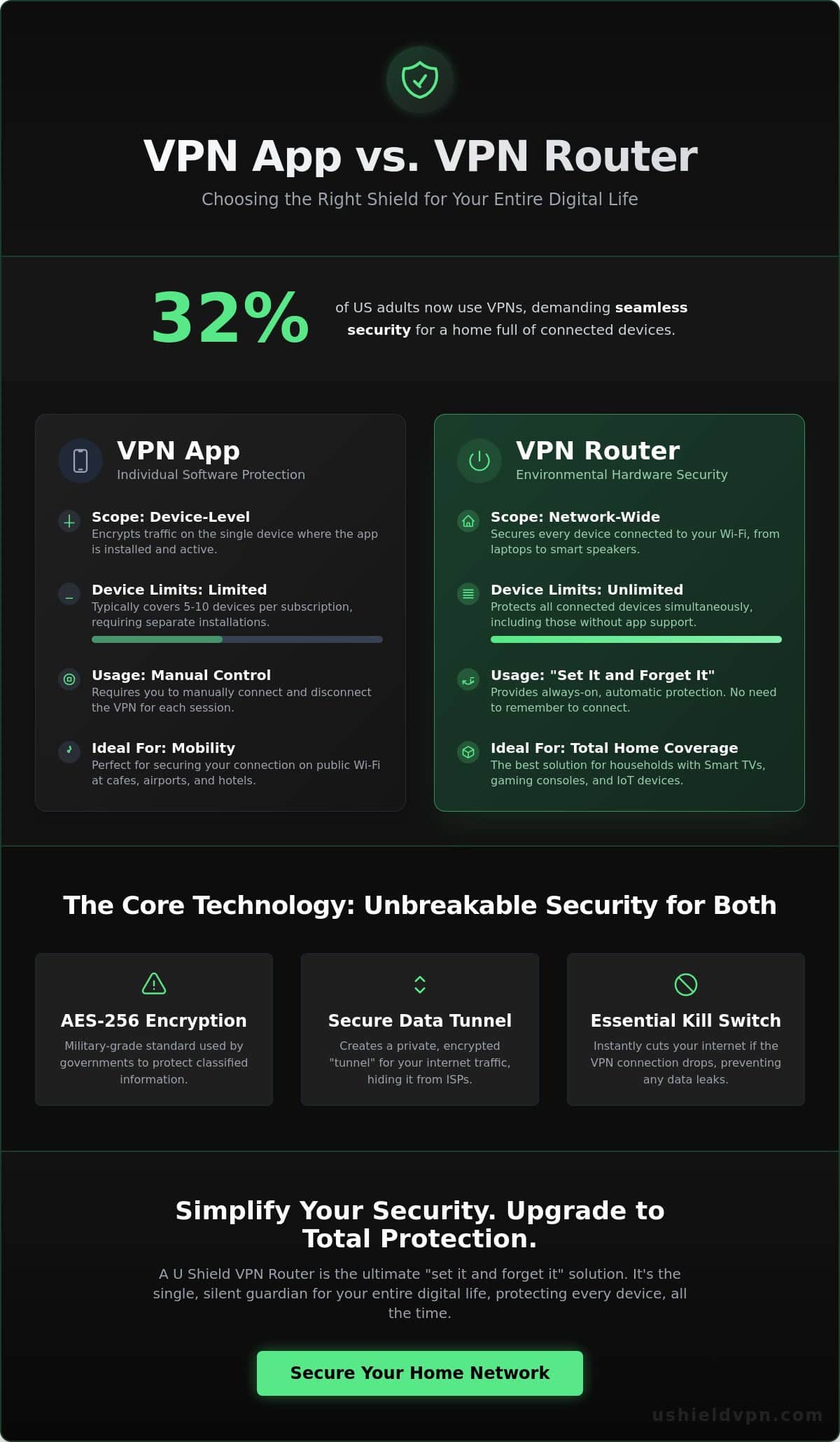
Speed and compatibility define your daily digital experience. When evaluating a VPN app vs VPN router, the most immediate difference is how they handle your hardware ecosystem. Most premium apps restrict you to between five and ten simultaneous connections. In a modern home filled with smartphones, laptops, and tablets, these limits disappear quickly. You shouldn’t have to decide which device stays safe and which remains exposed.
A router-based approach changes the math entirely. It counts as a single connection to the VPN provider but shields every device on your Wi-Fi. This creates an invisible blanket of security that covers your entire environment. Performance is another critical factor. While apps rely on your device’s CPU, a dedicated router uses its own specialized processor to handle encryption. This prevents your laptop or phone from slowing down during heavy tasks. Modern hardware ensures your security never creates a bottleneck.
Device Limits and Network-Wide Coverage
Managing a dozen different app logins isn’t just a chore; it’s a security risk. Every time a session expires or an app fails to auto-connect, your data is at risk. By moving the security to the network level, you can provide a VPN for all home devices simultaneously. This ensures that every visitor who joins your network is automatically protected. They don’t need to download software or enter new credentials. It’s a seamless experience for you and your guests. For a deeper look at how to implement this approach across your entire household, our 2026 guide to network-wide VPN protection walks you through every step of securing your home environment.
Streaming and Gaming Performance
Gamers and streamers often worry about lag. Some outdated reviews claim routers slow down speeds, but this only applies to underpowered, generic hardware. A high-performance pre-configured VPN router is built for speed. It prevents ISP throttling by masking your traffic type. This allows you to enjoy 4K streaming or low-ping competitive gaming without interference. By selecting optimized global servers, you can maintain a fast, stable connection for every player in the house.
Smart TVs and IoT sensors are the silent weak links in modern security. These devices often lack the interface to run native apps, leaving them vulnerable to tracking. A router-level solution is the only way to protect these “un-appable” devices. It offers a set-and-forget benefit that apps simply cannot match. Once your router is configured, your security is permanent. It operates quietly in the background, providing peace of mind without requiring a single click.
How to Implement the Right VPN Strategy for Your Home
Building a secure home network doesn’t require a degree in computer science. It requires a strategy. You must decide where your digital borders begin and end. The choice between a VPN app vs VPN router depends on your movement and your hardware. A smart implementation ensures you never leave a digital footprint. It turns security into a background process that serves you silently.
Start with a simple audit. Count every device that connects to your Wi-Fi. Look beyond your phone and laptop. Your smart printer, security cameras, and even your fridge are potential entry points. If you have more than five devices, managing individual apps becomes a burden. Next, assess your mobility. Do you work from local cafes often? If so, you need a hybrid approach. Use a router for the home and an app for the road. This creates a continuous shield that never breaks, regardless of your location.
Step-by-Step: Setting Up Your First VPN App
Deploying the U Shield VPN App is instantaneous. Download the software directly from official stores for your Android or iPhone. Avoid third-party sites to ensure file integrity. Once installed, activate the built-in anti-trackers. These features block invasive ads and malicious scripts before they load. Finally, test for IP leaks. Use a simple online check to confirm your real location is hidden. If the tunnel is active, your data is invisible. You can now browse with absolute confidence on any public network. To ensure you follow every best practice when connecting away from home, review our complete 2026 checklist for protecting devices on public Wi-Fi.
Step-by-Step: Deploying a Plug-and-Play Router
Forget the complexity of “flashing” firmware or manual coding. Modern security should be accessible. Setting up the U Shield VPN Router is a three-minute process. Connect the device to your existing modem using the provided cable. Power it on. It creates a new, secure SSID in your home. Link your smart TVs, gaming consoles, and IoT devices to this new network. They are now protected by military-grade encryption without any additional software. It is a true plug-and-play solution for the modern household.
Once your hardware is in place, optimize your server selection. If you are gaming, choose a server in your own country to keep ping low. If you are focused on maximum privacy, select a neutral territory with strict data laws. This strategic approach ensures your speed matches your security. Take the first step toward effortless, network-wide protection by exploring the U Shield VPN Router today. It is the ultimate upgrade for a truly private digital lifestyle.
Total Security Simplified: Why the U Shield VPN Router is the Ultimate Upgrade
Choosing between a VPN app vs VPN router shouldn’t feel like a compromise. While apps serve a purpose for travel, your home deserves a more robust foundation. “App fatigue” is real. Managing updates and toggling connections on ten different devices is an unnecessary burden. The U Shield VPN Router eliminates this friction. It transforms your living space into a digital fortress with a single, permanent login. Security becomes invisible. It simply works.
Your entire network benefits from military-grade encryption. From your primary workstation to your smart thermostat, every packet of data is shielded. This hardware-level approach includes built-in anti-trackers that stop data mining at the source. Gamers also gain a significant edge. The router features specialized optimizations that prioritize gaming traffic, reducing jitter and stabilizing your connection. It is high-performance protection that actually enhances your digital experience.
The Power of Pre-Configuration
Technical stress is the biggest barrier to better security. Some industry sources claim that setting up hardware takes hours or requires complex firmware updates. We’ve removed that obstacle. Our hardware arrives pre-configured and ready for action. It works out of the box. The U Shield VPN hardware is specifically engineered to handle high-speed encryption without thermal throttling. You get professional-grade support for your entire home network in minutes, not days. It’s the sophisticated way to simplify your life.
Choosing Your Plan: Monthly vs. Annual Freedom
Flexibility is at the core of our service. You can choose a Monthly VPN Plan for short-term needs or a VPN annual subscription for long-term peace of mind. The annual option is the most popular choice for high-bandwidth households. It provides consistent, unlimited data usage for 4K streaming and large downloads. Protecting your environment shouldn’t be a chore. It should be an automatic part of your home.
If you’re still weighing the pros and cons, read our deeper dive on the U Shield VPN Router vs VPN App to see which setup fits your lifestyle. True digital freedom starts with a secure foundation. By moving your defense to the router level, you ensure that every device, person, and guest in your home stays invisible to prying eyes. It’s the ultimate upgrade for 2026.
Take Command of Your Digital Privacy
Security is no longer a luxury. It is a necessity. You now understand how the right setup protects your data and your time. Apps provide essential defense for the mobile professional. Routers offer a permanent, invisible shield for the modern home. Deciding between a VPN app vs VPN router is about matching your security to your specific digital lifestyle. You deserve a solution that operates silently, protecting everything from your smartphone to your smart TV.
The U Shield VPN Router represents the ultimate evolution in home defense. It arrives pre-configured for plug-and-play security, removing every technical hurdle. You get military-grade AES-256 encryption across every connected device. It is also optimized for 4K streaming and low-latency gaming. This ensures your protection never slows you down. High-speed security is finally effortless.
Don’t leave your network exposed. Secure your entire home with the U Shield VPN Router today. Reclaim your peace of mind and enjoy the freedom of a truly private internet. You have the tools. Now, it’s time to take control.
Frequently Asked Questions
Can I use both a VPN app and a VPN router at the same time?
You can use both, but it is rarely necessary for the average user. This creates a “double VPN” effect, which adds two layers of encryption to your data. While this increases security, it often causes significant speed drops and latency issues. When comparing a VPN app vs VPN router, it is usually more efficient to choose one primary method based on whether you are at home or on the move.
Will a VPN router slow down my Wi-Fi speed for gaming?
High-performance hardware eliminates the risk of lag. Modern routers equipped with powerful processors handle heavy encryption without bottlenecking your connection. In many cases, a secure router actually improves your experience by preventing ISP throttling during peak gaming hours. You get a stable, low-latency connection that keeps your competitive edge sharp and your data invisible.
Do I still need a VPN app on my phone if I have a VPN router at home?
You still need a dedicated app for mobile freedom. A router only protects the devices within the range of your home Wi-Fi network. Once you step out the door, your phone connects to cellular data or public Wi-Fi hotspots. A VPN app ensures your protection follows you everywhere, creating a continuous shield that never breaks when you leave your home environment.
How do I put a VPN on my Smart TV if it doesn’t have an app store?
A VPN router is the only reliable way to secure a Smart TV without an app store. By encrypting the internet signal at the source, the router provides a secure tunnel for every device that connects to it. Your TV receives an encrypted connection automatically. No complex software installation or technical workarounds are required on the television itself.
Is it difficult to set up a VPN router for a non-technical person?
Setting up a pre-configured model is effortless and takes only a few minutes. Unlike generic routers that require manual “flashing” of firmware, the U Shield VPN Router is a plug-and-play solution. You simply connect it to your existing modem and power it on. It is designed to take the technical burden off your shoulders while providing immediate, network-wide security.
Does a VPN router protect my devices when I leave the house?
A router’s protection is stationary and limited to its physical Wi-Fi range. It acts as a silent guardian for your home environment, but it cannot reach your devices once they connect to external networks. This is why the VPN app vs VPN router debate often ends with a hybrid strategy. Use the router for your home and the app for your mobile life.
Can a VPN router help me access streaming content from other countries?
Yes, a router simplifies global streaming for your entire household. When you select a specific server location on your router, every connected device appears to be in that region. This is particularly useful for gaming consoles and streaming sticks that don’t allow you to change locations easily. It opens up a world of content with one simple setting change.
What happens if the VPN connection on my router drops?
Your privacy remains intact thanks to the built-in Kill Switch. If the secure tunnel fails for any reason, the router immediately cuts all internet traffic to your devices. This prevents your real IP address and private data from leaking onto the open web. Your connection only restores once the secure VPN tunnel is fully re-established, ensuring you are never exposed.
