






Your ISP likely knows exactly what you are sending before your recipient even opens the file. In an era of shifting data laws and constant surveillance, simply hitting “send” is a significant privacy risk. You deserve absolute peace of mind. Implementing an anonymous file sharing VPN is the most effective way to reclaim your digital space. It’s about more than just hiding; it’s about becoming truly invisible.
We know the frustration of ISP throttling and the fear of metadata leaks revealing your location. You shouldn’t have to master complex coding or struggle with difficult configurations just to share a document securely. Security should be effortless and approachable. This guide will teach you to send sensitive data without leaving a single digital footprint. We prioritize a layered security approach that works silently in the background. It protects your data while you focus on your life.
You will discover a simple, repeatable workflow for zero-trace transfers. We’ll show you how to bypass surveillance and strip away identifying markers instantly. This is your complete 2026 roadmap to fast, secure, and invisible data transfers.
Key Takeaways
- Decouple your identity from your data by moving beyond the hidden risks of standard cloud storage.
- Identify the best 2026 ephemeral storage tools that delete files automatically after a single download.
- Master a professional 5-step workflow using an anonymous file sharing VPN to bypass ISP surveillance.
- Fix common security gaps like DNS leaks that expose your activity even when using basic encryption.
- Simplify your privacy with hardware-level protection that secures every transfer across your entire network.
What is Anonymous File Sharing and Why Does Your VPN Matter?
Anonymous file sharing is the practice of decoupling your digital identity from the data you transmit. It ensures that while the file reaches its destination, the trail leading back to you is non-existent. Most people confuse simple encryption with true anonymity. Sending an encrypted file through Google Drive or Dropbox still leaves a clear metadata trail. These providers log your IP address, your login time, and even your physical location. They are central points of failure. You deserve a system that doesn’t keep tabs on your movements.
To achieve total privacy, you must account for three specific observers. Your ISP monitors the volume and type of your traffic. The service provider logs your account details. Finally, the recipient can often see your originating IP address. An anonymous file sharing VPN acts as the primary shield against all three. It creates a hardened, encrypted tunnel that hides your data stream from prying eyes. This is the first step in reclaiming your digital sovereignty. It provides the quiet authority you need over your own information.
The Difference Between Secure and Anonymous
Security and anonymity are two sides of the same coin. Security protects the content of your file through encryption. It ensures that if a hacker intercepts the data, they cannot read it. Anonymity is different. It protects the sender. It masks your identity, your location, and your habits. In 2026, high data standards require both. You need your files to be unreadable and your presence to be untraceable. This dual layer is the foundation of anonymous P2P communication, allowing for seamless transfers without exposure.
Why Standard ISPs Track Your File Transfers
ISPs use a technique called traffic shaping to manage their networks. They look for large file uploads to throttle your speeds or flag suspicious activity. Unencrypted direct transfers are easy to spot. They carry legal risks and expose your browsing habits to corporate surveillance. Using a military grade encryption VPN changes the game. It masks your traffic type entirely. Your ISP sees a stream of data but cannot distinguish a large file transfer from a simple web search. This level of invisibility prevents throttling and keeps your private life private. You gain the freedom to move data without a digital tail. It’s about taking the technical burden off your shoulders and enjoying a faster, safer experience.
Top Tools for Anonymous File Sharing in 2026
Choosing the right tool is the difference between a clean transfer and a permanent digital footprint. In 2026, the landscape of data privacy has shifted. You need tools that don’t just encrypt data; they must also protect your identity. The most effective strategy involves using an anonymous file sharing VPN as your foundation. This ensures your browser or application doesn’t leak your IP address before the file even leaves your device. It’s about creating a gap between your personal life and the data you move. You deserve a workflow that feels effortless and invisible.
Zero-Knowledge File Transfer Services
Zero-knowledge architecture is the gold standard for privacy. It means the service provider has no way to decrypt your files. The encryption keys never leave your device. You should always perform local encryption before uploading any sensitive document. Tools like OnionShare use the Tor network to host files directly from your computer. Bitwarden Send allows for ephemeral sharing with text or files that disappear after a set time. These services require no registration. No email address means no trail. It’s simple, fast, and secure.
When selecting these tools, research is vital. The Federal Trade Commission has previously warned about potential privacy and security risks in the mobile app market. Always opt for audited, open-source solutions that prioritize user anonymity over data collection. Using a U Shield VPN App adds an extra layer of protection, ensuring the service provider never sees your true originating location.
Peer-to-Peer (P2P) vs. Server-Based Sharing
Peer-to-peer transfers are incredibly fast for large datasets. They connect your computer directly to the recipient. However, this direct connection reveals your IP address to the person on the other end. For true anonymity, server-based “middle-man” tools are often better. They act as a buffer, hiding your identity from the recipient. If you must use P2P for large 4K video or massive databases, you need high speed VPN servers to maintain velocity. Without this, your ISP may detect the heavy traffic and throttle your connection.
Speed and security often exist on a spectrum. Tor-based sharing provides extreme anonymity but can be slow for multi-gigabyte files. Ephemeral storage tools offer a balance. They host your file for a single download and then delete it forever. This prevents long-term data storage on third-party servers. It’s a modern solution for a high-speed world. You get the protection you need without the technical headache. Every transfer becomes a silent, successful mission.
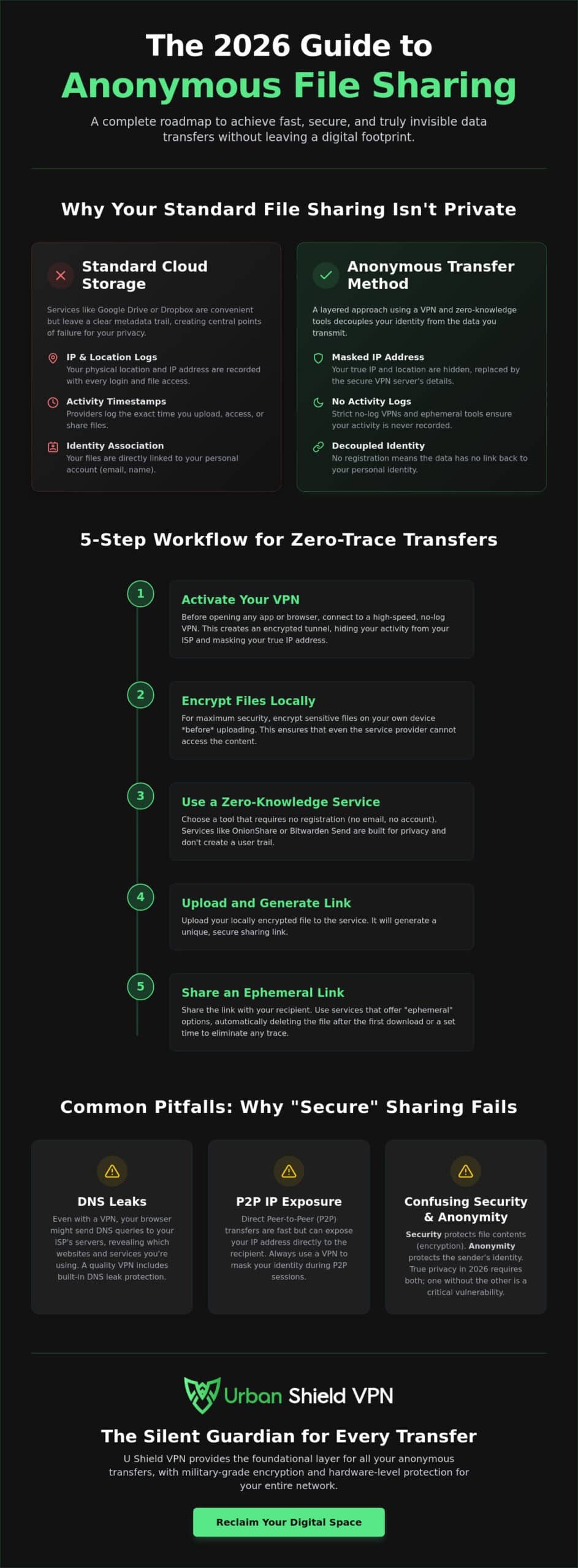
How to Share Files Anonymously: A 5-Step Workflow
True anonymity isn’t achieved with a single click. It’s a disciplined sequence of actions. This 5-step workflow ensures your data remains invisible from the moment you select the file to the moment it’s deleted. By following this methodical approach, you eliminate the risk of local leaks that often plague software-only solutions. You gain the quiet authority of knowing your digital footprint is non-existent. This is the modern standard for sensitive data transfers in 2026.
Establishing a secure environment is your first priority. Activate your network-wide anonymous file sharing VPN to create a baseline of protection. This covers every device in your home or office. It prevents accidental leaks if a single application bypasses your system settings. Hardware-level protection is superior here. It removes the technical burden from your shoulders and operates silently in the background.
Step 1: Establishing the Secure Environment
Before you begin any upload, verify your security. Ensure your VPN kill switch is active. This is a vital fail-safe. If your connection drops for even a second, the kill switch cuts all traffic. This prevents your true IP address from being exposed to your ISP or the file-sharing server. Run a quick leak test to confirm your mask is in place. You need absolute certainty before moving sensitive data. Once your network is hardened, you can proceed with confidence.
Step 2: Stripping the Digital Fingerprint
Every file you create contains a digital fingerprint. This is metadata. It includes your GPS coordinates, the device name, and the exact time of creation. Metadata is a silent snitch that betrays your location. Scrubbing this data is a non-negotiable step. Use dedicated tools to clean PDF, DOCX, and JPEG files before they ever touch the internet. For a fast and clean alternative, try the “Screenshot Method.” Open the image, take a screenshot, and share the screenshot instead. This creates a new file with zero original metadata. It’s a simple, repeatable security workflow that works every time.
Once the file is clean, apply secondary local encryption. Use tools like 7-Zip or VeraCrypt to password-protect the file itself. This “double-bagging” technique ensures that even if the transfer protocol is compromised, the content remains unreadable. Next, choose a zero-knowledge transfer protocol. These protocols ensure the service provider never has the keys to your data. Finally, set strict expiration limits. Use “burn-on-read” settings so the file vanishes the moment it is accessed. This leaves nothing behind for future observers to find. Using an anonymous file sharing VPN alongside these steps creates an impenetrable wall of privacy. You are now in full control of your digital presence.
Common Pitfalls: Why “Secure” Sharing Often Fails
Most users believe the green padlock icon in their browser is a total shield. It isn’t. HTTPS protects the contents of your message, but it does not hide the fact that you are sending a message. Your ISP still sees the destination. They see the frequency and size of your data packets. Relying on basic browser encryption alone is a common failure point in a professional anonymous file sharing VPN strategy. You need to hide the entire connection, not just the data inside it. True privacy requires a layer that sits above the application.
Security isn’t always what it seems, especially with free tools. Free VPNs are a dangerous trap in the file-sharing ecosystem. These services often log your activity to sell it to third-party advertisers. They lack the resources to maintain high-speed, secure infrastructure. If the service is free, your data is the currency. You deserve better than a compromise that puts your sensitive files at risk. A paid, audited service is the only way to ensure your transfer remains a private matter.
Browser fingerprinting is another subtle threat. Your browser shares unique details about your hardware, installed fonts, and screen resolution. This creates a digital signature that can link a transfer back to your identity; even if your IP address is hidden. You must use privacy-focused browsers or hardened settings to minimize this risk. Combining these settings with a robust network layer ensures that your identity and your data remain separate. It’s about closing every possible door to outside observers.
The DNS Leak Trap
Your browser is naturally chatty. Even with a software VPN active, your computer might bypass the encrypted tunnel to ask your ISP for website directions. This is a DNS leak. It tells your ISP exactly where you are going and which sharing services you use. A pre-configured VPN router solves this at the hardware level. It forces every request through the secure tunnel before it ever leaves your network. This eliminates the risk of accidental exposure. You can test your connection easily using online vulnerability scanners to ensure your mask is perfect.
ISP Throttling and Traffic Analysis
ISPs are experts at traffic analysis. They recognize the specific shape of a large, encrypted file transfer. Once they detect this pattern, they may throttle your speeds to preserve their bandwidth. This ruins the efficiency of your workflow. High-quality services use obfuscated servers to hide VPN usage from the network entirely. This makes your encrypted traffic look like standard, low-priority web browsing. It maintains high speeds during multi-gigabyte uploads while keeping your activities invisible. For total network-wide protection, invest in a U Shield VPN Router today.
U Shield VPN: The Silent Guardian for Every Transfer
The U Shield VPN Router is the foundation of a truly invisible workflow. It acts as a silent guardian, operating in the background to secure every byte of data. While software solutions offer a starting point, hardware-level protection provides absolute peace of mind. It removes the risk of human error. You don’t have to remember to toggle a switch. Your network is protected from the moment you plug it in. This is the simplest way to maintain a professional anonymous file sharing VPN environment without the technical headache.
Our router utilizes military-grade encryption for all outbound data. This ensures that every file transfer, whether it’s a small document or a massive database, is shielded by the strongest security standards available. It’s a “plug-and-play” solution designed for those who value their time and their privacy. You get high-level networking without the intimidation factor. It’s about empowering you to take control of your digital space.
Hardware-Level Security vs. App-Based VPNs
Choosing between a VPN app vs VPN router is a vital distinction for serious file sharing. Apps are useful, but they only protect the device they are installed on. A router secures your entire ecosystem. This includes your mobile phone, your workstation, and even IoT devices that don’t support traditional VPN software. It provides a blanket of invisibility for everything you own.
Using hardware eliminates the danger of “leaky” connections during a reboot or an app crash. It provides a consistent, hardened tunnel for multiple simultaneous high-speed transfers. You can move large files on one machine while browsing securely on another. The performance remains stable. The protection remains constant. It’s the ultimate “set and forget” security model for the modern home.
Setting Up Your U Shield for Maximum Anonymity
Optimization is the final step toward total invisibility. When configuring your U Shield, choose server locations in privacy-friendly jurisdictions. This adds a legal layer of protection to your technical shield. Our built-in anti-tracker works silently to block third-party observers who try to map your digital habits. It strips away the noise, leaving only a clean, anonymous path for your data to travel.
Before your next transfer, follow this final checklist for total peace of mind:
- Verify Connection: Ensure your router is active and the encrypted tunnel is established.
- Select Location: Pick a server optimized for both speed and privacy standards.
- Enable Anti-Tracking: Activate the built-in blocks to stop browser fingerprinting and silent observers.
- Scrub and Send: Follow the metadata-stripping steps mentioned in our previous workflow.
You are now ready to master the art of invisible data transfers. With U Shield, your privacy isn’t just a feature. It’s a guarantee. It’s about freedom, ease of use, and the quiet authority of total digital control. Every transfer is now a silent, successful mission.
Master Your Digital Invisibility
You now have the professional blueprint for total data privacy. True anonymity requires a disciplined, layered approach. You must strip hidden metadata, apply local encryption, and utilize zero-knowledge protocols. Most importantly, you need a hardened network foundation that never sleeps. An anonymous file sharing VPN is your primary shield against ISP surveillance and metadata leaks. It moves you from a state of vulnerability to absolute digital control.
The U Shield VPN Router simplifies this complex security landscape. It arrives pre-configured for instant protection. You gain military-grade AES-256 encryption across every device in your home or office. It supports unlimited devices with a single login; ensuring your entire ecosystem remains invisible without a single manual toggle. This hardware-first strategy removes the technical burden from your shoulders. It allows your security to operate silently and powerfully in the background.
Take the first step toward a trace-free digital life today. Secure your entire network for anonymous sharing with a U Shield VPN Router. Reclaim your freedom and share your most sensitive data with absolute confidence. Your digital footprint is now yours to erase.
Frequently Asked Questions
Is a VPN enough for anonymous file sharing?
A VPN is a vital foundation but isn’t a total solution on its own. It masks your IP address and location. You still need to address file-level identifiers. True anonymity requires stripping metadata and using zero-knowledge transfer platforms. Combining these steps with an anonymous file sharing VPN creates a comprehensive shield for your data. It provides the quiet authority you need over your information.
Does using a VPN slow down my file uploads?
High-quality encryption can cause a minor speed reduction due to processing overhead. However, it often results in faster uploads by bypassing ISP traffic shaping. ISPs frequently throttle large file transfers they can identify. A VPN hides the nature of your traffic. This prevents targeted slowing and ensures consistent performance for massive datasets. It’s a trade-off that favors both security and velocity.
What is metadata and how do I remove it?
Metadata is the hidden data about data embedded in every file. It includes your camera model, GPS coordinates, and edit history. You can remove it using specialized cleaning software or simple command-line tools. Taking a screenshot of an image is a fast way to create a clean version. This simple step prevents your location from being leaked to the recipient or silent observers.
Can my ISP see what files I am sending if I use a VPN?
Your ISP cannot see the specific content or names of the files you transmit through a VPN. They only see a stream of encrypted packets moving toward a secure server. The encryption tunnel makes the data unreadable to any middle-man. This level of invisibility is why a VPN is the first step in any secure workflow. It turns your activities into a silent stream.
Are free file-sharing sites safe to use with a VPN?
Free sites are rarely safe for sensitive data. These platforms often monetize user behavior or lack robust encryption standards. They may also store logs of your uploads. Always pair your anonymous file sharing VPN with trusted, zero-knowledge tools that require no personal registration. This ensures no trail leads back to your identity. It protects your privacy from being sold to the highest bidder.
What is the best file format for anonymous sharing?
Compressed archives like .7z or .zip are the most effective formats for privacy. These allow you to apply local AES-256 encryption before the file ever touches the internet. You can even encrypt the filenames within the archive. This adds a secondary layer of protection. If the transfer is intercepted, the observer sees only an unreadable container with no identifiable details.
How does a VPN router improve file sharing security?
A VPN router provides hardware-level security that software apps cannot match. It prevents DNS leaks at the source by forcing all traffic through the secure tunnel. It also protects every device on your network simultaneously. This eliminates the risk of forgetting to activate your protection. It creates a permanent, secure environment for all your digital interactions without the technical burden.
Is it legal to share files anonymously in 2026?
Privacy is a fundamental right in 2026. Sharing files anonymously is legal in most jurisdictions. It’s a standard practice for protecting intellectual property and sensitive personal information. You should always ensure the content you share complies with local regulations. Using a VPN simply ensures your right to a private digital life is respected. It empowers you to move data without a digital tail.
