






A simple VPN app is no longer enough to outsmart the world’s most aggressive streaming blocks. Most viewers believe a basic connection is all they need to watch UK television from abroad. However, finding the best VPN for BBC iPlayer from US in 2026 requires a more sophisticated approach to handle constant IP blacklisting. You deserve a connection that works every time you sit down on the couch. It’s frustrating when buffering ruins a climactic scene in EastEnders or a live match. We know you want your technology to be a silent, powerful guardian that stays out of the way.
This guide shows you how to achieve seamless 4K streaming from any device in your home. You’ll learn to eliminate ISP throttling and bypass geo-blocks using high-speed, secure technology. We’ll explore why moving beyond basic software to network-wide hardware protection is the only way to ensure total reliability for the whole family. We will cover everything from Smart TV setup to protecting your digital privacy from US-based ISPs. Get ready for a buffer-free experience that brings the best of British television directly to your living room.
Key Takeaways
- Understand how the BBC uses advanced IP databases to restrict content. Learn to bypass these licensing blocks effortlessly.
- Identify the specific features needed for the best VPN for BBC iPlayer from US. Prioritize obfuscation and high-speed UK servers for 4K quality.
- Compare the limitations of standalone apps against the power of hardware solutions. Hardware ensures a stable, “set and forget” experience for the whole family.
- Discover how network-wide protection secures every device at once. This includes Smart TVs and Roku players that usually don’t support VPN software.
- Follow a streamlined setup process to eliminate buffering. Start streaming your favorite British shows in minutes with zero technical friction.
Why BBC iPlayer Blocks US Viewers & How Geo-Blocking Works
Accessing British television from the United States shouldn’t be a headache. However, the BBC is legally bound by strict licensing agreements. these contracts dictate that content paid for by UK taxpayers stays within UK borders. To enforce this, the platform uses a digital fence. Geo-blocking is the practice of restricting access to internet content based on the user’s geographical location. This technology identifies your physical position the moment you click play. Understanding How Geo-Blocking Works is the first step toward reclaiming your viewing freedom.
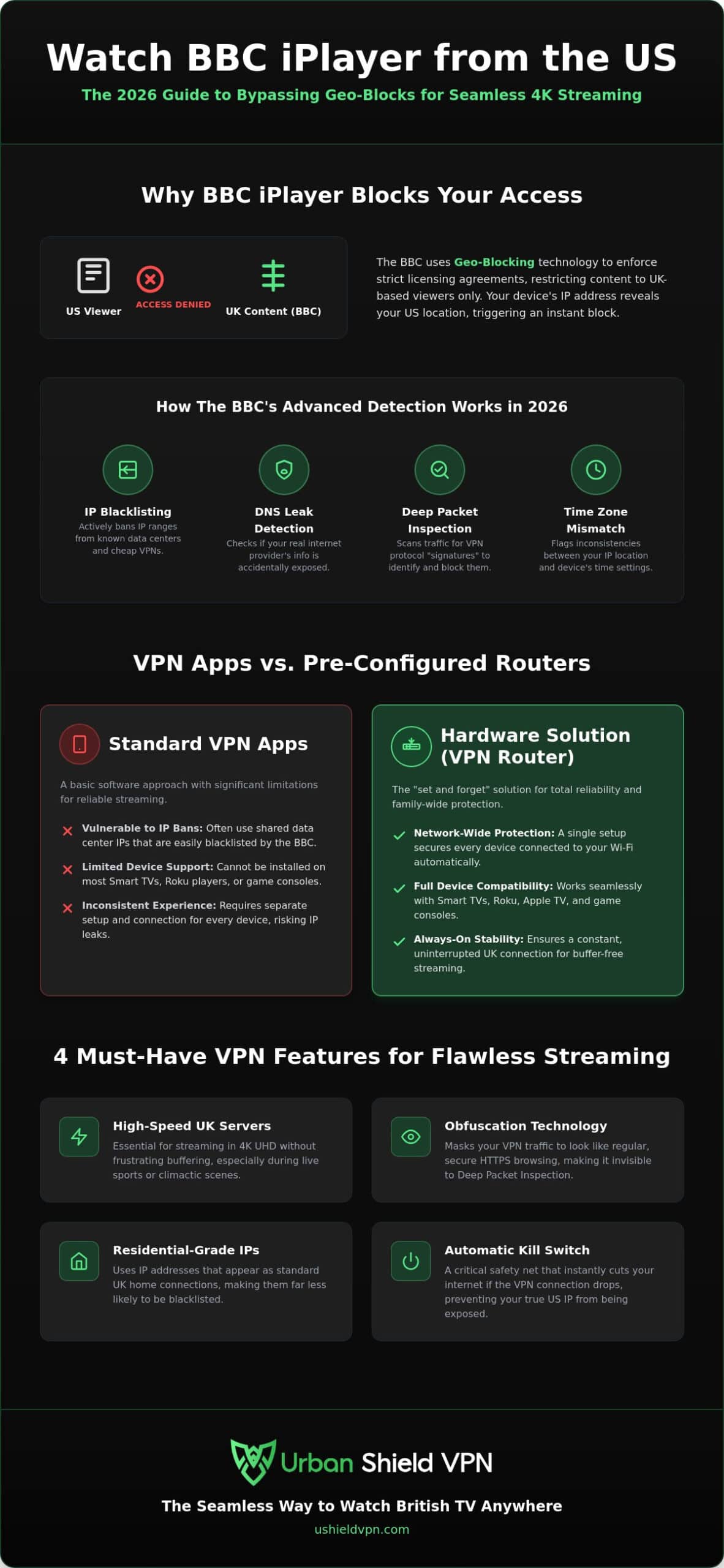
The BBC relies on sophisticated IP databases to manage its traffic. Every device on the internet has a unique IP address that acts like a digital return address. If your IP originates from a US-based provider, the system flags and blocks your connection instantly. In 2026, these detection methods have evolved. The platform no longer just looks at your IP address. It scans for DNS leaks and mismatched time zones to ensure you aren’t using a simple proxy. Finding the best VPN for BBC iPlayer from US requires a solution that addresses these advanced technical checks.
The “TV Licence” Requirement Explained
When you create an iPlayer account, you’ll encounter a specific legal prompt. The system asks if you possess a UK TV Licence. While the BBC doesn’t verify your license number against a live database in real-time, it uses your account registration to anchor your location. You must provide a valid UK postcode during setup to access the library. This registration process creates a persistent user profile. If you log in from a US IP address later, the BBC sees the conflict and revokes access to protect its licensing rights.
How the BBC Detects and Bans VPNs
The battle between streamers and broadcasters has intensified. The BBC now actively identifies and bans IP ranges associated with data centers. Many cheap or free VPN services use these bulk addresses, making them easy targets for blacklisting. If thousands of users connect from the same server, it’s a red flag. To stay hidden, you need residential-grade UK server IPs that look like standard home connections.
Modern detection also utilizes Deep Packet Inspection (DPI). This technique analyzes the metadata of your traffic to find “signatures” left by VPN protocols. If the system detects these signatures, it drops the connection even if your IP looks British. The best VPN for BBC iPlayer from US must use obfuscation technology. This feature masks your VPN traffic as regular HTTPS web browsing. It ensures your connection remains invisible and your stream stays uninterrupted.
Essential Features for a Reliable BBC iPlayer VPN in 2026
Streaming technology has advanced. To secure the best VPN for BBC iPlayer from US, you must look beyond basic connection stats. In 2026, the BBC’s detection systems are highly tuned. They look for subtle patterns in your data flow. Your VPN must act as a silent, powerful guardian. It should provide a seamless experience that feels like you’re sitting in a London flat. Reliability is the priority.
Key requirements for 2026 include:
- High-speed UK servers: Necessary for 4K UHD streaming. You want zero buffering during live sports or high-stakes drama.
- Obfuscation technology: This masks your VPN traffic. It makes your connection look like standard HTTPS browsing to avoid detection.
- Military-grade encryption: This protects your identity without slowing down your stream. It ensures high throughput.
- Kill Switch: A vital safety net. It cuts your internet if the VPN drops, preventing your US IP from leaking to the BBC.
UK-Optimised Server Networks
Physical distance creates latency. To minimize lag, choose servers located in major UK hubs like London or Manchester. London servers often provide the fastest routes for transatlantic traffic. Manchester offers a stable alternative if southern servers are congested. The best VPN for BBC iPlayer from US will also utilize dedicated streaming servers. These are assigned residential IPs. Because they look like home internet connections, they are rarely blacklisted by the BBC’s automated filters. Constant server refreshes keep you one step ahead of detection.
Security Protocols: WireGuard vs. OpenVPN
Your choice of protocol dictates your streaming quality. WireGuard is the undisputed king of speed in 2026. It uses leaner code to provide the velocity needed for 4K content. It connects almost instantly. OpenVPN remains the industry workhorse for stealth. It is highly effective when paired with obfuscation tools to bypass Deep Packet Inspection. It provides peace of mind for those prioritizing invisibility.
A military grade encryption VPN ensures that your ISP cannot see what you are watching. This prevents bandwidth throttling and protects your digital privacy. For those who want a “set and forget” solution, the U Shield VPN Router handles these complex protocols automatically at the network level. This removes the technical burden from your shoulders and lets you focus on the show. It makes high-level technology feel approachable and effortless.
VPN Apps vs. Pre-Configured Routers: Which is Best for Streaming?
Choosing how you connect is just as vital as the service you choose. Most users begin with a standard application. VPN apps are excellent for mobile devices, tablets, and laptops. They offer portability for those who stream on the go. However, apps require manual activation. You must remember to turn them on every time you want to watch. For a dedicated home cinema, this creates friction. Finding the best VPN for BBC iPlayer from US often means looking beyond the screen of a smartphone.
Hardware solutions offer a more permanent answer. A dedicated router provides network-wide VPN protection for every device in your household. It acts as a silent, powerful guardian for your entire digital life. There is no software to install on individual devices. You simply connect to the Wi-Fi. This “always-on” approach ensures your connection is secure before you even pick up the remote. It provides the stability required for a true home theatre experience.
The Smart TV and Roku Challenge
The biggest hurdle for US viewers is device compatibility. Many popular streaming platforms like Roku, Apple TV, and various Smart TVs do not support native VPN applications. This leaves users frustrated with complex DNS workarounds that often fail. You shouldn’t have to be a networking expert to watch the news. A pre-configured VPN router solves this problem instantly. Because the encryption happens at the source, your Smart TV simply sees a local UK connection. It is the ultimate plug-and-play solution for the living room.
Performance and Stability Comparison
Processing power dictates streaming quality. When you use an app, your device handles the heavy lifting of encryption. This can lead to slowdowns on older TVs or budget tablets. A high-performance router offloads this processing. It manages multiple 4K streams across the house without breaking a sweat. This results in lower ping and more consistent speeds for everyone. When you weigh the pros of a VPN app vs VPN router, the hardware path is clearly superior for a non-technical family. It removes the technical burden and delivers peace of mind. You get a reliable, high-speed connection that just works. Every time.
Step-by-Step: Setting Up Your iPlayer Stream in the US
Setting up your connection is a straightforward, linear process. Success starts with choosing the right provider. You need a service with verified UK streaming servers. This is the core of finding the best VPN for BBC iPlayer from US. Once you have your service, configure your device or connect to your hardware router. This initial setup takes only a few minutes but provides long-term access to your favorite shows.
Privacy begins with a clean slate. You must clear your browser cache and cookies before visiting the BBC website. This removes old location data that often triggers “content not available” errors. After clearing your data, connect to a UK server. Verify your new location using an IP checker tool. If the map shows London or Manchester, you are ready. Open the BBC iPlayer app or website. You will need to create an account. Use a valid UK postcode during this step to anchor your profile to the region. This ensures the system recognizes you as a local viewer.
Troubleshooting the “VPN Detected” Error
Blocks happen when the BBC identifies a specific IP address. If you see a detection error, simply switch servers. If “London 1” is flagged, “London 2” often provides a fresh, unblocked path. This is a common part of maintaining a secure stream. You should also disable WebRTC in your browser settings. This prevents your real US location from leaking through the browser’s background communication. Finally, check your device time zone. Ensure it matches your UK server location. A mismatch between your clock and your IP address is a major red flag for streaming platforms in 2026.
Optimising for 4K Ultra HD
High-definition drama requires high-performance settings. Always select the WireGuard protocol in your settings. It provides the velocity needed for 4K data packets with very low overhead. Your base ISP speed should be at least 25Mbps to support Ultra HD without buffering. To keep your speeds consistent, reduce network congestion by using a dedicated VPN for streaming. This prioritizes your entertainment traffic over other background tasks. It results in a smoother, more immersive experience.
Ready to eliminate the technical guesswork? Secure your home with a U Shield VPN Router for a permanent, reliable connection to the UK.
U Shield VPN: The Seamless Way to Watch British TV Anywhere
Streamlining your digital life shouldn’t be a chore. While many services offer software, the U Shield VPN Router provides a permanent, hardware-based solution for your home. It’s the ultimate plug-and-play choice for US-based streamers who value their time. You get high-speed global servers paired with military-grade encryption. This combination ensures your connection is both invisible and incredibly fast. Finding the best VPN for BBC iPlayer from US is about more than just unblocking content; it’s about absolute reliability. We provide that peace of mind.
Security is baked into the foundation of our technology. Every connection includes a built-in anti-tracker and a network-level kill switch. These features operate in the background to prevent data leaks and block intrusive advertisers. You can protect every device in your home with a single, secure login. This removes the need to manage multiple accounts or subscription tiers. It’s a sophisticated way to simplify your home network while expanding your entertainment options.
Why U Shield Hardware Wins
Traditional VPN apps often lead to “app fatigue.” You have to remember to toggle them on for your phone, then your tablet, then your laptop. U Shield hardware eliminates this stress. It comes pre-configured and ready to go out of the box. Simply plug it in and connect your devices. This approach provides native support for Smart TVs, gaming consoles, and IoT devices simultaneously. Because the encryption happens at the router level, even devices that don’t support VPN software are instantly protected. You get reliable access to UK content without the technical hurdles.
Secure Your Entire Home Network
Our solution goes far beyond just unblocking television shows. It acts as a silent, powerful guardian for your private data. By encrypting your entire network, you stay protected from hackers and intrusive ISP tracking. Your digital footprint remains your own. This comprehensive approach to privacy makes us the best VPN for BBC iPlayer from US for families who prioritize security. You deserve a digital experience that’s free from obstacles and prying eyes.
Stop fighting with unreliable apps and complex workarounds. Take control of your home entertainment and digital privacy with a single, elegant solution. Get your U Shield VPN Router and start streaming iPlayer today.
Reclaim Your Entertainment Freedom
Watching the best of British television shouldn’t feel like a technical chore. You now understand that hardware-based protection is the most reliable way to bypass aggressive geo-blocks on Smart TVs and Roku players. By prioritizing obfuscation and high-speed UK servers, you ensure your 4K streams remain uninterrupted and invisible. This is the foundation of the best VPN for BBC iPlayer from US in 2026. It’s about moving beyond basic apps to a total home solution that operates silently in the background. You gain peace of mind and total digital freedom.
You deserve a connection that works every time you pick up the remote. Our pre-configured hardware offers military-grade AES-256 encryption and unlimited data for a zero-stress setup. There’s no software to manage and no technical burden on your shoulders. It’s time to enjoy your favorite UK shows without the frustration of location errors or buffering. Secure your home and start streaming with U Shield VPN today. Your ultimate home cinema experience is just one plug-and-play step away. We are here to ensure your stream never stops.
Frequently Asked Questions
Is it legal to watch BBC iPlayer in the US with a VPN?
Using a VPN to access iPlayer is not illegal. However, it does breach the BBC’s Terms of Use. The broadcaster focuses its efforts on identifying and blocking VPN server IP addresses rather than taking action against individual viewers. You should always review the service agreements and local regulations before you connect.
Why does BBC iPlayer say “VPN detected” even when I am connected to the UK?
This error occurs when the BBC identifies your IP address as belonging to a known VPN provider. It can also happen if your browser leaks your real location through DNS or WebRTC. Switching to a different UK server or using a hardware router with obfuscation technology usually resolves this conflict immediately. It ensures your connection remains invisible to detection systems.
Can I use a free VPN for BBC iPlayer from the US?
Free VPNs are almost always ineffective for streaming UK television. They rely on crowded data center IP ranges that the BBC blacklists quickly. These services also lack the bandwidth and server density required for 4K video. To find the best VPN for BBC iPlayer from US, you need a provider that invests in high-speed infrastructure and residential-grade IPs.
Does BBC iPlayer work on Roku or Apple TV with a VPN?
Roku and Apple TV do not support native VPN applications. To stream on these devices, you must use a pre-configured VPN router to encrypt your entire home network. This hardware solution provides a UK IP address to every connected device at the source. It eliminates the need for complex workarounds or manual software installations on your TV.
How much speed do I need to stream BBC iPlayer in 4K?
You need a consistent download speed of at least 25Mbps for 4K Ultra HD streaming. If your speed drops below this threshold, the app may trigger buffering or reduce the video quality to 1080p. Using modern protocols like WireGuard can help you maintain the velocity needed for a crisp, high-definition experience without lag.
Can I watch live TV on BBC iPlayer from the USA?
Yes, live broadcasts are available once you establish a secure UK connection. You can watch channels like BBC One and BBC Two in real-time just like a viewer in London. This is the best way to catch live sporting events or news as they happen. Simply select the “Live” tab within the iPlayer interface to start your stream.
Do I need a UK TV Licence to use the iPlayer app abroad?
The BBC requires all users to have a valid UK TV Licence. When you create an account or open the app, you will be asked to confirm that you possess one. While the system currently relies on this self-declaration rather than a live database check, it remains a mandatory requirement for accessing the service legally.
What is the best UK server location for the fastest speeds?
London is generally the best server location for users connecting from the United States. It serves as a major hub for transatlantic underwater cables, which minimizes the physical distance your data travels. This results in lower latency and faster load times. Manchester is a reliable secondary option if you encounter congestion on southern servers.
