





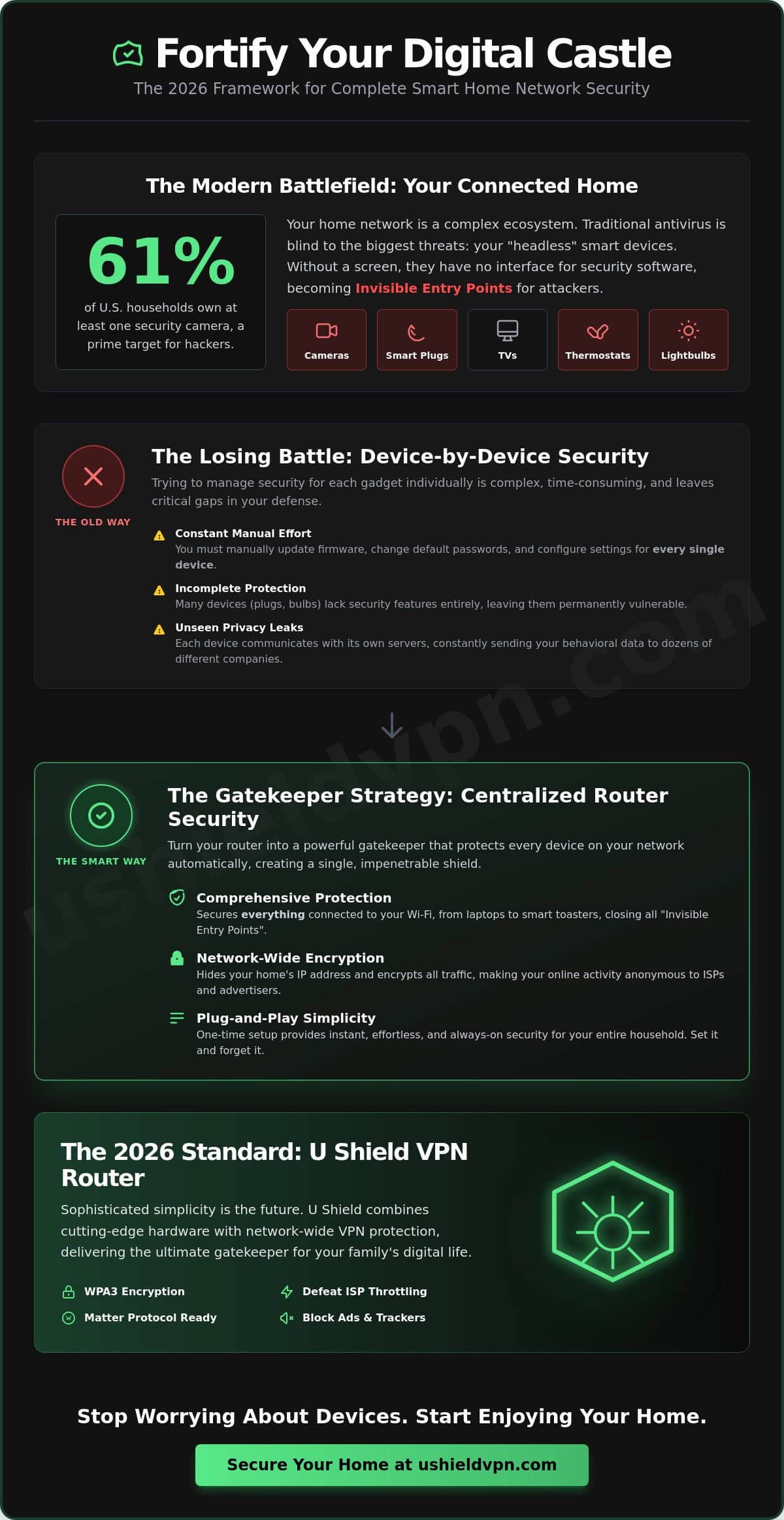
What if the smart cameras meant to protect your family are actually inviting hackers into your living room? With 61% of U.S. households now owning at least one security camera, your private life is more connected than ever. Most people struggle with smart home network security because they try to protect every lightbulb and TV individually. It is a losing battle. You need a silent, powerful guardian that handles the heavy lifting for you.
We agree that managing dozens of different security apps is a chore. You deserve total peace of mind regarding your family data privacy without needing a degree in engineering. This article promises a simple, expert-backed framework to secure every connected device in your home. We provide a complete 2026 checklist that covers the Matter protocol, WPA3 encryption, and the power of a U Shield VPN Router. You will discover how to turn your router into the ultimate gatekeeper for a faster, safer Wi-Fi experience. It is time to stop worrying about your devices and start enjoying your home.
Key Takeaways
- Identify “Invisible Entry” points. Learn why devices without screens are your biggest vulnerability and how to close those gaps.
- Streamline your defense. Use a 5-step checklist to audit unused devices and replace default passwords with unique, complex strings.
- Centralize your smart home network security. Turn your router into a powerful gatekeeper that protects every connected device at once.
- Reclaim your privacy. Discover how network-wide encryption hides your home’s IP address and stops advertisers from profiling your habits.
- Choose sophisticated simplicity. See how plug-and-play hardware provides instant, effortless protection for your entire household.
The Hidden Risks of Your Connected Home in 2026
Your home is no longer just a physical space. It’s a complex digital ecosystem. In 2026, smart home network security means protecting every device that connects to your Wi-Fi, from your thermostat to your toddler’s baby monitor. Most people assume their laptop’s antivirus is enough. It isn’t. These traditional tools can’t reach the “Invisible Entry” points that hackers love most. Your digital perimeter is only as strong as its quietest device.
Devices without screens, like smart plugs or LED bulbs, are the easiest to exploit. You cannot install a security app on a toaster. There is no user interface to check for malware. When your fridge becomes a target, traditional antivirus is powerless. This creates a massive gap in your defense. True protection requires a silent, powerful guardian that monitors your entire digital perimeter from the source. It’s about protecting the connection, not just the hardware.
The Weakest Link: Why IoT Devices are Vulnerable
Modern device design often prioritizes convenience over encryption. Manufacturers want you to set up your new gadget in seconds. This speed often comes at the cost of the core principles of information security. IoT devices rarely receive automated security patches. Once they leave the factory, they’re often frozen in time with outdated code. A single compromised smart bulb might seem harmless. However, it provides a silent gateway to your primary laptop and sensitive bank details.
The Privacy Cost of a Connected Life
Your smart home knows your habits. It tracks when you wake up, what you eat, and your daily family routines. This data is valuable. Unsecured information often flows back to unregulated servers without your consent. In 2026, effective smart home network security is about stopping corporate trackers just as much as stopping malicious hackers. You need to control who sees your life. Modern security must be proactive. It should act as a shield that stays invisible while you enjoy your technology.
- Identify every connected device in your home.
- Recognize that screenless hardware is a primary risk.
- Move security from the device level to the network level.
- Ensure your data stays within your four walls.
This approach removes the technical burden from your shoulders. It ensures your protection is absolute. By focusing on the network hub, you secure every device simultaneously. It’s a sophisticated solution for a complex world.
A 5-Step Checklist for Securing Your Individual IoT Devices
Securing your home starts with a clear inventory. Every connected gadget is a potential entry point. If you want to master smart home network security, you must handle the small details before they become big problems. Follow this streamlined checklist to harden your perimeter. It’s about taking control of your space.
- Audit your inventory. Disconnect any device you no longer use. Fewer connections mean fewer risks.
- Kill default passwords. Manufacturers use the same credentials for thousands of units. Change them to unique, complex strings immediately.
- Enable Multi-Factor Authentication (MFA). Add a second layer of defense. If a hacker steals your password, they still can’t get in without that second code.
- Disable Universal Plug and Play (UPnP). This feature allows devices to open holes in your firewall automatically. Turn it off in your network settings to keep the doors locked.
- Review privacy permissions. Check your apps. Turn off unnecessary microphone or camera access for devices that don’t need them to function.
Mastering Your Device Credentials
Password reuse is a gift to hackers. Don’t use the same code for your smart lock and your personal email. If one is breached, both are compromised. Use a password manager to handle the complexity for you. It’s the easiest way to maintain strong, unique keys for every device. Following IoT security and privacy best practices ensures your digital keys remain yours alone. If a service provider reports a data breach, update your credentials immediately. Speed is your best defense.
Managing Firmware and Software Updates
Software is never finished. Manufacturers release patches to fix newly discovered vulnerabilities. Many IoT devices don’t support auto-patching. Check for manual updates monthly to keep your hardware current. Register your products with the manufacturer. This simple step ensures you receive critical security alerts via email. If a device reaches its “End of Life” and no longer receives updates, replace it. An unpatchable device is a permanent hole in your smart home network security. For a more comprehensive solution, consider a U Shield VPN Router to protect even the oldest hardware on your network. It acts as a silent guardian for every connection.
The Gatekeeper Strategy: Why Your Router is the Ultimate Security Hub
Think of your router as the ultimate gatekeeper. It’s the single point of entry for every byte of data flowing into your household. If the hub is weak, the locks on your individual devices are irrelevant. This is the core of effective smart home network security. Many users rely on software VPNs on their smartphones. These are useful for travel, but they fail to protect a modern smart home. Your Smart TV, baby monitor, and connected cameras don’t support individual security software. They sit on your network, exposed and vulnerable.
The solution is a pre-configured VPN router. This hardware acts as a silent, powerful guardian for your entire digital perimeter. It encrypts your connection at the source. This ensures that every device, no matter how small or simple, is protected by high-level encryption. It’s a sophisticated way to simplify your life. You get total peace of mind without the technical headache of managing dozens of individual apps. You secure the connection, and the devices follow.
The Benefits of a Hardware VPN
A hardware VPN provides immediate, network-wide protection. It secures everything from your high-end gaming PC to your simplest smart plug. This approach eliminates the need to install and update security apps on every household device. You save time and reduce the risk of human error. This silent protection operates in the background, ensuring your family’s data privacy remains intact. It aligns perfectly with the NIST smart home security tips for maintaining a safer digital home. Efficiency and safety work together.
Network Segmentation Made Simple
Isolation is a powerful defense strategy. You should never allow a smart lightbulb to share the same network space as your primary laptop. Use your router to create a dedicated guest network for all IoT devices. This simple step keeps your smart appliances in a sandbox. If one device is compromised, the hacker cannot jump to your personal files or financial data. Many guides make this process sound complex. It’s actually a standard feature on modern hardware. Keep your primary Wi-Fi password private. Use the guest network for everything else. This creates a logical, secure barrier that protects your family’s most sensitive information. For a complete breakdown of how to deploy a VPN router for smart home protection across every device, our definitive 2026 guide walks you through every step of the process.
By centralizing your smart home network security at the router level, you remove the complexity of individual device management. You stop reacting to threats and start preventing them. It’s a proactive shift that defines modern digital protection. Your home stays private. Your devices stay secure. Your life stays yours.
Advanced Privacy: Defeating Trackers and Data Throttling
Modern security is about more than just stopping intruders. It’s about reclaiming your anonymity. Your home generates a massive amount of data every day. Advertisers and data brokers want that information. They use your home’s IP address to track your physical location and daily habits. A robust smart home network security strategy uses a VPN to mask this address. It makes your household invisible to prying eyes. You stop being a target for profiling. You start living with total peace of mind. It’s about taking back your digital space.
Military-grade encryption is the standard for 2026 home privacy. It’s no longer just for government agencies. You need this level of protection to stop companies from harvesting your family’s routines. Anti-trackers play a vital role here. They block the hidden scripts that report your device usage back to corporate servers. Adopting a privacy-first mindset is essential. Before adding a new smart feature, ensure it sits behind a powerful shield. Protect your data before it ever leaves your front door. You deserve a home that stays private.
The Role of a VPN Kill Switch
Reliability is the backbone of digital safety. A VPN is a secure tunnel, but even the best tunnels can occasionally flicker. A Kill Switch acts as your ultimate safety net. If your secure connection drops, the Kill Switch cuts all internet traffic instantly. This prevents any data from leaking onto an unencrypted line. It’s a non-negotiable feature for smart cameras and baby monitors. These devices must never transmit private visuals over an open connection. You get total security, even during ISP outages or brief network resets. It’s protection that never sleeps. It keeps your private life private.
Bypassing ISP Throttling and Surveillance
Your internet service provider (ISP) is often a major threat to your privacy. They see every device you connect. They know your schedule. They often sell this usage data to third-party advertisers without your consent. Many providers also use “throttling” to slow down your connection during high-bandwidth activities like 4K streaming or gaming. A VPN puts an end to this surveillance. It encrypts your traffic so your ISP cannot see what you’re doing. You maintain the high speeds you pay for. You stop being a product for your provider to sell. Secure your digital freedom today with a U Shield VPN Router and take back control of your home network.
By shifting to this advanced privacy model, you do more than just lock the door. You build a wall. You ensure that your smart home network security is proactive and absolute. Your devices stay fast. Your habits stay secret. Your home remains your sanctuary.
Plug-and-Play Protection: Why U Shield VPN Routers are the 2026 Standard
Security shouldn’t be a second job. You’ve seen the risks and reviewed the checklists. Now, you need a solution that just works. U Shield VPN is the sophisticated simplifier for modern smart home network security. We take the technical burden off your shoulders. Our hardware arrives pre-configured. You plug it in, and the protection starts instantly. It is the single, effective purchase that secures your entire digital perimeter. You get total protection without the technical fatigue.
The U Shield VPN Router acts as a silent, powerful guardian. It operates in the background of your daily life. While you enjoy your home, it works to deflect trackers and block unauthorized access. This is the new standard for 2026. It moves beyond individual device management to provide a unified shield. You don’t need to be a network engineer to have a secure home. You just need the right tools. It’s time to replace complexity with confidence.
Why U Shield VPN is Different
Most security solutions require hours of manual configuration. U Shield VPN is different. Our routers come ready to protect right out of the box. There is zero technical stress involved in the setup. We have optimized our hardware for 2026 speeds. This ensures zero-lag streaming for your 8K Smart TVs and high-speed gaming consoles. Every device in your home benefits from military-grade encryption. This includes the smart bulbs and cameras that cannot run individual apps. You get high-level security with the click of a cable. Speed and safety finally coexist.
Take Control of Your Digital Home
You are not alone in your search for better privacy. Join thousands of families who have already closed the security gap with U Shield VPN. Our global network of high-speed, secure servers ensures your data stays private and your connection stays fast. You can finally stop worrying about who is watching your cameras or tracking your habits. Reclaim your sanctuary. It is the most efficient way to achieve total peace of mind for your family. Secure your home today with a U Shield VPN Router and experience the freedom of a truly protected network.
Choosing U Shield VPN means choosing a better digital experience. You remove the obstacles between you and your technology. Your smart home network security becomes a background feature rather than a daily chore. It is fast, logical, and absolute. Your home is your private world. We help you keep it that way.
Secure Your Digital Sanctuary Today
Your home should be your most private space. We have explored how screenless devices create hidden risks and why the router is your ultimate line of defense. True protection doesn’t require constant maintenance. It requires a smarter strategy. By centralizing your security at the source, you protect every bulb, camera, and tablet simultaneously. It is the most efficient way to maintain a modern household.
Modern smart home network security is a choice between complexity and confidence. You can manage dozens of individual apps, or you can let a silent guardian handle the work. U Shield VPN provides military-grade encryption for unlimited devices with a single router. Our hardware is pre-configured for zero technical stress. This allows you to enjoy your connected life without compromise. It is time to lock your digital front door for good.
Get the U Shield VPN Router for Plug-and-Play Home Security
You deserve the freedom of a safe, fast, and private home network. Take the final step toward total peace of mind today. Your sanctuary is waiting.
Frequently Asked Questions
How do I know if my smart home network has been hacked?
Look for unusual device behavior, such as cameras moving on their own or lights flickering unexpectedly. Check your router’s admin panel for unrecognized connected devices. Sudden spikes in data usage or slow network speeds can also indicate an intruder. If your passwords no longer work or settings have changed without your input, your smart home network security has likely been compromised. Act immediately by resetting your hardware and changing all credentials.
Can a VPN protect my smart lightbulbs and plugs?
Yes, but only if the VPN is installed at the router level. Smart bulbs and plugs cannot run individual security apps. A VPN router encrypts the data for every device connected to your Wi-Fi, including those without screens. This creates a secure tunnel for all traffic, preventing hackers from using a simple lightbulb as a gateway into your private network. It is the most efficient way to achieve total home protection for every gadget.
What is the most important smart home security tip for beginners?
Change every default password immediately upon setup. Most manufacturers ship devices with identical, well-known credentials that hackers can easily exploit. Use a unique, complex string for every device and enable multi-factor authentication whenever it is available. This simple step creates a massive barrier for intruders. It is the foundation of a safe digital home and should be your first priority when adding any new technology to your household network.
Do I need a special router for a secure smart home?
A standard ISP router often lacks the advanced features needed for robust protection. You need a router that supports WPA3 encryption and has the processing power to handle network-wide VPN services. A pre-configured VPN router is the best choice for non-technical users. It provides sophisticated security features right out of the box, ensuring your smart home network security is absolute without requiring complex manual setup or deep engineering knowledge from the user.
How often should I update the firmware on my IoT devices?
Check for firmware updates at least once a month. Manufacturers release these patches to close security holes and fix vulnerabilities discovered by researchers. If your device supports auto-updates, enable that feature immediately to ensure you stay protected. For devices that require manual intervention, set a recurring calendar reminder. Running outdated software is like leaving your front door unlocked. Regular updates keep the locks strong and effective against modern digital threats.
Will a VPN router slow down my smart TV streaming speeds?
High-quality VPN routers are built to maintain maximum velocity. While encryption adds a layer of processing, modern hardware is optimized to handle 4K and 8K streaming without lag. In many cases, a VPN can actually prevent ISP throttling, which is when your provider intentionally slows down your connection during high-bandwidth activities. You get the benefit of absolute privacy while enjoying the fast, smooth performance you expect from your entertainment devices and gaming consoles.
Is it safe to use a smart camera inside my house in 2026?
It is safe only if you use a layered security approach. Ensure the camera is on a separate guest network and protected by a router-level VPN. This prevents unauthorized users from accessing the live feed or stored footage. Always use strong, unique passwords and enable physical privacy shutters if the hardware includes them. When these precautions are in place, you can enjoy the benefits of home monitoring with total peace of mind and complete privacy. For a deeper dive into the latest threats and defenses, our guide on how to prevent smart home hacking with a 2026 network-wide security strategy covers every layer of protection you need.
What should I do before selling or gifting an old smart device?
Perform a full factory reset to wipe all personal data and network credentials. Simply deleting the app from your phone is not enough. The device itself must be cleared. Check the manufacturer’s instructions to ensure the reset is complete. Unregister the hardware from your account and remove it from your home hub. This protects your privacy and ensures the new owner starts with a clean, secure device that is no longer linked to your network.
