






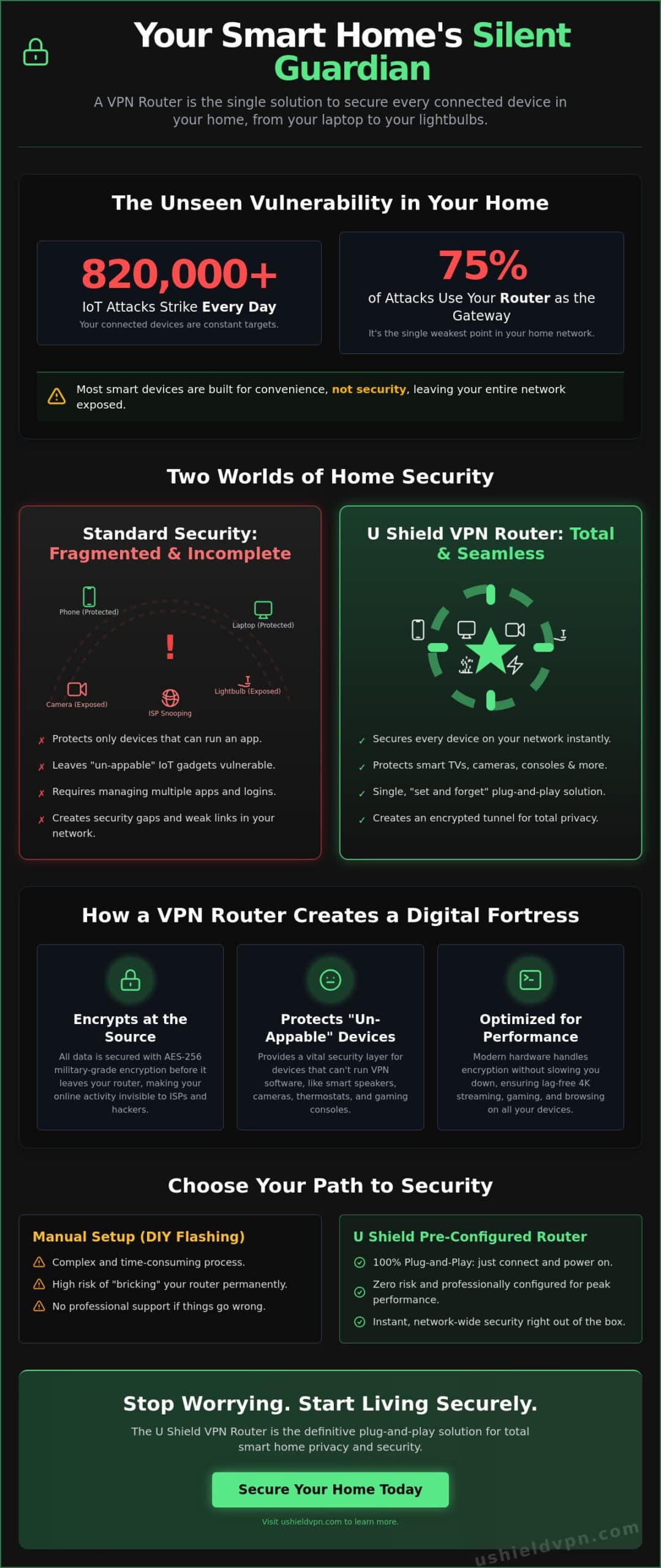
Over 820,000 IoT attacks strike every day. SentinelOne reports that routers are the primary gateway for 75% of these hits. Your smart home is only as secure as its front door. Installing a VPN router for smart home protection is the only way to lock that door permanently. It provides a silent, powerful layer of defense for every connected device you own.
We know you’re tired of complex technical setups that slow down your internet. Security shouldn’t mean sacrificing your 4K streaming speed. This guide shows you how to secure every device in your home instantly. You will learn to deploy a single solution that offers total privacy and plug-and-play ease. We’ll walk you through the latest 2026 standards and the best ways to keep your data invisible. It’s time to take the technical burden off your shoulders and enjoy a truly protected home.
Key Takeaways
- Secure every device instantly. A VPN router for smart home use protects “un-appable” hardware like smart bulbs and cameras.
- Encrypt data at the source. Learn how network-wide encryption stops threats before they enter your private space.
- Choose the right setup. Compare the risks of manual firmware flashing against the reliability of professional, pre-configured solutions.
- Maximize your performance. Discover placement and bandwidth management tips for lag-free 4K streaming and total home coverage.
- Simplify your security. See how the U Shield VPN Router offers a plug-and-play defense that stays invisible in the background.
Why Your Smart Home is Only as Secure as Your Router
Your smart home is an ecosystem of convenience. It’s also a vast map of digital vulnerabilities. In 2026, the average household manages dozens of connected devices. Most people focus on securing their laptops or phones. They ignore the smart toaster or the Wi-Fi connected doorbell. This is a mistake. Hackers don’t look for the strongest lock; they look for the open window. A VPN router for smart home security closes every window at once. It acts as a single, unbreakable gateway for your entire digital life.
The IoT Security Gap Explained
Smart lightbulbs and fridges are built for utility, not defense. They rarely have the processing power to run sophisticated antivirus software. Manufacturers often prioritize low costs over robust security patches. This creates a massive gap in your perimeter. If a hacker gains access to a single smart plug, they can move laterally across your network. They can reach your private files or sensitive personal data. The IoT “weakest link” is the primary entry point for 2026 cyber threats.
Beyond the App: Why You Need a Hardware Solution
Traditional security relies on individual applications. This approach fails in a modern smart home. You can’t install an app on a smart thermostat. You shouldn’t have to manage 20 separate logins just to stay safe. Managing a Virtual Private Network (VPN) on every individual gadget is exhausting and often impossible. Many devices lack a screen or interface entirely. This leaves them exposed and vulnerable to external monitoring.
A hardware solution solves this by encrypting data at the source. When you secure the router, you secure every bit of data that passes through it. It provides blanket protection for everything from your gaming console to your smart locks. This proactive approach is the best way to prevent smart home hacking without the constant headache of manual updates. It’s a “set and forget” strategy that prioritizes your peace of mind.
A VPN router for smart home setups acts as your network’s silent guardian. It stands at the edge of your connection, scrubbing every packet of data. This isn’t just about privacy; it’s about control. You decide what enters and exits your home. By centralizing your security, you remove the human error of forgotten updates or disabled apps. It’s a professional grade solution designed for everyday life. It turns a vulnerable network into a private fortress, operating quietly in the background while you enjoy your home.
The Silent Guardian: How a VPN Router Protects IoT Devices
Encryption shouldn’t be an afterthought. It should be the foundation of your network. When you use a VPN router for smart home security, you secure every byte of data before it ever leaves your property. This is encryption at the source. It creates a hardened tunnel that wraps around your entire Wi-Fi signal. Every device that joins your network is automatically shielded. There’s no need to configure individual settings on every new gadget you buy. You simply connect and stay protected.
Network-Wide Military-Grade Encryption
Privacy in 2026 relies on AES-256 encryption. This is the gold standard for data security. It’s the same level of protection used by government agencies to secure classified information. By applying military grade encryption VPN protocols at the router level, you make your home habits invisible. Your ISP can no longer track which shows you stream or when your smart locks engage. According to NIST on IoT security, establishing trustworthy connections is vital for a resilient home. This encrypted tunnel ensures that your private life stays private, even if your provider attempts to harvest your data.
Protecting Devices Without Native VPN Support
Most smart home hardware is “un-appable.” You cannot install a security app on a smart thermostat or a refrigerator. These devices are often the most vulnerable. A VPN router for smart home use provides a safety net for these specific targets. It secures your gaming consoles, Smart TVs, and security camera feeds without requiring any local software. This prevents hackers from hijacking your camera streams or using your thermostat as a backdoor into your network. Smart TVs in particular are among the fastest-growing cybersecurity concerns in 2026; if you want to understand exactly what hardware features matter most for your television’s protection, our secure router for smart TV buying guide covers Wi-Fi 7 performance, FCC regulations, and ISP throttling in full detail. If you own a Smart TV and want to understand how router-level protection compares to other methods, our guide on how to put VPN on smart TV without app covers every proven approach in detail. If the connection drops, a single network-wide kill switch stops all data flow. This ensures no unencrypted information ever leaks into the public web.
Performance remains a top priority. Modern routers use dedicated hardware to handle encryption tasks. This means you can enjoy total privacy without sacrificing your 4K streaming quality. You don’t have to choose between safety and speed. You can protect your family while maintaining the fast, responsive connection you expect. If you want to simplify your digital life, you might consider a U Shield VPN Router to handle the heavy lifting for you. It operates silently in the background, acting as a powerful guardian that never sleeps. You get the freedom of an open internet with the security of a closed fortress.
Pre-Configured vs. Manual Setup: Choosing Your Security Level
Deciding on a VPN router for smart home protection often boils down to one simple choice. Do you want a complex project or a reliable solution? Manual configuration appeals to the technical enthusiast. Pre-configured hardware serves the user who values time and absolute reliability. The difference between these two paths isn’t just about the initial setup. It’s about the long-term integrity of your home’s digital armor.
The Complexity of Manual Configuration
Flashing a router with custom VPN firmware is a high-stakes process. Most standard ISP routers are locked down. They often block the very modifications needed for network-wide encryption. If the installation process fails, you risk “bricking” your hardware. This turns an expensive router into a useless paperweight. Even when successful, DIY setups are prone to configuration errors. A small mistake in the kill switch settings or protocol selection can leave your data exposed. You might spend hours troubleshooting only to end up with a slower, less secure network. To understand which approach fits your lifestyle, compare a VPN app vs VPN router setup to see where the real value lies.
Security agencies like the Cybersecurity and Infrastructure Security Agency emphasize the importance of Securing the Internet of Things through consistent management. Manual setups often lack the streamlined update features found in professional builds. This forces you to manually track and apply security patches. If you miss a critical update, your entire home network becomes a target. The time-to-protection for a manual setup can stretch into an entire afternoon of frustration.
The Benefits of Pre-Configured Hardware
Pre-configured hardware removes every technical obstacle. It offers a true plug-and-play experience. You can achieve total network security in under five minutes. The firmware is specifically optimized for high-speed encryption. This ensures your 4K streaming remains crisp and your gaming remains lag-free. Every setting is pre-tested by experts for maximum stability. You don’t have to guess which protocol is best for your specific devices. The router arrives ready to defend your home from the moment it’s powered on.
Peace of mind is the ultimate benefit of a professional solution. A pre-configured VPN router for smart home use acts as a silent guardian that just works. It respects your time and takes the technical burden off your shoulders. You get the highest level of security without the risk of DIY errors. It’s the most efficient way to ensure every device in your home is protected by a tested, high-performance shield.
Optimizing Your Smart Home for Security and Performance
Securing your home is the first step. Optimizing it is the second. A VPN router for smart home use needs the right environment to thrive. Physical placement is critical. Place your router in a central, elevated location. Avoid hiding it in a cabinet or a basement corner. This ensures the encrypted signal reaches every smart bulb and camera without interference. Weak signals lead to dropped connections. Dropped connections lead to security gaps. A strong, centralized signal keeps your entire perimeter locked down.
Managing bandwidth is equally vital. High-definition 4K streaming and low-latency gaming require significant resources. Modern routers use advanced processors to handle encryption without slowing you down. You can also set up a dedicated guest network. This keeps visitors on a separate path while remaining under the VPN umbrella. It protects your primary network from outside devices that might be compromised. You get to share your Wi-Fi without sharing your private data.
Balancing Speed and Security
Server location impacts your daily experience. Choosing a server close to your physical location reduces latency. This is essential for smart home response times. You don’t want a five-second delay when you ask your smart assistant to turn off the lights. Proper server selection ensures your security doesn’t cause lag. For those prioritizing cinema-quality video, check out our guide on VPN for streaming to master your entertainment setup. It helps you maintain peak performance while staying invisible.
Managing Multiple Devices with One Login
The beauty of a network-wide solution is simplicity. You use one set of credentials for every device. When you buy a new smart appliance, you simply connect it to your Wi-Fi. It’s protected instantly. There’s no need to re-configure settings or install new apps. You should also monitor your network for unusual activity. Most professional router interfaces allow you to see every connected device in real-time. If an unknown device appears, you can block it with one click. This level of visibility is your best defense against unauthorized access.
Regular maintenance keeps your fortress strong. Firmware updates are non-negotiable. They contain the latest security patches and performance tweaks. Professional hardware often handles these updates automatically. This ensures you’re always protected against the newest 2026 threats. If you’re ready to upgrade your home network, get the U Shield VPN Router and experience seamless, high-speed security today. It takes the guesswork out of protection so you can focus on enjoying your home.
U Shield VPN Router: The Plug-and-Play Solution for 2026
The U Shield VPN Router is the sophisticated simplifier for your digital life. It removes the friction of high-level security. You get absolute protection without the technical overhead. The commitment from U Shield VPN is clear. We provide invisible, powerful defense that stays out of your way. This isn’t just hardware. It’s a silent guardian for your peace of mind. It turns a complex necessity into an effortless experience.
Integrated features set this solution apart. The built-in anti-tracker stops advertisers from profiling your home habits. The automatic kill switch acts as a final fail-safe. If your connection wavers, all data stops instantly. No leaks. No exposure. High-speed global servers are specifically optimized for IoT traffic. This ensures your smart home stays responsive and secure at all times. You get the speed you pay for with the privacy you deserve.
Instant Protection with U Shield VPN Router
Setup is effortless. Your VPN router for smart home arrives pre-configured and ready for action. You don’t need to flash firmware or navigate complex menus. You plug it in, and your network is secure in minutes. This eliminates the technical stress of DIY configurations. It’s a professional-grade solution designed for the average person.
U Shield VPN offers a unified experience. A single subscription for a Monthly VPN Plan or Annual VPN Plan covers both your high-performance hardware and network access. If you have questions, the U Shield VPN support team understands the entire ecosystem. You won’t be bounced between a hardware seller and a provider. We own the solution from end to end. This creates a reliable support loop that respects your time.
2026 Features for the Modern Smart Home
Security in 2026 requires more than just encryption. U Shield VPN Router hardware includes AI-enhanced threat detection. It identifies and blocks adaptive malware before it reaches your devices. This proactive defense is vital as cyberattacks become more sophisticated. It monitors your network for unusual patterns, acting as an early warning system for your household.
Your entertainment remains uninterrupted. We provide unlimited data for a household full of 4K devices. Stream, game, and browse without worrying about caps or speed drops. You get the full power of your fiber connection with the added benefit of total privacy. It’s time to stop managing security and start enjoying your home. Secure your home today with the U Shield VPN Router and experience the future of private networking.
Secure Your Connected Future Today
Your home deserves a silent guardian. We’ve shown how a single gateway secures every device, from smart cameras to thermostats. You don’t need to be a technical expert to achieve total privacy in 2026. Choosing a VPN router for smart home security is the single most effective step you can take for your digital peace of mind. It removes the vulnerability of individual gadgets. It replaces them with a unified, unbreakable shield that operates quietly in the background.
The U Shield VPN Router delivers this protection instantly. You get military-grade AES-256 encryption and plug-and-play hardware that works right out of the box. Our 24/7 expert security support is always ready to assist you. Stop managing complex settings. Start enjoying a truly private network. Protect your entire smart home with the U Shield VPN Router. Take control of your data today. Live with the absolute confidence that your family is safe and your connection is yours alone.
Frequently Asked Questions
Will a VPN router slow down my smart home devices?
No, high-performance hardware prevents noticeable speed drops. Modern processors in a VPN router for smart home use are designed to handle heavy encryption at the network edge. You can maintain 4K streaming and responsive smart home commands without the lag associated with older software setups. It’s about having the right hardware for the job.
Can I use a VPN router with my existing ISP modem?
Yes, it connects directly to your existing modem via a standard Ethernet cable. The VPN router sits behind your modem to create a separate, secure Wi-Fi network for your household. This configuration ensures every device is shielded regardless of which internet provider you use. It’s a simple addition that adds a massive layer of defense.
Do I still need the VPN app on my phone if I have a VPN router?
Yes, but only for protection when you leave the house. While the router secures every device connected to your home Wi-Fi, the U Shield VPN App protects your phone on cellular data or public hotspots. Using both ensures you have 360-degree security whether you’re in your living room or at a coffee shop.
How many devices can I connect to a U Shield VPN Router?
You can connect as many devices as your home requires. We support a house full of smart bulbs, security cameras, and streaming sticks without arbitrary limits. The hardware is built to manage the high density of connections found in a modern 2026 smart home. Every gadget gets the same level of military-grade protection.
Is it difficult to set up a pre-configured VPN router?
No, it’s a true plug-and-play experience. Pre-configured hardware arrives ready to use with your settings already optimized. You simply power it on and connect your devices to the new secure network. Most users achieve total home protection in under five minutes without touching a single line of code.
Does a VPN router protect my smart home from hackers?
Yes, it acts as a silent, powerful guardian for your network. By encrypting all incoming and outgoing data, a VPN router for smart home security prevents hackers from intercepting camera feeds or hijacking smart devices. It closes the entry points that attackers typically use to breach a home network.
What happens if the VPN connection drops?
The integrated kill switch stops all internet traffic immediately. This prevents unencrypted data from leaking onto the public web if the secure tunnel is interrupted. Your privacy remains intact until the connection is safely restored. You’re never left exposed to the open internet without your knowledge.
Can I exclude certain devices from the VPN on my router?
Yes, you can manage specific device paths through the router interface. This allows you to choose which devices use the encrypted tunnel and which connect directly to the internet. It’s a useful feature for gaming consoles or local services that might require a direct connection for specific regional features.
