






What if every device in your home was secure before you even turned it on? Most users feel the frustration of hitting app limits or managing separate logins for every phone, tablet, and laptop. It is even more concerning when smart TVs or gaming consoles stay exposed because they don’t support standard security software. One of the primary benefits of a dedicated vpn router is that it eliminates these gaps by protecting your network at the source.
You don’t need to be a networking expert to achieve total home encryption. We’ve designed this 2026 guide to remove the technical stress and the fear of damaging your hardware during setup. You’ll learn how to configure your system for permanent peace of mind using modern standards like WireGuard. We will walk through the exact steps to install a VPN on your router, covering everything from protocol selection to the plug-and-play simplicity of the U Shield VPN Router. It’s time to take the technical burden off your shoulders and let your network guard itself.
Key Takeaways
- Secure every device on your Wi-Fi instantly. Protect smart TVs and consoles that don’t support standard apps.
- Unlock the benefits of a dedicated vpn router to bypass device limits. Encrypt your entire home network with a single, powerful configuration.
- Identify if your hardware is compatible before you begin. Most ISP-provided routers lack the “VPN Client” mode needed for secure connections.
- Navigate the manual setup process with confidence. Learn how to access admin dashboards and resolve common speed or connectivity issues.
- Choose the plug-and-play path for zero technical stress. Pre-configured routers offer military-grade protection without the risk of manual configuration errors.
Why Put a VPN on Your Router? The Benefits of Network-Wide Security
Your home network is only as strong as its weakest device. Most people install security apps on their phones and laptops but leave the rest of the house exposed. This creates a massive security gap. One of the primary benefits of a dedicated vpn router is that it secures every single device at the source. Once the router is protected, every connection passing through it is safe. It’s a total shield for your digital life.
To grasp why this is so effective, it helps to revisit what a VPN is. It’s a technology that creates a secure, encrypted tunnel between your network and the internet. By placing this tunnel at the router level, you aren’t just protecting a single screen. You’re protecting your entire digital environment. This “always-on” encryption means you never have to worry about whether you remembered to toggle a switch before browsing. It stays active so you don’t have to.
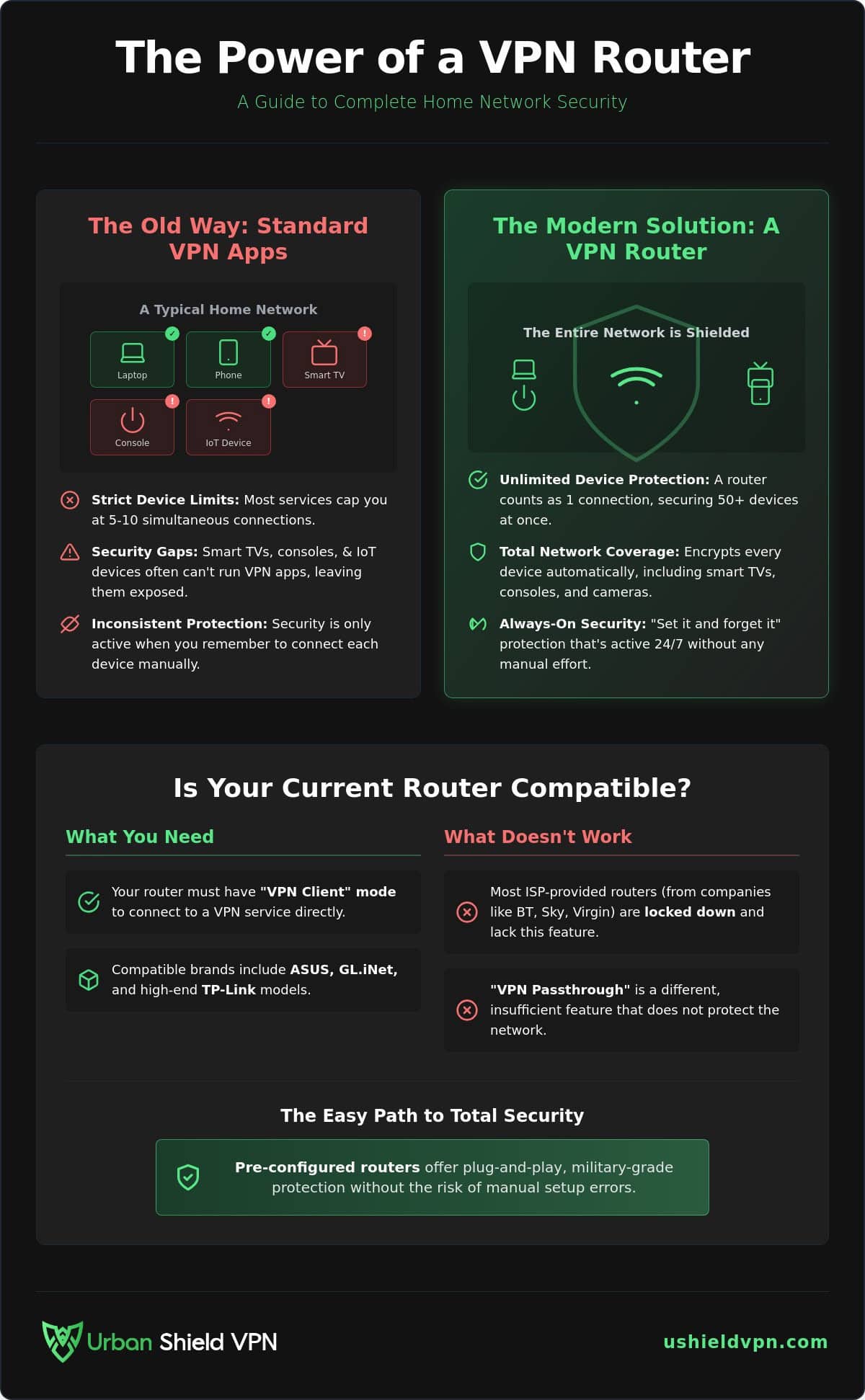
Standard VPN subscriptions often come with strict device limits. You might be allowed five or ten simultaneous connections. In a modern home with smart speakers, tablets, and phones, you’ll hit that limit in minutes. A router counts as exactly one connection. It doesn’t matter if you have 50 devices connected to your Wi-Fi; they are all shielded under that single router login. This allows you to scale your security without scaling your costs.
Securing the Weakest Links: Smart TVs and IoT
Smart TVs and IoT gadgets are the forgotten devices in home security. Most of these products don’t allow you to install third-party security apps. This makes them easy targets for data tracking and external hacking. Smart TVs, in particular, are notorious for collecting viewing habits and selling them to advertisers. They lack the internal defenses found in modern smartphones.
A network-wide VPN protection strategy closes these doors. When the encryption happens at the router, your TV’s data is masked before it even leaves your house. It turns vulnerable entry points into secure endpoints. You get the benefits of a dedicated vpn router without needing to tinker with individual device settings that don’t exist. It’s the only way to protect hardware that wasn’t built with privacy in mind.
One Login, Total Protection
Managing multiple logins is a chore. It leads to security fatigue, where users eventually stop using their protection because it’s too much of a hassle. A router setup eliminates this friction entirely. You configure it once, and you’re done. Your consoles, fridges, and cameras are safe without a single extra click.
This approach ensures you maintain consistent military grade encryption VPN standards across every piece of hardware you own. Whether it’s a guest’s phone or your work laptop, the protection is automatic and invisible. It’s the ultimate “set and forget” solution for modern privacy. You gain peace of mind by making security the default state of your home.
The Compatibility Check: Can Your Router Handle a VPN?
Your standard ISP router is likely a brick wall for digital privacy. Most hubs provided by companies like BT, Sky, or Virgin Media are locked down. They offer basic connectivity but lack the internal power to handle network-wide encryption. To experience the benefits of a dedicated vpn router, your hardware must support “VPN Client” mode. This is a specific feature that allows the router to log into a VPN service directly. Many users mistake this for “VPN Passthrough,” which is common but insufficient. Passthrough simply means the router won’t block a VPN signal from your phone or laptop. It does not protect the entire network.
You can verify your hardware by logging into the admin panel. Type your router’s IP address into a browser and look for “Advanced Settings.” If you don’t see a dedicated VPN tab or a “VPN Client” option, your current hardware cannot secure your home. Compatible brands often include ASUS, GL.iNet, and high-end TP-Link models. These manufacturers prioritize user freedom and include the necessary firmware. If your current hub feels like a dead end, a U Shield VPN Router offers a pre-configured escape from these technical hurdles.
ISP Routers vs. Third-Party Hardware
Internet providers lock their hardware to reduce support calls and maintain control over their ecosystem. They want a “one size fits all” experience that rarely includes advanced security. If you are stuck with a provider’s hub, you can use “Bridge Mode.” This setting turns your ISP router into a simple modem. You then connect a VPN-ready router to it, allowing the second device to handle all your security needs. It’s a clean, effective workaround for restrictive hardware.
Understanding VPN Protocols: OpenVPN vs. WireGuard
Protocols are the languages your router uses to encrypt data. In 2026, WireGuard is the undisputed standard for speed and efficiency. It is lightweight and perfect for high-speed 4K streaming. OpenVPN remains a reliable, industry-standard choice with excellent compatibility, but it often struggles on older router CPUs. Encryption is a heavy task for a processor. Before you start a manual setup, verify which protocol your firmware supports. WireGuard will always provide a smoother, faster experience for a busy household. Choose it whenever possible to ensure your security doesn’t slow you down.
Manual configuration turns your router into a powerful guardian. It requires attention to detail but provides a sense of absolute control. By following these steps, you can unlock the benefits of a dedicated vpn router without needing to install software on every individual phone or tablet. It’s a one-time effort for permanent peace of mind.
Step 1: Accessing the Admin Dashboard
Your journey begins at the heart of your network. Open a web browser on a device connected to your Wi-Fi. Type your router’s internal IP address into the search bar. Most devices use 192.168.1.1 or 192.168.0.1. If these don’t work, check the physical sticker on your hardware. It will list the default gateway address along with the factory username and password.
Security starts with current software. Ensure your firmware is updated to the latest version before you touch the VPN settings. Manufacturers release frequent patches to fix vulnerabilities and optimize performance. An outdated router might struggle with the processing power required for high-level encryption. Once you’re logged in and updated, navigate to the “Advanced Settings” or “Services” menu. This is where you’ll find the tools to transform your network.
Step 2: Configuring the VPN Client
Precision is vital when setting up your tunnel. Many routers offer a “VPN Server” option, but don’t be misled. A VPN Server is for accessing your home network while you’re away. To protect your outbound internet traffic, you must locate the “VPN Client” section. This is the feature that allows your router to connect to a secure global server.
You’ll need a configuration file from your VPN provider. For OpenVPN, look for .ovpn files. For WireGuard, you’ll need .conf files. Upload these directly into the router interface. Next, enter your VPN credentials. Remember that some providers use a unique “manual setup” username and password that differs from your standard website login.
Always enable “DNS Leak Protection” within these settings. This ensures your service provider can’t see your browsing history through the back door. Once you hit “Activate,” the router establishes its secure tunnel. Your smart fridge, gaming console, and guest devices are now shielded. You’ve successfully achieved the core benefits of a dedicated vpn router: total, invisible privacy for every corner of your home.
Common Challenges and How to Fix Them
A router-level VPN is a powerful fortress, but even the best defenses require occasional maintenance. Troubleshooting ensures your security remains impenetrable without sacrificing performance. Most issues stem from the physical limitations of your hardware or minor configuration errors. Understanding these hurdles allows you to maintain a seamless, protected connection for every device in your home.
Speed drops are the most frequent complaint. Encryption is a math-heavy process that demands significant processing power. Many standard router CPUs simply aren’t built for this level of heavy lifting. This is where the benefits of a dedicated vpn router become most apparent. These devices feature specialized processors designed to handle high-speed encryption without throttling your bandwidth. If you experience a slowdown, check your router’s CPU load in the admin panel. If it’s hitting 100%, your hardware is the bottleneck.
Connectivity loops can also occur, leaving your status stuck on “Connecting.” This usually indicates an outdated configuration file or a protocol mismatch. Refresh your .ovpn or .conf files from your provider’s dashboard. Additionally, ensure your system time is accurate. If your router’s internal clock is wrong, security certificates will fail to validate, preventing a successful tunnel. A quick sync with an NTP server usually solves the problem instantly.
You might also need to exclude certain devices from the VPN. Some local services, like grocery delivery apps or banking portals, may flag foreign IP addresses. Use “Policy-Based Routing” or “Split Tunneling” to let specific hardware bypass the VPN. Finally, verify your kill switch. This is your last line of defense. It cuts your internet connection immediately if the VPN drops, preventing accidental data leaks. Always test this by manually disconnecting the VPN and checking if your internet access stops.
Optimising Speed for Streaming and Gaming
Velocity is vital for a modern household. For the best VPN for streaming experience, switch your protocol to WireGuard. It is leaner and significantly faster than older standards. Always select a server physically close to your location. Physical distance to the server dictates your ping; closer servers mean lower latency and zero lag. This simple choice can be the difference between a smooth 4K stream and constant buffering.
The Risk of Flashing Custom Firmware
Older routers often require custom firmware like DD-WRT or Tomato to support VPNs. While this can breathe new life into old hardware, it carries a “bricking” risk. One wrong move during the installation can ruin your hardware permanently, turning it into an expensive paperweight. Modern pre-configured VPN routers remove this danger entirely. They arrive ready to protect, saving you from the stress of manual flashing. If you want to skip the technical hurdles and secure your home instantly, order your pre-configured U Shield VPN Router today.
The Easy Alternative: U Shield VPN Pre-Configured Routers
Manual setup is a powerful tool, but it’s not for everyone. If you want to bypass the technical stress discussed in previous sections, there is a streamlined path to total security. The U Shield VPN Router arrives at your door fully prepared for action. We handle the complex configuration so you don’t have to. You won’t need to flash firmware, risk bricking your hardware, or upload a single configuration file. It is a true plug-and-play experience designed for immediate peace of mind.
One of the core benefits of a dedicated vpn router from U Shield is the level of hardware optimization. Most generic routers treat encryption as an afterthought, which leads to the speed drops we’ve mentioned. Our routers are built with specific processors designed to work in harmony with our high-speed global server network. This ensures your 4K streaming and gaming remain fluid while your data stays encrypted. You get the protection you need without the performance trade-offs common in DIY setups.
Support is another area where the pre-configured approach wins. When you use third-party hardware with a separate VPN service, you often find yourself stuck between two different support teams when things go wrong. With U Shield, you have a single point of contact. We provide dedicated support for both the physical hardware and the VPN service itself. This unified approach removes the friction from digital security, making it accessible for any household regardless of technical skill.
Why Hardware-Level Security Wins
Security should be invisible and effortless. Our routers feature powerful internal processors capable of handling heavy AES-256 encryption without a hint of lag. These aren’t just standard routers; they are specialized security hubs. Features like the built-in anti-tracker and the network-wide kill switch are active from the very first boot. You gain the benefits of a dedicated vpn router immediately, knowing that every packet of data leaving your home is professionally secured. It’s a silent, powerful guardian that operates in the background of your life.
Getting Started with U Shield VPN
Securing your entire household is a simple choice. You can prevent smart home hacking by simply swapping your existing hub for a U Shield model. We offer flexible Monthly and Annual VPN Plans to provide the best value for your security needs. By choosing a pre-configured solution, you eliminate the “what-ifs” of manual installation and move straight to protection. It’s time to take the technical burden off your shoulders. Get your pre-configured U Shield VPN Router today and experience total digital freedom with a single click.
Future-Proof Your Home Network Security
Securing your digital life shouldn’t be a part-time job. By moving your protection to the router level, you ensure that every smart TV, gaming console, and guest device is shielded the moment it connects. You’ve seen how manual setup provides control; however, the true benefits of a dedicated vpn router lie in the simplicity of total, network-wide encryption. It’s about removing the technical burden and replacing it with permanent peace of mind.
You don’t have to struggle with firmware or configuration files. Our pre-configured hardware offers military-grade AES-256 encryption and plug-and-play simplicity. With 24/7 technical support for your home network, you are never left to navigate the complexities alone. It is time to let your network guard itself while you focus on what matters. Your home deserves a silent, powerful guardian that works in the background.
Secure your entire home instantly with a U Shield VPN Router
Take the final step toward a safer, faster, and more private digital experience. Start enjoying the freedom of a fully protected household today.
Frequently Asked Questions
Will putting a VPN on my router slow down my internet speed?
Encryption requires significant processing power, so older hardware may see a performance drop. One of the benefits of a dedicated vpn router is that it uses optimized processors to maintain high speeds. Choosing a modern protocol like WireGuard ensures your 4K streaming remains fluid and lag-free across all devices.
Can I put a VPN on my standard ISP-provided router?
No, most standard hubs from providers like BT or Sky are locked by the manufacturer. They do not support the “VPN Client” mode needed to establish a secure tunnel. You will need to connect a compatible router, such as a U Shield VPN Router, to your existing hub using bridge mode.
How do I know if my router is compatible with a VPN?
Check your admin dashboard for a “VPN Client” tab under Advanced Settings. If you only see “VPN Passthrough” or “VPN Server,” the hardware cannot protect your entire network. Compatible models from brands like ASUS or GL.iNet specifically list VPN Client support in their technical specifications.
Is it better to use a VPN app or a VPN router?
A router is superior for securing an entire household and IoT devices that don’t support native apps. It counts as a single connection, allowing you to protect dozens of devices simultaneously. Use the U Shield VPN App for security when you are traveling away from your home network.
What happens to my Smart TV if I put a VPN on my router?
Your Smart TV becomes instantly secure without any manual configuration. The router masks the TV’s data and location, preventing advertisers from tracking your viewing habits. This setup provides a permanent layer of privacy for hardware that lacks its own internal security software.
Can I still use local services like Netflix UK with a router VPN?
Yes, you can maintain access to local services by selecting a UK-based server in your router settings. Some advanced models also support split tunneling. This feature lets you choose which specific devices use the VPN tunnel and which connect directly to your local internet provider.
What is the difference between VPN Passthrough and a VPN Client?
VPN Passthrough simply allows a VPN signal from a phone or laptop to pass through the router. It does not provide any encryption itself. A VPN Client actually establishes the secure tunnel at the hardware level, protecting every single device connected to your Wi-Fi automatically.
Do I need a separate VPN subscription for my router?
Yes, you need an active service plan to enable the encryption. You can choose a Monthly or Annual VPN Plan from U Shield to power your hardware. Once active, this single subscription covers every device in your home through the router-level connection.
