






What if the most effective security tool in your house isn’t an app you install? It’s the network you connect to. Creating a whole home VPN is the professional way to protect every device without the clutter of software. You don’t need to worry about app store limitations on your Smart TV or storage space on your phone. This approach turns your router into a silent, powerful guardian. It works in the background so you don’t have to.
You probably feel the frustration of managing multiple logins across different devices. It’s a chore. You want protection that just works. This guide shows you how to secure your entire household using hardware and manual configurations. We’ll cover how to bypass geo-blocks on consoles and stop the 820,000 daily IoT attacks from reaching your family. You’ll learn how to deploy an invisible shield that provides absolute peace of mind. Let’s simplify your security and reclaim your digital freedom.
Key Takeaways
- Master the art of clientless security to protect devices that don’t support native applications, like Smart TVs and gaming consoles.
- Deploy a whole home VPN to secure every connected device instantly without the hassle of individual app management.
- Understand the critical privacy gap between basic browser extensions and the robust security of a true system-level VPN tunnel.
- Learn why hardware-level protection is the only way to defend vulnerable IoT devices from the rising tide of network-based attacks.
- Discover how pre-configured routers provide a professional, plug-and-play alternative to the friction of manual configuration.
Why You Might Need a VPN Without Installing an App
Digital security in 2026 has moved beyond the desktop. It is no longer just about your phone or your laptop. It’s about your entire environment. Clientless VPN access allows you to secure a device without needing a dedicated interface or software package. If you are looking for a baseline understanding of What is a VPN?, you’ll find it is a method for creating a private connection over public infrastructure. Traditionally, this required an app for every single gadget. But a whole home VPN approach moves that tunnel to the network level. This shift removes the technical burden from your individual devices and places it on your hardware.
Corporate laptops often come with locked administrative privileges. You can’t download software. You can’t change system settings. School networks are similar. When you can’t install an app, you need a different path to privacy. This is where hardware-based encryption shines. It protects the traffic before it even leaves the device. It’s a silent, powerful guardian that works without permission from your IT department’s software locks.
Consider your Smart TV or your gaming console. These devices rarely have a VPN app store. They are often the most vulnerable points in your house. With over 21.9 billion connected IoT devices globally in 2026, the attack surface is massive. Offloading encryption to external hardware also saves your device’s processor. It prevents lag during streaming and preserves battery life on mobile gear. It’s about efficiency and total coverage.
Common Scenarios for App-Free Security
Managed devices are a primary driver for this setup. Corporate IT departments often block third-party software to maintain control. You might also own legacy hardware that simply cannot run modern security protocols. A minimalist setup is another factor. By removing background apps, you reduce system clutter and extend battery life. This creates a cleaner, faster user experience on every device you own. It’s professional security without the digital footprint.
The Limitations of Software-Based VPNs
Software-based solutions are often fragile. Apps crash. They fail to reconnect after a sleep cycle. Managing updates across a dozen different operating systems is a chore. Many smart home gadgets use specialized operating systems that don’t support standard VPN clients. This leaves gaps in your defense. Centralizing your protection through a whole home VPN removes these points of failure. It ensures consistent coverage for everything on your Wi-Fi without the friction of manual updates.
Manual Configuration vs. Browser Extensions
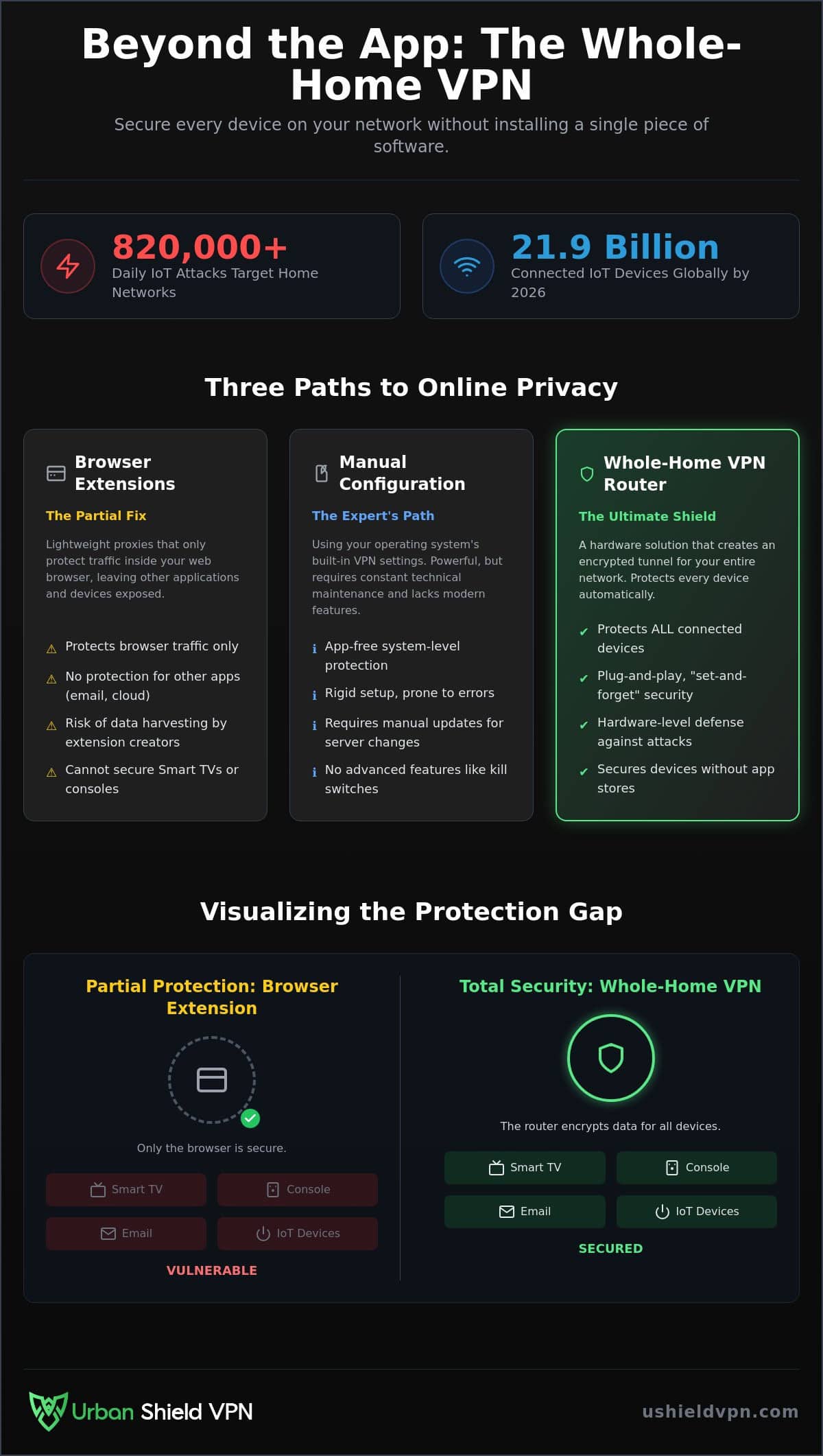
Many users confuse browser extensions with total security. They are not the same. A browser extension is typically an HTTPS proxy. It masks your web traffic within a single application. A whole home VPN is a different beast entirely. It creates a robust, encrypted tunnel for every bit of data leaving your network. Manual configuration sits between these two options. It offers system-level protection without an app, but it requires technical precision. If a server IP address changes, your connection fails. You must manually update the settings every time. It is a constant maintenance cycle that most people find exhausting.
The technical difference matters for your privacy. A proxy only handles web requests. It does not encrypt traffic from your email client, cloud storage, or background system updates. A real VPN tunnel secures everything. Unverified browser extensions carry significant risks. Many are built to harvest user data rather than protect it. They often lack the military-grade encryption found in professional hardware. Relying on an extension leaves your other apps exposed to the 820,000 daily IoT attacks that target home networks. It’s a partial fix for a total problem.
Setting Up Native VPNs on Windows and macOS
Windows 11 and macOS continue to support native protocols like IKEv2 and L2TP/IPsec in 2026. These are built directly into your network settings. You don’t need to download a single file. This approach avoids app crashes and saves system resources. However, the setup is rigid. You lose out on modern features like automated kill switches or built-in anti-trackers. Managing manual keys across multiple devices is a logistical nightmare. It’s a high-effort path that often leads to configuration errors. For those who want professional-grade security without the manual labor, a U Shield VPN Router provides a more streamlined, set-and-forget alternative.
Browser Extensions: A Lightweight but Limited Fix
Extensions are fast. They are easy to toggle on and off. They work well for simple tasks like bypassing a quick geo-block in your browser. But they are limited. They cannot protect your Smart TV, your gaming console, or your smart thermostat. This creates “leaky” traffic. While your browser looks secure, your other apps are broadcasting your data in the clear. Use an extension for temporary, low-stakes browsing. Use a full network solution for everything else. True peace of mind requires protection that covers the gaps extensions leave behind.
The Hardware Solution: Why VPN Routers Win in 2026
Manual configurations are a fragile stopgap. They break when server IPs change. They require constant attention. A whole home VPN router is the definitive answer for those who value both security and time. By moving the encryption process to a dedicated piece of hardware, you create a central gatekeeper for your entire digital life. This device acts as an invisible guardian. It stands between your family and the open internet, scrubbing every packet of data before it reaches your screens. It is the most reliable way to achieve network-wide VPN protection without the friction of individual app management.
One router protects everything. You don’t need to install software on your phone, your laptop, and your tablet separately. The protection is baked into the Wi-Fi signal itself. When a guest joins your network, they are instantly secured. When you buy a new gadget, it’s protected the moment it connects. This approach removes the technical burden from the user and places it on a powerful, silent machine that never sleeps. It’s a professional solution for a modern home.
Total Protection for Every Connected Device
Your smart fridge, security cameras, and Smart TVs often lack basic security features. They are easy targets for hackers. A router-level VPN secures these “un-appable” devices simultaneously. It also eliminates the frustrating “one login per device” limit found in most software plans. You can connect dozens of gadgets under a single account without hitches. Modern hardware utilizes AES-NI acceleration to handle the heavy lifting. This technical capability ensures your 4K streaming remains smooth and lag-free, even while military-grade encryption runs in the background. High speed meets high security.
Plug-and-Play Security: No Technical Skills Required
Traditional router setups are notoriously difficult. One wrong setting can brick your firmware and leave you without internet. Pre-configured hardware removes this risk entirely. These devices arrive ready to work right out of the box. You simply plug them in, follow a few prompts, and the protection begins. There is no need to learn complex networking protocols or manage server lists manually. The system operates silently in the background. It requires no user intervention. It just works, providing a level of reliability that software apps simply cannot match.
Securing Smart TVs and Consoles Without App Stores
Apple TV, PlayStation, and Xbox share a common limitation. They lack native VPN support. This leaves your streaming history and gaming data wide open to your ISP. You might have seen suggestions for Smart DNS on various forums. It’s a common “fix” for bypassing regional blocks. But it’s a hollow solution. Smart DNS only changes your perceived location. It provides zero encryption. Your data remains unshielded and vulnerable. To truly protect these devices, you need a solution that works at the source.
A whole home VPN changes the game for your living room. Instead of struggling with complex DNS hijacking, you secure the connection at the router level. The process is simple. You set up your VPN router once and connect your console to the secure Wi-Fi. Every packet of data is encrypted before it ever leaves your home. This is the most effective way to prevent smart home hacking while ensuring your entertainment remains private. It turns your network into an invisible guardian for every screen in the house.
Streaming Without Borders on Your Smart TV
Streaming should be effortless. A VPN router bypasses geo-restrictions for Netflix and Disney+ automatically. You don’t have to toggle settings or switch servers every time you want to watch a movie from a different region. Because the hardware handles the heavy encryption, you maintain true 4K speeds. There is no app-induced lag or system throttling to ruin your movie night. You get a dedicated, streaming-optimized experience that feels native to your TV. It is professional-grade entertainment without the technical friction.
Gaming Anonymity: Reducing DDoS Risks
Competitive gaming in 2026 carries invisible risks. Bad actors often use DDoS attacks to knock opponents offline by targeting their home IP address. Hiding that IP behind a VPN router is your best defense. This setup also fights ISP throttling. Many providers identify gaming traffic and intentionally slow it down during peak hours. A VPN masks your activity, keeping your speeds consistent. Hardware encryption is also superior for your ping. It processes the secure tunnel faster than any software app could. It keeps your latency low and your connection stable when it matters most.
For professional-grade gaming and streaming, choose a U Shield VPN Router to protect every console and Smart TV in your home instantly.
U Shield VPN Router: Professional Security Made Simple
Security shouldn’t be a part-time job. You shouldn’t have to toggle switches or check connection statuses every time you open a laptop. The U Shield VPN Router acts as a sophisticated simplifier for your digital life. It moves the technical burden from your shoulders to a dedicated piece of high-performance hardware. This is the ultimate whole home VPN solution. It provides a level of reliability that software alone cannot match. One device. Total control. Absolute peace of mind.
By centralizing your defense, you eliminate the friction of managing individual apps. You don’t need to worry about background updates or system compatibility. The U Shield VPN Router is a silent, powerful guardian. It operates in the background, securing every byte of data before it ever leaves your front door. It is the professional alternative to the chaos of manual configuration. It just works.
Military-Grade Encryption for the Whole Family
The U Shield hardware utilizes the AES-256 encryption standard. This is the same level of protection used by financial institutions and military organizations globally. It is virtually unbreakable. We have also integrated a built-in kill switch directly into the router’s core. If the VPN connection drops, the kill switch instantly severs the internet link. This prevents accidental data leaks at the source. Your family stays protected, even during unexpected network hiccups. It is invisible, high-level security for every member of your household.
The U Shield Advantage: Fast, Secure, Invisible
Speed is just as vital as security. Our global server network is optimized for high-speed browsing and ultra-low latency. You can enjoy 4K streaming and competitive gaming without the lag often associated with software-based encryption. The built-in anti-tracker adds another layer of defense. It stops aggressive advertisers and malicious scripts before they even reach your devices. This creates a cleaner, faster internet experience for everyone on your Wi-Fi. You can compare a VPN app vs VPN router to see exactly why hardware is the superior choice for a modern home.
Take the final step toward total network freedom. Secure your entire household with the U Shield VPN Router and pair it with our Annual VPN Plan for the most cost-effective, professional-grade protection available. Reclaim your privacy today.
Take Control of Your Digital Environment
You now have the blueprint for app-free privacy. Manual configurations offer a starting point, but they require constant maintenance and technical oversight. A whole home VPN is the professional standard for the modern household. It removes the technical burden from your shoulders and places it on a dedicated guardian. Your Smart TV, gaming console, and IoT gadgets are no longer vulnerable entry points. They are secured by a silent, powerful shield that operates in the background of every connection.
Efficiency meets absolute security. The U Shield VPN Router provides military-grade AES-256 encryption with a simple, plug-and-play setup. It is specifically optimized for 4K streaming and low-latency gaming. You don’t need to be a networking expert to achieve total peace of mind. It’s time to stop managing apps and start enjoying your digital freedom. Secure your entire home with the U Shield VPN Router today. Experience protection that is instantaneous and effortless. Your home deserves nothing less.
Frequently Asked Questions
Can I use a VPN on my Smart TV if there is no app store?
Yes, you can secure your Smart TV by using a hardware-level solution. Since most TVs lack native VPN support, a pre-configured router encrypts the connection before the signal reaches your screen. This protects your streaming data without requiring any software installation on the TV itself. It is the most reliable way to bypass geo-blocks and maintain privacy on “un-appable” devices.
Is it safe to use a browser-based VPN extension?
Extensions are best for light, temporary tasks. Most are actually HTTPS proxies that only secure traffic within that specific browser. They leave your email clients, cloud storage, and background system updates completely exposed to trackers. For total security, a system-level tunnel or a whole home VPN is necessary to protect every bit of outgoing data.
What is the easiest way to put a VPN on a gaming console?
Connecting your console to a VPN-enabled router is the fastest method. You avoid the headache of complex DNS hijacking or sharing a connection from a running PC. Once the router is active, your PlayStation or Xbox treats the secure Wi-Fi like any other network. You get instant DDoS protection and reduced ISP throttling without changing a single console setting.
Do I need to be a tech expert to set up a VPN router?
No, modern hardware has simplified the process entirely. Pre-configured devices like the U Shield VPN Router arrive ready to work right out of the box. You simply plug the device into your existing modem and follow a brief setup wizard. It removes the risk of bricking your firmware or getting lost in complex networking protocols. It’s professional security made accessible.
Will a manual VPN connection slow down my internet speed?
Speed depends heavily on the hardware’s processing power. Older routers may struggle with encryption, but modern devices use AES-NI acceleration to maintain high-velocity connections. This technical capability ensures you can stream 4K content and play competitive games without the lag often caused by software-based apps. Hardware-level encryption is built for performance.
Can I protect my entire home with just one VPN login?
Yes, a whole home VPN router secures every device under a single connection. While most software plans limit you to five or ten devices, a router protects dozens of gadgets simultaneously. Your Smart TV, cameras, phones, and guest devices are all covered by one account. It is the most cost-effective way to manage security for a large household.
What happens if my VPN connection drops without an app?
Professional VPN routers include a built-in hardware kill switch. If the secure tunnel fails, the router instantly severs your internet access to prevent data leaks. This happens at the network level, so your devices never broadcast unencrypted information. You stay protected even during unexpected server maintenance or network hiccups. It is a silent, automated safety net.
Is a VPN router better than a VPN app for my phone?
They serve different purposes. A router provides an “always-on” shield for your entire home network, protecting devices that can’t run apps. It is a set-and-forget solution for your household. However, a dedicated app is still useful for staying secure on mobile data or public Wi-Fi when you leave the house. Using both ensures you are protected everywhere you go.
