






What if the secret to a sub-20ms ping isn’t a faster internet plan, but a more intelligent route? Achieving low latency VPN gaming is no longer a contradiction; it’s a necessity for serious competitors in 2026. You’ve likely faced the frustration of a ranked match ruined by a sudden spike or seen your connection stutter because your ISP throttles gaming traffic. It’s an exhausting hurdle that feels impossible to clear. You deserve a connection that works as hard as you do.
This guide changes that. You’ll discover how to slash your ping by bypassing congested infrastructure and securing a direct path to the game server. We’ll show you how to stabilize your connection and shield your home network from the 129,000 DDoS attacks that now occur daily. We’ll also explore how to access regional lobbies without the penalty of high distance lag. By the end of this article, you’ll have a clear strategy to reclaim your competitive edge with absolute confidence and peace of mind. Your path to lag-free performance starts here.
Key Takeaways
- Master the science of data routing. Learn how to eliminate rubber-banding and input delay by understanding round-trip times.
- Optimize your path to the server. Achieve low latency VPN gaming by bypassing congested ISP infrastructure with direct peering.
- Protect every device. Use the U Shield VPN App for PC or a pre-configured router to bring high-speed security to your consoles.
- Fine-tune your connection. Select servers based on game host proximity and use the WireGuard protocol for maximum velocity.
- Play with total peace of mind. Stabilize your ping while maintaining a silent, powerful defense against malicious DDoS attacks.
Understanding Latency: Why Your Ping Spikes During Gaming
Latency is the heartbeat of your online experience. It measures the round-trip time for a data packet to travel from your device to the game server and back. When this time increases, you experience lag. High latency leads to rubber-banding, where your character snaps back to a previous position; it also causes delayed input registration that makes fast-paced actions feel sluggish. While many players focus solely on the millisecond count in the corner of their screen, Wikipedia explains the causes of lag go far beyond simple distance. Achieving low latency VPN gaming requires addressing the underlying infrastructure of your connection.
Ping is only half the story. Jitter and packet loss often cause more damage to a ranked match than a slightly higher, stable ping. Jitter refers to the variance in your ping over time. If your ping jumps from 20ms to 120ms and back, your game engine cannot predict your movement accurately. Packet loss occurs when data simply fails to arrive. This results in missing frames, “teleporting” enemies, and disconnected sessions. A stable, consistent connection remains the primary foundation of high-level play. You need a path that is both fast and predictable.
The Role of ISP Throttling in 2026
ISP throttling is the intentional slowing of specific data streams. In 2026, many providers use deep packet inspection to identify gaming traffic during peak evening hours. They deprioritize these packets to manage bandwidth for high-resolution streaming services. This results in artificial lag spikes exactly when you want to compete. VPN encryption masks your traffic type from your provider. If they cannot identify your data as gaming traffic, they cannot target your connection for slowdowns. It restores the raw speed you already pay for.
How Distance and Routing Impact Your Rank
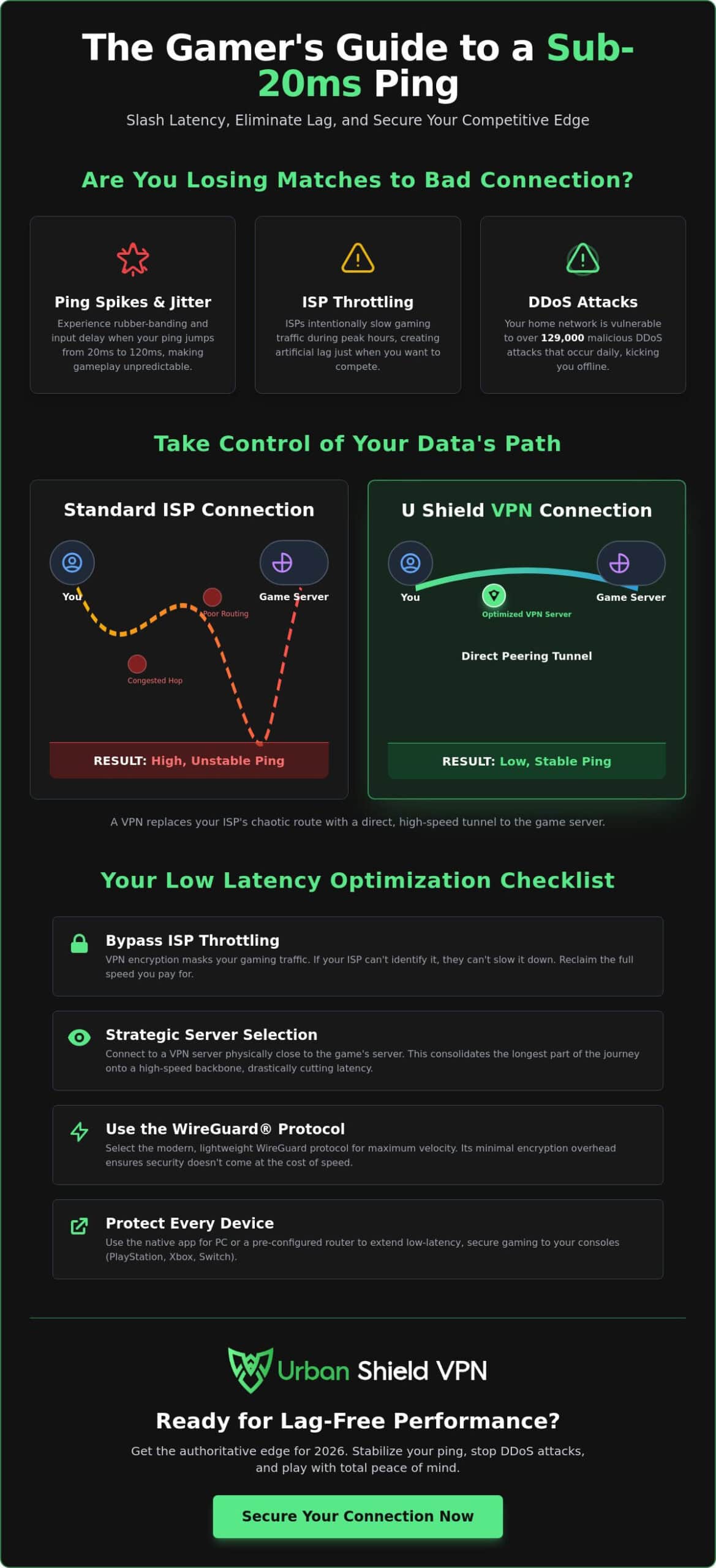
The shortest physical distance is rarely the fastest digital path for data packets. Standard home connections often pass through multiple congested exchange points before reaching a game server. These intermediate “hops” act as bottlenecks for standard home connections. Poor routing is a more common cause of lag than physical distance. A VPN provides a dedicated tunnel that bypasses these digital traffic jams. By utilizing Tier-1 networks and direct peering agreements, a VPN ensures your data takes the most efficient route possible. This optimization keeps your inputs sharp and your rank protected.
Can a VPN Actually Lower Your Ping?
The idea that a VPN always increases lag is a persistent myth. For many players, low latency VPN gaming is only possible when they take control of their data routing. Your ISP often prioritizes cost-saving paths that lead to congestion and high ping. A VPN replaces these inefficient routes with a direct, high-speed tunnel. It effectively removes the obstacles between your keyboard and the game server. You gain a cleaner path that results in a more responsive experience.
Direct peering is the secret weapon of modern networks. By establishing dedicated connections with major internet backbones, providers reduce the time spent at each junction. This ensures your data moves with maximum velocity. If you want to experience this level of precision, consider how a gaming-optimized connection can transform your performance. It provides the stability required for high-stakes matches where every millisecond counts.
The Science of Optimized Routing
Standard ISP paths are often chaotic. They move data through multiple public exchange points that act as bottlenecks. In contrast, global VPN servers provide a curated path. You can jump onto a faster backbone closer to the game host, significantly lowering your ping. This is particularly useful for regional matchmaking. It allows you to enter competitive lobbies without the penalty of high distance lag. You get the advantage of a local connection from anywhere in the world.
Debunking the ‘Extra Hop’ Myth
Many believe an extra server always adds time. However, Network latency depends on the quality of each connection point. Ten optimized hops will always outperform five congested ones. With 2026 protocols like WireGuard, encryption overhead is negligible. You can enjoy the security of a military grade encryption VPN without feeling any delay. These high-bandwidth networks maintain 1:1 speed ratios. Your protection remains silent and invisible while your connection stays lightning fast.
Strategic server selection completes this strategy. By choosing a VPN server located in the same city as the game server, you consolidate the long-distance leg of the journey onto a professional-grade network. This bypasses the unpredictable “last mile” issues common with home internet providers. It’s a proactive approach to low latency VPN gaming that puts you in control of your digital environment. You no longer have to settle for the default, sluggish path provided by your ISP.
VPN Router vs. App: Which is Best for Gaming?
Your entry point into low latency VPN gaming determines your ceiling for performance. Software apps are the standard choice for PC gaming. They’re quick to install and easy to toggle. However, they add CPU overhead to your rig. This can cause micro-stutters in resource-heavy titles. Hardware-level encryption removes this burden entirely. By processing the secure tunnel at the router level, your gaming device stays dedicated to one task: winning. It’s a cleaner, more professional approach to digital performance.
When your router handles the encryption, your PC’s processor doesn’t have to cycle through security protocols while you’re in a firefight. This results in higher, more stable FPS. It’s about removing every possible obstacle between your intent and the game’s response. You want a connection that operates in the background, powerful and unnoticed. Standard apps can sometimes conflict with anti-cheat software or background updates. A router-based approach avoids these software-level clashes entirely. It provides a pure, unencumbered stream of data directly from the server to your screen.
Why Serious Gamers Choose VPN Hardware
Serious gamers choose hardware for its reliability. Consoles like the PlayStation 5 and Xbox Series X simply don’t support native VPN apps. Relying on PC-to-console connection sharing is a recipe for instability. It adds unnecessary hops and increases the risk of packet loss. A pre-configured VPN router eliminates these hurdles. It provides a clean, professional-grade connection for every device in your home. You get plug-and-play simplicity without software interference. It’s a silent, powerful upgrade to your entire network.
The Advantage of Network-Wide Protection
Protection should be invisible and comprehensive. A network-wide VPN protection strategy ensures every device benefits from the same high-speed backbone. This is vital for mobile gaming, where tablets and phones often lack robust security. It also shields your home IP address from DDoS attacks, which can knock you offline for hours. By securing the network at the source, you ensure unlimited data VPN performance for everything from your console to your smart TV. It’s total peace of mind for the modern digital home. You gain a competitive edge while your security stays firmly in the background.
Optimization Checklist for Low Latency Gaming
Refining your setup is the final step toward total digital control. You need a configuration that prioritizes speed without compromising your defense. Achieving low latency VPN gaming is a matter of precision. It’s about stripping away the digital noise that slows your reaction time. Follow this methodical checklist to ensure your connection is primed for high-stakes competition. A well-tuned connection is your most powerful tool.
- Select the server closest to the game host. Physical distance to the game’s data center matters more than distance to your house. If the game server is in London, a London-based VPN server is your best choice.
- Disable ‘Double VPN’ or ‘Multi-hop’ features. While these offer extra layers of security, they significantly increase latency by bouncing your data through multiple locations. One high-quality, direct tunnel is all you need for performance.
- Switch to a wired Ethernet connection. Wi-Fi introduces unpredictable jitter that even the most optimized VPN cannot fix. A physical cable provides the stable foundation required for professional-grade play.
- Activate your kill switch. This acts as a silent guardian. It immediately cuts your data flow if the VPN connection fluctuates, preventing your real IP address from leaking to the game server or malicious actors.
Choosing the Right Protocol
WireGuard is the undisputed king of 2026 gaming latency. It’s built for velocity. Legacy protocols like OpenVPN are often too resource-intensive, leading to delayed packet transmission during intense firefights. WireGuard’s minimalist design allows for near-instant encryption. UDP is generally preferred over TCP for gaming traffic. It allows data to flow continuously without the ‘wait-and-verify’ delays that cause stuttering in fast-paced titles. This ensures your inputs reach the server with zero hesitation.
Server Selection Strategies
The ‘Golden Triangle’ of server selection involves you, the VPN, and the Game Host. Your goal is to make the lines between these three points as straight as possible. Test your ping across various global nodes before you commit to a ranked match. This ensures your chosen path is clear of sudden congestion. You can apply is VPN safe for streaming logic to verify your connection’s stability. If a server can handle a high-bitrate 4K stream without buffering, it can handle the precise demands of your game. Constant monitoring keeps you ahead of the curve.
Ready to take the lead? Secure your gaming-optimized VPN plan and experience the difference of a professional-grade route today.
U Shield VPN: The Authoritative Edge for 2026 Gamers
U Shield VPN serves as the final piece of your performance puzzle. It’s a high-speed global network engineered specifically for the demands of the modern competitor. We understand that in a ranked environment, there’s no room for compromise. Our infrastructure provides the stability and speed required for consistent low latency VPN gaming. You gain a connection that works as hard as you do. It’s a professional-grade solution for those who refuse to let technical hurdles dictate their rank.
Security and speed coexist within our network. We utilize military-grade encryption to ensure your gaming sessions remain private and shielded from external threats. This protection operates in the background, powerful and unnoticed. Our zero-throttling policy means your speeds stay consistent, even during peak evening hours. While other players struggle with ISP-imposed lag, your connection remains unencumbered and lightning fast. You reclaim the raw performance you pay for every month.
Plug-and-Play Simplicity with U Shield Hardware
Skip the complex setup with our pre-configured VPN router solutions. We’ve removed the technical friction often associated with network-wide security. The U Shield VPN Router arrives ready to perform. Just plug it in to protect your entire household with one subscription. This approach offers a silent guardian for every device, from your high-end PC to your gaming consoles. It eliminates the need for manual configuration on individual devices. Automatic updates ensure you always have the latest security patches and speed optimizations without lifting a finger. It’s digital protection made effortless.
The U Shield Commitment to Speed
Our commitment to performance is absolute. We provide access to high-bandwidth servers designed to handle the most data-intensive tasks. Whether you’re competing in a fast-paced shooter or enjoying 4K streaming, your connection stays fluid. Built-in anti-tracker and kill switch features offer total peace of mind. They prevent accidental data leaks and keep your home IP address invisible to malicious actors. You can focus entirely on your gameplay while we handle the complexities of your digital defense. It’s time to experience low latency VPN gaming without the traditional headaches. Secure your gaming edge with U Shield VPN today.
Reclaim Your Competitive Edge
Latency is no longer an obstacle you must accept. You now have the blueprint to bypass congested routes and eliminate ISP throttling. By choosing the right protocol and leveraging an optimized global server network, you secure the stability required for elite play. Mastering low latency VPN gaming is about more than raw speed. It’s about the precision of the path your data takes. You deserve a connection that is as fast as your reflexes.
Our hardware-level solutions remove the technical burden from your devices. You get military-grade AES-256 encryption without sacrificing a single frame of performance. These plug-and-play hardware solutions ensure your entire network is protected instantly. Zero technical friction. No background stutters. Just a clean, professional-grade connection that stays invisible while you focus on the win. Your best gaming experience is now within reach. It’s time to play without limits.
Get the U Shield VPN Router for Lag-Free Gaming and take total control of your digital environment. Your next victory starts with a connection you can trust.
Frequently Asked Questions
Will a VPN increase my ping?
A VPN typically adds a marginal amount of latency, but it can actually lower your ping if your ISP uses inefficient routing. By providing a more direct path to game servers, it bypasses congested public exchange points. For most users, a high-quality service adds only 5 to 20ms of ping. This is often imperceptible during standard gameplay and is a small price for a more stable connection.
Can I use a VPN on my PS5 or Xbox for gaming?
Yes, you can secure your console connection, though PlayStation and Xbox don’t support native VPN apps. The most effective method is using a pre-configured router. This protects your console at the network level without complex manual settings. Every device connected to the router benefits from the same high-speed, encrypted tunnel, ensuring your console stays protected and fast.
What is the best VPN protocol for low latency?
WireGuard is the undisputed standard for low latency VPN gaming in 2026. It’s designed with a minimalist code base that allows for near-instant encryption. This reduces the CPU load on your hardware and ensures data packets move with maximum velocity. It consistently outperforms legacy protocols like OpenVPN in speed tests, making it the primary choice for serious competitors.
How do I stop my ISP from throttling my gaming speeds?
You can stop ISP throttling by using a VPN to encrypt your internet traffic. Encryption masks the type of data you’re sending, preventing your provider from identifying and slowing down gaming streams. Because the ISP cannot see that you’re gaming, they cannot apply targeted speed reductions during peak hours. Your performance stays consistent, unrestricted, and entirely under your control.
Is it legal to use a VPN for gaming?
Using a VPN for gaming is entirely legal in most countries. It’s a standard tool for digital privacy and security used by millions. However, you should always check the Terms of Service for individual games. While the VPN itself is legal, some developers may have specific rules regarding regional matchmaking or bypassing geo-locks to ensure fair play across their global player base.
Does a VPN protect me from DDoS attacks?
Yes, a VPN provides a powerful shield against DDoS attacks by hiding your home IP address. Malicious actors can only target the VPN server’s IP, which is built to withstand high-volume traffic. With over 129,000 DDoS attacks detected daily in 2025, this layer of protection is vital for competitive players. It ensures your match remains uninterrupted while your home network stays invisible.
Can a VPN help me get into easier gaming lobbies?
A VPN allows you to change your virtual location, which can place you in different regional matchmaking pools. Some players use this to access lobbies in time zones where the player base might be less competitive or to find matches faster in regions with higher player counts. This flexibility gives you more control over your competitive environment and helps you find the right challenge.
Do I need a special router for a gaming VPN?
You don’t need a special router for the app, but a dedicated VPN router is the best choice for console gaming. Standard ISP routers often lack the processing power for hardware-level encryption. A pre-configured device like the U Shield VPN Router handles the technical heavy lifting at the source. This ensures every device in your home enjoys low latency VPN gaming without software stutters.
