






You have high-speed internet and a pro-grade setup. Yet, your character still teleports across the map at the worst possible moment. It’s a common frustration. Most gamers believe speed is everything, but your routing often matters more. ISP throttling and poor server paths can turn a winning streak into a lag-filled nightmare. You deserve a connection that remains steady under pressure.
Choosing the best VPN for avoiding lag spikes is the secret to reclaiming your performance. A dedicated gaming VPN doesn’t just hide your IP; it finds a more direct path to the game server. This means you can eliminate sudden ping jumps and secure your network against DDoS attacks. You gain a stable environment where your skill, not your latency, determines the outcome.
This guide shows you how to optimize your setup for 2026. You’ll learn why hardware-level solutions like a VPN router provide the most consistent results. We also cover how to access international lobbies and keep your ping predictable. It’s time to stop fighting your connection and start winning your matches.
Key Takeaways
- Learn why high-speed internet often fails to prevent latency and how data “hops” create frustrating ping spikes.
- Discover how the best VPN for avoiding lag spikes secures a direct route to game servers while bypassing ISP throttling.
- Compare the performance of VPN apps versus hardware routers to choose the right setup for your PC or console.
- Identify actionable network optimizations, including server proximity and wired connections, to stabilize your gaming environment.
- Explore how a pre-configured VPN router acts as a silent guardian for your network, removing the need for manual setup.
Understanding Lag Spikes: Why Your Fast Internet Still Fails
Your fiber connection might be fast, but it isn’t always stable. High download speeds measure capacity, not velocity. You can move large files quickly, yet your character still stutters during a firefight. This happens because gaming relies on latency, not just bandwidth. A deep Understanding Lag in Gaming reveals that speed is only half the battle. You need a connection that stays consistent from start to finish.
Every action you take in-game is a data packet. This packet travels through several “hops” before reaching the server. These hops are intermediate routers and switches. If even one node is congested, your connection suffers. This is why the best VPN for avoiding lag spikes is a game-changer. It bypasses broken nodes and forces your traffic onto a cleaner, more efficient path. You stop fighting the network and start focusing on the match.
Packet loss is the silent killer of your K/D ratio. It occurs when data simply disappears mid-transit. Your game loses sync. You teleport backward. It’s often a result of poor routing or network interference. A reliable VPN stabilizes the flow. It ensures every packet arrives on time, every time. This creates the predictable environment required for competitive play.
The Difference Between Ping and Lag Spikes
Ping is your baseline connection speed. It should be low and steady. Lag spikes are sudden, violent departures from that baseline. Jitter is the variance between those pings. High jitter ruins your competitive edge because it makes your movements unpredictable. If your local network is fine, these spikes usually originate with your ISP’s handling of gaming traffic. You need a tool that smooths out these irregularities.
How ISP Routing Creates Artificial Latency
ISPs often prioritize cost over performance. They send your data through the “scenic route” to save on transit fees. These routes often hit congested exchange points during peak evening hours. Your ISP might even deprioritize gaming packets specifically to manage network load. This is artificial latency. By using the best VPN for avoiding lag spikes, you encrypt your traffic. Your ISP can’t see you’re gaming, so they can’t throttle your specific connection. You get the fast lane you pay for. It’s simple, effective, and immediate.
How a VPN Reduces Lag and Stabilizes Your Connection
A gaming VPN is a dedicated tunnel that prioritizes direct routing over standard ISP paths. While critics often claim that adding a VPN layer increases latency, modern protocols have changed the game. In 2026, technology like WireGuard has reduced encryption overhead to negligible levels. This allows the best VPN for avoiding lag spikes to actually lower your ping by finding a more efficient route through the global web.
Standard internet traffic is subject to the chaos of public interconnection points. These are the physical junctions where different network providers exchange data. During peak hours, these peering points become massive bottlenecks. Your data gets stuck in a digital traffic jam. A professional VPN service uses its own private network backbone to bypass these congested public nodes. It keeps your data on a high-speed, private lane from your home to the game server.
This level of control is essential for competitive play. Implementing advanced Techniques for Reducing Latency ensures that your connection remains stable even when the rest of the neighborhood is streaming 4K video. By avoiding the unpredictable nature of standard routing, you achieve a flat ping line. No more sudden jumps. No more missed shots. If you want to secure this level of stability, consider a high-performance solution like U Shield VPN to protect your connection.
Bypassing Throttling with Encryption
ISPs use Deep Packet Inspection to monitor your activity. When they detect high-bandwidth gaming, they may artificially limit your speeds to preserve network capacity. Encryption solves this. It wraps your data in a secure layer that your ISP cannot read. They see traffic, but they don’t know it’s a gaming session. This prevents targeted slowdowns and keeps your performance consistent 24/7. You get the full speed you pay for without interference.
Optimized Server Routing
Standard routing often takes the cheapest path, not the fastest. This can lead to regional routing loops where your data travels hundreds of miles in the wrong direction before heading to the server. A VPN allows you to pick a server location physically close to the game host. This reduces the number of hops. Fewer hops mean fewer opportunities for delay. You get a direct, clean connection that stays under the 50ms threshold required for elite gaming.
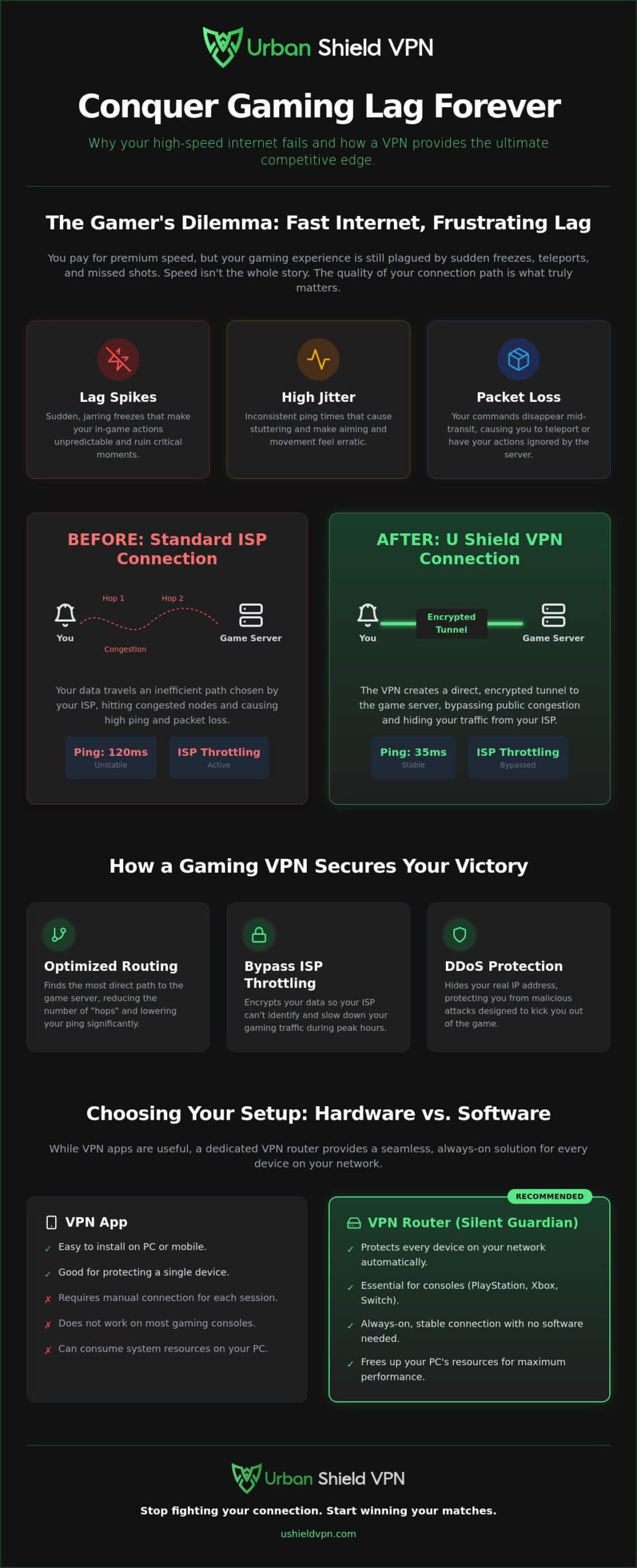
VPN Router vs. VPN App: Choosing the Best Gaming Setup
Choosing the right platform is as vital as choosing the service itself. Most gamers default to a desktop app. It’s a simple choice, but it carries a hidden cost. Software apps consume vital CPU resources. They perform complex encryption tasks in real-time on your gaming machine. This can lead to micro-stuttering or local lag during high-intensity matches. You need every bit of processing power for the game itself.
A hardware-level solution offloads this heavy lifting. It encrypts your data before it ever reaches your PC or console. This removes the “processing lag” that software apps often introduce. Because the router handles the tunnel, your gaming rig stays focused on performance. This hardware-first approach is why a dedicated router is the best VPN for avoiding lag spikes. It provides a cleaner, faster path for your data without taxing your hardware.
Console players face even greater challenges. Devices like the PS5 and Xbox don’t support native VPN applications. You’re often forced into complex connection-sharing setups or unreliable DNS tweaks. A VPN router removes these obstacles entirely. It creates a secure, optimized network for every device in your home. Whether you’re on a PC, a console, or a mobile device, the protection is instantaneous and automatic.
Why Hardware-Level VPN Wins for Gamers
Hardware solutions eliminate background app interference. There’s no risk of a background process crashing mid-match or stealing bandwidth for an unwanted update. It’s a silent, powerful guardian that stays in the background. This setup lowers the technical barrier for console players while maximizing rig efficiency. To understand which path fits your lifestyle, explore our comparison of VPN App vs. VPN Router: How to Choose the Best Security for 2026. You’ll find that hardware offers the most consistent results for competitive play.
The Pre-Configured Advantage
Manual router configuration is a technical headache. It often requires flashing custom firmware, which can “brick” your expensive hardware if done incorrectly. Pre-configured routers remove this stress. They arrive with optimal settings locked in from day one. You simply plug it in and play. Reliability is the ultimate benefit here. A router doesn’t crash or lag like a background PC app. It provides a rock-solid foundation for the best VPN for avoiding lag spikes, ensuring your connection is ready whenever you are.
How to Optimize Your Network for Zero-Lag Gaming
Stop settling for “playable” ping. In 2026, the best VPN for avoiding lag spikes works alongside your physical hardware to create a fortress of speed. You don’t need a degree in networking to fix your connection. You just need the right sequence of actions to claim your competitive edge. Follow these steps to transform your gaming environment into a high-performance zone.
First, switch to a wired Ethernet connection. Even with the latest wireless standards, Wi-Fi remains a liability for serious gamers. Signal interference from household appliances and neighboring networks causes packet collisions. This leads to the very spikes you’re trying to avoid. A physical cable provides a dedicated, unshakeable lane for your data. It delivers the consistent, low-jitter environment that high-stakes matches require. It’s the foundation of a stable setup.
Next, server choice is a matter of geography. You must select a VPN server location nearest to the game’s data center. This reduces the physical distance your data travels. It’s the most effective way to lower your ping instantly. When you shorten the journey, you reduce the risk of encountering congested nodes along the way. This direct routing is the primary reason why professional players use a VPN to stabilize their connection.
Finally, use a dedicated gaming router to manage traffic priority. These devices use Quality of Service (QoS) settings to ensure your gaming packets always come first. This means your match won’t suffer if someone else in the house starts a high-definition stream or a large download. To secure a connection that stays fast under pressure, choose a professional solution like U Shield VPN.
Server Selection Strategy
Finding the right server is a science. Most VPN apps display real-time latency or “load” percentages next to server names. Follow the Golden Rule of proximity: the shorter the physical distance to the host, the lower the ping. Don’t just pick the first server you see. Test different regions to identify where the competitive lobbies are most stable. A well-chosen server ensures you’re always on the most direct path to the game host, cutting out unnecessary hops and regional loops.
Security Features That Don’t Slow You Down
Security should never come at the cost of speed. A VPN Kill Switch is a non-negotiable tool for the modern gamer. It acts as a silent safety net. If your VPN connection flickers, the Kill Switch instantly halts all traffic. This prevents unencrypted data leaks and keeps your identity hidden from potential DDoS attackers. Modern anti-trackers also improve overall network efficiency. They block hidden background requests that silently steal your bandwidth. You maintain total anonymity without sacrificing a single millisecond of performance. You stay invisible, protected, and fast.
U Shield VPN: The Silent Guardian of Your Gaming Network
U Shield VPN operates as a silent, powerful guardian for your digital life. It removes the technical burden of network management entirely. You don’t need to spend hours tweaking complex settings or flashing risky firmware. Our solutions are designed to work in the background, providing peace of mind while you focus on the match. It’s the best VPN for avoiding lag spikes because it handles the complexity so you don’t have to. You simply connect and play with absolute confidence.
Our hardware-first approach is built on reliability. The U Shield VPN Router arrives pre-configured for maximum performance. It establishes a secure, high-speed tunnel the moment you plug it in. This setup protects every device in your home, from your gaming PC to your consoles and mobile phones. It provides a level of stability that software apps alone cannot match. You get a professional-grade network without the professional-grade headache. It’s a modern solution for a better digital experience.
Security is a core component of smooth gameplay. We use military-grade encryption to keep your IP address hidden from prying eyes. This is your primary defense against DDoS attackers who want to knock you offline during a winning streak. By masking your digital footprint, we ensure your connection remains invisible and uninterrupted. You gain the freedom to compete in international lobbies without fear of targeted slowdowns or malicious interference. It’s about protecting your performance as much as your data.
Designed for Performance
Our network is optimized for the most popular online titles in 2026. We maintain high-speed global servers in key locations, including the UK, US, Germany, France, and the Netherlands. These data centers are specifically chosen for their low-latency connections and 4K streaming capabilities. You get unlimited data for your longest gaming marathons. There are no caps, no throttling, and no compromises. One login supports all your home devices, ensuring a seamless experience across your entire household. Efficiency and velocity are built into every server we operate.
Your Next Move for Better Gaming
Waiting for your ISP to fix their routing is a losing strategy. They prioritize their own costs over your competitive rank. They use congested public nodes that cause the very ping jumps you’re trying to escape. Take control of your connection with U Shield hardware. Our router gives you a private, optimized lane through the digital noise. It’s the ultimate upgrade for any serious setup. Don’t let poor infrastructure dictate your skill level. Upgrade to a U Shield VPN Router for lag-free gaming and experience the difference of a connection that finally keeps up with your reflexes.
Take Control of Your Competitive Edge
Lag spikes don’t have to define your gaming experience. You now understand that routing, not just raw speed, determines your victory. By choosing a hardware-first approach, you eliminate the CPU overhead of software apps and bypass the congested paths your ISP prefers. Finding the best VPN for avoiding lag spikes is the final step in building a professional-grade setup that stays fast when the pressure is on. It’s about more than just privacy; it’s about reclaiming your performance.
Your connection deserves a silent guardian that works in the background. Our optimized global server network and military-grade AES-256 encryption provide the stability you need for elite play. Experience instant, plug-and-play security that protects every device on your network simultaneously. It’s time to stop fighting your hardware and start focusing on your rank. Secure your win with the U Shield VPN Router and leave latency behind. You’ve got the skill; now you have the network to match it. Play with confidence and never miss a shot again.
Frequently Asked Questions
Can a VPN really reduce my ping in online games?
Yes, a VPN can reduce ping by providing a more direct route to the game server. Standard ISP paths often take longer, congested routes to save on transit costs. A high-quality service bypasses these bottlenecks. This results in a stable connection and lower latency for competitive play.
Will using a VPN get me banned from games like Call of Duty or Fortnite?
No, using a VPN is not a bannable offense in most major titles. Developers focus on preventing cheating and hardware spoofing. A VPN simply secures your connection and stabilizes your routing. It is a legitimate tool for players seeking the best VPN for avoiding lag spikes and protecting their home network.
What is the best VPN protocol for low-latency gaming in 2026?
WireGuard is the industry standard for low-latency gaming in 2026. It offers high speeds with minimal encryption overhead. This ensures your data travels fast without taxing your hardware. It provides the perfect balance of security and velocity for fast-paced shooters and battle royales.
Why should I use a VPN router instead of an app for my console?
Consoles like the PS5 and Xbox do not natively support VPN apps. A U Shield VPN Router solves this by protecting your entire network at the source. It offloads processing from your gaming device to the router hardware. This prevents local lag and ensures a seamless setup for every connected device.
Does a VPN protect me against DDoS attacks during competitive matches?
Yes, a VPN acts as a shield against DDoS attacks. It masks your home IP address with the IP of the VPN server. Malicious players cannot target your home network if they cannot find it. You stay online and protected even during the most intense competitive matches.
How much speed will I lose when using military-grade encryption?
Speed loss is negligible with modern 2026 protocols. Military-grade AES-256 encryption is now highly optimized for speed and efficiency. Most users will not notice a difference in their download or upload rates. The stability gained from better routing often outweighs any minor change in raw bandwidth.
Can I use one U Shield account for my PC, phone, and router?
Yes, a single U Shield account covers your entire digital ecosystem. You can use the U Shield VPN App on your phone and PC while simultaneously securing your home with a router. This provides consistent protection and performance whether you are at home or on the move. It is a streamlined solution for the modern gamer.
What happens if my VPN connection drops mid-game?
A built-in Kill Switch protects you if the connection drops. It instantly halts all data transmission to prevent your real IP from leaking. This keeps you secure until the encrypted tunnel is restored. You remain invisible to attackers and protected from ISP tracking at all times. It is the best VPN for avoiding lag spikes and maintaining total privacy.
