






Why are your most expensive devices often the most vulnerable? Most users search for a vpn for devices that don’t support apps only to realize their Smart TV, gaming console, or smart lock doesn’t have a VPN menu. It’s a frustrating wall to hit. You want the freedom of global streaming and the peace of mind of encrypted security, but the technology seems to work against you.
We understand the technical overwhelm. You shouldn’t need to be a networking expert to protect your home. This guide simplifies the process. You’ll discover how a single, network-wide solution like the U Shield VPN Router shields every connected device at once. We’ll show you how to bypass geo-blocks, secure your IoT devices, and enjoy a plug-and-play experience that stays out of your way. Your digital life is about to get much simpler and significantly safer.
Key Takeaways
- Stop struggling with proprietary operating systems that block native security software on your Smart TV or gaming console.
- Discover why a network-wide router is the ultimate vpn for devices that don’t support apps by protecting your data at the source.
- Learn why military-grade encryption beats Smart DNS when it comes to securing vulnerable IoT devices like cameras and smart locks.
- Identify the fastest path to security by choosing pre-configured hardware over complex, manual router settings.
The App Gap: Why Some Devices Don’t Support VPNs
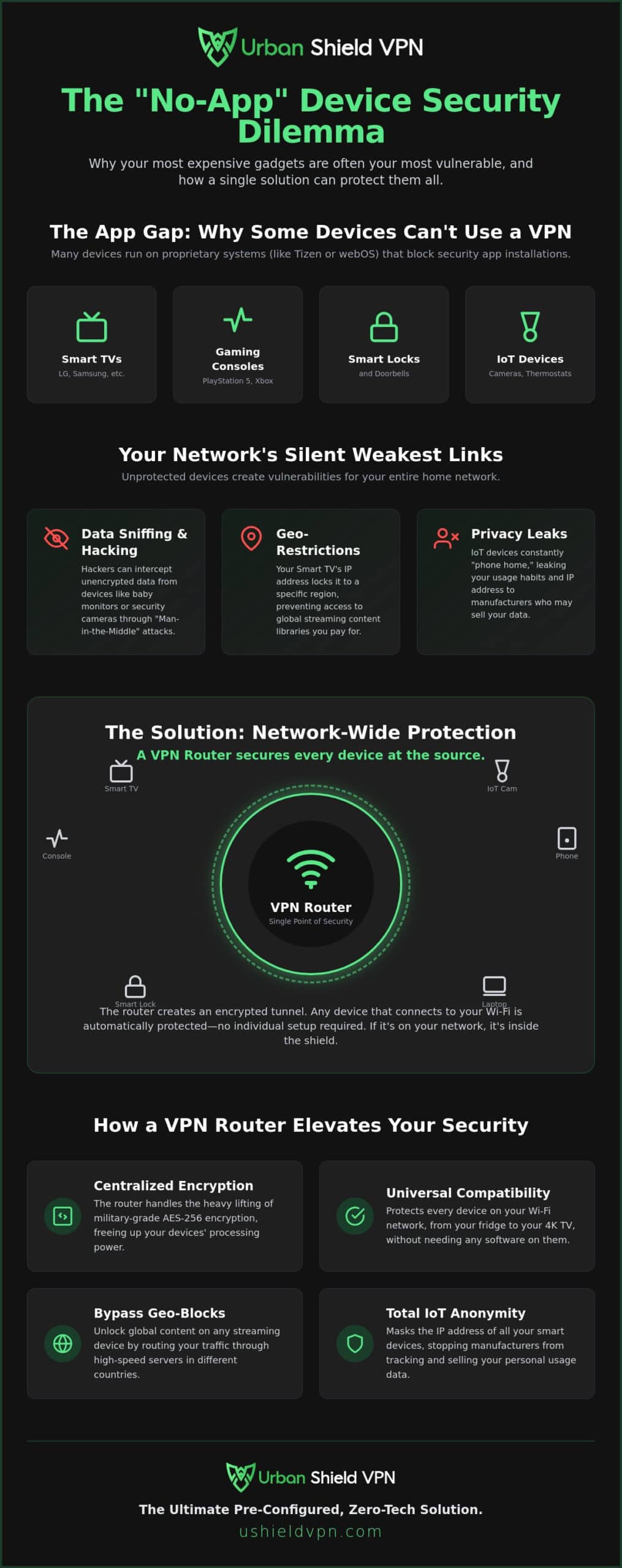
Your home is likely filled with “No-App Devices.” We define these as hardware that lacks a dedicated app store or the system resources to run encryption software. It’s a common hurdle for modern households. You buy a top-tier Smart TV or a high-end gaming console, only to find you can’t install the security tools you use on your phone or laptop. This gap exists because many of these devices run on proprietary operating systems. LG uses webOS; Samsung relies on Tizen. These systems are built for a single purpose: speed and media consumption.
Manufacturers prioritize lightweight performance over the ability to run complex third-party security software. A Virtual Private Network (VPN) requires significant processing power to encrypt and decrypt data in real time. Most smart thermostats, doorbells, and fridges simply don’t have the “brains” for it. Gaming consoles like the PlayStation 5 and Xbox Series X also lack native VPN support, though for a different reason. Sony and Microsoft restrict network settings to prevent cheating or network manipulation, leaving you without a direct way to shield your connection.
This is where the search for a vpn for devices that don’t support apps begins. You shouldn’t have to choose between a smart home and a secure one. Understanding these limitations is the first step toward a better solution that covers your entire network at once.
The Weakest Link in Your Home Network
Unprotected IoT devices are the silent “weakest links” in your digital security. Because they lack native encryption, they are prime targets for botnets and data sniffing. Your smart security camera or baby monitor needs the same level of protection as your bank account. Without a vpn for devices that don’t support apps, these gadgets transmit data in the clear. This makes them vulnerable to “Man-in-the-Middle” attacks, where a hacker on your network intercepts your private video feeds or login credentials. Security shouldn’t be an afterthought for your hardware; it should be the foundation.
Streaming and Geo-Restrictions
Your Smart TV is often locked to a specific region by default. Manufacturers and streaming platforms track your location via your IP address to enforce licensing agreements. It’s a frustrating experience. You pay for a premium 4K display, yet you’re restricted from accessing global content libraries. This regional locking happens at the hardware level. Since you can’t install an app to change your location, the TV remains stuck in its home market. Protecting your IP address is the only way to reclaim the freedom you expected when you bought the device.
Network-Wide Protection: The Solution for Every Device
Stop trying to install software where it isn’t welcome. If you’ve struggled with a device that lacks an app store, you know the frustration. The solution isn’t to force an app onto a system that can’t handle it. Instead, you protect the source: your router. A VPN router creates a secure, encrypted tunnel for every bit of data leaving your home. This approach completely removes the burden of individual security from your hardware. network-wide VPN protection acts as a single gatekeeper for all incoming and outgoing traffic. It’s a silent, powerful guardian for your digital life.
This method is the most efficient way to manage a vpn for devices that don’t support apps. You no longer have to worry about whether your smart bulb or security camera is vulnerable. If it’s on your Wi-Fi, it’s inside the tunnel. It’s that simple.
How a VPN Router Works
The router handles the heavy lifting of encryption. Modern encryption standards like AES-256 require significant processing power. Most smart devices simply aren’t built for that. By shifting this task to the router, your devices can focus on their primary jobs. It’s a seamless integration. Once a device connects to your Wi-Fi, it’s automatically secured. There are no settings to toggle or logins to remember on each individual machine. High-speed global servers ensure your connection remains fast. You can enjoy 4K streaming and low-latency gaming without the “encryption tax” slowing you down. For those who want immediate results, the U Shield VPN Router offers a pre-configured, zero-tech setup experience.
Total Anonymity for IoT
Smart devices are notorious for “phoning home” with your data. They often leak your IP address and usage habits to manufacturers who then sell that information. By masking the IP addresses of all connected smart home devices, you reclaim your privacy. This stops trackers at the network level before they ever reach your gadgets. Adhering to cybersecurity best practices for IoT devices means ensuring your smart fridge or security camera isn’t a backdoor into your life. A vpn for devices that don’t support apps ensures that your data remains yours alone. It prevents manufacturers from collecting and selling your usage data for profit. You get total anonymity with minimal effort.
VPN Router vs. Smart DNS: Which is Better?
Choosing between a VPN router and Smart DNS is often a choice between total security and a quick fix. Smart DNS only changes your perceived location. It does not secure your data. A VPN router provides both location spoofing and military-grade encryption for every connection. When you need a vpn for devices that don’t support apps, you want a solution that actually works when streaming filters get tough. VPN routers are far more reliable for bypassing the advanced anti-VPN blocks used by major streaming platforms. They don’t just hide your location; they hide the fact that you’re using a VPN at all.
- Security: VPN routers offer full encryption; Smart DNS offers none.
- Privacy: VPNs mask your traffic from your ISP; Smart DNS does not.
- Reliability: VPNs use obfuscation to stay ahead of streaming blocks.
- Compatibility: Both work with Smart TVs and gaming consoles.
Why Encryption Matters in 2026
Encryption is your primary line of defense. There is a massive technical gap between a military grade encryption VPN and simple proxy servers. Smart DNS acts as a proxy; it redirects your traffic without shielding it. This leaves your smart home vulnerable to hackers who can intercept data from your cameras or smart locks. A VPN router provides the peace of mind that comes with a network-wide kill switch. If the connection drops, your data stops. It’s a fail-safe that Smart DNS simply cannot provide. Protecting your home requires more than just a new IP address.
Speed vs. Security: Debunking the Myth
Speed is no longer a valid reason to skip encryption. Modern routers equipped with optimized protocols like WireGuard offer near-native speeds. You can enjoy 4K streaming on your Smart TV without the frustrating buffering of the past. A high-performance router handles the processing heavy lifting, preventing the “VPN slowdown” often associated with older technology. This makes it a superior vpn for devices that don’t support apps because it maintains velocity across your entire network. To ensure the best experience, choose a server close to your actual location or the content’s origin. This minimizes latency and keeps your online gaming sessions smooth and responsive.
How to Secure Your “No-App” Devices in 3 Steps
You have two paths to securing your home network. The technical route involves manually configuring your existing router. This is often a high-difficulty task. It requires flashing firmware and navigating complex settings that can easily go wrong. The smart route is different. By using a pre-configured, plug-and-play router, you remove the technical burden entirely. This is the most efficient way to deploy a vpn for devices that don’t support apps without needing a degree in network engineering.
Follow these three simple steps to secure your entire household:
- Step 1: Connect your VPN router to your existing modem or ISP hub using an ethernet cable. This establishes your secure gateway.
- Step 2: Connect your Smart TV, gaming console, or IoT devices to the new VPN Wi-Fi network. They will recognize it just like any other wireless connection.
- Step 3: Log in to your VPN dashboard on any browser to select your desired global server location. Your devices are now instantly protected.
If you’re ready to skip the technical headaches, you can order a pre-configured U Shield VPN Router today and be protected in minutes.
Pre-Configured vs. Manual Setup
Choosing a pre-configured VPN router is the safest choice for non-experts. Many competitors provide 15-step manual guides that require you to “flash” your router’s firmware. This process is risky. One wrong move can “brick” your hardware, rendering it completely useless. A pre-configured solution arrives ready to work. It includes dedicated technical support, ensuring you never have to troubleshoot hardware-based VPN issues alone. You get the security you need without the risk of destroying your expensive equipment.
Managing Your Network-Wide VPN
A hardware solution simplifies your digital life by providing a VPN single login for multiple devices across your entire home. You don’t need to manage individual subscriptions for your TV, laptop, and phone. Everything is controlled from one central hub. You can switch locations easily. Set your Smart TV to the UK for a specific show while keeping your gaming console on a local US server for better latency. You can even set up “split tunneling” at the router level. This allows specific devices to bypass the VPN while others remain encrypted. It’s the ultimate vpn for devices that don’t support apps because it adapts to your specific needs.
U Shield VPN Router: The Ultimate “No-App” Solution
Your search for a vpn for devices that don’t support apps ends with a specialized hardware solution. The U Shield VPN Router is a high-performance gateway. It arrives pre-configured. It’s ready to secure your home the moment it’s plugged in. We’ve enabled military-grade AES-256 encryption by default for every connected device. This means your Smart TV, gaming console, and smart home gadgets are protected without a single manual setting. It’s security that works for you, not the other way around. You don’t need to be a technician to enjoy professional-grade privacy.
Performance is never sacrificed for protection. This router is optimized for 4K streaming and low-latency gaming. We understand that consoles like the PlayStation or Xbox don’t allow native apps. Our hardware bridges that gap. It acts as a “silent guardian” for your digital life. With a built-in anti-tracker and an integrated kill switch, your data remains private even if the connection fluctuates. You get absolute peace of mind. Your network stays fast, stable, and invisible to outside observers. This is the power of a dedicated security hub.
The U Shield experience is about removing obstacles. Many users get frustrated when their high-end hardware is limited by regional blocks or security vulnerabilities. We solve this at the source. By choosing a vpn for devices that don’t support apps, you’re investing in a future-proof network. Every bit of data that passes through your home is shielded by the same technology used by global security experts. It’s a bold, innovative way to manage your digital footprint without the headache of individual app updates.
Plug-and-Play Simplicity
We’ve removed the technical jargon. There’s no complex installation required. The U Shield VPN Router works with any ISP and any device. Whether it’s an Apple TV, a smart thermostat, or a high-end security camera, the protection is automatic. One subscription covers every device in your household. It’s a streamlined approach to modern security. You get total coverage with zero friction. It’s the most reliable way to secure a household full of diverse gadgets. You connect once and stay protected forever.
Get Total Protection Today
Protecting your home shouldn’t be a chore. You can choose between flexible monthly and annual plans to suit your needs. We provide fast global shipping on all pre-configured hardware. This ensures you can start securing your network as soon as possible. Don’t leave your most vulnerable devices exposed to trackers or geo-blocks. Reclaim your digital freedom and privacy with a solution built for the modern home. The process is fast, efficient, and deeply respectful of your time. Start your journey toward a safer digital experience now.
Secure every device in your home with U Shield VPN
Take Control of Your Digital Home
Your smart home shouldn’t be a security risk. Protecting every device doesn’t require technical expertise or hours of manual configuration. By securing your network at the source, you eliminate the “app gap” and reclaim your digital freedom. You now know how a router-based solution provides military-grade AES-256 encryption for every connection, from your 4K TV to your smart locks. This is the most reliable way to manage a vpn for devices that don’t support apps while maintaining the high speeds needed for streaming and gaming.
Peace of mind is now a plug-and-play reality. Our hardware arrives pre-configured for instant setup, ensuring you’re protected from the moment you connect. If you ever have questions, our 24/7 technical support is ready to help you manage your secure network. Don’t let proprietary systems dictate your privacy or limit your content. You deserve a network that works for you without the technical burden.
Get the U Shield VPN Router for Plug-and-Play Security
Your journey to a safer, borderless internet starts today. You have the tools to protect what matters most. It’s time to enjoy the web without limits.
Frequently Asked Questions
How do I put a VPN on my Smart TV if there is no app?
You connect your Smart TV to a VPN-enabled router. Since TVs using proprietary systems like Samsung’s Tizen or LG’s webOS don’t support native apps, the router handles the encryption for them. This creates a secure tunnel for all your streaming traffic automatically. It’s the most efficient way to use a vpn for devices that don’t support apps. Once connected to the VPN Wi-Fi, your TV enjoys full protection and global content access.
Will a VPN router slow down my gaming console?
Modern high-performance routers minimize speed loss through optimized protocols like WireGuard. While encryption adds a small amount of overhead, a powerful processor prevents noticeable lag. You’ll maintain the low latency required for competitive gaming while gaining protection against DDoS attacks. Selecting a server close to your physical location or the game server ensures your connection remains fast and stable for every match. Velocity and security work together.
Do I need a special router to use a VPN network-wide?
Yes, you need a router with the processing power to handle real-time encryption. Most standard ISP hubs aren’t powerful enough to run VPN software directly. A pre-configured U Shield VPN Router is built specifically for this task. It arrives ready to secure your entire home without complex manual setup. This dedicated hardware ensures your connection stays fast even when multiple devices are streaming or gaming at once.
Can I use a VPN on my Apple TV without an app?
You can secure your Apple TV by connecting it to a VPN router. While some newer models support apps, older versions or specific region-locked content require a network-level solution. The router masks your IP address before the data reaches the device. This allows you to bypass geo-blocks and encrypt your viewing habits effortlessly. It’s a seamless way to enjoy a global library on your big screen without technical hurdles.
Is it better to use a VPN app or a VPN router?
It depends on your needs, but a router is superior for total home protection. Apps are excellent for mobile devices on the go. A router is the ideal vpn for devices that don’t support apps like smart fridges or gaming consoles. It protects every device with a single login. You don’t have to manage multiple app instances or worry about hardware compatibility. It’s a set-and-forget security solution.
Does a VPN router protect my smart home security cameras?
Absolutely, a VPN router encrypts all data sent from your security cameras to the cloud. This prevents hackers from intercepting your private video feeds through your network. It shields your cameras from data sniffing and botnet recruitment. By masking the camera’s IP address, you prevent manufacturers from tracking your precise location. Your home’s physical security is finally matched by professional-grade digital protection. Peace of mind becomes standard.
What happens if my VPN connection drops on a router?
A built-in kill switch instantly cuts your internet connection if the VPN drops. This prevents your real IP address and unencrypted data from leaking onto the public web. Your security cameras and smart locks won’t transmit data in the clear. Once the secure tunnel is re-established, the router restores your internet access automatically. It’s a vital fail-safe that keeps your digital life private at all times. Your protection is constant.
Can I still use my local printer if my router is on a VPN?
Yes, you can still use local devices like printers through a feature called split tunneling. This allows local traffic to stay within your home network while outgoing internet traffic goes through the VPN. You can print documents or share files between computers without disconnecting from your secure tunnel. It offers the perfect balance of local convenience and global security. Your home office stays productive and protected simultaneously.
