






Why does your 4K movie buffer when your speed test says everything is perfect? Your ISP is likely watching your traffic and slowing down specific apps they don’t like. It’s a targeted attack on your digital habits. Using a VPN router to stop throttling is the most effective way to fight back. It hides your activity behind a wall of encryption. This makes it impossible for providers to see if you’re gaming, streaming, or downloading. When they can’t see what you’re doing, they can’t slow you down.
You deserve the full speed you pay for every month. We understand the frustration of lag that only happens when you need performance most. This article explains how a pre-configured U Shield VPN Router restores your true internet speed across every device in your home. You’ll learn how to bypass ISP restrictions without touching a single complex setting. We’ll cover the hardware that protects your network and the simple steps to reclaim your bandwidth for a lag-free 2026.
Key Takeaways
- Identify how ISPs use Deep Packet Inspection to target high-bandwidth activities like 4K streaming and gaming.
- Discover why a VPN router to stop throttling is the only way to shield your entire network from provider monitoring.
- Protect every device in your home simultaneously, including Smart TVs and consoles that cannot run standard apps.
- Learn a simple two-step testing method to reveal your true speed potential and expose hidden bandwidth restrictions.
- Restore your performance instantly with a pre-configured U Shield VPN Router designed for zero-stress, plug-and-play security.
ISP Throttling Explained: Why Your Fast Internet Feels Slow
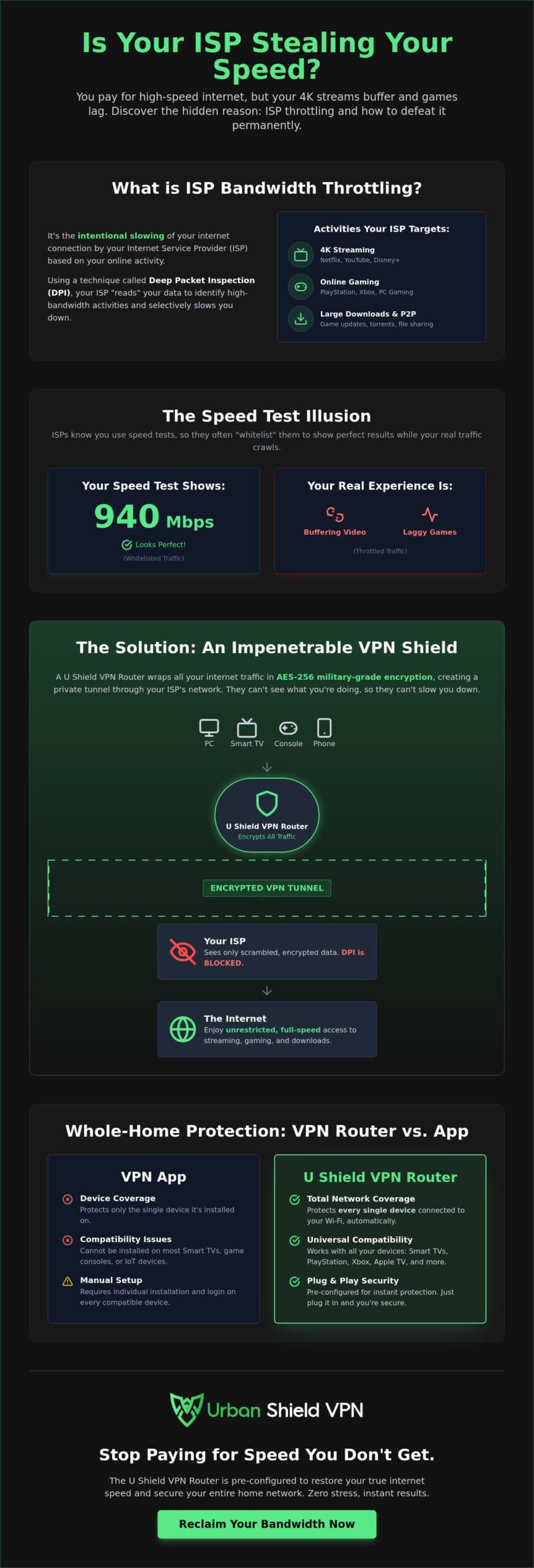
You pay for high speed fiber or cable, yet your favorite 4K series still buffers. This isn’t usually a technical glitch. It is often a deliberate choice made by your provider. Bandwidth throttling is the intentional slowing of your internet connection based on what you are doing online. Your ISP monitors your traffic signatures. If they see you streaming high definition video, downloading a 100GB game update, or using P2P networks, they pull the digital brake. It is a quiet attack on your digital freedom. Using a VPN router to stop throttling is the most effective way to end this interference.
Providers justify these slowdowns as “network management.” They claim it prevents congestion during peak hours. The reality is often tied to profit margins. By slowing down heavy users, ISPs avoid upgrading their infrastructure while still collecting full monthly fees. If you suspect your current provider isn’t delivering the performance you’re paying for, you can learn more about finding a more reliable high-speed connection. It is important to distinguish this from a data cap. A data cap is a transparent limit on how much data you can use. Throttling is a hidden, service-specific slowdown that targets your most demanding habits. It creates an inconsistent experience where some websites feel snappy while your primary entertainment lags.
The Symptoms of Bandwidth Throttling
Throttling is designed to be subtle, but it leaves clear footprints. Look for these specific performance drops in your home:
- The 4K Freeze: Your movie starts in high definition but quickly drops to grainy 720p or pauses to buffer.
- Evening Lag Spikes: Your gaming ping is perfect at noon but becomes unplayable at 8:00 PM when the ISP applies “peak hour” filters.
- Selective Slowness: Your social media feed loads instantly, but a large file download takes hours despite your “gigabit” plan.
Is My ISP Throttling Me? The Speed Test Trap
Most users turn to a standard speed test when things feel slow. This is where the deception deepens. ISPs recognize the traffic signatures of popular speed test sites. They often “whitelist” these sites, giving them priority access to full bandwidth. This creates a fast lane illusion where your test results look perfect, but your actual apps continue to crawl. The ISP shows you the speed you’re paying for only when they know you’re checking. This traffic discrimination makes it hard to prove you’re being cheated. Deploying a VPN router to stop throttling removes this mask. It wraps your entire network in encryption, making every byte look identical to your provider. When they can’t see the 4K stream, they can’t choose to slow it down. You simply get the speed you deserve.
How a VPN Router Bypasses Bandwidth Restrictions
ISPs aren’t just looking at the address on your digital envelopes. They are opening them to see what’s inside. This process is known as Deep Packet Inspection (DPI). It’s the primary tool your provider uses to monitor your online behavior. When they detect the signature of a 4K stream or a massive game download, they instantly apply a speed limit. Using a VPN router to stop throttling changes the rules of the game. It makes your traffic invisible to these invasive filters. For those who enjoy the strategy of navigating complex industries, Studio Showdown offers a tabletop experience that puts you in the seat of a video game developer and entrepreneur.
The solution lies in sophisticated data scrambling. A military grade encryption VPN takes your activity and turns it into unreadable code. Your ISP still sees that you are using the internet, but they can’t see what you are doing. They lose the ability to identify specific services like Netflix, YouTube, or PlayStation Network. Because they cannot categorize your traffic, their automated throttling systems never trigger. You get a clean, unrestricted connection for every device in your home.
Defeating Deep Packet Inspection (DPI)
DPI works by identifying “traffic signatures.” Every app has one. A 4K movie looks different to your ISP than a basic webpage. They use these signatures to decide who gets full speed and who gets slowed down. AES-256 encryption effectively blinds these ISP filters. It strips away the identifying marks of your data packets. Your provider is forced to treat your traffic as generic data. They can’t justify slowing you down if they don’t know you’re streaming. This level of anonymity is the only way to ensure you actually get the bandwidth you pay for every month.
The VPN Tunnel: A Private Lane for Your Data
Think of a VPN as a private, reinforced tunnel running through your ISP’s infrastructure. Your data enters this tunnel at your router and only exits when it reaches a secure, high-speed server. Your ISP sees the tunnel, but they have no idea what is moving inside it. They also can’t see your final destination. By hiding the fact that you’re connecting to gaming or streaming servers, you bypass local network bottlenecks and artificial restrictions. High-speed global servers ensure this process happens in milliseconds, maintaining your original connection speeds without the ISP interference. If you want this protection without the setup hassle, the U Shield VPN Router offers a pre-configured, plug-and-play solution for your entire house.
Router vs. App: The Best Way to Shield Your Entire Network
Most users start their privacy journey with a simple app. It’s a good first step, but it’s an incomplete solution. Your smartphone might be secure, but your PlayStation, Smart TV, and security cameras remain exposed. These devices are often the primary targets for ISP interference. A VPN router to stop throttling provides a blanket of network-wide VPN protection that no individual app can match. You secure the source, and the benefits flow to every connected device instantly.
Think of your home network as a single pipe. If your ISP sees a heavy stream coming from an unprotected Apple TV, they don’t care if your laptop is using an app. They see the high-bandwidth “signature” and pull the digital brake on your entire connection. This is the “Weakest Link” theory in action. One visible device can trigger network-wide slowing. A router-level solution eliminates these blind spots. It makes your entire household’s data look like a single, encrypted, and unidentifiable stream.
Protecting Devices Without Native VPN Support
Many of the most data-hungry devices don’t allow you to install third-party security software. You can’t put a VPN app on a gaming console or a smart fridge. This leaves your gaming sessions and streaming marathons vulnerable to artificial slowdowns. A hardware-level solution acts as a silent gatekeeper. It encrypts the data before it ever leaves your house. This includes IoT devices like smart speakers and cameras, which are often overlooked. By using a VPN router to stop throttling, you also gain a hardware-level kill switch. If the secure connection ever falters, the internet cuts off immediately. This ensures your ISP never catches a glimpse of your unencrypted habits.
Efficiency and Resource Management
Running encryption is a heavy task for any processor. When you run an app on your phone or tablet, it consumes significant battery life and processing power. This can lead to overheating and slower performance during intense tasks. Moving this workload to a dedicated router offloads the stress. Your mobile devices stay cool, fast, and last longer on a single charge. A single, powerful hardware unit manages dozens of connections simultaneously with far greater efficiency than a dozen separate apps. Choosing between a VPN app vs VPN router is the most critical decision for 2026 home security. It is the difference between protecting a single screen and securing your entire digital life.
Detecting and Defeating Throttling in 3 Simple Steps
You suspect your ISP is cheating you. Now it’s time to prove it. Identifying the slowdown requires a methodical approach. By following these three steps, you can move from suspicion to a permanent solution. A VPN router to stop throttling is your final destination in this process. It turns your home into a fortress where performance is guaranteed. You pay for the speed. You should be able to use it.
Step 1: Baseline Testing. Run a standard speed test on a site like Ookla. This establishes the “marketing speed” your ISP wants you to see. As we explored in the first section, these results are often inflated because ISPs prioritize this traffic. Record this number as your baseline.
Step 2: Comparison Testing. Use a VPN to encrypt your connection and run a service-specific test, like Netflix’s Fast.com. If your speed for 4K streaming suddenly jumps higher than your baseline or feels significantly smoother, you’ve caught your ISP in the act. The VPN reveals the true capacity of your line by hiding the nature of your traffic from their filters.
Step 3: Hardware Implementation. Once you’ve confirmed the interference, deploy a pre-configured VPN router. This locks in your unrestricted speeds across every device. You won’t have to toggle apps or change settings ever again. It is a set-and-forget solution for your entire household.
Sometimes, slow speeds aren’t intentional throttling. They can be “peering” issues. This happens when your ISP’s network meets another network at a congested exchange point. If a VPN doesn’t fix the speed, the bottleneck might be physical infrastructure rather than a digital filter. However, in 2026, the majority of selective slowdowns remain software-driven.
Running a Scientific Speed Comparison
To get the most accurate data, use specialized tools that ISPs are likely to throttle. If your standard test shows 500Mbps but a video-focused test shows only 50Mbps, your provider is targeting your entertainment. This gap represents the “Real-world speed” you’re actually getting versus what you’re being sold. You might also notice that certain gaming ports are restricted during peak hours. A VPN bypasses these port-specific blocks by wrapping all data in a single, standard port signature that looks like harmless web browsing.
Setting Up Your Hardware Shield
You have two choices for hardware. You can attempt to “flash” your existing router with custom firmware. This is risky, technical, and can “brick” your device. The better option is a pre-configured unit. A pre-configured router comes ready to go out of the box. It removes the technical anxiety of manual setup. To ensure the best performance, select a server location physically closest to you. This keeps latency low for gaming. Finally, verify your new shield with an IP leak test to ensure your ISP is truly blinded. If you’re ready to reclaim your bandwidth today, order the U Shield VPN Router for instant, network-wide protection.
The U Shield VPN Router: Instant Speed, Zero Configuration
Setting up a secure network shouldn’t feel like a chore. The U Shield VPN Router is the sophisticated simplifier for your home speed issues. It removes the technical burden from your shoulders. This is a true plug-and-play solution. No complex manuals. No network anxiety. You simply connect it to your existing modem and start enjoying the speed you already pay for. A VPN router to stop throttling should be effortless. We make sure it is. It operates as a silent, powerful guardian that protects every device from the moment it connects.
Your digital security is our priority. Every unit comes with military-grade encryption as a standard feature. This turns your personal data into unreadable code that ISPs cannot decipher. We also include a built-in anti-tracker. This prevents advertisers and third parties from following your digital footprint across the web. You gain total invisibility without ever touching a single complex configuration screen. It’s time to reclaim the bandwidth you are already paying for every month. You deserve a connection that works at full capacity all the time.
Optimised for Streaming and Gaming
Speed is nothing without stability. Our servers are specifically tuned for high-performance tasks. They prioritize low-latency gaming and buffer-free 4K video. You get a smooth experience because the ISP no longer sees your traffic signatures. They can’t slow down what they can’t identify. Unlimited data usage comes standard with every plan. This ensures unrestricted entertainment for every member of your household. The U Shield hardware acts as a silent guardian. It works tirelessly in the background to keep your connection fast, private, and consistent. For those who require this level of stability in a professional setting, you can discover Stratelegy to see how enterprise-grade communication solutions support business growth.
Total Peace of Mind with Global Support
Control your digital location with ease. You gain access to a global network of high-speed servers with a single login. This allows you to bypass local network congestion and reach your content faster. Reliability is built into the hardware. Every router includes a professional-grade kill switch. If your secure connection ever falters, your internet cuts off instantly. This prevents accidental data leaks to your ISP. You remain protected, even during a momentary outage. Stop letting your provider dictate your internet experience. It’s time to take control of your digital home. Order your pre-configured U Shield VPN Router today and experience the internet without limits.
Take Control of Your Digital Experience Today
Your internet speed shouldn’t be a gamble. We have explored how ISPs use hidden filters to monitor and slow your connection. You pay for performance. You deserve to receive it. A VPN router to stop throttling is the most reliable way to ensure your 4K streams and gaming sessions remain uninterrupted. By encrypting every byte at the source, you remove the ISP’s power to choose what you do online. It is the ultimate tool for reclaiming your digital freedom.
The U Shield VPN Router provides a complete shield with zero configuration stress. You get military-grade AES-256 encryption and hardware specifically optimised for high-speed entertainment. It is a silent guardian for your entire home network. Don’t let your provider dictate your digital life any longer. You can enjoy a consistent connection across every device without touching a single complex setting. The power to restore your true speed is now in your hands.
Stop the buffering and reclaim your speed with a pre-configured U Shield VPN Router. Enjoy the internet exactly as it was meant to be. Fast. Private. Entirely yours.
Frequently Asked Questions
Does a VPN router actually increase my internet speed?
A VPN cannot exceed the maximum physical capacity of your internet line, but it can restore speeds your ISP has artificially lowered. By encrypting your data, the router hides your activity from provider filters. This prevents selective slowing of streaming or gaming traffic. You get the full bandwidth you are paying for instead of a restricted version.
Is ISP throttling legal in 2026?
Yes, most providers include “reasonable network management” clauses in their service agreements. These terms allow them to slow down specific traffic types during peak hours or for high-bandwidth users. While regulations vary by region, these practices remain common industry standards. Using a VPN router to stop throttling is a legal and effective way to protect your connection from these intentional slowdowns.
Can I use a VPN router with my existing modem?
Absolutely. You connect the U Shield VPN Router directly to your existing modem or gateway using a standard Ethernet cable. Your modem continues to handle the physical internet signal from your provider. The VPN router then takes that signal, encrypts it, and distributes it to your devices. This setup creates a secure, secondary network that protects everything in your home.
Will a VPN router stop lag in online games like Call of Duty or Fortnite?
It can significantly reduce lag if your ISP is specifically targeting gaming traffic for slowdowns. By masking your data as generic web traffic, you bypass artificial “ping spikes” applied during busy evening hours. It cannot fix lag caused by poor physical infrastructure or long distances to game servers. It simply ensures your ISP isn’t the one sabotaging your match.
For those managing their own online platforms, maintaining visibility during such network issues is key; StatusPulse provides a comprehensive solution for uptime monitoring and public status pages to keep users informed.
How do I know if my VPN is actually stopping the throttling?
You can verify the impact by running a comparison speed test on a video-specific site. First, test your speed with the VPN off. Then, test it again with the VPN active. If your streaming speed increases significantly with the VPN on, you have confirmed that your ISP was previously restricting your bandwidth. This reveals the true potential of your home connection.
Do I need a technical background to install a pre-configured VPN router?
No technical expertise is required. A pre-configured U Shield VPN Router arrives ready to use out of the box. You simply plug it in and connect your devices to the new Wi-Fi network. We handle the complex security settings and server configurations for you. It is a true plug-and-play solution designed for simplicity and peace of mind.
Can my ISP see that I am using a VPN to bypass their limits?
Your ISP can see that you are connected to a VPN, but they cannot see what you are doing inside that connection. All your activity is wrapped in a layer of encrypted code. They can’t distinguish between a 4K movie and a basic email. Because they can’t identify the specific service you are using, they can’t apply targeted speed restrictions.
What happens if the VPN connection drops while I am streaming?
Our routers feature a professional-grade kill switch that protects your privacy instantly. If the VPN connection falters, the kill switch cuts your internet access immediately. This prevents your devices from reverting to an unencrypted connection where the ISP could see your activity. Your streaming will pause, but your habits remain hidden from provider monitoring until the secure tunnel is restored.
