






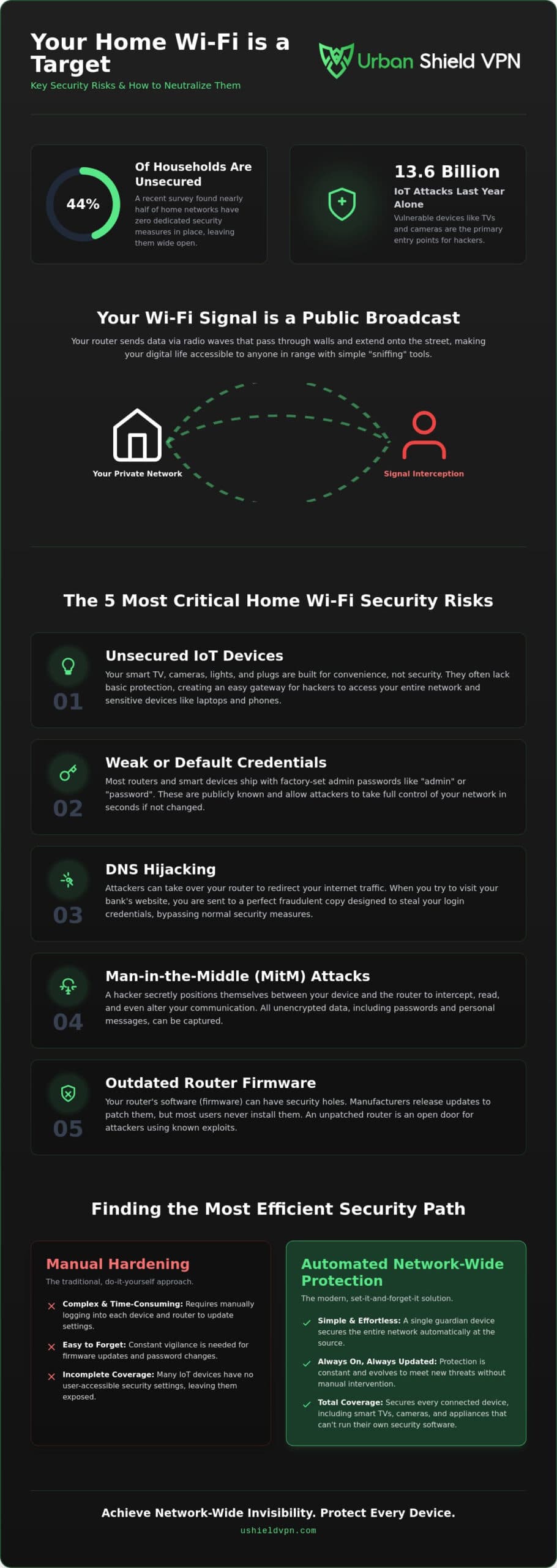
A recent survey revealed that 44% of households have taken zero steps to secure their home networks in 2026. This gap persists even after 13.6 billion IoT attacks were documented last year alone. Your smart TV, cameras, and doorbells are often the most vulnerable entry points. Managing home wi-fi security risks shouldn’t feel like a complex chore. You deserve a home that’s a private sanctuary, not a target. It’s time to take control without the technical headache.
We know you value speed and simplicity. You want total protection that doesn’t throttle your streaming or require hours of manual configuration. This guide will help you identify hidden vulnerabilities in your network. You’ll discover how to neutralize threats with a professional, solution-oriented approach to digital privacy. We’ll show you how to achieve network-wide invisibility. Every device stays protected. Your speed remains untouched. Peace of mind becomes your new default setting.
Key Takeaways
- Understand how invisible radio waves expose your network and how to regain total digital privacy.
- Identify the five most critical home wi-fi security risks, including vulnerable IoT devices and weak factory credentials.
- Compare manual hardening against automated network-wide protection to find the most efficient security path.
- Learn practical steps to audit your connected devices and neutralize hidden vulnerabilities immediately.
- Discover how a single, powerful guardian can secure every device in your home without sacrificing streaming speed.
Understanding the Invisible: Why Home Wi-Fi is a Primary Target in 2026
Wi-Fi feels like a private utility. It’s actually a public broadcast. Your router sends data through walls, floors, and onto the street via radio waves. This physical reality creates significant home wi-fi security risks. Hackers don’t need to pick a physical lock to enter your digital life. They simply need to be within range of your signal. Wi-Fi signal interception is the primary entry point for home breaches.
Being on a network means your devices are visible to others by default. When your laptop or phone searches for a connection, it broadcasts its presence. This digital footprint is easy to track. Threat actors use “sniffing” tools to capture unencrypted data packets directly from the air. These packets can contain sensitive information, from login credentials to private browsing habits. Protection must be invisible and constant to be effective.
The Nature of Wireless Signals and Interception
Wireless signals operate on 2.4GHz and 5GHz frequencies. These waves don’t stop at your property line. They broadcast your personal data to anyone with the right antenna. In the past, attackers used “war-driving” to find open networks manually. Today, technology has evolved. Sophisticated threat actors use remote exploitation tools to target networks from a distance. Physical proximity is no longer a strict requirement. Modern equipment can amplify signals from blocks away, making your data vulnerable even in a quiet neighborhood. For those seeking a comprehensive overview of wireless security, it’s clear that the air itself is the battleground. Encryption is your only shield against this silent surveillance.
Network Visibility: Why Being Connected Means Being Seen
Every time a device connects, it performs a “handshake.” This process identifies your device to the router. It also announces your device to anyone listening. Many people believe hiding their Network ID (SSID) keeps them safe. This is a myth. Hidden networks still broadcast signals that hackers can detect in seconds. They provide a false sense of security while leaving your home wi-fi security risks unaddressed. You can’t hide by simply turning off a name. You must mask the data itself. Implementing network-wide VPN protection is the most effective way to stay invisible. It encrypts every bit of data before it ever leaves your home. Your devices stay connected, but your identity remains private. This approach removes the target from your back without requiring complex manual settings.
The 5 Most Critical Home Wi-Fi Security Risks You Face Today
Understanding the air is just the start. To stay protected, you must recognize the specific home wi-fi security risks that compromise modern households. Most breaches aren’t the result of complex coding. They happen because of simple, overlooked vulnerabilities. These gaps allow attackers to bypass your defenses without a sound. Identifying them is the first step toward reclaiming your digital privacy.
- Unsecured IoT Devices: Smart appliances often lack basic security protocols.
- Weak Credentials: Factory-set admin passwords are easy for hackers to guess.
- DNS Hijacking: Attackers redirect your traffic to malicious, fraudulent clones.
- Man-in-the-Middle (MitM) Attacks: Data is intercepted between your device and the router.
- Outdated Firmware: Unpatched routers leave doors wide open for known exploits.
Following home network security best practices is a strong start for any homeowner. However, manual updates are easy to forget. Consistent protection requires a more automated approach.
The IoT Gap: Why Your Smart Home is the Weakest Link
Your smart fridge or lightbulb is a gateway. These devices are built for convenience, not defense. Most lack the processing power to run standard security software. This creates a massive vulnerability. If a hacker compromises a single smart plug, they can move laterally through your network. They can then access your laptop or phone data. You can learn more about how to prevent smart home hacking to secure these specific entry points. Protecting the network at the source is the only way to cover devices that can’t protect themselves.
DNS Hijacking and Data Redirection
DNS is the internet’s phonebook. It translates website names into IP addresses. Attackers can hijack your router to manipulate this book. You type in your bank’s address. The router sends you to a perfect, fraudulent replica. You enter your credentials, and the attacker captures them instantly. This is one of the most dangerous home wi-fi security risks today. It bypasses your visual checks because the URL looks correct.
Military-grade encryption stops this threat. It wraps your data in an unbreakable shell. Even if an attacker intercepts the traffic, the information is garbled and useless. For total peace of mind, a pre-configured U Shield VPN Router handles this encryption automatically. It protects every device in your home without requiring individual app installs. Protection becomes effortless. Your network becomes a fortress.
Manual Hardening vs. Automated Network-Wide Protection
Securing your digital life shouldn’t be a second job. Most people try to manage home wi-fi security risks by tweaking individual router settings. This manual hardening requires deep technical knowledge. It also demands constant attention. You have to update every device. You have to check logs. It’s a recipe for burnout and human error. Chores get ignored. Security shouldn’t be one of them. When protection feels like work, vulnerabilities grow.
Automation offers a more reliable path. It shifts the burden from your shoulders to a dedicated system. Instead of fixing individual leaks, you build a stronger dam. This approach ensures that your protection is always active. It doesn’t rely on your memory or your technical skills. It just works in the background, providing a silent, powerful layer of defense for your entire family.
The Limitations of Basic Router Settings
WPA3 is the current standard for wireless encryption. It’s a massive improvement over older protocols, but it isn’t a silver bullet. Sophisticated traffic analysis can still identify your online habits even if your password is strong. The real challenge lies in the sheer volume of devices. The average home now has 20 or more connected products. Managing security updates across all of them is an impossible task. Most users forget to update their router firmware for months at a time. This oversight creates a playground for cybercriminals. Even the NSA’s best practices for home network security emphasize that manual steps are often the weakest link. Relying on your own memory to stay safe is a gamble you don’t need to take.
Why a VPN Router is the Ultimate Security Move
Automated protection via a VPN router changes the dynamic entirely. It secures your entire network at the source. Every bit of data is encrypted the moment it leaves your device. This includes your smart TV, gaming console, and smart home hubs. These devices usually cannot run native security software. They are often left exposed when you only use device-level apps. Understanding the difference between a VPN app vs. VPN router is essential for anyone serious about privacy. Apps are great for your phone when you’re on the go. However, a router protects your entire household with a single setup.
Pre-configured hardware offers a powerful “set-it-and-forget-it” advantage. You don’t have to configure 20 different devices. You just connect them to your secure network. This hardware-level security eliminates the need for manual device configuration. It also addresses the primary home wi-fi security risks by masking your entire network’s identity. Your digital life stays private. Your streaming speeds stay fast. You get total peace of mind without the technical headache. It’s professional-grade security made simple for the modern home.
Practical Steps to Secure Your Home Network Immediately
Audit your connected devices today. Identify every “weakest link” in your household. Your security is only as strong as your least protected device. Start by listing everything from your laptop to your smart doorbell. This inventory helps you see exactly where home wi-fi security risks are hiding. Knowledge is your first line of defense.
Update your router firmware now. Manufacturers release 2026 security patches to close newly discovered gaps. Don’t leave the door unlocked for cybercriminals. Regular updates ensure your hardware has the latest defensive tools. It’s a simple step that provides massive protection. Finally, disable remote management features. These tools allow access to your router from the open internet. Hackers exploit them to gain total control of your network from anywhere in the world.
Securing the Gateway: Beyond the Password
Passwords are just the first layer. Change the default IP address of your router to prevent automated scans. Most attackers look for standard addresses. Moving yours makes you a harder target. Set up a guest network for visitors and unverified devices. This isolates your primary data from outside hardware. It ensures a single compromised phone doesn’t threaten your entire digital life. Finally, disable Wi-Fi Protected Setup (WPS). This is a critical security step. WPS is convenient for initial setup, but it’s notoriously easy for sophisticated attackers to bypass. Closing this gap removes a major entry point for home wi-fi security risks.
Implementing Military-Grade Encryption
Data is your most valuable asset. Encryption keeps it safe. Understanding what military grade encryption VPN actually means is vital for your privacy. It’s the difference between exposed traffic and an unbreakable digital shell. AES-256 encryption is the global gold standard for security. It would take millions of years for even the world’s most powerful computers to crack. This encryption acts as a final, impenetrable wall. Even if your Wi-Fi signal is intercepted by a neighbor or a hacker, your data remains a garbled, useless mess to the intruder. It ensures your private conversations and banking details stay private.
You don’t have to be a tech expert to achieve this level of safety. Deploy a network-wide encryption solution to mask all traffic automatically. It removes the need for manual effort and constant monitoring. You can secure every device in your home instantly with a U Shield VPN Router. It’s the ultimate set-it-and-forget-it solution for modern digital life. Protect your family. Secure your future. Enjoy the internet without the worry.
U Shield VPN: The Silent Guardian for Your Connected Life
You’ve seen the vulnerabilities. You know the air around your home is a broadcast. Now, you need a solution that operates with quiet authority. The U Shield VPN Router acts as a silent guardian for your digital life. It handles home wi-fi security risks at the source. This means you don’t have to worry about individual device settings. It provides military-grade encryption for every single device in your home. One simple setup secures your laptops, tablets, and phones. It’s protection that works in the background while you live your life.
Speed is never a sacrifice. Our high-speed global servers ensure zero lag for your household. You can stream 4K content or engage in high-stakes gaming without interruption. Most security tools slow you down. U Shield VPN is optimized for velocity. It removes the friction between safety and performance. You get absolute privacy. You keep your maximum connection speed.
Plug-and-Play Peace of Mind
Technical stress is a thing of the past. A pre-configured VPN router removes the complexity of modern networking. It offers total protection for Smart TVs, gaming consoles, and IoT devices without installing any apps. We’ve already discussed why these are the weakest links in 2026. This hardware-level approach closes those gaps permanently. You enjoy the freedom of unlimited data. You get the peace of mind that comes with a professional-grade defense. It’s security that respects your time.
Advanced Features for Total Anonymity
True invisibility requires advanced tools. Our built-in anti-tracker stops advertisers from following your Wi-Fi usage across the web. It prevents third parties from building a profile on your family. The kill switch provides another layer of absolute reliability. If your VPN connection ever wavers, the kill switch cuts your internet access instantly. This prevents any unencrypted data from leaking out. It ensures your home wi-fi security risks are neutralized 100% of the time. You deserve a network that protects itself.
Take the technical burden off your shoulders. You don’t need to be an expert to be safe. You just need the right guardian. Reclaim your digital freedom and protect your family’s privacy with a single, powerful move. Secure your entire home network with U Shield VPN today.
Secure Your Digital Future Today
Protecting your digital life in 2026 requires more than just a strong password. You’ve seen how invisible radio waves and vulnerable smart devices create constant home wi-fi security risks. Relying on manual updates or individual device apps is a gamble that often leaves your family exposed. True security comes from a network that defends itself automatically. It’s about shifting from constant technical maintenance to total, effortless peace of mind. The technical burden is gone. The silent guardian is here.
You don’t have to choose between safety and speed. Our dedicated hardware provides military-grade AES-256 encryption for every device in your household. It’s pre-configured for plug-and-play ease; you’ll be protected in minutes. With our global high-speed server network, your streaming and gaming remain seamless and lag-free. You deserve a home that’s private, powerful, and protected. Get the U Shield VPN Router for Total Home Protection and reclaim your digital freedom today. Your sanctuary is finally secure.
Frequently Asked Questions
Is my home Wi-Fi secure if I have a strong password?
A strong password is only the first line of defense. It prevents unauthorized access to the network, but it doesn’t protect the data traveling through the air. Hackers can still use sniffing tools to capture unencrypted packets. To fully address home wi-fi security risks, you must implement network-wide encryption. This ensures that even if a signal is intercepted, the data remains unreadable and useless to intruders.
How do I know if someone is hacking my Wi-Fi?
Monitor your network for unexplained slowdowns or unknown devices. You can check your router’s administrator dashboard to see a list of currently connected hardware. If you see a device you don’t recognize, your security may be compromised. Advanced security routers provide real-time alerts for suspicious activity. However, the best approach is making your network invisible through encryption, which prevents hackers from finding you in the first place.
Can smart home devices like cameras be hacked through Wi-Fi?
Absolutely. Smart cameras and doorbells are often the weakest links in a home network. These devices frequently lack the memory or processing power to run complex security software. If a hacker gains access to one camera, they can often jump to other devices on the same network. Protecting these gadgets at the router level is the only way to ensure they don’t become gateways into your private life.
Do I need a VPN on every device or just the router?
Protecting the router is the most comprehensive strategy. While individual apps are useful for laptops and phones, they cannot be installed on many smart home devices. A VPN router secures everything at the source. This includes your gaming consoles, Smart TVs, and even your smart fridge. It provides a single, powerful shield for every device in your household without requiring individual software management or manual updates.
Will a VPN router slow down my internet speed for gaming?
High-performance hardware ensures your speed remains consistent. Older or low-end routers might struggle with the processing required for encryption, but modern VPN routers are built for velocity. U Shield VPN uses optimized global servers to maintain low latency. This means you can enjoy military-grade protection while gaming or streaming 4K content without any noticeable lag or buffering. Speed and security are no longer a trade-off.
What is the biggest security risk for home Wi-Fi in 2026?
Unsecured IoT devices represent the greatest threat in 2026. With billions of smart products now in homes, the number of potential entry points for hackers has exploded. Many of these devices ship with weak factory passwords and never receive security patches. Centralizing your defense at the router level is the most effective way to manage these home wi-fi security risks across your entire connected ecosystem.
Can a VPN protect me if my router firmware is outdated?
A VPN acts as a powerful redundant layer of safety. Even if your router firmware has an unpatched vulnerability, your data is encrypted before it ever touches the router’s software. This means that a hacker exploiting a firmware bug would only see garbled, encrypted traffic. While keeping firmware updated is still recommended, a VPN provides an essential fallback that keeps your personal information private under any circumstances.
Is it better to use a monthly or annual VPN plan for home security?
Annual plans are the superior choice for consistent protection. Digital threats don’t take breaks, so your defense shouldn’t either. An annual plan ensures your home remains a private sanctuary 365 days a year without the risk of a coverage lapse. It’s a cost-effective way to secure your digital future. You get long-term peace of mind and the latest security features with a single, simple decision.
