





Did you know that the gaming industry is the target of nearly 57% of all DDoS attacks? In 2026, network-layer attacks have surged by over 168%. This means your home network is a visible target every time you join a competitive lobby. Learning how to hide IP address on gaming console hardware is no longer just for pros. It is a vital step to stay online. Protect your connection. Stay in the game.
You deserve a gaming experience defined by skill; not by who has the cheapest booter tool. We know the frustration of a dropped connection during a critical match. This guide shows you the three most effective ways to shield your console from DDoS attacks and IP pulling without sacrificing your gaming speed. You will gain total anonymity and protection against disruptions. We will break down how to use hardware and smart routing to maintain a stable ping while staying completely hidden from prying eyes.
Key Takeaways
- Secure your network. Learn why hardware-based gateways offer the most seamless protection for consoles without native app support.
- Shield your identity. Master three proven methods for how to hide IP address on gaming console hardware to stop toxic players from pulling your location.
- Balance speed and security. Understand the difference between Smart DNS for location spoofing and full VPN encryption for DDoS defense.
- Eliminate lag. Discover how modern protocols and strategic server selection keep your ping low while your connection stays invisible.
Why Gamers Must Hide Their IP Address in 2026
Your IP address functions as your digital home address. It broadcasts your general location and provides a direct gateway to your home network. In 2026, competitive gaming lobbies are frequent targets for “IP pulling” tools. These scripts scrape your data from peer-to-peer connections during matches or voice chats. Once a toxic player has your address, your connection is vulnerable. Understanding how to hide IP address on gaming console hardware is the first step toward reclaiming your privacy. It stops the threat before it reaches your router. You remain invisible and protected.
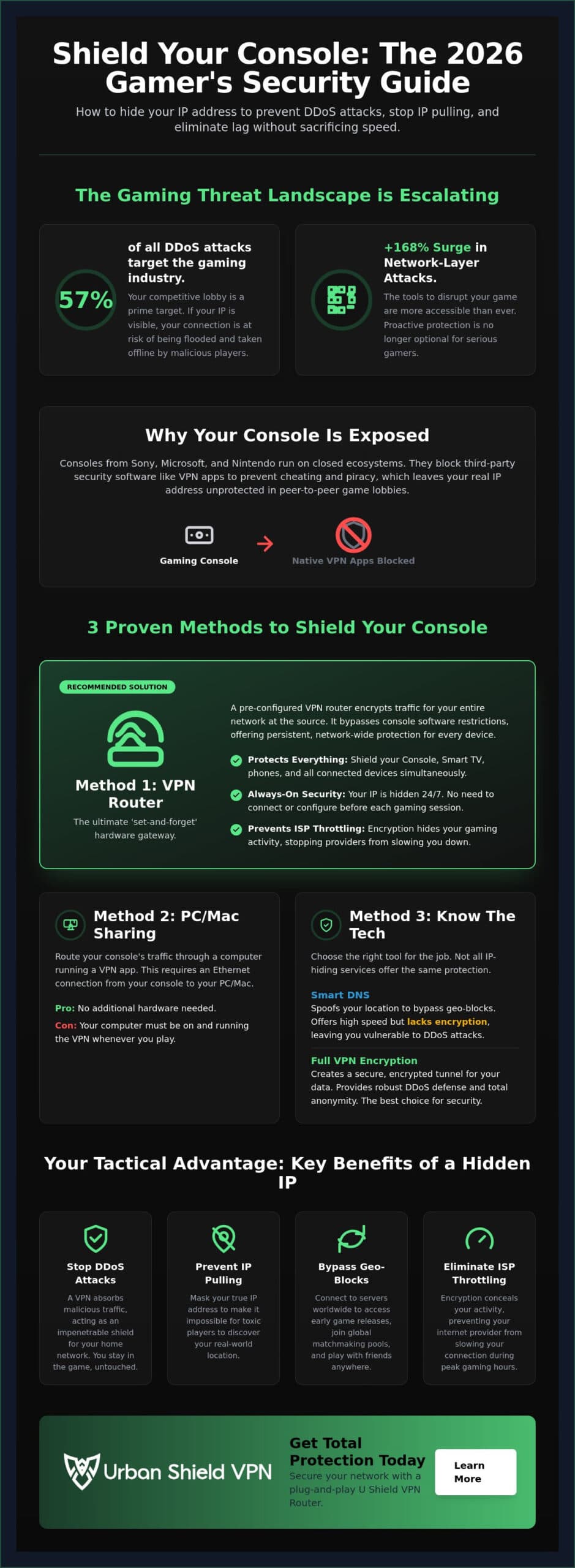
The gaming industry faces a massive security challenge. It currently attracts 57% of all DDoS attacks globally. These attacks are no longer reserved for high-stakes tournaments; they happen in everyday lobbies. If your IP is visible, you are a target. Learning how to hide IP address on gaming console setups protects your home from being part of these statistics. It ensures your network remains your own.
The Threat of DDoS Attacks and ‘Booting’
DDoS attacks are a growing menace. A Distributed Denial of Service (DDoS) occurs when an attacker uses a network of devices to flood your router with fake traffic. This surge consumes your bandwidth and crashes your connection. Booting is the act of forcing a player offline via traffic flooding. When you use a Virtual Private Network (VPN), your real IP is masked. The attacker sees only the VPN server’s address. The server acts as a shield. It absorbs the malicious traffic while your actual connection remains stable and untouched. You stay in the match while the attack fails.
Bypassing Geo-Blocks for Global Matchmaking
Geo-restrictions often limit your gaming experience. Publishers frequently lock servers or downloadable content based on your residential IP coordinates. This leads to longer queue times or laggy matches in underpopulated regions. Hiding your IP allows you to safely hop between global servers. You can access early releases or join lobbies in regions with higher skill ceilings. Utilizing a military grade encryption VPN ensures this process is secure. It protects your data from prying eyes while giving you the freedom to play anywhere in the world. You gain total control over your digital footprint. Privacy is not a luxury. It is a requirement for modern gaming.
Method 1: Pre-Configured VPN Routers for Instant Protection
Most gamers search for a dedicated app on the PlayStation Store or Xbox Marketplace. They usually find nothing. Consoles are built on closed ecosystems that prioritize proprietary software over third-party security tools. This makes a hardware-based solution essential. A router acts as a secure gateway for your entire home. It encrypts every byte of data before it ever reaches the open web. Protection happens at the source. It is the most reliable way to stay invisible.
Learning how to hide IP address on gaming console devices becomes effortless with this approach. You don’t need to configure individual game settings or navigate complex console menus. The router handles the heavy lifting. You simply connect to your Wi-Fi and play. The masking is persistent. Your IP stays hidden 24/7 without you ever needing to toggle a switch. It is a set-and-forget solution for total peace of mind.
Why Consoles Can’t Run VPN Apps Directly
Sony, Microsoft, and Nintendo maintain strict control over their platforms. They block deep network modifications to prevent cheating and piracy. This policy also prevents you from installing traditional security software. This leaves your residential IP exposed in peer-to-peer lobbies. A pre-configured VPN router is the ultimate fix for this limitation. It bypasses software restrictions by securing the connection before it reaches the console. This is the core of how VPNs work to protect privacy; they redirect your traffic through an encrypted tunnel, making your true location impossible to track.
The Benefits of Network-Wide Encryption
Securing your console is just the beginning. Most households have dozens of unprotected devices on home network connections. Smart TVs, phones, and tablets are often silent vulnerabilities. A VPN router shields everything simultaneously. It also prevents ISP throttling. Internet providers often slow down gaming traffic during peak hours to manage bandwidth. Encryption hides your activity type from your provider. Since they can’t see that you’re gaming, they can’t target your connection for slowdowns. You maintain your speed and your privacy at the same time.
For gamers who value a seamless experience, the U Shield VPN Router offers a powerful, plug-and-play solution. It arrives ready to protect your home network the moment you plug it in. You gain professional-grade security without the technical burden. It is the gold standard for modern console privacy.
Method 2: Sharing Your VPN Connection via PC or Mac
If you aren’t ready to upgrade your hardware, your computer can serve as a powerful bridge. This method turns your PC or Mac into a protective middleman. It receives the encrypted signal from the web and passes it directly to your console. It is a smart, accessible way to learn how to hide IP address on gaming console hardware using the equipment you already own. You gain the security of a desktop app on a device that typically lacks it. Protection becomes immediate.
This physical setup is mandatory. You must connect your console to your computer using an Ethernet cable to ensure a stable, low-latency link. While this method is highly effective, it does have a specific requirement. Your computer must remain powered on and active throughout your entire gaming session. If your PC enters sleep mode, your console loses both its protection and its internet access. To start, you will need an active hide IP address VPN application running on your desktop.
Bridging Connections on Windows
Windows handles connection sharing with ease. First, open the “Network and Sharing Center” and select “Change adapter settings.” Locate the specific adapter created by your VPN software. Right-click it and choose Properties. Under the Sharing tab, check the box that allows other network users to connect through your computer’s internet. Finally, select the Ethernet port connected to your console from the dropdown list. Your console is now shielded by your PC’s encryption. It is fast and secure.
Using macOS to Secure Your Console
Apple users can secure their lobbies through System Settings. Navigate to the General tab and click on Sharing. Select “Internet Sharing” from the list but don’t toggle it on yet. Choose to share your connection from your VPN adapter to computers using Ethernet. Once these parameters are set, toggle the sharing service to “On.” Always verify your success. Check the network status on your console to ensure the IP address matches your VPN server location. If the addresses match, your residential coordinates are successfully masked. You are ready to play.
This bridging technique offers a high level of flexibility. It allows you to toggle your protection on a per-session basis. You get professional-grade privacy without permanent network changes. It is a reliable choice for gamers who want control. Stay hidden while you climb the ranks.
Method 3: Smart DNS vs. Full VPN Encryption
Many gamers confuse changing their region with securing their network. Smart DNS is a popular choice for accessing international content. It is designed for speed and location spoofing. It is not a security tool. It does not provide the encryption necessary to keep your data private from hackers. If your primary goal is learning how to hide IP address on gaming console systems for safety, DNS alone is insufficient. It changes your perceived location while leaving your residential IP completely visible to the world.
The distinction is critical for your safety. Smart DNS works by only rerouting your DNS queries. This is enough to trick a streaming service into thinking you are in another country. However, your actual gaming traffic still travels over the open web. Anyone in your lobby with a basic IP pulling tool can see your true coordinates. You lack the protective tunnel that a full VPN provides. Speed is useless if your connection is easily compromised by a malicious player.
When to Use Smart DNS for Gaming
This method has a specific, limited purpose. It is ideal for accessing streaming apps like Netflix, Hulu, or YouTube on your console. You will experience zero latency impact because there is no encryption overhead to slow you down. This makes it a great choice for media consumption. The trade-off is your security. Your real home IP is still exposed to every player in every match. Use Smart DNS for movies, but never for competitive play where your reputation or connectivity is at stake.
Why Smart DNS Fails at IP Hiding
DNS only redirects specific traffic types. It does not wrap your entire network presence in a secure layer. This is why Smart DNS provides zero protection against DDoS attacks. It also lacks a VPN kill switch, which is essential for stopping data leaks during a connection failure. Without this feature, your real IP is instantly revealed the moment a server hiccups. Think of DNS as a mask; it only changes your appearance. A VPN is a shield; it actively stops the incoming attack. True privacy requires more than a simple redirect. It requires total encryption.
Don’t settle for half-measures that leave your network vulnerable. Secure your console with an Annual VPN Plan to move beyond simple masking and achieve true digital defense. Protect your ping and your privacy simultaneously.
Optimizing Your Console for Speed and Security
Security should never cost you a victory. Many players still believe the myth that encryption leads to high latency or “VPN lag.” In 2026, this is no longer the case. Modern protocols like WireGuard have transformed digital protection. They offer lightning-fast speeds that traditional methods cannot match. When you master how to hide IP address on gaming console hardware using these protocols, you maintain your competitive edge. You get total protection without a performance penalty. Speed meets security.
Your NAT type is the next priority for a seamless experience. For the best matchmaking and voice chat, you want an “Open” NAT. This allows your console to communicate freely with other players in a lobby. While some basic security layers can restrict this, a high-quality VPN server supports the necessary port forwarding. This ensures your connection remains fluid and accessible. You stay hidden from attackers while staying open to the game. It is the perfect balance for serious competitive play.
Reducing Latency with Global Gaming Servers
Physical distance is the primary driver of ping. To optimize your connection, always select a VPN server closest to the game’s actual data center. If the game server is in London, connect to a London VPN node. This minimizes the distance your data packets must travel. Additionally, using a VPN with anti-tracker capabilities helps reduce background bandwidth usage. It stops hidden scripts and telemetry from eating into your upload speeds. Always test your ping before and after connecting to ensure your route is as efficient as possible.
The U Shield VPN Router Advantage
Hardware-level encryption remains the superior choice for competitive play. It offloads the heavy processing power from your console to the router itself. This prevents any potential performance dips or stuttering on your gaming machine. You don’t have to worry about software compatibility or system updates breaking your shield. The U Shield VPN Router provides absolute simplicity. There is no bridging, no complex software, and no manual configuration required. You get instant, network-wide protection the moment you power it up.
For those seeking a permanent solution, we recommend reading our ultimate guide to pre-configured VPN routers. It is the logical conclusion for any gamer who values their privacy as much as their rank. Knowing how to hide IP address on gaming console setups is about more than just avoiding a DDoS attack. It is about taking full control of your digital environment. Play with confidence. Stay invisible. Stay in the game.
Secure Your Victory and Your Privacy
Privacy is the foundation of competitive integrity. You now understand the technical gap between simple location masking and true network defense. Whether you choose to bridge a connection or deploy a dedicated gateway, the objective remains the same. You’re removing the target from your home network. Mastering how to hide IP address on gaming console hardware ensures that your skill, not your network vulnerability, determines the outcome of every match. You deserve a connection that’s as resilient as your gameplay.
Real security shouldn’t be a technical chore. It should operate silently in the background. Our hardware provides military-grade AES-256 encryption with zero configuration required. You get 24/7 global server access for low-latency gaming across every platform. This plug-and-play solution removes the friction of manual setups. It’s the ultimate guardian for your digital life. Stop worrying about toxic players and start focusing on the leaderboard. Secure your entire console network with a U Shield VPN Router today. Play without limits. Stay protected.
Frequently Asked Questions
Can someone really find my home address from my Xbox IP?
An IP address reveals your city and internet service provider (ISP); it doesn’t show your exact street address. However, this information is enough for a toxic player to launch a DDoS attack. This can crash your router and take your entire home offline. Masking your presence prevents these disruptions. It ensures your network remains private and secure.
Does hiding my IP address with a VPN cause lag in Call of Duty or Fortnite?
Modern VPN protocols like WireGuard minimize latency issues. If you choose a server close to the game’s data center, your ping may stay stable or even improve. Many ISPs throttle gaming traffic during peak hours to manage their bandwidth. Encryption hides your activity. This prevents artificial slowdowns. You stay protected without losing your competitive edge.
Is it legal to use a VPN on a gaming console in 2026?
Using a VPN is entirely legal in 2026. However, you must follow the terms of service for your specific platform. While Sony and Microsoft don’t ban VPNs for privacy, using one to buy games in cheaper regions can lead to account restrictions. It’s best to use your shield for security and matchmaking rather than regional price exploitation.
Will a VPN help me get into ‘bot lobbies’ for easier matchmaking?
Yes, a VPN can influence your matchmaking experience. By shifting your location to a different time zone, you may find lobbies with fewer competitive players. This can lead to more relaxed matches. It’s a common strategy for those learning how to hide IP address on gaming console systems to improve their overall experience and avoid sweatier lobbies.
What is the difference between a VPN and a Proxy for gaming?
The main difference is encryption. A proxy only masks your IP address for specific traffic. It offers no actual security. A VPN creates a secure tunnel for every bit of data leaving your console. This protects you from hackers and DDoS attacks. For gaming, a VPN is the only choice that provides both privacy and defense.
Can I use a free VPN to hide my IP on my PlayStation?
We don’t recommend free VPNs for console gaming. Most free services impose strict data caps and have slow, overcrowded servers. This leads to massive lag and frequent disconnects. Many free providers also sell your browsing data to third parties to cover their costs. For a reliable and secure experience, a dedicated hardware solution is essential.
How do I check if my console’s IP address is actually hidden?
Checking your status is simple. Open the web browser on your PlayStation or Xbox and visit a site like “WhatIsMyIP.com.” If the location shown is your VPN server and not your home city, your shield is active. This is the most direct way to verify how to hide IP address on gaming console setups effectively before starting a match.
What happens if my VPN disconnects while I am mid-game?
Your real IP address is instantly exposed unless your setup includes a kill switch. This feature blocks all internet traffic if the VPN connection drops. Our hardware solutions include this protection automatically. It prevents data leaks. It ensures you never accidentally broadcast your residential coordinates to a hostile lobby during a sudden server hiccup.
