






Your VPN icon is green. You feel safe. But if your connection drops for even half a second, is your private data instantly exposed to your ISP? It’s a valid concern in 2026. With 23 percent of global users now relying on encrypted tunnels, the stakes for digital privacy are higher than ever. Understanding what is a vpn kill switch is the key to closing that vulnerability gap. This feature isn’t just a setting; it’s your silent guardian. It stays alert so you don’t have to.
You shouldn’t have to be a networking expert to stay secure. It’s frustrating to wonder if your tools are actually working in the background. We know you want protection that feels effortless and reliable. This guide explains how a kill switch acts as your final line of defense. It ensures your data never leaks even if your internet connection fails. We will explore the vital difference between app-level and system-level protection. You’ll learn how to achieve automatic security that requires zero manual effort and provides total peace of mind.
Key Takeaways
- Master the basics of what is a vpn kill switch to prevent your private data from leaking during unexpected connection failures.
- See how real-time heartbeat monitoring instantly severs your internet the moment a secure tunnel drops.
- Compare system-level and application-level switches to choose the right balance of flexibility and total device security.
- Secure every device in your home, including Smart TVs, by moving protection from individual apps to your network hardware.
Defining the VPN Kill Switch: Your Ultimate Digital Safety Net
A Virtual Private Network (VPN) creates a secure, encrypted tunnel for your data to travel through. It masks your identity and protects your browsing from prying eyes. But what happens when that tunnel collapses? For most users, the device simply reconnects to the standard, unencrypted internet without a single alert. This is where understanding what is a vpn kill switch becomes vital for your security. It is an automated mechanism designed to sever your internet connection the moment your VPN tunnel fails. Without this fail-safe, your real IP address and private activity are exposed to your ISP and every website you visit for even a millisecond.
Think of it as an emergency brake for your data traffic. It monitors the health of your connection constantly and with total precision. If the encryption drops, the kill switch pulls the plug on your internet access immediately. It’s the difference between a minor technical interruption and a major privacy breach. In 2026, where digital tracking is pervasive and automated, leaving this feature off is like driving without a seatbelt. Your device defaults to an unsecured connection by design; the kill switch is what overrides that default to keep your identity hidden. It stays alert so you don’t have to.
Why “Silent Failures” Are Your Biggest Risk
The most dangerous threat to your privacy isn’t a hacker; it’s a silent failure. VPN connections can drop in the background due to server congestion, software updates, or signal interference. You might continue browsing or downloading, completely unaware that your protection has vanished. If you’re on public Wi-Fi at a coffee shop or airport, this “leak” can transmit sensitive login credentials in plain text. A kill switch provides an immediate alert by stopping all traffic the moment the tunnel breaks. If the internet stops working, you know your privacy is being protected. It turns a potential security disaster into a simple, manageable notification.
The 2026 Standard for Fail-Safe Privacy
Security experts now view a kill switch as a non-negotiable requirement for any modern setup. It works in tandem with military grade encryption VPN standards to ensure no unencrypted data ever leaves your device. While encryption scrambles your data, the kill switch ensures that data only travels through the secure path. It’s the final layer of a robust defense strategy that prioritizes peace of mind. The kill switch is the guardian of the encrypted tunnel, ensuring your privacy remains absolute even during technical glitches.
Under the Hood: How a Kill Switch Protects Your Data in Real-Time
To understand what is a vpn kill switch, you must look at the silent dialogue happening between your device and the secure server. This feature doesn’t just wait for a crash; it actively manages your connection health. It operates with a level of precision that makes digital security feel invisible and effortless. When you activate your VPN, the kill switch starts a continuous cycle of verification that ensures your data never touches an unencrypted path.
The process follows a strict, four-step logic to maintain your privacy:
- Continuous Monitoring: The software sends constant “pings” or heartbeats to the VPN server. This verifies the tunnel is active and secure every few milliseconds.
- Instant Detection: The moment a server heartbeat is missed, the system recognizes a failure. It doesn’t wait for the operating system to catch up.
- Immediate Blocking: The software modifies your device’s routing table. It effectively shuts the digital gates, preventing any data packets from exiting through an unsecured gateway.
- Secure Restoration: Traffic only resumes once a new, secure handshake is established. This prevents the “reconnection leak” that often occurs when devices try to find a signal.
Many users overlook the danger of the reconnection phase. When a VPN drops, your device is programmed to find the fastest way back online. Usually, that is your ISP’s unencrypted network. A reliable kill switch keeps the connection dead until the encryption is fully restored. You can experience this level of seamless, automated protection with the U Shield VPN App, which handles the technical heavy lifting in the background.
The Anatomy of a Data Leak
When a VPN tunnel collapses without a kill switch, your computer immediately reverts to its default settings. At the packet level, your data begins “spilling” onto the public network. Even if you stop browsing, background processes continue to send information. DNS requests are especially vulnerable. These small packets tell your ISP exactly which websites or services you are trying to reach. The kill switch acts as a hard barrier. It stops these specific leaks by freezing all outbound requests the moment the secure tunnel is compromised.
Active vs. Passive Monitoring
There is a significant difference between software that “watches” and software that “locks.” Passive monitoring waits for the operating system to report a connection error. This delay can last several seconds, leaving you exposed. Active monitoring is the 2026 standard for high-stakes privacy. It constantly pings the server to ensure health. It locks the connection before the OS even realizes a problem exists. In our fast-paced digital environment, this low-latency detection is the only way to ensure total peace of mind.
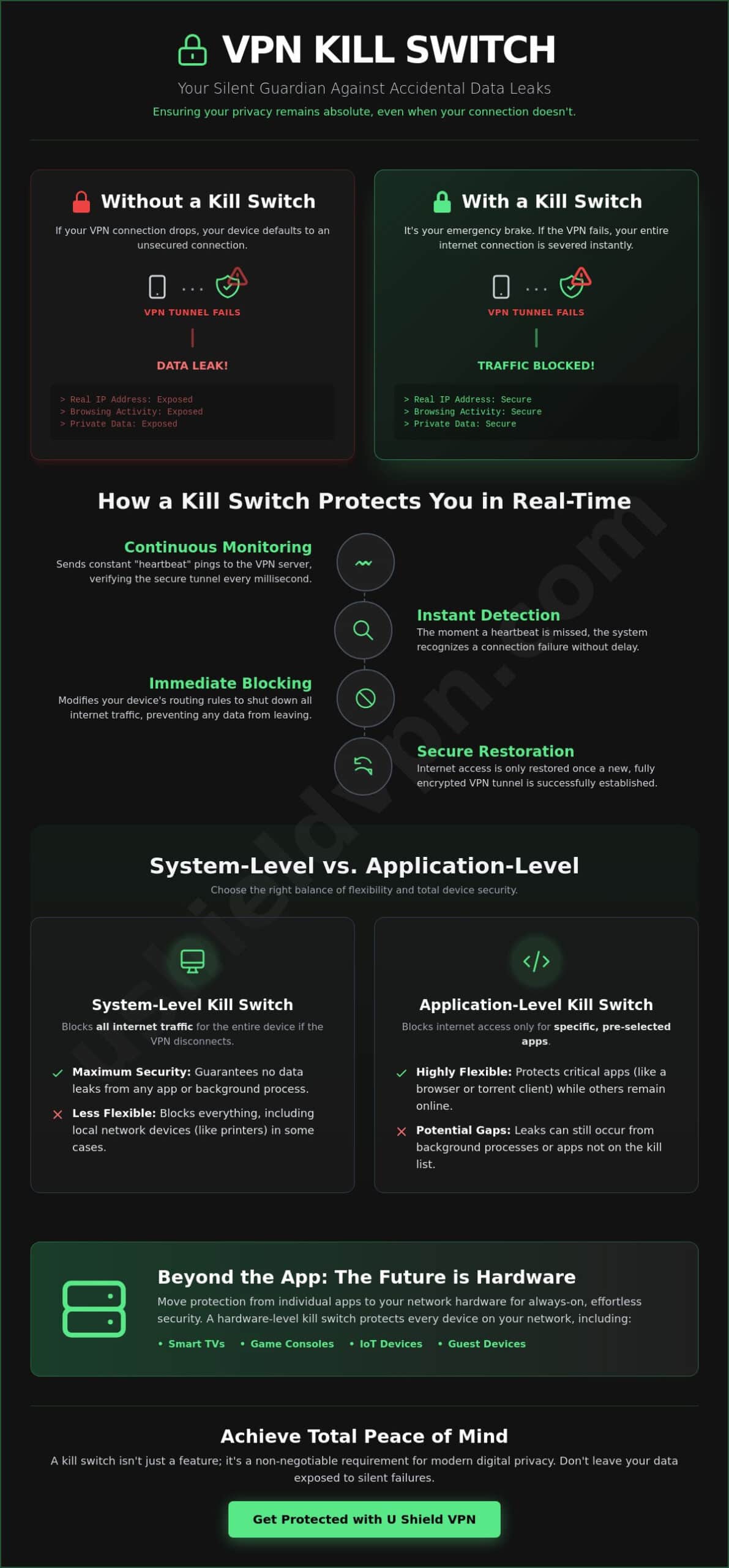
System-Level vs. Application-Level: Which Kill Switch Do You Need?
Not all protection is created equal. When you are deciding how to secure your digital life, understanding the technical nuances of what is a vpn kill switch helps you choose the right fail-safe for your specific needs. There are two primary ways these tools operate: by targeting specific programs or by locking down your entire device. Choosing between them is a matter of balancing convenience with absolute anonymity. While both offer a safety net, one provides a much stronger foundation for long-term peace of mind.
A system-wide approach is essential for preventing unprotected devices on home network issues from exposing your physical location. If one device leaks, it can compromise the privacy of your entire household. Professional-grade security setups always prioritize the system-level option because it removes the element of human error. It ensures that no matter what you are doing, your data remains behind a locked door until the secure tunnel is restored.
When to Use Application-Level Protection
Application-level switches act like a surgical strike. They only shut down specific programs that you have pre-selected, such as your web browser or a torrent client. This is ideal for specific tasks like secure file transfers where you only care about one stream of data. It allows your other non-sensitive apps to remain connected to the open web without interruption. However, there is a trade-off. While it offers more convenience, it leaves other background processes exposed. If an app you forgot to list starts communicating, your real IP address is instantly visible to the world.
The Power of System-Wide Security
System-level kill switches offer a blanket of protection for your entire operating system. This is the preferred choice for anyone serious about digital privacy. Beyond your browser, your computer constantly sends out OS-level pings, location services requests, and time-sync data. These background signals can reveal your identity even if your browser is closed. A system-wide switch blocks every single bit of outbound data the moment the VPN fails. This level of protection is the foundation of a sophisticated simplifier security strategy. It takes the technical burden off your shoulders by providing a single, powerful guardian that covers every vulnerability at once. It is the ultimate “set it and forget it” solution for modern security. For complete invisibility, pairing this protection with a VPN with anti-tracker capabilities ensures that even behavioral tracking scripts cannot build a profile of your online activity.
Real-World Scenarios: When Your Privacy Depends on a Kill Switch
Security isn’t just a setting in an app. It’s a shield that must hold up in the messy, unpredictable real world. Understanding what is a vpn kill switch matters most when your connection is at its weakest. You might have the strongest encryption in the world, but it only works while the tunnel is active. In the seconds it takes for a connection to drop and reconnect, your privacy is at its highest risk. These moments happen more often than you think.
Consider these common situations where your digital guard might slip:
- Unstable Public Wi-Fi: Signals at coffee shops or airports frequently drop. Your device will try to stay online by jumping to any available signal, often without encryption.
- ISP Throttling: Some providers reset your connection to manage bandwidth or discourage high-data activities. This brief reset can tear down your VPN tunnel.
- Server Maintenance: Even premium VPN servers need updates. If your chosen server goes offline, your app must find a new one.
- The Reconnection Gap: This is the most dangerous phase. It is the window of time between a VPN drop and a successful new handshake. Without a kill switch, your data flows freely during this gap.
You can eliminate these vulnerabilities today. Secure your connection instantly with a Monthly VPN Plan to ensure these gaps never expose your private information.
Public Wi-Fi and the Danger of Auto-Reconnect
Your smartphone is designed for convenience. It remembers known networks and jumps back to them the moment they are in range. If your VPN drops while you are moving through an airport, your phone might auto-reconnect to a public hotspot before the VPN can restart. This opens the door for man-in-the-middle attacks. A kill switch acts as a hard barrier. It prevents your phone from sending a single byte of data until the encrypted tunnel is fully restored. It ensures you remain anonymous while traveling in 2026, regardless of how many times your Wi-Fi signal flickers.
Protecting Sensitive Professional Data
For remote workers, the stakes are even higher. You are often handling proprietary company information or customer data. If your VPN fails, your real IP address could be exposed to corporate firewalls or third-party tracking tools. This can lead to security flags or even compliance violations. A kill switch ensures that no unencrypted data ever leaves your laptop. It helps you maintain strict data protection standards effortlessly. You get to focus on your work while your security tools handle the technical defense in the background. Combining a kill switch with a VPN with anti-tracker technology adds an additional layer of defense, stopping invisible behavioral scripts from harvesting your professional activity even when your connection is stable.
Beyond the App: Why a Hardware-Level Kill Switch is the Future
Most people think of a VPN as an app on their phone. When they ask what is a vpn kill switch, they usually imagine a simple toggle in a software menu. But in 2026, our homes are filled with “silent” devices that can’t run traditional apps. Smart TVs, gaming consoles, and IoT sensors often lack the interface to manage independent security settings. This creates a massive vulnerability. If your laptop is protected but your smart camera is leaking data, your privacy is still at risk. Hardware-level protection is the necessary evolution for a truly secure home.
A pre-configured VPN router acts as a central gatekeeper for your entire digital life. It moves the fail-safe from the individual device to the source of your internet. If the router loses its secure VPN connection, it cuts the internet for every connected device simultaneously. This removes the need to configure individual settings on every gadget in your home. One device protects them all. It is the most efficient way to ensure that no data packet ever leaves your house unencrypted.
Securing the “Un-Securable” Devices
Modern smart homes are complex and interconnected. Smart fridges, cameras, and thermostats are often the weakest links in a defense strategy. They are difficult to secure and even easier to forget. A hardware kill switch closes this security gap without causing you technical stress. It provides a blanket of safety that protects your family’s privacy at the network level. Whether you are streaming on a Smart TV or checking a nursery monitor, the protection is always active. Gaming consoles are another category of devices that cannot run a VPN app directly, making them especially vulnerable to IP exposure and DDoS attacks; learning how to hide your IP address on gaming consoles through router-level protection is an essential step for any serious gamer. It is the ultimate solution for a worry-free digital environment.
U Shield VPN: Your Silent, Powerful Guardian
At U Shield, we believe security should be invisible and absolute. We integrate the kill switch into both our apps and our dedicated hardware to provide a multi-layered defense. This follows our “set it and forget it” philosophy. You don’t need to be a networking expert to have professional-grade protection. We take the technical burden off your shoulders, acting as a silent guardian in the background. Secure your entire home network with a U Shield VPN Router today and experience the peace of mind that comes with total, automated security.
Secure Your Digital Future Today
Your digital safety shouldn’t be a matter of chance. We’ve explored what is a vpn kill switch and why it’s the essential final line of defense for your online life. From stopping silent leaks on public Wi-Fi to providing network-wide security through dedicated hardware, this feature ensures your data remains invisible. You deserve a setup that works tirelessly in the background. It turns a technical vulnerability into a privacy guarantee. It stays alert so you don’t have to.
U Shield provides the tools to make this level of protection effortless. Our solutions feature military-grade AES-256 encryption and built-in anti-trackers to block prying eyes. Whether you choose our plug-and-play pre-configured routers or our intuitive app, the kill switch is always standing guard. It’s time to remove the technical burden and reclaim your digital freedom. Protection should be instantaneous; it shouldn’t be a chore. Experience the power of a silent guardian that never sleeps.
Get Total Peace of Mind with U Shield VPN. Take control of your security today and browse with absolute confidence. Your privacy is a right. We make it a permanent reality.
Frequently Asked Questions
Does a VPN kill switch slow down my internet speed?
No, a kill switch does not slow down your internet speed. It is a monitoring tool that remains dormant while your connection is stable. It only consumes a negligible amount of system resources to ping the server. Your speed is determined by the VPN protocol and server distance, not the safety mechanism. It stays silent in the background until it is needed to protect your data.
Will my internet stop working if I turn on the kill switch?
Your internet will only stop working if your VPN connection drops unexpectedly. The kill switch severs your access to prevent an unencrypted data leak. This is a deliberate safety feature, not a bug. Once the secure tunnel is restored, your internet access resumes automatically. It ensures you never browse the web without the protection of your encrypted shield.
Is the kill switch enabled by default in the U Shield VPN app?
Yes, the kill switch is enabled by default in the U Shield VPN App. We believe your privacy should be the standard setting, not an optional extra. You have the freedom to adjust these settings, but we recommend keeping the guardian active at all times. This provides a “set it and forget it” experience that guarantees your real IP address remains hidden.
Can a kill switch protect me from hackers on public Wi-Fi?
A kill switch is a powerful defense against hackers on public Wi-Fi. It prevents your device from automatically reconnecting to an unsecured network if the VPN fails. This stops man-in-the-middle attacks where hackers intercept unencrypted data. By freezing all traffic, the kill switch ensures your sensitive information stays within the secure tunnel and out of the wrong hands.
What is the difference between a “standard” and “advanced” kill switch?
The main difference lies in the scope of protection. A standard kill switch often operates at the application level, only closing specific programs. An advanced kill switch, like those found in the U Shield VPN Router, works at the system or hardware level. This covers every background process, location service, and OS update. Understanding what is a vpn kill switch at this deeper level is vital for total security.
Do I need a kill switch if I only use my VPN for streaming?
Yes, you absolutely need a kill switch for streaming. Even if you aren’t handling sensitive documents, an accidental VPN drop can reveal your real location to streaming services. This can lead to account flags or the loss of access to your favorite content. A kill switch ensures your virtual location stays consistent, providing a seamless and private entertainment experience without interruptions.
How do I know if my VPN kill switch is actually working?
You can easily verify your kill switch with a simple test. Open a website and then manually disconnect your VPN through the app. If your internet access stops immediately and the website fails to load, your kill switch is working perfectly. This fail-safe is your final line of defense. It gives you the confidence that your data is never traveling over an unsecured path.
Can a kill switch prevent my ISP from seeing what I am doing?
Yes, a kill switch is essential for hiding your activity from your ISP. It ensures that every bit of data travels through the encrypted tunnel. If the tunnel fails, the kill switch stops the data flow before your ISP can see your destination. Knowing what is a vpn kill switch helps you realize that your privacy is only as strong as your fail-safe.
