






Managing security app by app is a relic of the past. It is tedious. It is inefficient. In 2026, true privacy requires a network-level shield that protects every screen simultaneously. You likely feel the daily friction of managing multiple logins while your Android TV remains a vulnerable entry point. You notice the battery drain from background security apps. You feel the lag when your ISP throttles your 4K stream. It is an exhausting way to manage your digital life.
You can secure all android devices at once using a single, high-performance shield. With the recent release of Android 17 and the 124 vulnerabilities identified in the June 2026 security update, including the critical CVE-2025-48595 flaw, manual hardening is no longer sufficient. You need a silent, powerful guardian that operates in the background of your entire network. This approach removes the technical burden from your shoulders and places it onto a system designed for speed.
This guide shows you how to eliminate security gaps across your entire ecosystem. You will discover how to achieve total privacy on public Wi-Fi and unlock unrestricted 4K streaming across all your screens. We are moving past the era of technical complexity. Welcome to the future of unified, effortless protection.
Key Takeaways
- Identify the hidden vulnerabilities in your ecosystem. Learn why securing devices one-by-one is an outdated strategy that leaves Android TV and IoT screens exposed.
- Master the single-shield approach. Discover how to secure all android devices at once using a VPN router to eliminate security gaps across your entire home network.
- Protect your data on the move. Understand how professional VPN apps with AES-256 encryption and Kill Switch technology keep your mobile devices safe on public Wi-Fi.
- Eliminate streaming lag. See how a unified security strategy stops ISP throttling to provide unrestricted 4K streaming on every screen in your household.
- Simplify your digital life. Implement a high-performance plan that replaces complex individual logins with one powerful, invisible guardian for your whole family.
Why Securing Android Devices One-by-One is an Outdated Strategy
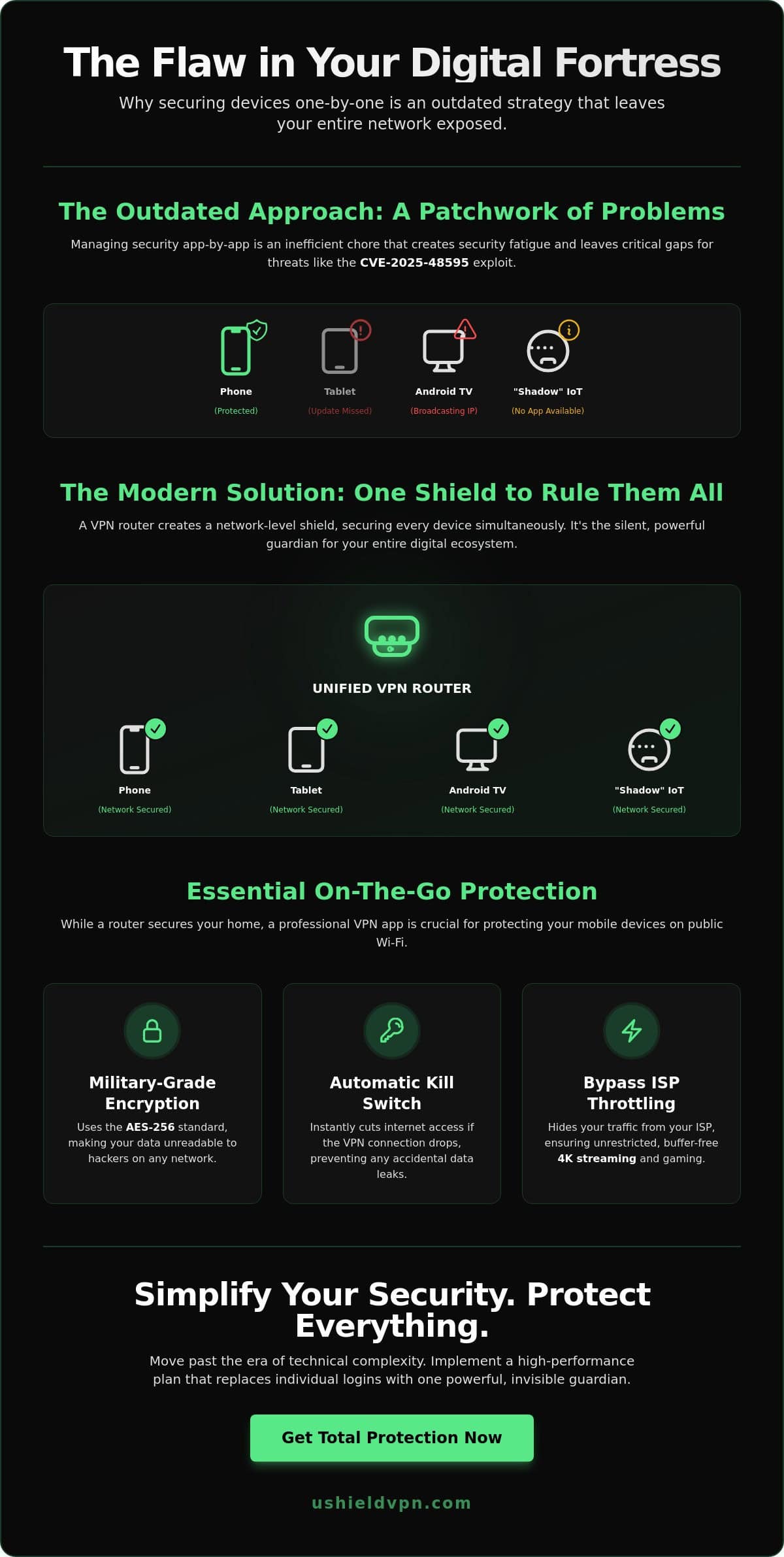
Managing security device-by-device is a full-time job you didn’t sign up for. It’s a chore. Most users still try to secure all android devices at once by installing apps on every phone, tablet, and TV. This method is failing. It creates “security fatigue” where you eventually ignore notifications or skip critical updates on secondary screens. With the June 2026 Android update patching 124 vulnerabilities, missing just one update on an old tablet can leave your entire house open to the CVE-2025-48595 exploit.
Individual protection leads to data fragmentation. Your phone might be locked down, but your Android TV is likely broadcasting your viewing habits and IP address to your ISP. This inconsistency turns your living room into a privacy hole. A traditional Virtual Private Network (VPN) app works well for a single smartphone, but it cannot fix a network that is fundamentally exposed at the source. Your home network is only as strong as its weakest Android link.
The Rise of “Shadow” Android Devices
Your home is filled with devices you likely forgot run on Android. Smart displays, gaming consoles, and even some kitchen appliances utilize Android-based kernels. These “shadow” devices are prime targets for AI-driven data skimming. They sit in the background, collecting usage patterns without the benefit of a user interface that makes security easy. Installing traditional security software on a smart display or a streaming stick is often impossible. These gadgets remain “invisible” vulnerabilities that hackers use as a backdoor into your private life.
The Maintenance Trap
Think about the time cost of managing ten or more individual VPN app updates. It’s a cycle of logins, password resets, and background battery drain. When protection is inconsistent, you face frequent IP leaks and identity exposure. You might forget to toggle the shield on your tablet, leaving your location data ripe for the taking. This manual approach is a trap that rewards the slightest moment of forgetfulness. Your digital privacy is only as resilient as the least protected device connected to your Wi-Fi. Relying on individual apps means you’re constantly betting against your own memory.
The Individual Shield: Every Android Needs a Professional VPN App
A unified network shield is the ultimate goal for any modern home. However, your mobile devices require a dedicated layer of protection the moment you cross your front door’s threshold. You cannot carry your home router to a coffee shop. Individual apps provide the necessary portability to maintain your privacy in the wild. They ensure that even if you can’t secure all android devices at once while traveling, your primary phone remains a digital fortress. This individual shield acts as a silent guardian when you are beyond the reach of your home network.
Modern security relies on military-grade AES-256 encryption. It is your primary defense against sophisticated hackers. This standard is so robust that it would take billions of years for a supercomputer to crack. It turns your private data into unreadable code. Alongside encryption, a professional Kill Switch is essential. It prevents accidental data exposure during signal drops. If your connection falters, the Kill Switch instantly severs your internet access. This ensures no unencrypted data ever leaves your device. It is a fail-safe that guarantees your identity stays hidden.
Performance is another critical factor for Android users. Professional apps bypass ISP throttling. This allows for buffer-free 4K streaming and low-latency gaming. When your ISP cannot see your traffic type, they cannot slow you down. This results in a faster, more reliable connection for every app on your phone. Forbes notes that selecting the best business VPN router is only half the strategy; mobile apps provide the other essential half of the equation.
Securing Public Wi-Fi Connections
Public Wi-Fi is a playground for data thieves. Hackers in cafes and airports use simple tools to intercept Android data in real-time. They target mobile banking logins and password data. A VPN creates an encrypted tunnel that makes your information invisible to these prying eyes. You should follow a specific protect devices on public Wi-Fi strategy to ensure your passwords stay private. This protection is vital for anyone who works remotely or travels frequently.
Optimizing for Mobile Performance
Many users fear that security software will ruin their battery life. This is a myth in 2026. Modern protocols like WireGuard are designed for speed and efficiency. They are lightweight and connect almost instantly. This protocol has become the standard for those seeking high-velocity performance. A professional app also stops advertisers from tracking your mobile ID. It blocks the scripts that follow you across the web. For total peace of mind on the go, the U Shield VPN App provides the velocity and invisibility you need to stay safe.
VPN Router vs. Apps: The Secret to Securing Everything Simultaneously
Individual apps are excellent for portability. However, they are only one part of a complete security strategy. If you want to secure all android devices at once without the friction of manual logins, a VPN router is the definitive solution. It operates at the source of your internet connection. This means every byte of data entering or leaving your home is encrypted before it even reaches your smartphone or tablet. It is the ultimate “set and forget” system for the modern household.
The “Single Login” advantage cannot be overstated. Instead of managing credentials on a dozen different screens, you configure your settings once on the router. This provides total network coverage with zero ongoing management. It also solves the problem of subscription caps. Most VPN providers limit you to five or ten simultaneous connections. A VPN router counts as just one device, yet it extends protection to every single gadget in your home. This allows you to scale your security without increasing your monthly costs.
Hardware-level encryption is another major benefit. By handling the complex math of AES-256 encryption at the router level, you take the processing load off your individual devices. This results in better performance and longer battery life for your phones and tablets. Your devices no longer have to work overtime to keep your data private. The router acts as a dedicated security processor for your entire digital life.
Total Coverage for the Smart Home
A router is the only way to protect devices that don’t support native apps. This includes your Android TV, smart fridge, and older tablets. These devices are often the most vulnerable points in a network. You must prevent smart home hacking by securing the gateway they all share. This ensures consistent 24/7 protection. You never have to worry if a family member forgot to turn on their security app. If they are on the Wi-Fi, they are safe. It is a seamless, invisible blanket of privacy for everyone.
Comparing the Two Approaches
Choosing between a router and an app depends on your lifestyle. Apps offer flexibility for travelers and remote workers. Routers provide the “always-on” reliability that a busy household requires. For many, the ideal setup is a hybrid approach. You use a router at home and an app while on the move. You can find more detail in this VPN app vs VPN router comparison. Determining which setup fits your household size is the first step toward true digital freedom. Most families find that the U Shield VPN Router provides the perfect balance of power and simplicity.
Implementing Your Unified Android Security Strategy
Transitioning to a unified model is simpler than you think. You can secure all android devices at once by following a logical, three-step process. Begin with an audit of your digital ecosystem. Count every screen. Your smartphone, your child’s tablet, and that Android TV in the guest room all require protection. Identifying these targets ensures no device is left behind. This audit is the foundation of your new security posture.
Once you have your list, select a high-performance plan. You need a service that supports both your stationary router and your mobile devices. This dual-layer approach provides peace of mind regardless of where you are. The physical setup is remarkably fast. Connecting a pre-configured router to your modem takes less than five minutes. It is a plug-and-play solution that removes the need for complex technical knowledge. It is the most efficient way to upgrade your home infrastructure.
Setting Up the Home Shield
The core of your strategy is the hardware. Using a pre-configured VPN router allows for instant privacy without the headache of manual firmware updates. Once the device is active, perform a quick security audit. Test your network for IP leaks and DNS vulnerabilities to confirm the shield is solid. You should also establish a guest network. This keeps your primary devices isolated while offering visitors a secure way to browse. It protects your family while remaining hospitable to guests.
Mobile Optimization Steps
Synchronizing your mobile devices is the final step. Download the Android app to every phone and tablet you own. This covers the gaps when you leave your home Wi-Fi. For the best results, enable the “Always-on VPN” setting in your Android system menus. This prevents any data from leaking if your connection drops. It is a fail-safe for your mobile identity. To maximize your investment, check out the options for a VPN annual subscription. It offers the best balance of long-term security and cost-efficiency.
Take control of your privacy now. Secure your home with a U Shield VPN Router and experience the freedom of an invisible guardian.
U Shield VPN: The Seamless Way to Protect Your Entire Android Ecosystem
U Shield VPN is the 2026 leader in high-speed, integrated security. It bridges the gap between your home network and your mobile life. You can secure all android devices at once using an ecosystem designed for velocity and invisibility. This integrated approach ensures that your privacy doesn’t stop at your front door. It follows you everywhere. It protects every screen you own without compromise.
The U Shield VPN Router is the heart of this system. It offers plug-and-play military-grade protection. You don’t need to be a networking expert to use it. You plug it in. You are protected. It’s that simple. This hardware-level shield is complemented by our global server network. We’ve optimized every server for 4K streaming and competitive gaming. You get the speed you pay for without the prying eyes of your ISP. It’s a silent, powerful guardian that operates in the background of your digital life.
Reliability is our hallmark. We provide 24/7 expert support to ensure your Android shield never falters. If you encounter an obstacle, we help you remove it immediately. We act as your friendly guide in a complex technical world. This commitment to service ensures your peace of mind remains absolute. We take the technical burden off your shoulders so you can focus on what matters most.
The U Shield Advantage
Privacy is a right, not a feature. We maintain a strict no-logs policy. Your data remains your property, always. We don’t track your movements. We don’t sell your habits. The U Shield VPN App includes built-in anti-trackers and kill switches as standard features. These tools operate silently. They prevent leaks before they happen. A pre-configured solution offers the ultimate peace of mind by removing the friction of technical setup. You gain total freedom without the frustration of manual configuration.
Ready to Secure Your World?
Taking the first step is effortless. You can choose the path that best suits your lifestyle. Our Monthly VPN Plan offers short-term flexibility for those who want to test the waters. For long-term protection and the best value, our Annual VPN Plan provides significant security savings. Both options grant you full access to the U Shield VPN hardware and app ecosystem. You can secure all android devices at once and start protecting your family in minutes. It’s time to reclaim your digital sovereignty.
Secure all your Android devices at once with U Shield VPN and experience the future of unified privacy today.
Take Command of Your Digital Sovereignty
Digital security should be effortless. You now understand why managing devices one-by-one is a strategy of the past. It leads to maintenance fatigue and leaves vulnerable gaps in your living room ecosystem. By shifting to a unified network model, you eliminate the technical burden. You protect your phones, tablets, and Android TVs with a single, invisible guardian that never sleeps. This is the most efficient way to secure all android devices at once without sacrificing your time or your battery life.
Reliability is built into every layer of our service. You gain military-grade AES-256 encryption and the simplicity of plug-and-play pre-configured hardware. Our network is specifically optimized for 4K streaming and high-velocity gaming. You no longer have to choose between top-tier speed and total safety. You can enjoy the best of both worlds with a system that operates silently in the background. It is about removing obstacles and facilitating a better digital experience for everyone in your home.
Your privacy is a right; it should be a constant rather than a chore. Reclaim your digital freedom and protect your family with a solution that values your time. Secure all your Android devices at once with U Shield VPN and experience the peace of mind you deserve. Welcome to the future of effortless protection.
Frequently Asked Questions
Can I really secure all my Android devices with just one VPN router?
Yes, you can. A VPN router acts as a central gateway, encrypting every byte of data for every device on your network. This allows you to secure all android devices at once without installing apps on every single screen. It covers everything from your primary smartphone to your smart fridge and Android TV automatically. It is the most efficient way to achieve total network privacy.
Will a VPN router slow down my internet speed for gaming on Android?
High-performance hardware prevents noticeable lag. Modern routers use optimized protocols to maintain high-velocity connections. This ensures low latency for competitive gaming and buffer-free 4K streaming. You get the protection you need without sacrificing the speed you pay for. The processing happens at the router level, which often improves device performance.
Do I still need the VPN app if I have a VPN router at home?
You only need the app when you are away from home. Your router protects you while you are on your local Wi-Fi. Once you step outside, the U Shield VPN App takes over. It maintains your privacy on public networks and cellular data. This ensures your shield never drops regardless of your location.
Is it difficult to set up a pre-configured VPN router?
Setup is effortless. A pre-configured router arrives ready to work. You simply connect it to your existing modem and power it on. There are no complex settings to navigate or firmware to flash. It is a true plug-and-play solution for instant peace of mind. We handle the technical burden for you.
Does a VPN router protect my Android devices when I leave the house?
No, the router’s protection is stationary. It covers every device within its Wi-Fi range. To maintain your privacy on the move, you must use a dedicated mobile app. This ensures your data stays encrypted while using cafe Wi-Fi or airport hotspots. The two tools work together for complete coverage.
Can I use one U Shield VPN subscription for both my phone and my router?
Yes, a single subscription covers your entire ecosystem. You can secure all android devices at once at home through the router while using the same account for your mobile app. This unified approach provides seamless protection across all your digital environments. It simplifies your management and reduces your costs.
Will a VPN router work with my existing ISP modem?
It works perfectly with your current setup. The VPN router connects directly to your ISP modem using an Ethernet cable. It then creates its own secure Wi-Fi network for your devices. This dual-router configuration is the standard way to add a layer of privacy to any home without changing your provider.
What happens if my VPN connection drops on my Android devices?
Our systems include an integrated Kill Switch. If the VPN connection falters, the Kill Switch instantly blocks all internet traffic. This prevents your real IP address or private data from leaking onto the open web. Your security remains absolute even during unexpected signal drops. Protection is instantaneous and reliable.
