






Your smart doorbell shouldn’t be a digital backdoor for hackers. By the end of 2024, the world reached 17.7 billion active IoT devices. Most of these gadgets lack basic security features. It’s exhausting to manage twenty different devices while worrying about your family’s privacy. You want to secure IoT devices at home without the headache of complex router menus or manual updates. We believe security should be invisible and effortless.
You shouldn’t have to choose between a smart home and a private one. We agree that the current “device-by-device” approach is broken. This guide will show you how to protect every camera, microphone, and sensor in your house with a single, network-wide solution. You’ll learn how to deploy a “set and forget” shield that stops breaches before they reach your living room. We will explore how to maintain lightning-fast streaming speeds while hardware remains protected. It’s time to take the technical burden off your shoulders and reclaim your peace of mind.
Key Takeaways
- Understand why “headless” smart gadgets are your network’s weakest link and why they can’t run traditional security software.
- Discover how to secure IoT devices at home using a network-wide approach that protects your entire ecosystem at once.
- Learn how a VPN router encrypts data at the source to ensure your cameras and microphones remain completely private.
- Master a five-step audit to isolate your hardware and eliminate the frustration of manual firmware updates and password fatigue.
- Explore the benefits of the U Shield VPN Router for plug-and-play protection that secures unlimited devices with zero technical configuration.
Why Smart Home Devices Are Your Network’s Weakest Link
Your home network is only as strong as its quietest member. While you likely have antivirus software on your laptop and biometric locks on your phone, your smart lightbulbs and coffee makers are often left completely exposed. Taking steps to secure IoT devices at home starts with understanding the hardware you can’t see. These gadgets are designed for convenience and low cost, not high-level defense. This creates a massive gap in your digital perimeter.
Most smart home tech lacks the processing power required for built-in encryption. Because these devices are small and inexpensive, manufacturers strip away complex security protocols to save on battery life and hardware costs. This gap in protection violates the fundamental principles of computer security, which require every endpoint to be authenticated and encrypted. Without these layers, a single compromised device acts as a gateway. A hacker doesn’t need to crack your laptop’s firewall if they can simply walk through your smart doorbell.
The Problem with Headless Devices
Your smart TV and fridge are “headless” gadgets. This means they have no traditional user interface or operating system capable of running security software. You can’t install an app on a smart plug to scan for malware. This makes them invisible to standard antivirus tools. These devices frequently “call home” to manufacturer servers to check for updates or sync data. If those servers are insecure, your device becomes a direct pipeline for unencrypted data to leave your house. Hackers exploit these quiet entry points to gain a foothold on your Wi-Fi, eventually moving laterally to access your private laptops and tablets.
Vulnerabilities Beyond the Password
Many homeowners believe a strong Wi-Fi password is enough. It isn’t. Learning how to prevent smart home hacking requires moving beyond the login screen. By 2026, the reality of unpatched firmware has become a primary threat. Manufacturers often deprioritize security updates for older models, leaving them permanently vulnerable to new exploits. An IoT vulnerability is a structural flaw in device communication that allows unauthorized access regardless of password strength. To truly secure IoT devices at home, you must address the following risks:
- Hardcoded Credentials: Many devices ship with “backdoor” passwords that users cannot change.
- Lack of Updates: Budget manufacturers often stop supporting devices just months after release.
- Open Ports: Smart gadgets frequently leave digital doors open to make setup easier, inviting external scans.
- Lateral Movement: Once one device is breached, the attacker can see every other device on your network.
The danger isn’t just about someone controlling your lights. It is about the data they can intercept once they are inside. Protection must happen at the network level to be effective.
The Failure of Manual Security: Why Tips Aren’t Enough
Traditional security advice is failing. Most experts tell you to use unique passwords for every gadget. They suggest checking for firmware updates weekly. They recommend complex network segmentation. This is a part-time job. You shouldn’t have to be a network engineer to secure IoT devices at home. With the global IoT landscape projected to reach over 40 billion devices by 2034, the sheer volume of hardware makes manual management impossible. You need a system that works as fast as the threats do.
Password fatigue is a real threat. Most users reuse passwords across multiple devices to stay sane. This creates a dangerous domino effect. If a hacker breaches one cheap smart plug, they have the keys to your entire network. Even the FTC guide to securing connected devices highlights the importance of regular updates, but manufacturers often hide these in obscure apps. You might have twenty different apps for twenty different devices. Missing just one critical update leaves a door wide open. Security should be a silent guardian, not a daily chore.
The Myth of the Secure Individual Device
Securing your phone is a great first step. It does nothing to protect your smart doorbell. Many users rely on “Cloud Security” promised by third-party brands. This is often just marketing. If the manufacturer’s server is compromised, your local device is too. A network-wide approach is different. It neutralizes threats before they even reach your hardware. It eliminates the need for individual security apps on every single lightbulb and sensor. You gain total invisibility for every device on your Wi-Fi. This streamlined logic is why more people are choosing a U Shield VPN Router to handle the heavy lifting.
Security Fatigue and Human Error
The math is against you. If you own 20 devices, the statistical likelihood of missing a critical patch is high. Over 50% of cybersecurity incidents in 2025 involved attacks on operational technology like IoT. Relying on your memory to keep things safe is a gamble. A centralized guardian at the router level is more reliable. It provides a single point of defense that never forgets to update. This is why many are moving toward network-wide VPN protection to shield their entire living space. You deserve peace of mind that doesn’t require constant maintenance.
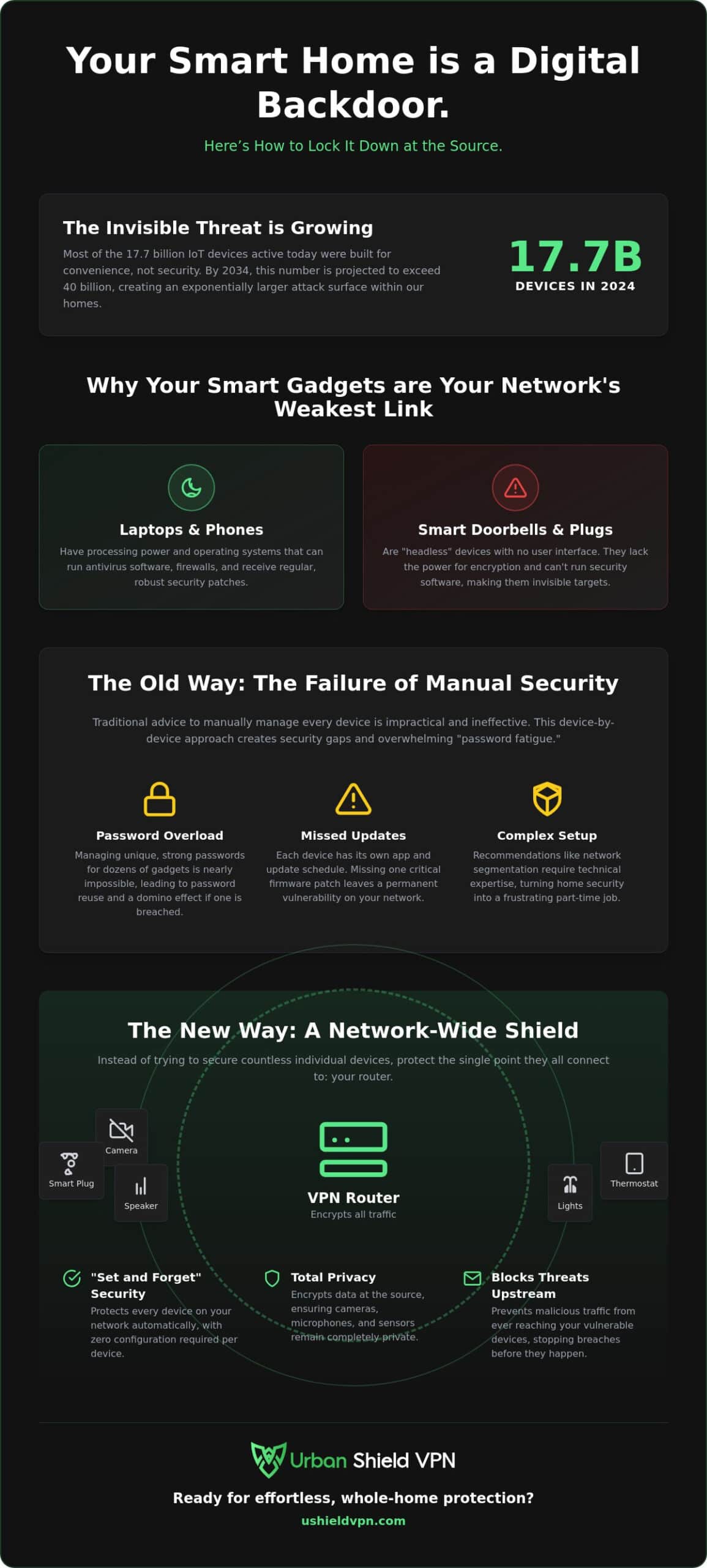
How to Secure IoT Devices at Home: The Network-Wide Solution
Securing your home shouldn’t feel like a second job. Manual updates and individual passwords are a losing game. The most efficient way to secure IoT devices at home is to move the defense to your network’s entry point. A VPN router acts as a high-speed checkpoint. It encrypts every byte of data before it ever leaves your front door. This creates a unified tunnel of privacy for every connected gadget you own. From your smart thermostat to your Wi-Fi kettle, everything becomes invisible to external threats.
Total invisibility is the goal. When you use a network-wide solution, your devices no longer appear as individual targets. They exist behind a single, encrypted IP address. This follows the official FTC guide to securing IoT devices which emphasizes the importance of router-level security. By centralizing your defense, you eliminate the risk of a single weak link compromising your personal data. You stop managing devices and start managing your peace of mind.
The Router as a Digital Shield
Hardware-level protection is inherently superior to software patches. A pre-configured VPN router builds a secure perimeter that requires zero maintenance from the user. It applies military grade encryption VPN protocols to every packet of data. This is vital for gadgets that don’t support encryption natively. You don’t need to worry if your smart lightbulb is “secure by design.” The router makes it secure by default. It acts as a silent, powerful guardian that operates in the background.
Comparing VPN Apps vs. VPN Routers
The debate over VPN app vs VPN router usually ends at the “App Gap.” Most smart home devices simply cannot run a VPN client. Your Smart TV, gaming console, and smart speakers don’t have an interface for security software. An app on your phone won’t protect your fridge. The router is the only way to shield these headless devices. It provides a “set and forget” solution that covers unlimited connections. You get the speed you need for streaming with the peace of mind that your microphones and cameras are private. It’s the only way to ensure 100% network coverage without the technical headache.
5 Steps to a Secure Smart Home Network
Taking control of your digital perimeter is a linear process. You don’t need to be a coder. You just need a plan. Follow these five steps to secure IoT devices at home and lock down your living space. This systematic approach ensures no device is left exposed to external threats.
- 1. Audit your devices: Identify every connection on your Wi-Fi. If you don’t recognize a gadget, disconnect it immediately.
- 2. Isolate the network: Use a dedicated hardware layer to separate your smart home tech from your personal computers.
- 3. Encrypt the source: Deploy a VPN at the router level to shield all traffic simultaneously.
- 4. Disable UPnP: Universal Plug and Play is a security risk. Close these “open doors” in your router settings to prevent unauthorized port forwarding.
- 5. Kill Switch activation: Ensure your security system has a fail-safe to cut the connection if the VPN tunnel drops.
Auditing and Isolation
Knowledge is your first line of defense. Use network scanning tools or your router’s admin panel to see every hidden device. Many homeowners are surprised to find old tablets or forgotten smart plugs still drawing data. Change default usernames like “admin” or “guest” immediately. These predictable credentials are the first thing a hacker will try. Isolation is equally vital. By using a hardware barrier, you ensure a breach in a smart bulb cannot spread to your banking laptop. A built-in anti-tracker is also essential. It stops IoT hardware from harvesting your data and sending it to third-party brokers without your consent.
Encryption and Leak Prevention
Encryption is the final wall between your privacy and the public web. AES-256 encryption is the gold standard for home IoT in 2026. It makes your data unreadable to outsiders, even if they intercept the signal. You should regularly verify that your devices are protected. Check the IP address on your smart TV’s browser. If the location matches your secure VPN server, your shield is active. The Kill Switch is your emergency brake. If your secure connection falters, the Kill Switch cuts all internet traffic instantly. This prevents your devices from “leaking” unencrypted data during a server switch or reboot. It is the ultimate “set and forget” safety feature for a modern home.
Ready to automate your home defense? Secure your network with the U Shield VPN Router today.
Effortless Protection with the U Shield VPN Router
Modern security shouldn’t be a hurdle. It should be an enabler. The U Shield VPN Router offers plug-and-play simplicity that removes the intimidation factor from digital defense. You don’t need a degree in computer science to secure IoT devices at home. Our hardware arrives ready to defend. Simply plug it in to protect unlimited devices with a single network connection. This is the ultimate “set and forget” guardian for the modern household. It works silently in the background while you focus on what matters most. You get total protection without the technical friction of traditional setups.
Quiet authority defines our approach. We believe a security solution is best when it is invisible. Your smart home should feel like a sanctuary, not a construction site for complex network settings. By centralizing your defense at the router level, you eliminate the need to manage twenty different apps or worry about individual device vulnerabilities. The U Shield VPN Router acts as a powerful, silent sentinel. It manages the complexities of encryption and traffic routing so you don’t have to. It is the sophisticated simplifier your home deserves.
Why U Shield is the Smart Home Choice
Most families are busy. They don’t have time for manual configurations or troubleshooting connection drops. We designed our hardware specifically for non-technical users who value their privacy. You get military-grade protection as a standard feature, not a paid upgrade. Our network is optimized for the high-bandwidth demands of 2026. This means high-speed 8K streaming and low-latency gaming without the frustration of ISP throttling. You can access global servers for an unrestricted VPN for streaming experience. Security never comes at the cost of speed. It enhances your digital freedom by removing obstacles.
Getting Started with U Shield
Setup is instantaneous. First, connect the U Shield VPN Router to your existing internet modem. Second, log in to your secure account. Third, watch as your entire home network becomes invisible to trackers and hackers. This simple three-step process is the most reliable way to secure IoT devices at home. You gain the immediate peace of mind that your cameras and microphones are strictly private. No more worrying about unpatched firmware or weak factory passwords on budget gadgets. The router handles the heavy lifting while you enjoy the benefits of a connected life. It is a bold, innovative solution for a complex world. Secure your entire smart home today with the U Shield VPN Router and experience digital peace of mind.
Reclaim Your Digital Sanctuary
Your home should be a place of total privacy. We have explored why individual device security is no longer enough in 2026. Securing every lightbulb and camera manually is a chore that leads to human error. The most effective way to secure IoT devices at home is to move your defense to the network source. By protecting the router, you protect everything. This centralized approach removes the technical burden from your shoulders and replaces it with quiet authority.
The U Shield VPN Router provides this invisible layer of protection instantly. It features military-grade AES-256 encryption and a built-in Kill Switch to ensure your data never leaks. With its pre-configured plug-and-play design and integrated Anti-Tracker, you can stop managing settings and start enjoying your smart home. It is time to choose a solution that values your time as much as your privacy. Take the first step toward a worry-free digital life today.
Secure every device in your home with the U Shield VPN Router
You deserve the peace of mind that comes with a silent, powerful guardian. Your smarter, safer home is just one connection away.
Frequently Asked Questions
How do I secure my smart home devices if they don’t have a screen?
You secure them at the network source rather than on the device itself. Headless gadgets like smart plugs or lightbulbs can’t run apps. You must use a VPN router to encrypt their traffic. This creates a secure tunnel for all data leaving your home. It’s the most effective way to secure IoT devices at home without needing a user interface. You set the protection once and every connected gadget is shielded.
Can a VPN protect my smart cameras from being hacked?
Yes, a VPN provides a critical layer of defense by encrypting your camera’s video feed. It masks your home’s actual IP address. This makes it much harder for external attackers to locate or access your hardware. This prevents unauthorized users from intercepting your private moments. By routing the traffic through a secure tunnel, you ensure that even if the manufacturer’s server is weak, your local connection remains private and invisible to prying eyes.
Will a VPN router slow down my smart TV streaming?
Modern VPN routers are built for high-velocity data. In 2026, advanced hardware handles 4K and 8K streaming without noticeable lag or buffering. While encryption adds a tiny processing step, a high-performance router ensures your speeds remain fast enough for gaming and movies. You actually bypass ISP throttling in many cases. This results in a smoother, more consistent streaming experience while maintaining absolute security for your entire smart home network.
Do I need a separate VPN for every IoT device in my house?
No, you only need one network-wide solution to cover every device. A single VPN router protects your phones, laptops, and every smart gadget simultaneously. You don’t have to install individual apps or manage multiple subscriptions. This “set and forget” approach is the most efficient way to secure IoT devices at home. It saves time and ensures that even the smallest sensor is behind your digital shield without any extra effort.
What is the most common way smart home devices are hacked?
Most breaches occur through weak default passwords and unpatched firmware. Hackers use automated scripts to scan for devices with “admin” or “1234” credentials. Once they find an open port or an outdated software version, they can enter your network. This is why hardware-level protection is so important. It acts as a gatekeeper that blocks these scans and secures devices that the manufacturer may have stopped supporting years ago.
Is a pre-configured VPN router better than a standard router?
A pre-configured router is superior because it eliminates the risk of setup errors. Standard routers often require complex manual configuration that can lead to data leaks if done incorrectly. Pre-configured hardware arrives with the security layers already active. You simply plug it in and log in. It provides a professional level of protection for non-technical users. You get the peace of mind that your security is perfect from the first minute.
Can I still use my smart home apps while the VPN is active?
Yes, your smart home apps will function normally. The VPN works in the background to encrypt the data your apps send and receive. It doesn’t interfere with your ability to dim lights or check your doorbell from your phone. In fact, it makes these apps safer to use when you are away from home. You can access your devices through the secure tunnel, ensuring that your remote commands are encrypted and private at all times.
What happens to my IoT devices if the VPN connection drops?
A built-in Kill Switch protects your devices during a connection drop. It instantly cuts all internet traffic to prevent your hardware from sending unencrypted data over the public web. This fail-safe ensures your privacy remains intact until the secure tunnel is restored. Without a Kill Switch, your devices would leak your actual IP address and activity. This protective feature makes your security system truly reliable and automated.
